-
Thread
Library für GUI
als Ausgabe und Rotary Encoder und Buttons als Eingabe hat. Das Display ist momentan ein standard SSD1306 0.96 Zoll OLED mit 64x128 Pixeln. Das ist aber für die zukünftigen Revisionen nicht mehr gut genug und daher will ich ein 2 Zoll Farbdisplay verwenden. Programmiert wird ein ESP32S3 mit Arduino IDE
meine Anwendung allerdings nicht gut geeignet. Und Displayspezifische Librarys wie die Adafruit SSD1306 Library in Arduino IDE haben den Nachteil, dass die immer nur mit einem oder ein Paar wenigen Displays der gleichen Type funktionieren. Und da ich nicht weis ob das nächste Display, dass wir aussuchen
-
Thread
Lesestoff, Antennenbaukasten, Funkstandards und mehr
### Lesestoff, zur Zweiten - „bessere“ Textdarstellung für kleine Oled-Displays. Die auf dem SSD1306-Controller basierenden organischen Displays haben sich im Bereich verschiedenster Projekte als Quasistandard etabliert. Unschön ist an ihnen lediglich, dass die Textdarstellung ab einer gewissen Größe
-
Thread
Waveshare 1.3 Inch OLED HAT im I2C Modus
unumgänglich. Ich nutze die OLED Library von Michael Köhler, wurde hier auch schon vorgestellt. Kann mit ssd1306/ssd1309/sh1106 Displaychips umgehen. Läuft auf einem AVR Tiny 2-Series unter Nutzung des HW-TWI. Von Microchip gibt es ein Tutorial und Beispielcode im Github, der ist aber bezüglich der Ack-Abfrage
-
Thread
Programmstruktur
. [c] #include <Arduino.h> #include <Wire.h> #include <Adafruit_GFX.h> #include <Adafruit_SSD1306.h> #define SCREEN_WIDTH 128 // OLED display width, in pixels #define SCREEN_HEIGHT 64 // OLED display height, in pixels Adafruit_SSD1306 oled(SCREEN_WIDTH, SCREEN_HEIGHT, &Wire, -1); // create
setup() { // put your setup code here, to run once: Serial.begin(9600); if (!oled.begin(SSD1306_SWITCHCAPVCC, 0x3C)) { // initialize OLED display with address 0x3C for 128x64 Serial.println(F("SSD1306 allocation failed")); while (true); } delay(2000); // wait
-
Thread
Display mit SSD1306 Controller ansteuern
einwandfrei, bis ich die Helligkeit ändern wollte, da geht weder mit [c] // Helligkeit: display.ssd1306_command(SSD1306_SETCONTRAST); // 0x81 display.ssd1306_command(0xff); [/c] noch mit [c] // Pre Charge Period: display.ssd1306_command(SSD1306_SETPRECHARGE); // 0xD9 display.ssd1306_
ich die Helligkeit ändern > wollte, da geht weder mit > [c] > // Helligkeit: > display.ssd1306_command(SSD1306_SETCONTRAST); // 0x81 > display.ssd1306_command(0xff); > [/c] > noch mit > [c] > // Pre Charge Period: > display.ssd1306_command(SSD1306_SETPRECHARGE); // 0xD9 > display.ssd1306
-
Thread
OLED Display SSD1306 Tod nach Kleben
Guten Abend, mir ist ein OLED Display "SSD1306" mit 128x32 Pixeln auf seltsame Weise offenbar verstorben. Das Display ist so ein sehr kleines Exemplar ohne Schraublöcher, also schwierig zu befestigen. Ein chinesisches Standardteil für ein paar
20:48:16.661 -> I2C device found at address 0x3C ! 20:48:16.693 -> done Ich hab dann den "ssd1306_128x32_i2c.ino" Scetch aus der Adafruit_SSD1306 lib laufen lassen. Das Programm fängt an zu meckern, wenn es kein Display findet. Das Programm hat nicht gemeckert, aber es gibt auch keine Pixel. Das
-
Thread
OpenDTU +LAN
tbnobody/OpenDTU/blob/master/docs/builds/README.md (allerdings ohne Display) Laut Konfig muss dass "SSD1306" funktionieren. Gibt es bessere Kanditaten aus der Liste: https://www.opendtu.solar/hardware/display/ die man in Augenschein nehmen sollte? Cool wäre eine Bauteilliste, von euch, falls ihr es
-
 Bild
Bild
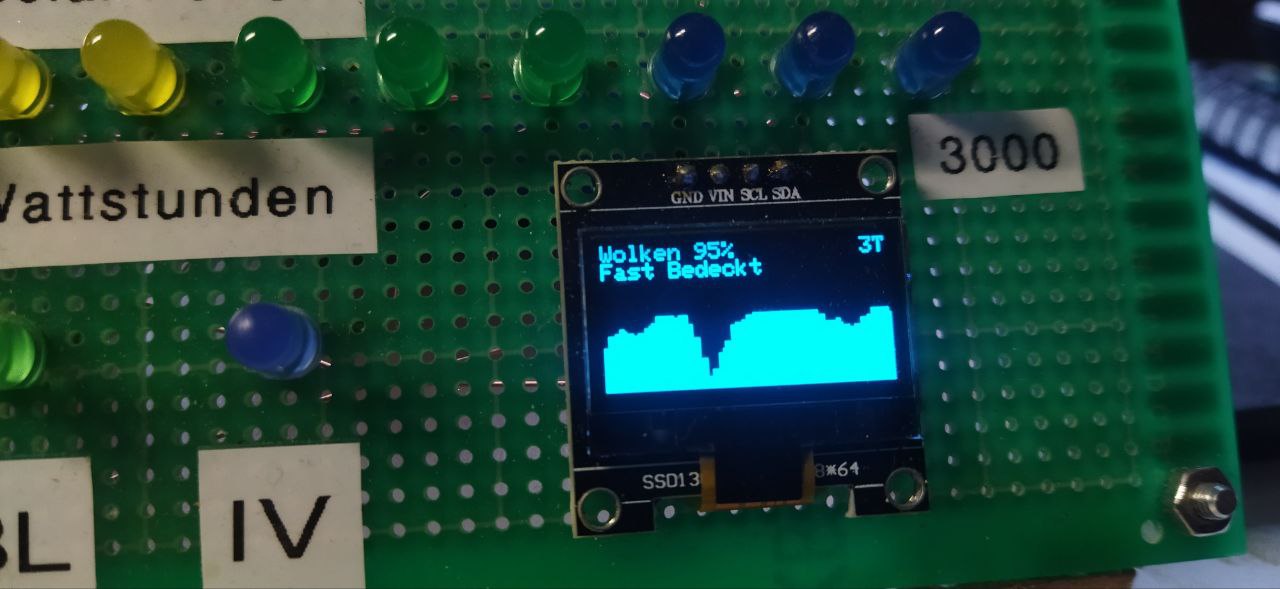
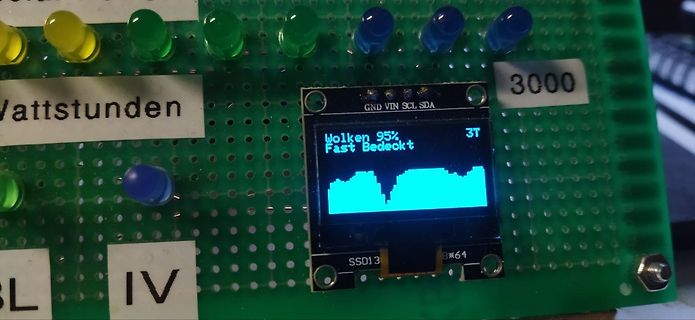
Aufbau mit Lochrasterplatine, LEDs und OLED-Display
Wattstunden 3000 GND VIN SCL SDA Wolken 95% Fast Bedeckt 3T SSD1306 8x64 IV SL
-
Thread
Unbekanntes LCD-Display
Steuerplatine(?) fand ich den die Pinbelegung heraus. Soweit so gut. Dann lag da ein Uno rum, Display (SSD1306) ab, dieses ran und ich konnte schon mal feststellen, 16x32 Dot auf einer Fläche von 0,45x0,65 inch zeigt es an. Kann mir jemand weiterhelfen um den Typ herauszufinden ? oder kennt jemand diese Teile
-
Thread
Anfänger-Entwicklung einer Gärbox Steuerung
> #include <cstring> // For std::strlen // Initialize the display with I2C connection U8G2_SSD1306_128X64_NONAME_F_HW_I2C u8g2(U8G2_R0, /* reset=*/ U8X8_PIN_NONE); // Define maximum characters per line and number of lines const int MAX_CHARS_PER_LINE = 21; const int MAX_LINES = 3; // Function
-
Thread
Wo ist in meiner Berechnung der Fehler?
if(!display.begin(SSD1306_SWITCHCAPVCC, SCREEN_ADDRESS)) { Serial.println(F("SSD1306 allocation failed")); for(;;); // Don't proceed, loop forever } } void updateDisplay() { display.clearDisplay();
, SCREEN_ADDRESS)) { Serial.println(F("SSD1306 allocation failed")); for(;;); // Don't proceed, loop forever } } void updateDisplay() { display.clearDisplay(); display.setTextSize(1); display.setTextColor(SSD1306_WHITE);
-
Thread
SSD1306 vs. SH1106 Schaltplan
habe ich eine Schematik gefunden (ausschnitt im Anhang), die so scheint als ob sie für Displays mit SSD1306 Treiber funktioniert. Nun ist meine Frage, ob ich mit der selben Schematik auch Displays mit SH1106 Treiber anschließen und ansteuern kann und sich die Handhabung nur in der Software unterscheidet
-
Thread
TMP05 Temperatursensor ohne µC auslesen
niedristem Aufwand bzg. > Dokumentation und Entwicklung verbunden. Kauf Dir einen ESP32 und ein SSD1306-OLED, flashe den ESP per esptool mit Micropython und häng den Sensor ran. Falls Du einigermassen mit Python umgehen kannst, ist so eine Software in 1-2 Stunden fertig. Zeiten kann man auf den ESP
-
 Bild
Bild
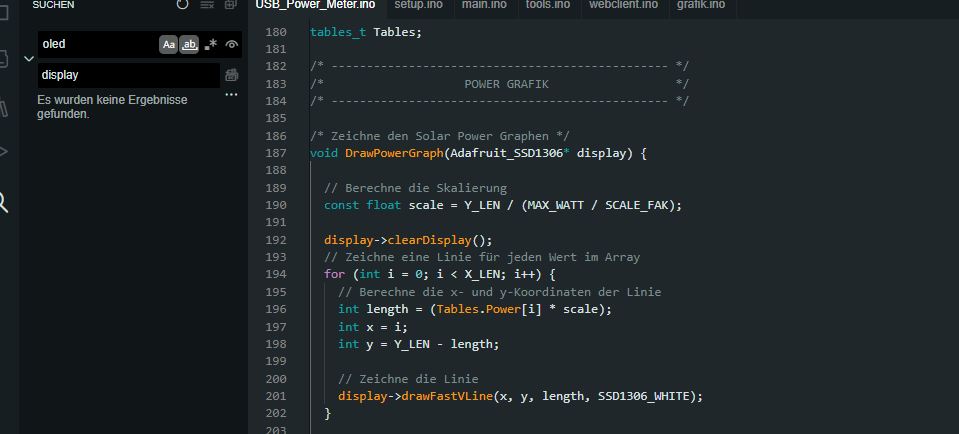
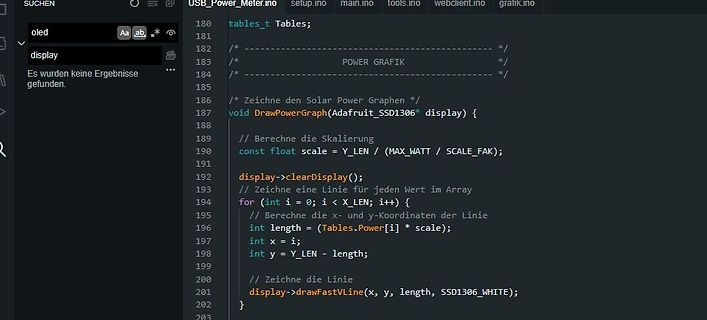
C++ Quellcode für Solar Power Grafik auf OLED Display
Tables; /* /* POWER GRAFIK /* */ /* Zeichne den Solar Power Graphen */ void DrawPowerGraph(Adafruit_SSD1306* display) { // Berechne die Skalierung const float scale = Y_LEN / (MAX_WATT / SCALE_FAK); // Zeichne eine Linie für jeden Wert im Array display->clearDisplay(); for (int i = 0; i < X_LEN; i++) {
-
Thread
Adafruit SSD1306 Objekt lässt keine Zeiger zu
Hallo, ich verzweifel grad bei der Arduino IDE. Definition [c] // Declaration for an SSD1306 display connected to I2C (SDA, SCL pins) #define OLED_RESET -1 // Reset pin # (or -1 if sharing Arduino reset pin) Adafruit_SSD1306 oled1(128, 64, &Wire, OLED_RESET); Adafruit_SSD1306 oled2(128
proceed, loop forever } // SSD1306_SWITCHCAPVCC = generate display voltage from 3.3V internally if (!oled2.begin(SSD1306_SWITCHCAPVCC, 0x3c)) { Serial.println(F("SSD1306 2 allocation failed")); for (;;) ; // Don't
-
Thread
ESP8266 mehrere Temperaturfühler mit Display
[/c] OLED bekommst du damit auch leicht installiert: https://esphome.io/components/display/ssd1306.html?highlight=oled Verwendete Sensoren: https://www.az-delivery.de/products/1m-kabel-ds18b20-ohne-schrumpfschlauch Läuft seit über einem Jahr zuverlässig zur Erfassung der Vor- und Rücklauftemperaturen
-
Thread
Mit Wire.h über I2C auf LCD-Display 1602 zugreifen
Frank O. schrieb im Beitrag #7618869: > Wenn du ein Oled Display SSD1306 Noch ein Video dazu. https://www.youtube.com/watch?v=HtuWLufEt9g
werde ich mich in Zukunft sehr genau mit befassen. Dann brauchst du wohl noch das Datenblatt des SSD1306 COG. Ich habe dir auch die Datenblätter der größeren Displays angehängt.
-
Thread
OLED 1306 128x64 Display an ESP32-WROOM board
Display Probleme, wenn ich es mit einer Demo-App ssd13ß6_128x64_i2c (Beispielprogramm aus der AdaFruit SSD1306 Library) auf einem ESP32-WROOM Board laufen lasse. Mit einem STM32F103 (Blue Pill) habe ich die Funktion parallel dazu heute noch mal verifiziert. Das allerdings mit einem anderen Treiber.
mich nur irritieren lassen, da ich in einem früheren Projekt (STM32) ein Paket benutzt hatte, das ssd1306.c hieß (* original author: Tilen Majerle<tilen@xxxxx.eu> * modification for STM32f10x: Alexander Lutsai<xxlyra@xxxxx>) Allerdings scrollt da immer noch ein Streifen im oberen Bereich während die
-
Thread
Induktiver Positionssensor - Fragen dazu
for 128x32 oled. // Use smaller faster AvrI2c class in place of Wire. // Edit AVRI2C_FASTMODE in SSD1306Ascii.h to change the default I2C frequency. // #include "SSD1306Ascii.h" #include "SSD1306AsciiAvrI2c.h" // 0X3C+SA0 - 0x3C or 0x3D #define I2C_ADDRESS 0x3C // Define proper RST_PIN if required
128x32 oled. > // Use smaller faster AvrI2c class in place of Wire. > // Edit AVRI2C_FASTMODE in SSD1306Ascii.h to change the default I2C > frequency. > // > #include "SSD1306Ascii.h" > #include "SSD1306AsciiAvrI2c.h"[/c] Ich fürchte, dass diese Variante nicht mit dem Zugriff auf andere I2C wie
-
Thread
Hilfe beim Identifizieren eines LCD-Displays
habe ich erfolglos durchgetestet: U8G2_SSD1305_128X64_ADAFRUIT U8G2_SSD1305_128X64_RAYSTAR U8G2_SSD1306_128X64_NONAME U8G2_SSD1306_128X64_VCOMH0 U8G2_SSD1306_128X64_ALT0 U8G2_SSD1312_128X64_NONAME U8G2_SH1106_128X64_NONAME U8G2_SH1106_128X64_VCOMH0 U8G2_SH1106_128X64_WINSTAR U8G2_SH1107_64X128
-
Thread
Transistortester AVR
MAX31855.o HD44780.o ILI9163.o ILI9341.o ILI9481.o ILI9486.o ILI9488.o PCD8544.o PCF8814.o SH1106.o SSD1306.o ST7036.o ST7565R.o ST7735.o Semi_ST7735.o ST7920.o STE2007.o VT100.o RD_Display.o wait.o -o ComponentTester user.o: In function `MainMenu': C:\Users\Admin\Documents\Mytester\M-Softw\ComponentTester
MAX31855.o HD44780.o ILI9163.o ILI9341.o ILI9481.o ILI9486.o ILI9488.o PCD8544.o PCF8814.o SH1106.o SSD1306.o ST7036.o ST7565R.o ST7735.o Semi_ST7735.o ST7920.o STE2007.o VT100.o RD_Display.o wait.o -o ComponentTester [/code] gibt es aber keine Objektdatei tools_counter.o. Wahrscheinlich musst Du beim
-
Thread
OLED SSD1306 + MicroPython
Neben dem üblichen 8x8 Font für das OLED SSD1306 hier noch die Fonts: - 16x16 - 24x24 - 32x32 Code und Beschreibung findet sich hier [1] [1] https://github.com/Feinmechaniker/micropython/tree/main/drivers/ssd1306
Beschreibung findet sich hier [1]. [1] https://github.com/Feinmechaniker/micropython/tree/main/drivers/ssd1306_drt
-
Thread
Super Mini ESP32-C3 Board
Verkaufsfirmen ein beispiel für das Problem veröffentlicht. keiner bietet ein beispiel esp32c3 risc-v und ssd1306 ohne extra hardware an beschriebe probleme mit dem prozessor und der i2c gibt es zu haufe in den foren , ohne echte lösung
iTimeDisplay = 0; unsigned int iBlink = 1000; float fUin=44.4, fIout=5.3, fUout=28.6; #include "SSD1306Wire.h" // legacy include: `#include "SSD1306.h"` // custom fonts: http://oleddisplay.squix.ch #include "Dialog_plain_32.h" // Initialize the OLED display using Wire library SSD1306Wire display
-
Thread
Tageslicht taugliches Kleindisplay
Sieht in nicht zu heller Umgebung toll aus. - simple Ansteuerung (Lib lcd.c von Michael Köhler für ssd1306/ssd1309/sh1106-Controller) - leider um Größenordnungen zu dunkel für Betrieb im Freien unter Sonnenlicht. *LCD transreflektiv* - brauchbarer Kontrast bei allen Umgebungsbedingungen, notfalls
-
Thread
Hilfe benötigt (ESP32 amoled + Neigungssensor + Ultraschallsensor = Größenbestimmung)
die Spezifikation? Wenn ich mir den Schaltplan ansehe (https://github.com/Xinyuan-LilyGO/T96-OLED-SSD1306/blob/main/schematic.pdf) dann ist das ein Minimaldesign, auf dem wenig mehr drauf ist als ein ESP32, ein serielles Flash-ROM und das OLED.
-
Thread
Wie kann man Mikrocontroller kaufen und programmieren
Schau doch mal hier bevor Du mit Video anfängst. https://randomnerdtutorials.com/esp32-ssd1306-oled-display-arduino-ide
Library oder fertiges Sketch, wenn man genügend sucht: https://www.engineersgarage.com/esp32-ssd1306-oled-video-streaming/ Wenn auch die Qualität zum Teil etwas dürftig ist.
-
Thread
Mini Display ansteuern
Sven schrieb im Beitrag #7462166: > In der Beschreibung steht IIC. Da steht vor allem SSD1306, und für diesen Controller gibt es jede Mengen Libraries. Er kann parallel und via SPI oder auch I2C angesteuert werden. Man sollte das Datenblatt lesen.
Aber nur, wenn man das passende breakout board dazu hat. Er hat jedoch 16 Leitungen, die man lt. SSD1306 Datenblatt beschalten muß.
-
 Bild
Bild
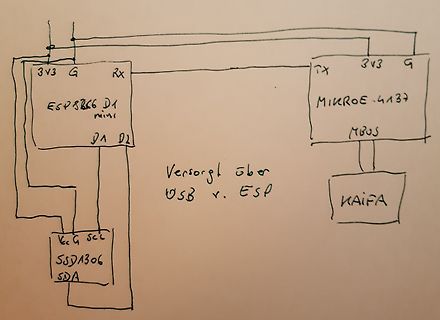
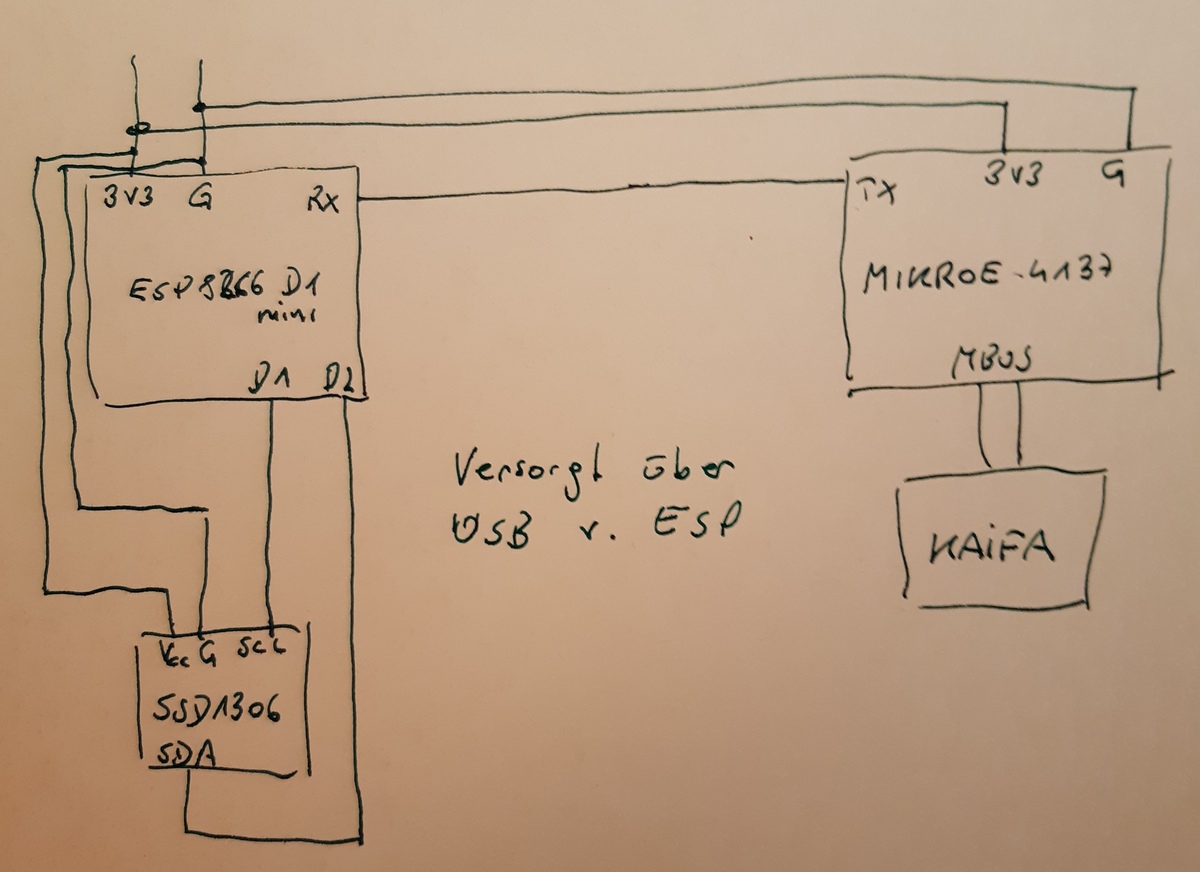
Handgezeichneter Schaltplan mit ESP8266 und MikroE Modul
3V3 G RX TX 3V3 G MIKROE-4137 ESP8266 D1 mini D4 D2 Versorgt über USB v. ESP KAIF A VCC G SCL SDA SSD1306