-
PDF
AVR-ASM-Tutorial_16_05_08_v2.pdf
einem Timer?.........................................................................................128 13.10 Weblinks ...........................................................................................................................128 14 AVR-Tutorial: Uhr....................................
in „AVR-ASM-Tutorial: PDF 16.5.08“ · www.mikrocontroller.net ·
-
PDF
AVR_tutorial.pdf
Mikrocontroller und einem PC austauschen? 99-110 • Flash, EEPROM, RAM: Die verschiedenen Speicherarten des AVR und ihre Anwendung. 111-120 • Die Timer: in regelmäßigen Zeitabständen Dinge tun. 121-128 • Die Timer: Uhr und CTC Modus. 129-137 • Der ADC: Die Brücke von der analogen zur digitalen Welt. 138-156 •
in „AVR-Tutorial als PDF bzw *.doc“ · Mikrocontroller und Digitale Elektronik ·
-
Datei
EXT_LCD_EADOG_UC1610.h
----------------------------------------------------------------- // das File muss im Ordner // "myAVR/WinAVR/AVR/Include/UB_EXT_MODULE/" // liegen und mit #include <UB_EXT_MODULE/EXT_LCD_EADOG_UC1610.h> // eingebunden werden // //----------------------------------------------------------------------
in „LCD Display defekt oder einstellungen ändern ?“ · Mikrocontroller und Digitale Elektronik ·
-
Datei
Programm_Option_-v_Ausgabe_.txt
_329374\core\UART.cpp.o -D__AVR_AVR128DB64__ -D__AVR_DEVICE_NAME__=avr128db64 -D__AVR_DEV_LIB_NAME__=avr128db64 -D F_CPU=20000000L -D CLOCK_SOURCE=1 -D TWI_MORS_SINGLE -D MILLIS_USE_TIMERB4 -D CORE_ATTACH_ALL -D LOCK_FLMAP -D FLMAPSECTION3
in „GCC v14 Release“ · Mikrocontroller und Digitale Elektronik ·
-
Datei
Programm_Option_-v_und_-Wl-v_Ausgabe_.txt
_268176\core\WMath.cpp.o -D__AVR_AVR128DB64__ -D__AVR_DEVICE_NAME__=avr128db64 -D__AVR_DEV_LIB_NAME__=avr128db64 -D F_CPU=20000000L -D CLOCK_SOURCE=1 -D TWI_MORS_SINGLE -D MILLIS_USE_TIMERB4 -D CORE_ATTACH_ALL -D LOCK_FLMAP -D FLMAPSECTION3
in „GCC v14 Release“ · Mikrocontroller und Digitale Elektronik ·
-
PDF
AVRISPmkII_UG.pdf
AVRISP mkII. AVR Studio Requirements It is required to use AVR Studio 4.12 or later in order to use the AVRISP mkII. Latest version of the AVR Studio can be found at: www.atmel.com/products/AVR/ 4 Note: AVR Studio and
in „AVRISP mkII - 10-polig?“ · Mikrocontroller und Digitale Elektronik ·
-
PDF
AVRISPmkII_UG.pdf
AVRISP mkII. AVR Studio Requirements It is required to use AVR Studio 4.12 or later in order to use the AVRISP mkII. Latest version of the AVR Studio can be found at: www.atmel.com/products/AVR/ 4 Note: AVR Studio and
in „ISP Leiterbahnen an ATMega328 funktionieren nicht“ · Mikrocontroller und Digitale Elektronik ·
-
 Bild
Bild
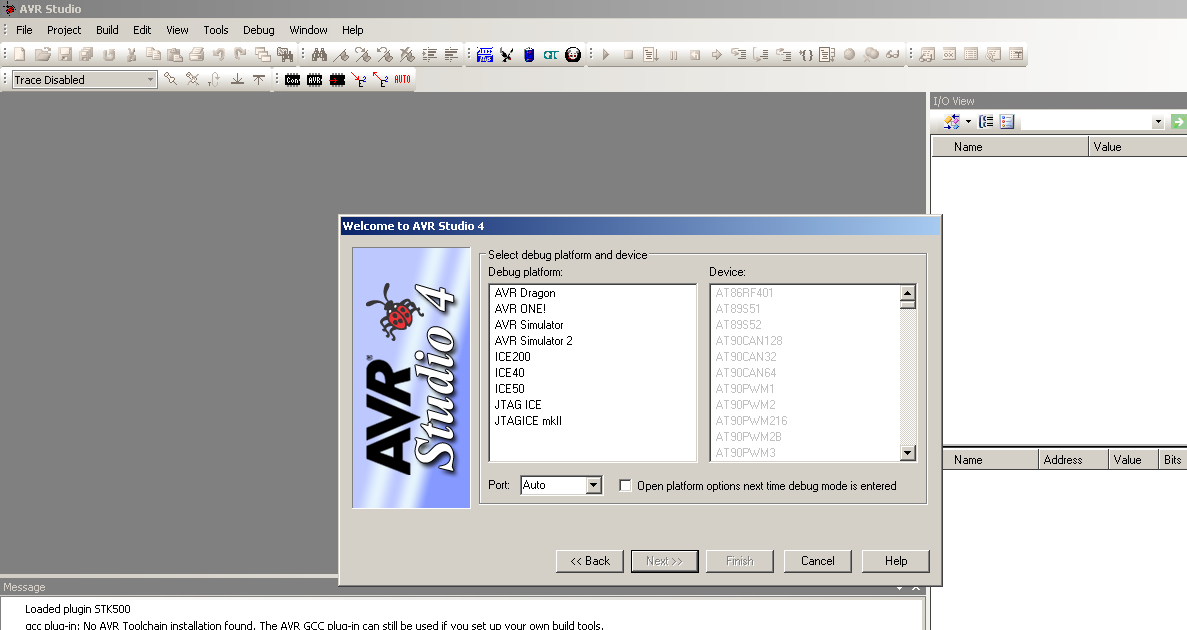
Startbildschirm der Software AVR Studio 4
AVR Studio File Project Build Edit View Tools Debug Window Help Trace Disabled I/O View Name Value Welcome to AVR Studio 4 Select debug platform and device Debug platform: Device: AVR Dragon AT86RF401 AVR ONE! AT89S51 AVR Simulator AT89S52 AVR Simulator 2 AT90CAN128 ICE200 AT90CAN32 ICE40 AT90CAN64 ICE50 JTAG ICE AT90PWM1 JTAGICE mkII AT90PWM216 AT90PWM28 AT90PWM3 Port: Auto Open platform options next time debug mode
in „AT89S52 mit AVRisp MKII auslesen / flashen“ · Mikrocontroller und Digitale Elektronik · · Screenshots
-
Datei
main.lst
terminierten String senden, der im Flash steht. void uart_string_P (const char *s) { d2: cf 93 push r28 d4: df 93 push r29 d6: ec 01 movw r28, r24 while (1) { unsigned char c = pgm_read_byte(s); d8: fe 01 movw r30, r28 da: 84 91 lpm r24, Z+ s ++; dc: 21 96 adiw r28, 0x01 ; 1 if (c == '\0') break; de: 88 23 and r24, r24 e0: 11 f0 breq .+4 ; 0xe6 <uart_string_P+0x14> uart_char (c); e2: c0 df rcall .-128 ; 0x64 <uart_char> } e4: f9 cf rjmp .-14 ; 0xd8 <uart_string_P+0x6> } e6: df 91 pop r29 e8: cf 91 pop r28 ea: 08 95 ret 000000ec <uart_getc>: // Zeichen empfangen uint8_t uart_getc(void) { while (!(
in „AVR-GCC 4.7.2 Bug?“ · Mikrocontroller und Digitale Elektronik ·
-
Datei
avrasm.txt
ganz von vorn anfangen (bei 0 und 1 sozusagen). Als konkrete Hardware dient dabei der Mikrocontroller AVR AT90S4433 von Atmel. Für Beispiel-Schaltungen und weiterführende Texte und Beispiele wird das Tutorial auf http://www.mikrocontroller.net und das Tutorial auf http://www.avr-asm-tutorial.net empfohlen
-
Datei
log.txt
ReadBack ----------- ---- ----- ----- ---- ------ ------ ---- ------ ----- --- -- --------- eeprom 4 20 128 0 no 512 4 0 9000 90 00 0xff 0xff Memory Ops: Oeration Inst Bit Bit Type Bitno Value ----------- -------- -------- ----- ----- READ 31 VALUE 7 1 30 VALUE 6 0 29 VALUE 5 1 28 VALUE 4 0 27 VALUE 3 0 26
in „USBasp + AVSDUDE + ATmega8 Problem“ · Mikrocontroller und Digitale Elektronik ·
-
Datei
schedule_try5.c
#include <avr/io.h> #include <avr/interrupt.h> #include <stdint.h> uint8_t cnt = 0; // http://www.newty.de/fpt/fpt.html#defi void (*pt_function1)() = 0;//http://www.alenck.de/AVR_Tutorial_4_CVAVR/05_Syntax%20der%
in „AVR AtMega8 Preemtive Scheduler“ · Mikrocontroller und Digitale Elektronik ·
-
Datei
avr910_2313_v38c.asm
;CAN128 avr910-Devicecode not official! .db 0x23 ,0x10 ;tn2313 avr910-Devicecode not official! (STK500 Code used) .db 0x31 ,0x20 ;m48 avr910-Devicecode not official! .db 0x33 ,0x20 ;m88 avr910-Devicecode not
in „Programmer incl. neuem Code für Atmel AN910“ · Projekte & Code ·
-
Datei
test.lst
unsigned char data) { while (EECR & (1<<EEPE)); // warten bis Zugriff m glich 22: e1 99 sbic 0x1c, 1 ; 28 24: fe cf rjmp .-4 ; 0x22 <Write_EE> EEARL = adr; 26: 8e bb out 0x1e, r24 ; 30 EEDR = data; 28: 6d bb out 0x1d, r22 ; 29 EECR |= (1<<EEMPE); // Write vorbereiten 2a: e2 9a sbi 0x1c, 2 ; 28 EECR |= (1<<EEPE); // Write ausl sen 2c: e1 9a sbi 0x1c, 1 ; 28 } 2e: 08 95 ret 00000030 <main>: int main(void) { 30: 0f 93 push r16 32: 1f 93 push r17 34: cf 93 push r28 36: df 93 push r29 CLKPR = 0x80; 38: 80 e8 ldi r24, 0x80 ; 128 3a: 86 bd out 0x26, r24 ; 38
in „EEPROM Schreibfrequenz auf eine Adresse“ · Mikrocontroller und Digitale Elektronik ·
-
PDF
AVR-Tutorial.pdf
aus dem Mikrocontroller.net-Shop Sehr gut für dieses Tutorial geeignet ist das OlimexAVR-P28-Board, welches zusätzlich noch den ControllerATmega8, einen USB-ISP-Programmieradapter und ein Steckernetzteil benötigt. Die Platine enthält eine Fassung für den Controller, einen Spannungswandler
in „AVR-Tutorial als PDF“ · Offtopic ·
-
Datei
fft3.asm
----------------------------------------------------------------; ; .include "m8def.inc" .include "avr.inc" .include "akiglcd.inc" .equ Sync = 3 ;Port D bit definitions .equ FFT_N = 128 ;Number of samples .equ LCD_H = 16 ;/ ;ADC0: 20kHz Signal ;ADC1: 6kHz Signal .def _0 = r15 ;Zero .def _Flags = r25
in „Schnelle FFT in Assembler“ · Digitale Signalverarbeitung / DSP / Machine Learning ·
-
Datei
fft3.asm
----------------------------------------------------------------; ; .include "m8def.inc" .include "avr.inc" .include "akiglcd.inc" .equ Sync = 3 ;Port D bit definitions .equ FFT_N = 128 ;Number of samples .equ LCD_H = 16 ;/ ;ADC0: 20kHz Signal ;ADC1: 6kHz Signal .def _0 = r15 ;Zero .def _Flags = r25
in „Schnelle FFT in Assembler“ · Digitale Signalverarbeitung / DSP / Machine Learning ·
-
Datei
avrasm.txt
ganz von vorn anfangen (bei 0 und 1 sozusagen). Als konkrete Hardware dient dabei der Mikrocontroller AVR AT90S4433 von Atmel. Ansonsten wird als Assembler-Programm avrasm.exe von Atmel verwendet, das Teil der AVR-Studio-Software ist, die man sich bei http://www.atmel.com gratis besorgen kann. Für Beispiel-Schaltungen
-
PDF
avrasm.pdf
Hardware dient dabei der Mikrocon- mal-Zahl 255 kann man damit folgendermaßen auseinandernehmen: troller AVR AT90S4433 von Atmel. Ansonsten wird als Assembler-Programm avrasm.exe von Atmel verwendet, 2 5 5 das Teil der AVR-Studio-Software ist, die man sichhttp://www.atmel.com gratis besorgen kann. | | |_ 5
-
Datei
123.c
#include <avr/io.h> #include <avr/interrupt.h> #include <util/delay.h> #include <stdint.h> #include <inttypes.h> #include <avr/pgmspace.h> #ifndef F_CPU #define F_CPU 4000000L #endif #define XTAL F_CPU #define DEBOUNCE
in „LED Fading und Uhr beides benötigt Timer1“ · Mikrocontroller und Digitale Elektronik ·
-
Datei
lcdcon_ft245_4bit.asm
Speicher geladen. * ;* Aufgrund der hohen Datenrate des Parallelports und der LCD Ausgang, * ;* läuft der AVR mit >10MHz und steuert das LCD mit bis zu 100Hz an. * ;* Wird nur ein 32kB SRAM verwendet, muss der Anschluss Q8 (A7) des 74x573 * ;* übersprungen werden. Dann sollte man bei XMax den Wert auf 128 stellen
in „LCD Controller für 640x480 LCD mit mega8515“ · Projekte & Code ·
-
Datei
Mega128.lst
__start: __text_start: 0046 EFCF LDI R28,0xFF 0047 E1D0 LDI R29,0x10 0048 BFCD OUT P3D,R28 0049 BFDE OUT P3E,R29 004A 51C0 SUBI R28,0x10 004B 40D0 SBCI R29,0 004C EA0A LDI R16,0xAA 004D 8308 STD R16,0+Y 004E 2400 CLR R0 004F E0E0 LDI R30,0
in „Source Problem ICC“ · Mikrocontroller und Digitale Elektronik ·
-
Datei
dude5.4arduino_avr910.txt
not exist or is not a regular file, skipping Using Port : /dev/cu.SLAB_USBtoUART Using Programmer : avr910 Overriding Baud Rate : 19200 AVR Part : ATMEGA8 Chip Erase delay : 10000 us PAGEL : PD7 BS2 : PC2 RESET disposition : dedicated RETRY pulse : SCK serial program mode : yes parallel program mode :
in „avrdude - Probleme unter Mac OS X 10.7 (Lion)“ · Mikrocontroller und Digitale Elektronik ·
-
Datei
dude54arduino.txt
not exist or is not a regular file, skipping Using Port : /dev/cu.SLAB_USBtoUART Using Programmer : avr910 Overriding Baud Rate : 19200 AVR Part : ATMEGA8 Chip Erase delay : 10000 us PAGEL : PD7 BS2 : PC2 RESET disposition : dedicated RETRY pulse : SCK serial program mode : yes parallel program mode :
in „avrdude - Probleme unter Mac OS X 10.7 (Lion)“ · Mikrocontroller und Digitale Elektronik ·
-
Datei
avr.txt
interessant, die sich in die Programmierung der AVR Mikrocontroller einarbeiten wollen. Mit einfachen Assembler-Programmen wird ausprobiert, was sich mit den Input-Output-Registern eine AVR Mikrocontrollers so alles bewirken läßt. Um mit Assembler etwas
-
Datei
net.c
HTML main page * all other requests return also HTML main page * * Test configuration: MCU: ATMEGA128 Dev.Board: BigAVR2 Oscillator: 10.0000 MHz Ext. Modules: mE Serial Ethernet board SW: mikroC Pro for AVR * NOTES: - Since the ENC28J60 doesn't support auto-negotiation, full-duplex mode is not compatible
in „Ethernet mit atmega2560“ · Mikrocontroller und Digitale Elektronik ·
-
Datei
test-funktion.asm
;CodeVisionAVR C Compiler V1.24.1c Evaluation ;(C) Copyright 1998-2004 Pavel Haiduc, HP InfoTech s.r.l. ;http://www.hpinfotech.ro ;e-mail:office@hpinfotech.ro ;Chip type : ATmega128 ;Program type : Application ;Clock
-
Datei
test-ohne_funkton.asm
;CodeVisionAVR C Compiler V1.24.1c Evaluation ;(C) Copyright 1998-2004 Pavel Haiduc, HP InfoTech s.r.l. ;http://www.hpinfotech.ro ;e-mail:office@hpinfotech.ro ;Chip type : ATmega128 ;Program type : Application ;Clock
-
Datei
telefonadapter.c
März 2009 - 8. Oktober 2015 * tabsize = 8, encoding = utf-8 (ohne Windows-Header BOM) */ #include <avr/io.h> #include <avr/pgmspace.h> #include <avr/interrupt.h> #include <avr/sleep.h> #include <util/delay.h> #include <avr/fuse.h> #include <avr/signature.h> FUSES={ 0x5F, // Taktteiler /8, kein Taktausgang
in „HEX-File passt nicht in Attiny 25“ · Mikrocontroller und Digitale Elektronik ·
-
PDF
AVR-ASM-Tutorial_16_05_08_v1.pdf
benutzen, wenn mehr Strom benötigt wird.............................................................28 4 AVR-Tutorial: Logik........................................................................................................................29 4.1Allgemeines.........................................
in „AVR-ASM-Tutorial: PDF 16.5.08“ · www.mikrocontroller.net ·
-
PDF
rn_propellerclock_1.11.pdf
halbe Spannung. Daher ist eine H-Bridge und Richtungsumschaltung wesentlich günstiger. Seite 8 von 28 Tipps und Tricks zum Aufbau einer PropellerClock mit vorgefertigter Platine von www.robotikhardware.de Das dazu passende Beispielprogramm für einen Mega128 '################################################### ' PowerMotorDriverFrequenzgenerator ' für ' Controllerboard Board mit Mega128 für ' die Serie RN-Modular, dem modularen ' AVR Entwicklungssystem ' 'Aufgabe: ' Ansteuerung des Pololu Power Motor Driver 36v9 ' Erzeugt eine Konstante Frequenz am Ausgang OC1A (Kein PWM) 'Autor: Frank
in „Programm für Propellerclock“ · Mikrocontroller und Digitale Elektronik ·
-
PDF
OpenM128_Interrupts__1_.pdf
OpenM128 Interrupts Nummer Adresse AVR_NAME Beschreibung 1 0000 RESET External Pin, Power-on Reset, Brown-out Reset, Watchdog Reset, and JTAG AVR Reset INT0_vect 2 0002 External Interrupt Request 0 3 0004 INT1
in „OpenM128, eigene Hardware und RFM12-Modul“ · Mikrocontroller und Digitale Elektronik ·
-
PDF
PWM_Controller_Manual.pdf
$7A 32 $01B PWM_vs_CALC_EEP PWM_vs_CALC_SRAM $07B Speicherbelegung 2/2 AVR- Speicherreservierungen SRAM Adresse [^16] Größe[Byte] Reserviert für RX Bottom SRAM Start 128 Befehle TOP E0 Bottom E1 TWI Receive Buffer 128 TOP Bla Bla TWI Transmitt Buffer Bottom Bla Bla 128 TOP Bla Bla Bottom Bla Bla Daten Speicher TOP Bla Bla 512 Stack Bottom RAMEND- 128 128 TOP RAMEND Die Befehle 1/3 Temporäre Speicherbefehle Für alle Befehle 0x00 bis 0x80 ist die Autoinkrement Funktion aktiv. Ein Befehl aus diesem Bereich ist in der Lage ein Byte an Informationen
in „PWM- Controller 18- Kanal TWI- Bus Proj.“ · Projekte & Code ·
-
PDF
PWM_Controller_Manual.pdf
32 $01B PWM_vs_BUS_EEP PWM_vs_CALC_SRAM $07B Speicherbelegung 2/2 AVR- Speicherreservierungen SRAM Adresse [*16] Größe[Byte] Bottom SRAM Start Reserviert für RX Befehle TOP 128 TWI Receive Buffer Bottom E0 128 TOP TWI Transmitt Buffer Bottom 160 128 TOP Bottom Temporary 32 TOP Bottom Daten Speicher 480 TOP Stack Bottom RAMEND- 128 128 TOP RAMEND EEPROM Adresse [*16] Größe[Byte] Bottom EEPROM Start Reserviert für RX Befehle 128 TOP EEPROM- Datenspeicher Bottom Bereich 384 TOP Die Befehle 1/2 Das besondere an diesen Registern ist
in „PWM- Controller 18- Kanal TWI- Bus Proj.“ · Projekte & Code ·
-
Datei
dude5.6_avr911.txt
not exist or is not a regular file, skipping Using Port : /dev/cu.SLAB_USBtoUART Using Programmer : avr911 avr910_devcode (avrdude.conf) : 0x76 Overriding Baud Rate : 19200 avrdude: ser_open(): can't open device "/dev/cu.SLAB_USBtoUART": Resource busy iMac:Release vinz$ avrdude -pm8 -c avr911 -P /dev/
in „avrdude - Probleme unter Mac OS X 10.7 (Lion)“ · Mikrocontroller und Digitale Elektronik ·
-
PDF
atmega_328.pdf
/MLF) 28P3 28-lead, 0.300” Wide, Plastic Dual Inline Package (PDIP) 18 8271BS–AVR–04/10 ATmega48A/48PA/88A/88PA/168A/168PA/328/328P 6.5 ATmega168A Speed (MHz)(3) Power Supply (V) Ordering Code (2) Package (1)
in „1 Wire mit Atmega328“ · Mikrocontroller und Digitale Elektronik ·
-
Datei
wiring.c
x5 us, = 7 cycles // account for the time taken in the preceeding commands. // we just burned 26 (28) cycles above, remove 7, (7*4=28) // us is at least 10 so we can substract 7 us -= 7; // 2 cycles #elif F_CPU >= 16000000L // for the 16 MHz clock on most Arduino boards // for a one-microsecond delay
in „Sekunden,Minuten zählen mit der Funktion Millis()“ · Mikrocontroller und Digitale Elektronik ·
-
Datei
main.c
stdio.h> #include <string.h> #include <math.h> #include <stdlib.h> #include <util/delay.h> #include <avr/pgmspace.h> #include <avr/io.h> #include <avr/interrupt.h> #include <avr/sleep.h> #include <avr/iocan128.h> struct InOut structIO; struct InOut *ptr_InOut; volatile uint8_t* Ptr_Reg ; uint8_t Adr_Reg
in „Schreiben in der Adresse geht nicht“ · Mikrocontroller und Digitale Elektronik ·
-
Datei
dude511.txt
not exist or is not a regular file, skipping Using Port : /dev/cu.SLAB_USBtoUART Using Programmer : avr910 avr910_devcode (avrdude.conf) : 0x76 Overriding Baud Rate : 19200 AVR Part : ATMEGA8 Chip Erase delay : 10000 us PAGEL : PD7 BS2 : PC2 RESET disposition : dedicated RETRY pulse : SCK serial program
in „avrdude - Probleme unter Mac OS X 10.7 (Lion)“ · Mikrocontroller und Digitale Elektronik ·
-
Datei
dude511_mit_arduino_conf.txt
not exist or is not a regular file, skipping Using Port : /dev/cu.SLAB_USBtoUART Using Programmer : avr910 avr910_devcode (avrdude.conf) : 0x76 Overriding Baud Rate : 19200 AVR Part : ATMEGA8 Chip Erase delay : 10000 us PAGEL : PD7 BS2 : PC2 RESET disposition : dedicated RETRY pulse : SCK serial program
in „avrdude - Probleme unter Mac OS X 10.7 (Lion)“ · Mikrocontroller und Digitale Elektronik ·
-
Datei
Test.lst
bad_interrupt> 00000054 <__ctors_end>: 54: 11 24 eor r1, r1 56: 1f be out 0x3f, r1 ; 63 58: cf e5 ldi r28, 0x5F ; 95 5a: d4 e0 ldi r29, 0x04 ; 4 5c: de bf out 0x3e, r29 ; 62 5e: cd bf out 0x3d, r28 ; 61 60: 0e 94 36 00 call 0x6c ; 0x6c <main> 64: 0c 94 3d 00 jmp 0x7a ; 0x7a <_exit> 00000068 <__bad_interrupt>: 68: 0c 94 00 00 jmp 0 ; 0x0 <__vectors> 0000006c <main>: #include <util/delay.h> #include <avr/io.h> int main(void) { MCUCSR = (1<<JTD); 6c: 80 e8 ldi r24, 0x80 ; 128 6e: 84 bf out 0x34, r24 ; 52 MCUCSR = (1<<JTD); 70: 84 bf out 0x34, r24 ; 52 DDRC = 0xFF; 72: 8f ef ldi r24, 0xFF ; 255 74: 84
in „ATmega16 Port Ausgabe Problem“ · Mikrocontroller und Digitale Elektronik ·
-
Datei
glcd.inc
#define LCD_SCL PB7 // SCK #define SPI_IN_LOWER_IO_REGS #elif defined (__AVR_ATmega128__) #define LCD_PORT _SFR_IO_ADDR(PORTB) #define LCD_PIN _SFR_IO_ADDR(PINB) #define LCD_DDR _SFR_IO_ADDR(DDRB) #define LCD_CS 0 // SS #define LCD_SDA 2 // MOSI #define LCD_RESET 3 // MISO #define LCD_SCL 1 // SCK #define SPI_IN_LOWER_IO_REGS #elif defined (__AVR_AT90CAN128__) || defined (__AVR_AT90CAN64__) || defined (__AVR_AT90CAN32__) #define LCD_PORT _SFR_IO_ADDR(PORTB) #define LCD_PIN _SFR_IO_ADDR(PINB) #define LCD_DDR _SFR_IO_ADDR(DDRB) #define LCD_CS
in „Nokia 6100 Grafiklibrary die Zweite“ · Projekte & Code ·
-
PDF
AVR_ASM_Tutorial.pdf
braucht man einen Assembler, der in Assemblersprache geschriebene Programme file:///E|/Elektronik/AVR/assemblertutorial/equipment.htm (3 of 4)30.01.2007 15:23:28 AVR-Tutorial - 1. Benötigte Ausrüstung - www.mikrocontroller.net in Maschinencode übersetzt. Windows-User können das AVR-Studio von Atmel
in „ASM Tutorial jetzt als PDF“ · Mikrocontroller und Digitale Elektronik ·
-
Datei
910.asm
;*************************************************************************** ;* ;* Title : AVR ISP (Auto adr inc, 115200bps) ;* Version : 3.2.1 ;* Last updated : Nov 18 2003 ;* Target : AT90S2313 ;* File : avr910_2313_v32.asm ;* Author(s) : klaus@mikrocontroller-projekte.de ;* last Filename:
in „avr910 programmer“ · Mikrocontroller und Digitale Elektronik ·
-
PDF
AVR-ASM_Tutorial.pdf
AVR-Tutorial Aufbau des Tutorials • Einleitung: Worum geht es überhaupt? • BenötigteAusrüstung: Welche Hard- und Software brauche ich, umAVR-Mikrocontroller zu programmieren? • I/O-Grundlagen: Wie kann
in „AVR-Tutorial als PDF“ · Offtopic ·
-
PDF
Java_AVR32_doc32049.pdf
The dcmpg and dcmpl instructions differ only in their treatment of a comparison involving NaN. 54 AVR32 32049A–AVR32–09/06 AVR32 4.28 DCONST_<D> – Push double 4.28.1 Description Push the double constant <d> onto the operand stack 4.28.2 Stack ... → ..., result.word1, result.word2 4.28.3 Operation JOSP
in „Arm(e)s JAVA - Jazelle“ · Mikrocontroller und Digitale Elektronik ·
-
Datei
senden.c
IMPORTANT: it contains F_CPU definition, so include it before delay.h #include <stdlib.h> #include <avr/io.h> #include <avr/pgmspace.h> #include <util/delay.h> #include <avr/interrupt.h> #include <stdio.h> #include <avr/sleep.h> #include "sht/libsht.h" #include "rfm12/rfm12.h" //Uhr nur mit Sekunden-Aufloesung, ohne Korrektur von Quarzungenauigkeiten: #define F_QUARZ 32768 #define VORTEILER 128 static volatile uchar sekunden = 0; float vcc; char messen = 0; char senden = 0; const uchar NormalerCompwert=F_QUARZ/VORTEILER-1; void long_delay(uint16_t ms) { for(; ms>0; ms--) _delay_ms(1); } void
in „Atmega328p Sleep-Modus, ich komme nicht weiter“ · Mikrocontroller und Digitale Elektronik ·
-
Datei
io.c
stdio.h> #include <string.h> #include <math.h> #include <stdlib.h> #include <util/delay.h> #include <avr/pgmspace.h> #include <avr/io.h> #include <avr/interrupt.h> #include <avr/sleep.h> #include <avr/iocan128.h> void init(void) { DDRC = 0xff & (~0x4);// Adresse= 0x27 PORTC = 0xff;// Adresse=0X28 } void
in „Schreiben in der Adresse geht nicht“ · Mikrocontroller und Digitale Elektronik ·
-
PDF
GCC_Tut_Test.pdf
Make▯les (1.6). D:\tmp\gcc_tut\quickstart>dir Verzeichnis von D:\tmp\gcc_tut\quickstart 6 KAPITEL 1. AVR-GCC-TUTORIAL 28.11.2006 22:53 <DIR> . 28.11.2006 22:53 <DIR> .. 28.11.2006 20:06 118 main.c 28.11.2006 20:03 16.810 Makefile 2 Datei(en) 16.928 Bytes Nun gibt man make all ein. Falls das mit WinAVR
-
Datei
dude5.4arduino_avr911.txt
not exist or is not a regular file, skipping Using Port : /dev/cu.SLAB_USBtoUART Using Programmer : avr911 Overriding Baud Rate : 19200 AVR Part : ATMEGA8 Chip Erase delay : 10000 us PAGEL : PD7 BS2 : PC2 RESET disposition : dedicated RETRY pulse : SCK serial program mode : yes parallel program mode :
in „avrdude - Probleme unter Mac OS X 10.7 (Lion)“ · Mikrocontroller und Digitale Elektronik ·