-
Bild
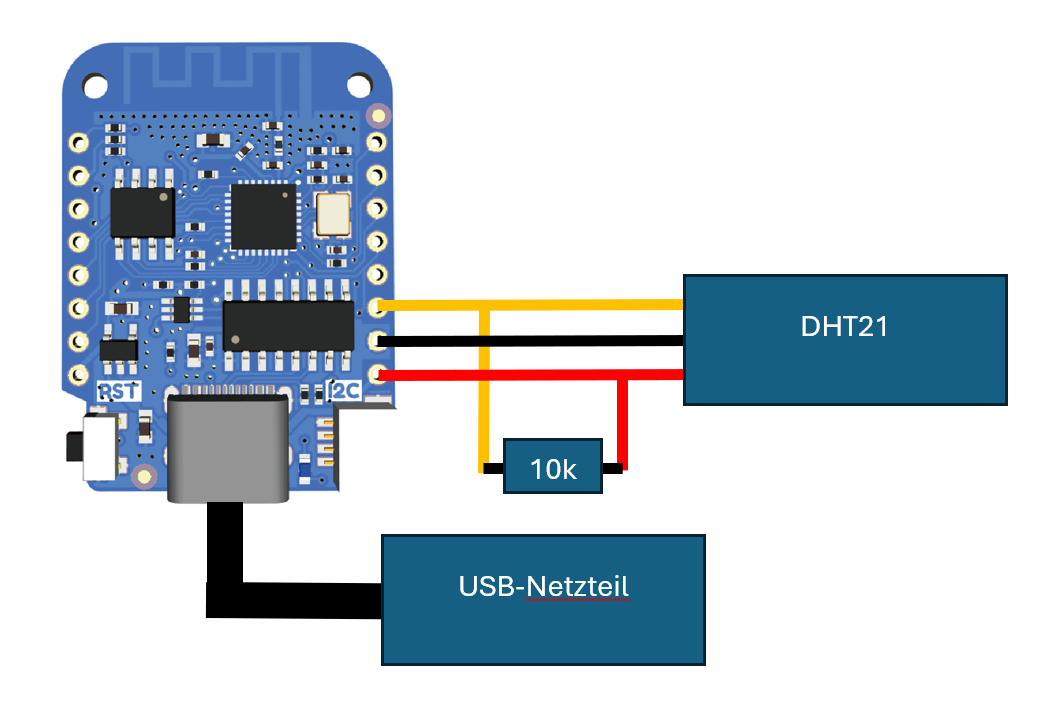
Schaltplan eines Mikrocontroller-Aufbaus mit DHT21 Sensor
DHT21 10k USB-Netzteil RST I2C
in „Leseprobleme mit dem DHT21 an einem D1 Mini V3“ · Mikrocontroller und Digitale Elektronik · · Diagramme
-
Bild
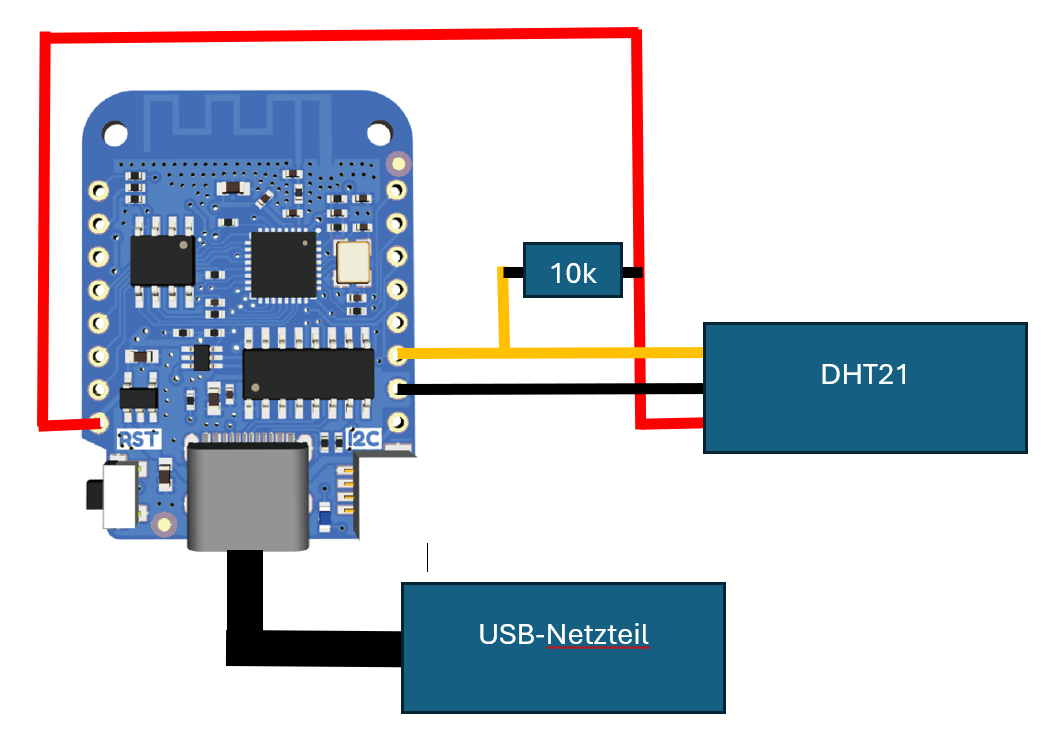
Schaltplan eines Mikrocontroller-Aufbaus mit DHT21 Sensor
10k DHT21 USB-Netzteil RST I2C
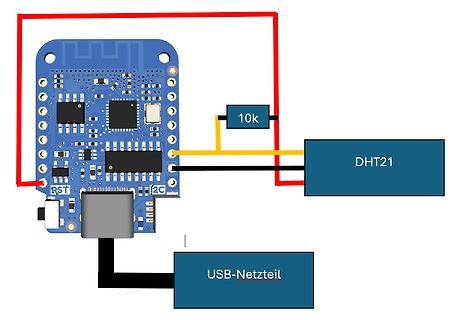
in „Leseprobleme mit dem DHT21 an einem D1 Mini V3“ · Mikrocontroller und Digitale Elektronik · · Diagramme
-
Datei
Nano.txt
DHTPIN 10 // what digital pin we're connected to OneWire ds(2); //pin für ds1820 #define DHTTYPE DHT21 // DHT 21 (AM2301) // Connect pin 1 (on the left) of the sensor to +5V // NOTE: If using a board with 3.3V logic like an Arduino Due connect pin 1 // to 3.3V instead of 5V! // Connect pin 2 of the
in „C# Temp werte als label anzeigen“ · Softwareentwicklung ·
-
Datei
dht.c
Mask; // hw bit mask uint8_t Valid: 1; // 1 = valid uint8_t Type: 2; // 0 = unknown, 1 = DHT11, 2 = DHT21/22 uint8_t LastError; // 1 = no hw } CHumiditySensor; static CHumiditySensor gHumiditySensor[2] = {{0, 0, 0, 0, 0}, {0, 0, 0, 0, 0}}; void initDHT(void) { gHumiditySensor[0].Valid = 0; gHumiditySensor
in „DHT22 liefert eigenartige Werte“ · Mikrocontroller und Digitale Elektronik ·
-
Datei
Program.txt
define DHTTYPE DHT11 // DHT 11 //#define DHTTYPE DHT22 // DHT 22 (AM2302), AM2321 #define DHTTYPE DHT21 // DHT 21 (AM2301) // Connect pin 1 (on the left) of the sensor to +5V // NOTE: If using a board with 3.3V logic like an Arduino Due connect pin 1 // to 3.3V instead of 5V! // Connect pin 2 of the
in „Leseprobleme mit dem DHT21 an einem D1 Mini V3“ · Mikrocontroller und Digitale Elektronik ·
-
Datei
TFT_DHT11_mit_1_8_TFT_LED.ino
using! #define DHTTYPE DHT11 // DHT 11 //#define DHTTYPE DHT22 // DHT 22 (AM2302) //#define DHTTYPE DHT21 // DHT 21 (AM2301) // Connect pin + (middle) of the sensor to +5V // Connect pin S (on the right) of the sensor to whatever your DHTPIN is // Connect pin - (on the left) of the sensor to GROUND //
in „Sketch für Projekt will nicht so richtig“ · Mikrocontroller und Digitale Elektronik ·
-
Datei
TFT_DHT11_mit_1_8_TFT_LED.ino
using! #define DHTTYPE DHT11 // DHT 11 //#define DHTTYPE DHT22 // DHT 22 (AM2302) //#define DHTTYPE DHT21 // DHT 21 (AM2301) // Connect pin + (middle) of the sensor to +5V // Connect pin S (on the right) of the sensor to whatever your DHTPIN is // Connect pin - (on the left) of the sensor to GROUND //
in „Sketch für Projekt will nicht so richtig“ · Mikrocontroller und Digitale Elektronik ·
-
Datei
test.cpp
using! #define DHTTYPE DHT11 // DHT 11 //#define DHTTYPE DHT22 // DHT 22 (AM2302) //#define DHTTYPE DHT21 // DHT 21 (AM2301) // Connect pin + (middle) of the sensor to +5V // Connect pin S (on the right) of the sensor to whatever your DHTPIN is // Connect pin - (on the left) of the sensor to GROUND //
in „Sketch für Projekt will nicht so richtig“ · Mikrocontroller und Digitale Elektronik ·
-
Bild
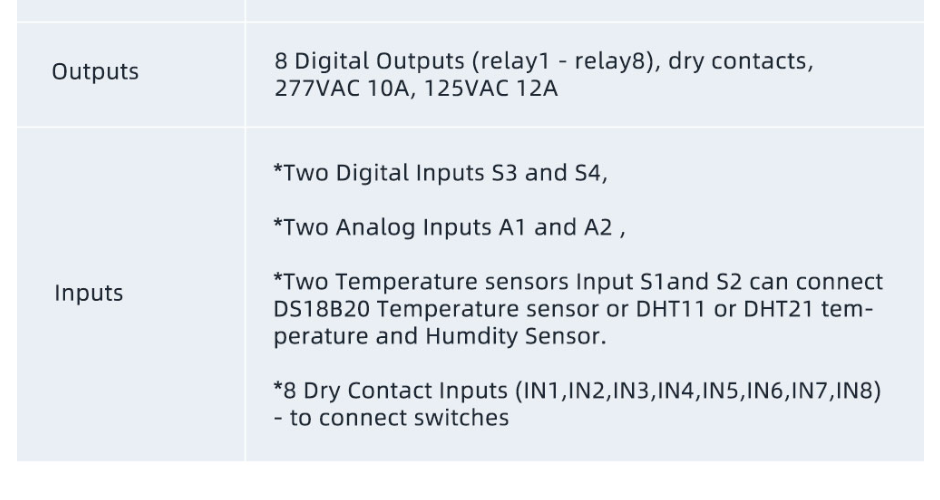
Spezifikationen von Digitalen und Analogen Ein- und Ausgängen
and A2 , *Two Temperature sensors Input S1and S2 can connect DS18B20 Temperature sensor or DHT11 or DHT21 temperature and Humdity Sensor. *8 Dry Contact Inputs (IN1,IN2,IN3,IN4,IN5,IN6,IN7,IN8) - to connect switches
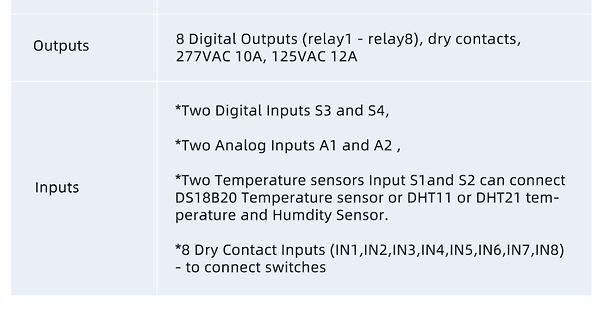
in „AM312 am KC868-A8“ · Mikrocontroller und Digitale Elektronik · · Screenshots
-
Datei
Sender_mit_DHT.ino
library #include <VirtualWire.h> #include <DHT.h> #define DHTPIN 9 #define DHTTYPE DHT22 //DHT11, DHT21, DHT22 DHT dht(9, DHT22); void setup() { Serial.begin(9600); // virtual wire vw_set_tx_pin(12); // pin vw_setup(8000); // bps } void loop() { float h = dht.readHumidity(); //Luftfeuchte auslesen float
in „Arduino 433Mhz Modul mit Temperatur Sensor“ · Mikrocontroller und Digitale Elektronik ·
-
Datei
Wetterstation.ino
PIN # for 433Mhz Transmitter #define LEDPIN 0 // PIN # for LED Indicator #define DHTTYPE DHT22 // DHT 21 (AM2301) DHT dht(DHTPIN, DHTTYPE); //char msg1[]={0x0,0xa,0x0,0xf,0x0,0x7,0x0,0x1,0x7,0x0,0x8}; //char msg2[]={0x0,0xa,0x0,0xf,0x1,0x5,0x8,0x6,0x5,0x8,0xa}; unsigned long msg_timer = 10000; // Transmits
in „code für TX 3-TH Funksender“ · Mikrocontroller und Digitale Elektronik ·
-
Datei
Display_DHT22.txt
COLOR_MAGENTA RGB( 0xFF, 0x00, 0xFF ) #define I2C_ADDR 0x20 #define DHTPIN 9 #define DHTTYPE DHT22 //DHT11, DHT21, DHT22 DHT dht(DHTPIN, DHTTYPE); #define SER void wait_for_input(void) { //#ifdef SER // Serial.println("Wait for input!"); // while(Serial.available() == 0); // while(Serial.available() != 0){ Serial.read
in „Arduino Uno - Temperaturverlaufskurve mit Sensor und Display“ · Mikrocontroller und Digitale Elektronik ·
-
Datei
Luftsensor.ino
define DHTTYPE DHT11 // DHT 11 //#define DHTTYPE DHT22 // DHT 22 (AM2302), AM2321 //#define DHTTYPE DHT21 // DHT 21 (AM2301) // Connect pin 1 (on the left) of the sensor to +5V // NOTE: If using a board with 3.3V logic like an Arduino Due connect pin 1 // to 3.3V instead of 5V! // Connect pin 2 of the
in „China Arduino zu kleiner flash Speicher?“ · Mikrocontroller und Digitale Elektronik ·