-
 Bild
Bild
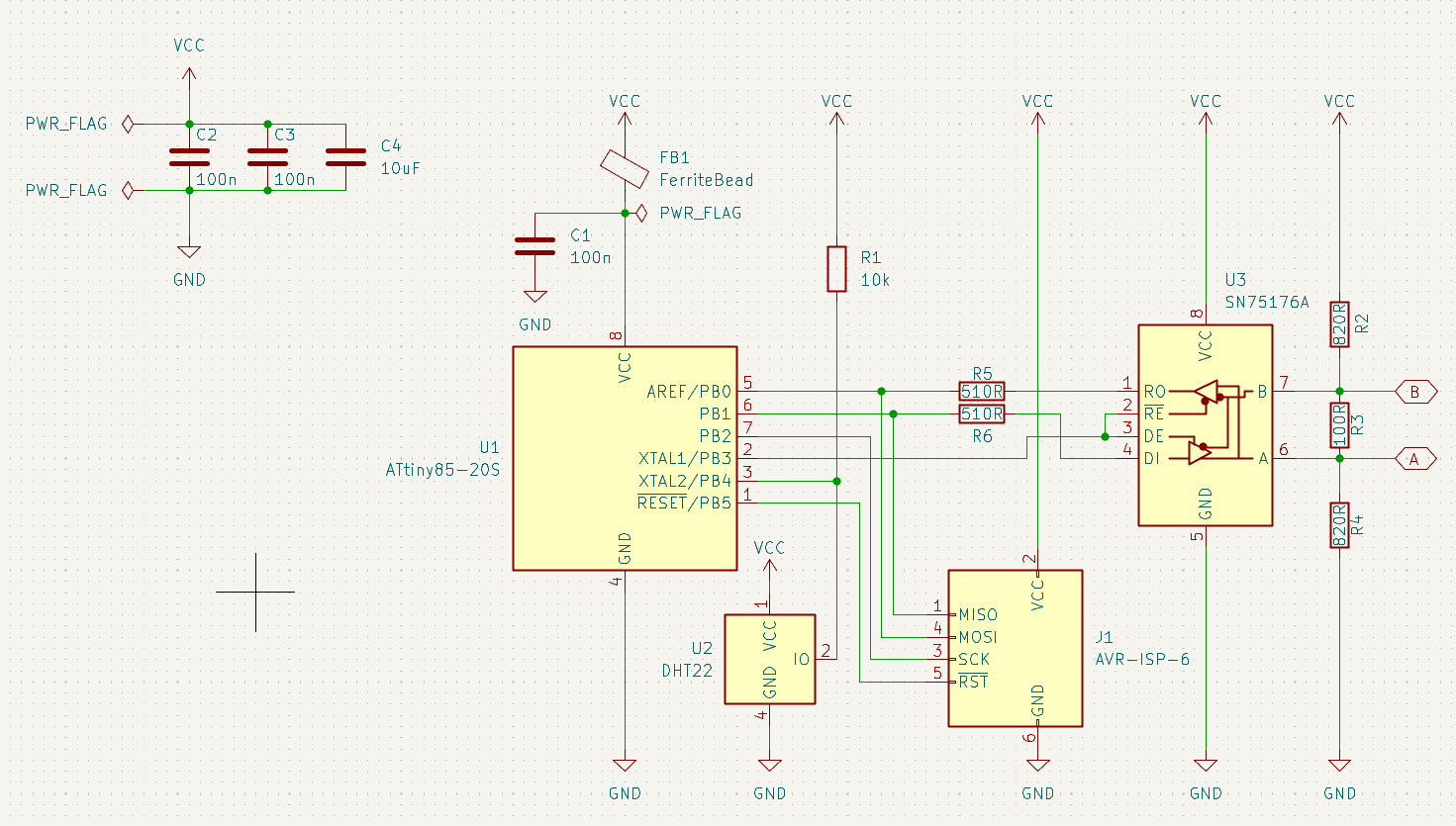
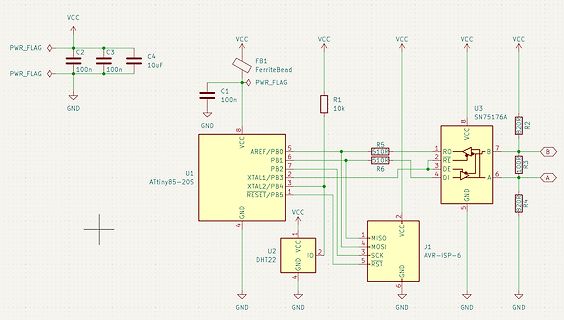
Schaltplan mit ATtiny85, DHT22 und RS485-Transceiver
XTAL2/PB4, RESET/PB5, VCC, R5, 510R, R6, 510R, U3, SN75176A, RO, RE, DE, DI, R2, B, R3, A, GND, U2, DHT22, MIS0, MOSI, SCK, RST, J1, AVR-ISP-6, R4, B20R
in „USI-UART mit ATTiny85: MSB kaputt“ · Mikrocontroller und Digitale Elektronik · · Schaltpläne
-
Datei
dht22.c
#include "dht22.h" #include "uart.h" #include "stm32f1xx_hal.h" extern DHT22_TypeDef dht22_1; int dht22_Init(DHT22_TypeDef* dht22){ int ret = -1; #ifdef DEBUG UART_printf(dht22->debug_uart.Instance, "(I) dht22: init"); #endif ret = dht22_gpio_init(dht22); if(ret != 0){ return ret; } TIM2_Init(dht22); //start timer TIM2_start(); return ret; } int dht22_gpio_init(DHT22_TypeDef* dht22){ #ifdef DEBUG UART_printf(dht22->debug_uart.Instance
in „stm32f103 Timer Input Capture Interrupt“ · Mikrocontroller und Digitale Elektronik ·
-
PDF
DHT22.pdf
------------------------------------------------------------------------------------------ Step 2: DHT22 send response signal to MCU When DHT22 detect the start signal, DHT22 will send out low-voltage-level signal and this signal last 80us as response signal, then program of DHT22 transform data-bus's
in „DHT22 in Arduinoprojekt“ · Mikrocontroller und Digitale Elektronik ·
-
Datei
main.asm
dht_hum,r11 ;H sts dht_hum+1,r12 ;L sts dht_temp,r13 sts dht_temp+1,r14 #if debug sendtxt dht22 lds wl,dht_temp+1 lds wh,dht_temp rcall u_print_dht sendtxt dht22t lds wl,dht_hum+1 lds wh,dht_hum rcall u_print_dht
in „ATMega328 + Si7021 + I2C (Assembler)“ · Mikrocontroller und Digitale Elektronik ·
-
Datei
dht22.h
_Init(DHT22_TypeDef* dht22); // GPIO Pin Init for timer int dht22_gpio_init(DHT22_TypeDef* dht22); // Timer int TIM2_Init(DHT22_TypeDef* dht22); void TIM2_CC_Edge(TIM2_CC2_Edge Edge); void TIM2_start(void); void TIM2_stop(void); void TIM2_IRQHandler(void); void TIM2_Interrupt_handle(DHT22_TypeDef* dht22);
in „stm32f103 Timer Input Capture Interrupt“ · Mikrocontroller und Digitale Elektronik ·
-
Datei
debug_okay.asm
2 ; 0x330 <acquire_DHT+0x1bc> 32e: 22 0f add r18, r18 330: 0a 94 dec r0 332: ea f7 brpl .-6 ; 0x32e <acquire_DHT+0x1ba> 334: 30 91 04 01 lds r19, 0x0104 338: 32 2b or r19, r18 33a: 1c c0 rjmp .+56 ; 0x374 <acquire_DHT+0x200
in „Fehler bei einfacher Integer-Division?“ · Mikrocontroller und Digitale Elektronik ·
-
Datei
Taupunkt_V1_V2_THD_DS18B_3ok.ino
// DHT 11 #define DHTTYPE DHT22 // DHT 22 (AM2302) #define LED 13 // LED an Pin 13 #define GND 10 // GND für DHT als LOW Level #define Vcc 9 // DHT Ucc+5V Pin als HIGH Level // Data wire is plugged into port
in „Taupunktberechnung mit Arduino, DHT22, DS18B20“ · Projekte & Code ·
-
Datei
FINAL_OLED.ino
with standard arduinos #include <avr/power.h> // needed to up clock to 16 MHz on 5v Trinket #include <dht.h> dht DHT; const byte DHT22_Pin = 1; //const int analogInPin = 3; //int sensorValue = 0; #include "SSD1306_minimal.h" //#include <avr/pgmspace.h> //#define DEG "\xa7" "C" SSD1306_Mini oled; // Struct
in „Attiny85 dht22 oled ssd1306 i2C“ · Mikrocontroller und Digitale Elektronik ·
-
Datei
debug_error.asm
1 1ac: 20 40 sbci r18, 0x00 ; 0 1ae: 80 40 sbci r24, 0x00 ; 0 1b0: e1 f7 brne .-8 ; 0x1aa <acquire_DHT+0x36> 1b2: 00 c0 rjmp .+0 ; 0x1b4 <acquire_DHT+0x40> 1b4: 00 00 nop _delay_ms( 18); // note: in case of the DHT22, 800us would be enough (which can be used to distinguish both models) // prepare and
in „Fehler bei einfacher Integer-Division?“ · Mikrocontroller und Digitale Elektronik ·
-
Datei
IRQ.c
# IRQ 10ms ############ /* if(nok5110flags_cnt) nok5110flags_cnt--; #ifdef MY_HUM_SENSOR if(uint16_dht22_update_time) uint16_dht22_update_time--; #if defined(DHT_T_LINE) || defined(DHT_H_LINE) if(uint16_dht22_show_upd_flag & uint16_dht22_update_time) uint16_dht22_show_upd_flag--; if(!uint16_dht22_show_upd_flag) { #ifdef DHT_H_LINE menu[HAUPT_SCREEN][DHT_H_LINE-1][0]=' '; #endif // #ifdef DHT_H_LINE #ifdef DHT_T_LINE menu[HAUPT_SCREEN][DHT_T_LINE-1][0]=' '; #endif // #ifdef DHT_T_LINE } #endif #endif // #ifdef MY_HUM_SENSOR
in „Entprellen Flankenerkennung“ · Mikrocontroller und Digitale Elektronik ·
-
Datei
DHT_LCD.ino
#include "DHT.h" #include <rgb_lcd.h> #include "Wire.h" #include <SPI.h> // DHT Sensor Setup #define DHTPIN 2 // what pin we're connected to #define DHTTYPE DHT22 // DHT 22 (AM2302) int kuehlschrank = 5; int luftbefeuchter
in „Arduino friert ein nach 1-3h“ · Mikrocontroller und Digitale Elektronik ·
-
Datei
main.cpp
#include <Arduino.h> #include <Adafruit_Sensor.h> #include <DHT.h> #include <DHT_U.h> #include <Wire.h> #include <SPI.h> #include <WiFi.h> #include <AdafruitIO.h> #include <AdafruitIO_WiFi.h> #include "config.h" // pin connected to DH22 data line #define DATA_PIN 5 // create DHT22 instance DHT_Unified dht(DATA_PIN, DHT22); AdafruitIO_WiFi io(IO_USERNAME, IO_KEY, WIFI_SSID, WIFI_PASS); // set up the 'temperature' and 'humidity' feeds AdafruitIO_Feed *temperature = io.feed("temperature
in „ESP32 + PlatformIO + Adafruit IO = Error“ · Mikrocontroller und Digitale Elektronik ·
-
Datei
main.v0.02.cpp
define WIFI_SSID "myssid" #define WIFI_PASS "geheimgeheimgehi" #include <Adafruit_Sensor.h> #include <DHT.h> #include <DHT_U.h> #include "AdafruitIO_WiFi.h" // pin connected to DH22 data line #define DATA_PIN 5 // create DHT22 instance DHT_Unified dht(DATA_PIN, DHT22); // set up the 'temperature' and 'humidity
in „ESP32 + PlatformIO + Adafruit IO = Error“ · Mikrocontroller und Digitale Elektronik ·
-
Datei
zimmergewaechshaussteuerung.txt
Feuchte- und Temperatursensor: HYT939 über i²C für 1. Pflanzschale Feuchte- und Temperatursensor: DHT22 für 2. Pflanzschale */ #include <Wire.h> #include "RTClib.h" #include <Adafruit_SSD1306.h> // Library für OLED #include "DHT.h" // DHT Temperatur- und Feuchtesensor #include <LCD.h> #include <LiquidCrystal_I2C.h
in „LCD Display aktualisierung“ · Mikrocontroller und Digitale Elektronik ·
-
Datei
Sender_mit_DHT.ino
// library #include <VirtualWire.h> #include <DHT.h> #define DHTPIN 9 #define DHTTYPE DHT22 //DHT11, DHT21, DHT22 DHT dht(9, DHT22); void setup() { Serial.begin(9600); // virtual wire vw_set_tx_pin(12); // pin vw_setup(8000); // bps } void loop() { float h = dht.readHumidity(); //Luftfeuchte auslesen float t = dht.readTemperature(); //Temperatur auslesen sendString("t", true); delay(100); } void sendString(String message, bool wait) { byte messageLength = message.length
in „Arduino 433Mhz Modul mit Temperatur Sensor“ · Mikrocontroller und Digitale Elektronik ·
-
Datei
LCD_TEST01.asm
rjmp anf_ ;ob im zweiten durchlauf die 1 immer noch anliegt ;;;;;;;;;;;Byte lesen;;;;;;;;;;;;;;;; DHT_bytlesen: ldi temp,0x08 ldi byte,00 ; mov temp2,DHTmaske ;Pin an dem der DHT22 haengt runde: ;erkennen der Steigenden Flanke in arg,PINC and arg,DHTmaske ;Pin an dem der DHT22 haengt breq runde ldi
in „Problem beim abfragen von 2 DHT22“ · Mikrocontroller und Digitale Elektronik ·
-
Datei
LCD_TEST01.asm
rjmp anf_ ;ob im zweiten durchlauf die 1 immer noch anliegt ;;;;;;;;;;;Byte lesen;;;;;;;;;;;;;;;; DHT_bytlesen: ldi temp,0x08 ldi byte,00 ; mov temp2,DHTmaske ;Pin an dem der DHT22 haengt runde: ;erkennen der Steigenden Flanke in arg,PINC and arg,DHTmaske ;Pin an dem der DHT22 haengt breq runde ldi
in „AVR Attmega8a Routinenaufruf fumktioniert nicht (asm)“ · Mikrocontroller und Digitale Elektronik ·
-
Datei
Program.txt
/* * DHT-Sensor: */ #include "DHT.h" #define DHTPIN 2 // Digital pin connected to the DHT sensor // Feather HUZZAH ESP8266 note: use pins 3, 4, 5, 12, 13 or 14 -- // Pin 15 can work but DHT must be disconnected during program upload. // Uncomment whatever type you're using! //#define DHTTYPE DHT11 // DHT 11 //#define DHTTYPE DHT22 // DHT 22 (AM2302), AM2321 #define DHTTYPE DHT21 // DHT 21 (AM2301) // Connect pin 1 (on the left) of the sensor to +5V // NOTE: If using a board with 3.3V logic
in „Leseprobleme mit dem DHT21 an einem D1 Mini V3“ · Mikrocontroller und Digitale Elektronik ·
-
Datei
dht.c
C uint8_t Mask; // hw bit mask uint8_t Valid: 1; // 1 = valid uint8_t Type: 2; // 0 = unknown, 1 = DHT11, 2 = DHT21/22 uint8_t LastError; // 1 = no hw } CHumiditySensor; static CHumiditySensor gHumiditySensor[2] = {{0, 0, 0, 0, 0}, {0, 0, 0, 0, 0}}; void initDHT(void) { gHumiditySensor[0].Valid = 0;
in „DHT22 liefert eigenartige Werte“ · Mikrocontroller und Digitale Elektronik ·
-
Datei
Display_DHT22.txt
define COLOR_MAGENTA RGB( 0xFF, 0x00, 0xFF ) #define I2C_ADDR 0x20 #define DHTPIN 9 #define DHTTYPE DHT22 //DHT11, DHT21, DHT22 DHT dht(DHTPIN, DHTTYPE); #define SER void wait_for_input(void) { //#ifdef SER // Serial.println("Wait for input!"); // while(Serial.available() == 0); // while(Serial.available
in „Arduino Uno - Temperaturverlaufskurve mit Sensor und Display“ · Mikrocontroller und Digitale Elektronik ·
-
Datei
Wetterstation.ino
// Example testing sketch for various DHT humidity/temperature sensors // Written by ladyada, public domain #include "DHT.h" #define DHTPIN 3 // PIN # for DHT22 Temperature Sensor #define TXPIN 1 // PIN # for 433Mhz Transmitter #define LEDPIN 0 // PIN # for LED Indicator #define DHTTYPE DHT22 // DHT 21 (AM2301) DHT dht(DHTPIN, DHTTYPE); //char msg1[]={0x0,0xa,0x0,0xf,0x0,0x7,0x0,0x1,0x7,0x0,0x8}; //char msg2[]={0x0,0xa,0x0,0xf,0x1,0x5,0x8,0x6,0x5,0x8,0xa}; unsigned long msg_timer = 10000
in „code für TX 3-TH Funksender“ · Mikrocontroller und Digitale Elektronik ·
-
Datei
wetter.ino
AUTO_DETECT verwendet, // was bedeutet, dass versucht wird, den Sensortyp automatisch zu erkennen // dht.setup(2, DHTesp::AUTO_DETECT); // data pin = GPIO2 // dht.setup(2,DHTesp::DHT11); // data pin = GPIO2 dht.setup(2,DHTesp::DHT22); // data pin = GPIO2 // Zeit zwischen 2 Messungen delay(dht.getMinimumSamplingPeriod()); // Lese Daten float humidity = dht.getHumidity(); float temperature = dht.getTemperature(); const char* dhtstatus = dht.getStatusString(); float heat = dht.computeHeatIndex(temperature, humidity, false); // Verbinde mit dem Webserver
in „ESP-01 funktioniert in Sleep-Mode nur nach 2xReset“ · Mikrocontroller und Digitale Elektronik ·
-
Datei
make.txt
funsigned-char -funsigned-bitfie lds -fpack-struct -fshort-enums -Wall -Wstrict-prototypes -Wa,-adhlns=../../dht2 2/dht22.lst -std=gnu99 -DF_CPU=12000000 ../../dht22/dht22.c \ | sed 's,\(.*\)\.o[ :]*,\1.o \1.d : ,g' > ../../dht22/dht22.d; \ [ -s ../../dht22/dht22.d ] || rm -f ../../dht22/dht22.d 'sed' is not recognized
in „GCC, Toolchain: 'make' macht's nicht mehr“ · Mikrocontroller und Digitale Elektronik ·
-
Datei
DHT11_22.c
include <avr/interrupt.h> #include <util/delay.h> #include <stdbool.h> #include <string.h> #include "DHT11+22.h" /****************************************************************************** * cpp definitions ******************************************************************************/ // IO-port pin
in „Fehler bei einfacher Integer-Division?“ · Mikrocontroller und Digitale Elektronik ·
-
Datei
Luftsensor.ino
,0x11,0x20,0x20,0x10,0x3F,0x20,//d68 0x00,0x00,0x80,0x80,0x80,0x80,0x00,0x00,0x00,0x1F,0x22,0x22,0x22,0x22,0x13,0x00,//e69 0x00,0x80,0x80,0xF0,0x88,0x88,0x88,0x18,0x00,0x20,0x20,0x3F,0x20,0x20,0x00,0x00,//f70 0x00,0x00,0x80,0x80,0x80,0x80,0x80,0x00,0x00,0x6B,0x94,0x94,0x94,0x93,0x60,0x00,//
in „China Arduino zu kleiner flash Speicher?“ · Mikrocontroller und Digitale Elektronik ·
-
Datei
attiny84_24ghz.ino
standard Libs */ #include <stdint.h> /* Projekt Libs */ #include <SPI.h> #include <nRF24L01.h> #include <DHT.h> #include <printf.h> #include <RF24.h> #include <RF24_config.h> #include <DallasTemperature.h> #include <OneWire.h> #define DHTTYPE DHT22 // DHT 22 (AM2302), AM2321 #define DHTPIN 2 // what digital
in „[STM32F4xx] NRF24L01+ Funkmodul Source Code“ · Projekte & Code ·
-
Datei
arduino328.ino
standard Libs */ #include <stdint.h> /* Projekt Libs */ #include <SPI.h> #include <nRF24L01.h> #include <DHT.h> #include <printf.h> #include <RF24.h> #include <RF24_config.h> #include <DallasTemperature.h> #include <OneWire.h> #define DHTTYPE DHT22 // DHT 22 (AM2302), AM2321 #define DHTPIN 2 // what digital
in „Zeigt her eure Kunstwerke (2017-2019)“ · Projekte & Code ·
-
Datei
arduino328.ino
standard Libs */ #include <stdint.h> /* Projekt Libs */ #include <SPI.h> #include <nRF24L01.h> #include <DHT.h> #include <printf.h> #include <RF24.h> #include <RF24_config.h> #include <DallasTemperature.h> #include <OneWire.h> #define DHTTYPE DHT22 // DHT 22 (AM2302), AM2321 #define DHTPIN 2 // what digital
in „NRF24L01+ auf STM32F103: Ich weiss nicht mehr weiter :-(“ · Mikrocontroller und Digitale Elektronik ·
-
Datei
TFT_DHT11_mit_1_8_TFT_LED.ino
print to the screen char tempPrintout[6]; char humPrintout[6]; // Example testing sketch for various DHT humidity/temperature sensors // Written by ladyada, public domain // Fahrenheit conversion added by Steve Spence, http://arduinotronics.blogspot.com #include "DHT.h" //https://learn.adafruit.com/dht
in „Sketch für Projekt will nicht so richtig“ · Mikrocontroller und Digitale Elektronik ·
-
Datei
TFT_DHT11_mit_1_8_TFT_LED.ino
print to the screen char tempPrintout[6]; char humPrintout[6]; // Example testing sketch for various DHT humidity/temperature sensors // Written by ladyada, public domain // Fahrenheit conversion added by Steve Spence, http://arduinotronics.blogspot.com #include "DHT.h" //https://learn.adafruit.com/dht
in „Sketch für Projekt will nicht so richtig“ · Mikrocontroller und Digitale Elektronik ·
-
Datei
test.cpp
print to the screen char tempPrintout[6]; char humPrintout[6]; // Example testing sketch for various DHT humidity/temperature sensors // Written by ladyada, public domain // Fahrenheit conversion added by Steve Spence, http://arduinotronics.blogspot.com #include "DHT.h" //https://learn.adafruit.com/dht
in „Sketch für Projekt will nicht so richtig“ · Mikrocontroller und Digitale Elektronik ·
-
 Bild
Bild
Logikanalysator Messung eines ROM-Befehls
Logic 2 [Logic Pro 8 - Connected] [Session 0] File Edit View Capture Measure Help GPIO0 1-Wire Duty: 1.08 % Freq: 498.794 Hz width⁻¹: 504.237 Hz RESET condition 1.983196 ms 2.004836 ms INVALID ROM COMMAND DATA: [0x00] DATA: [0x00] DATA: [0x00] DATA: [0x00] Measurements M0 Δ 5.670698 ms Nfalling 44 Nrising 44 fmin 8.906 kHz fmax 80.026 kHz fmean 7.622 kHz Tstd 293.542 µs Np(+) 43 Np(-) 44
in „DHT22 > Logic Analyzer > One Wire Problem?“ · Mikrocontroller und Digitale Elektronik · · Oszi-Bilder

-
Datei
DHT22.bas
'######################## DHT-22 Humidity & Temperature Sensor #################### $regfile = "m8def.dat" $crystal = 8000000 $baud = 9600 $hwstack = 64 $swstack = 64 $framesize = 64 Config Lcdpin = Pin , Db4 = Portd.4 , Db5 = Portd
in „2 Stk DHT 22 am Atmega?“ · Mikrocontroller und Digitale Elektronik ·
-
Datei
DHT22_with_AdafruitIO_in_VSCode_with_Arduino-Community-Edition-Plugin.txt
Autor: igel1, 27.02.2026 ARDUINO-IDE: ------------ Beschreibung, wie man einen DHT22-Sensor mit dem Arduino-Beispielcode aus der Adafruit IO Bibliothek auslesen kann und die Daten in die AdafruitIO-Cloud hochladen kann: - Arduino IDE v2.3.8 installieren - Per Menü Tools > Board Manager
in „ESP32 + PlatformIO + Adafruit IO = Error“ · Mikrocontroller und Digitale Elektronik ·
-
Datei
dht.h
/* * Sasoung DHT (11/21/22) * * */ #ifndef DHT_H #define DHT_H #include <stdint.h> #include <stdbool.h> // uses defines from hwconfig.h extern void initDHT(void); extern bool readDHT(const int aNumber); extern bool
in „DHT22 liefert eigenartige Werte“ · Mikrocontroller und Digitale Elektronik ·
-
Datei
project1.c
(void) { ROM_GPIOPinTypeGPIOOutput(GPIO_PORTE_BASE, DHT11_PORT); // Port E3 Bit Output ROM_GPIOPinWrite(GPIO_PORTE_BASE, DHT11_PORT, 0); // dht11port 0 ROM_SysCtlDelay( 20*ms ); // wait for 20ms ROM_GPIOPinWrite(GPIO_PORTE_BASE, DHT11_PORT, DHT11_PORT); // dht11 port 1 ROM_SysCtlDelay( 40*us ); // wait 40us ROM_GPIOPinTypeGPIOInput(GPIO_PORTE_BASE, DHT11_PORT); // dht11 port auf Input ROM_SysCtlDelay( 20*us ); // wait 20 us // read dht11 port if( !ROM_GPIOPinRead
in „Stellaris ARM Launchpad, ADC, UART, DHT11, RFM12, LCD“ · Projekte & Code ·
-
Datei
Lueftersteuerung.ino
================================================ #define DHTPIN 2 #define FanPin 9 #define DHTTYPE DHT22 #define i2c_Address 0x3c #define SCREEN_WIDTH 128 // OLED display width #define SCREEN_HEIGHT 64 // OLED display height #define OLED_RESET -1 // QT-PY / XIAO Adafruit_SH1106G display = Adafruit_SH1106G(SCREEN_WIDTH, SCREEN_HEIGHT, &Wire, OLED_RESET); float temp; String status; DHT dht(DHTPIN, DHTTYPE); void setup() { display.begin(i2c_Address, true); display.display(); delay(2000); display.clearDisplay(); dht.begin(); pinMode(FanPin, OUTPUT); } void loop() { // Lüftersteuerung
in „Probleme mit Arduino Uno und Oled Display“ · Mikrocontroller und Digitale Elektronik ·
-
PDF
TCM8240MD_E150405_REV13.pdf
Components number (2:U) 11 H2=1,V2=1 +11 +13 02 Quantization designation 04/12/13 21/30 TCM8240MD Ver 1.3 DHT structure Code (Hex) Meaning +00 FF Marker Prefix C4 DHT +01 +02 01 Length of field A2 2+(1+16+12+1+16+162)*2=418 (Byte) +04 00 Table number Y-DC : 00 DHT parameter 10 Table number Y-AC : 10 DHT parameter 01 Table number C-DC : 01 DHT parameter 11 Table number C-AC : 11 DHT parameter 00 Table number Y-DC : 00 DHT parameter 10 Table number Y-AC : 10 DHT parameter 01 Table number C-DC : 01 DHT parameter 11 Table number C-AC : 11 DHT
in „Cam-Modul TCM8240MD und ARM-Board per I²C“ · Mikrocontroller und Digitale Elektronik ·
-
Datei
dht22_protokoll.txt
0 0 0 0 0 0 1 0 | 1 0 0 0 1 0 0 0 | 0 0 0 0 0 0 0 0 | 1 1 0 1 0 0 0 1 | 0 1 0 1 1 0 1 1 | 1 1 1 data[0]= 2 data[1]= 136 data[2]= 0 data[3]= 209 0 DATA_OK 0 0 0 0 0 0 1 0 | 1 0 0 0 0 1 1 0 | 0 0 0 0 0 0 0 0 | 1 1 0 1 0 0 0 0 | 0 1 0 1 1 0 0 0 | 1 1 1 data[0]= 2 data[1]= 134 data[2]= 0 data[3]= 208 0 DATA_OK 0 0 0 0 0 0 1 0 | 1 0 0 0 0 1 1 1 | 0 0 0 0 0 0 0 0 | 1 1 0 1 0 0 0 1 | 0 1 0 1 1 0 1 0 | 1 1 1 data[0]= 2 data[1]= 135 data[2]= 0 data[3]= 209 0 DATA_OK ################################################ Anhauchen des Sensors: ################################################ data[0]= 3 data[1
in „DHT22 liefert eigenartige Werte“ · Mikrocontroller und Digitale Elektronik ·
-
PDF
DHT22_Datasheet.pdf
Your specialist in innovating humidity & temperature sensors StandardAM2302/DHT22 AM2302/DHT22 with big case and wires Digital relative humidity & temperature sensorAM2302/DHT22 1. Feature &Application: *High precision *Outstanding long-term stability *Capacitive type *Extra components
in „DHT22: Datenblatt + Pegel passt nicht / ungenau“ · Mikrocontroller und Digitale Elektronik ·
-
 Bild
Bild
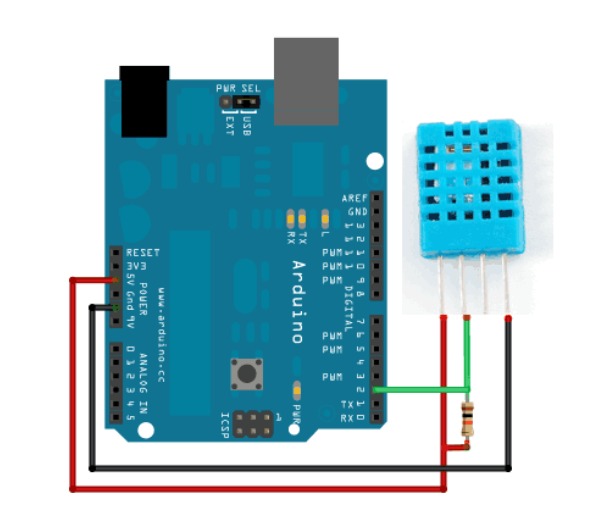
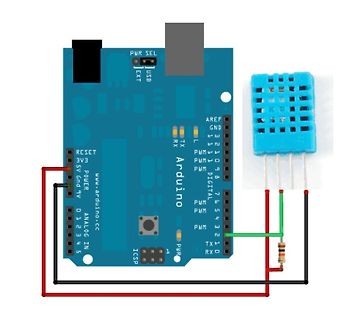
Arduino Uno mit Matrix-LED-Modul und Widerstand
PWR SEL, USB, EXT, AREF, GND, 13, 12, 11, 10, 9, 8, 7, 6, 5, 4, 3, 2, 1, 0, DIGITAL, PWM, PWM, PWM, TX, RX, ANALOG IN, 5V, GND, 3V3, RESET, www.arduino.cc, Arduino, ICSP, PWR
in „DS1621 mit Arduino Uno in SimulIDE 1.1.0-SR2 at Rev 260312“ · Mikrocontroller und Digitale Elektronik · · Fotos
-
Datei
iO.c
delay.h> #include <stdlib.h> #include "spi.h" #include "wl_module.h" #include "nRF24L01.h" #include "dht.h" #include "dht.c" #include "bmp085.h" #include "bmp085.c" #include "spi.h" #include "uart.h" uint16_t adc_read(uint8_t ch) { ch &= 0b00000111; ADMUX |= (ADMUX & 0xF8)|ch; ADCSRA |= (1 << ADSC ); while
in „AVR Programm läuft nur fehlerfrei direkt nach Programmierung mittels ISP“ · Mikrocontroller und Digitale Elektronik ·
-
Datei
niO.c
delay.h> #include <stdlib.h> #include "spi.h" #include "wl_module.h" #include "nRF24L01.h" #include "dht.h" #include "dht.c" #include "bmp085.h" #include "bmp085.c" #include "spi.h" #include "uart.h" uint16_t adc_read(uint8_t ch) { ch &= 0b00000111; ADMUX |= (ADMUX & 0xF8)|ch; ADCSRA |= (1 << ADSC ); while
in „AVR Programm läuft nur fehlerfrei direkt nach Programmierung mittels ISP“ · Mikrocontroller und Digitale Elektronik ·
-
Datei
main.c
"lcd.h" #include "lcd.c" #include "wl_module.h" #include "nRF24L01.h" #include "uart.h" #include "dht.h" #include "dht.c" #include "bmp085.h" #include "bmp085.c" //Variablen volatile uint8_t PTX; uint8_t nRF_status; uint8_t i; uint16_t check,l; float temperature, humidity; long p; double t; char txtt
in „UART läuft auf ATMEGA 32 aber nicht auf 328“ · Mikrocontroller und Digitale Elektronik ·
-
PDF
Arduino_Project_Handbook_25_Practical_Projects_to_Get_You_Started.pdf
domain. */ #include <LiquidCrystal.h> #include "DHT.h" // Call the DHT library #define DHTPIN 8 // Pin connected to DHT LiquidCrystal lcd(12, 11, 5, 4, 3, 2); #define DHTTYPE DHT11 // Define the type of DHT module DHT dht(DHTPIN, DHTTYPE); // Command to the DHT.h library void setup() { dht.begin(); // Start the sensor lcd.begin(16, 2); // LCD screen is 16 characters by 2 lines } void loop() { float h = dht.readHumidity(); // Value for humidity float t = dht.readTemperature
in „LED Driver mit µC“ · Analoge Elektronik und Schaltungstechnik ·
-
PDF
DHT22-RTH03.pdf
Your specialist in innovating humidity & temperature sensors Digital relative humidity & temperature sensor RHT03 1. Feature &Application: *High precision *Outstanding long-term stability *Capacitive type *Extra components not needed *Full range temperature compensated *Long transmission distance, up to 100 meters *Relative humidity and temperature measurement *Low power consumption *Calibrated digital signal *4 pins packaged and fully interchangeable 2. Description: RHT03 output calibrated digital signal. It applys exclusive digital-signal-collecting-technique and humidity sensing technology,
in „DHT22 bzw. DHT11 - Problem - Luftfeuchtigkeit - Sensor - C-Code“ · Mikrocontroller und Digitale Elektronik ·
-
PDF
small_pcb.PDF
PIOTP05 CORP PIVFD2536NC19 13 RP1 10K PIVFD2536GND0 VCC5.0 YF017 PIVFD2536NC21 GND GND VFD_CS PIVFD2536CS22 GND VFD_DATA PIVFD2536DATA GND VFD_CLK PIVFD2536CLK4 VFD_RST PIVFD2536RST5 I1 P71 R1R COle PIVFD2536NC26 CO6 C7 led PIR10PIR1P01Iled02 VCC 3.3V VFD_SLEEP PIVFD2536SLEEP I2 22pF P72 22pF 10K PIVFD2536GND8
in „STC LED Cube 8x8x8 RGB“ · Mikrocontroller und Digitale Elektronik ·
-
 Bild
Bild
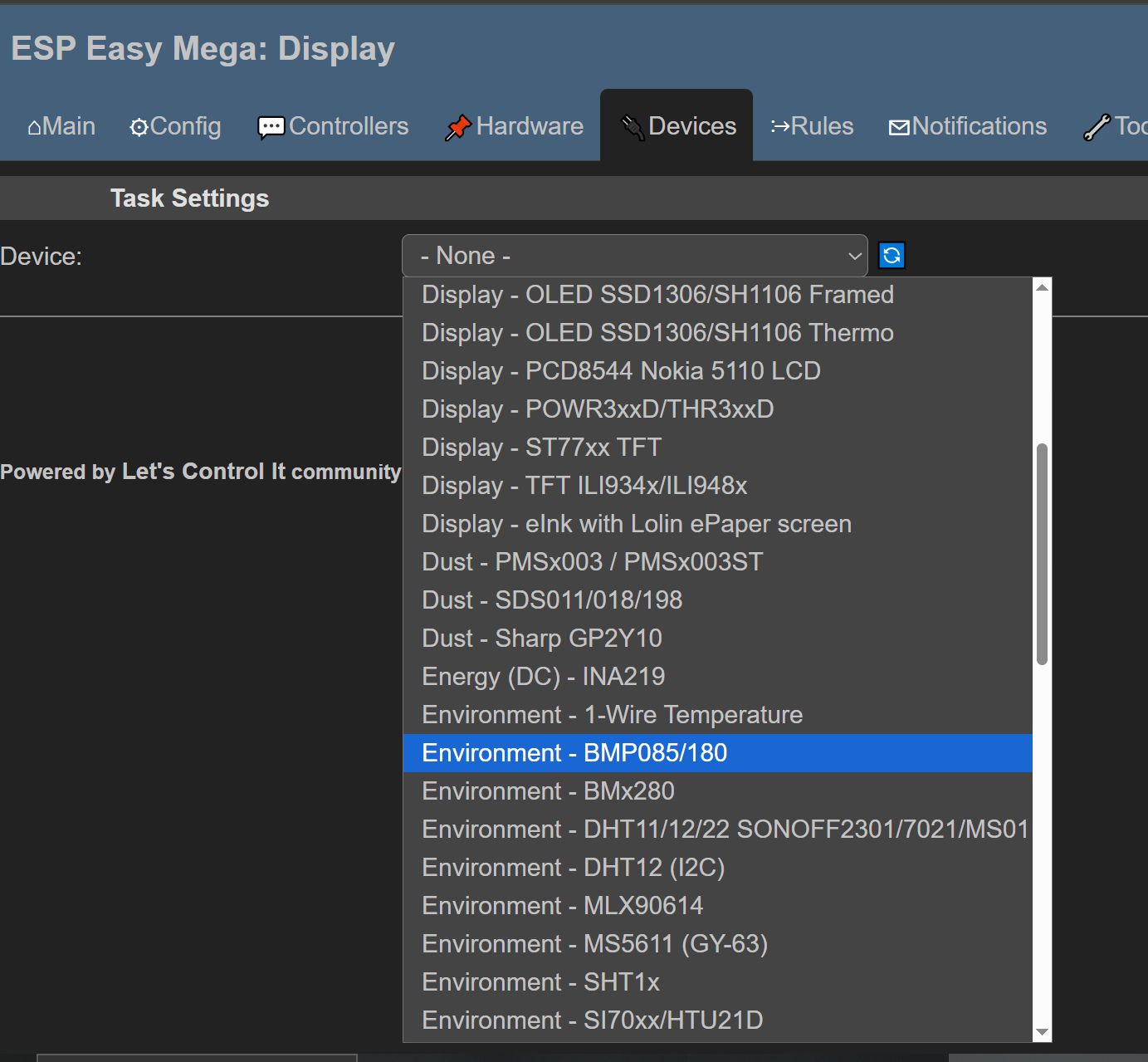
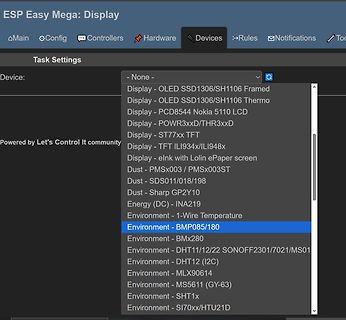
Dropdown-Menü für Geräteeinstellungen in einer Software
INA219 Environment - 1-Wire Temperature Environment - BMP085/180 Environment - BMx280 Environment - DHT11/12/22 SONOFF2301/7021/MS01 Environment - DHT12 (I2C) Environment - MLX90614 Environment - MS5611 (GY-63) Environment - SHT1x Environment - SI70xx/HTU21D
in „Günstiges und einfaches Mini-Controller Board, was würdet ihr heute nehmen?“ · Mikrocontroller und Digitale Elektronik · · Screenshots
-
 Bild
Bild
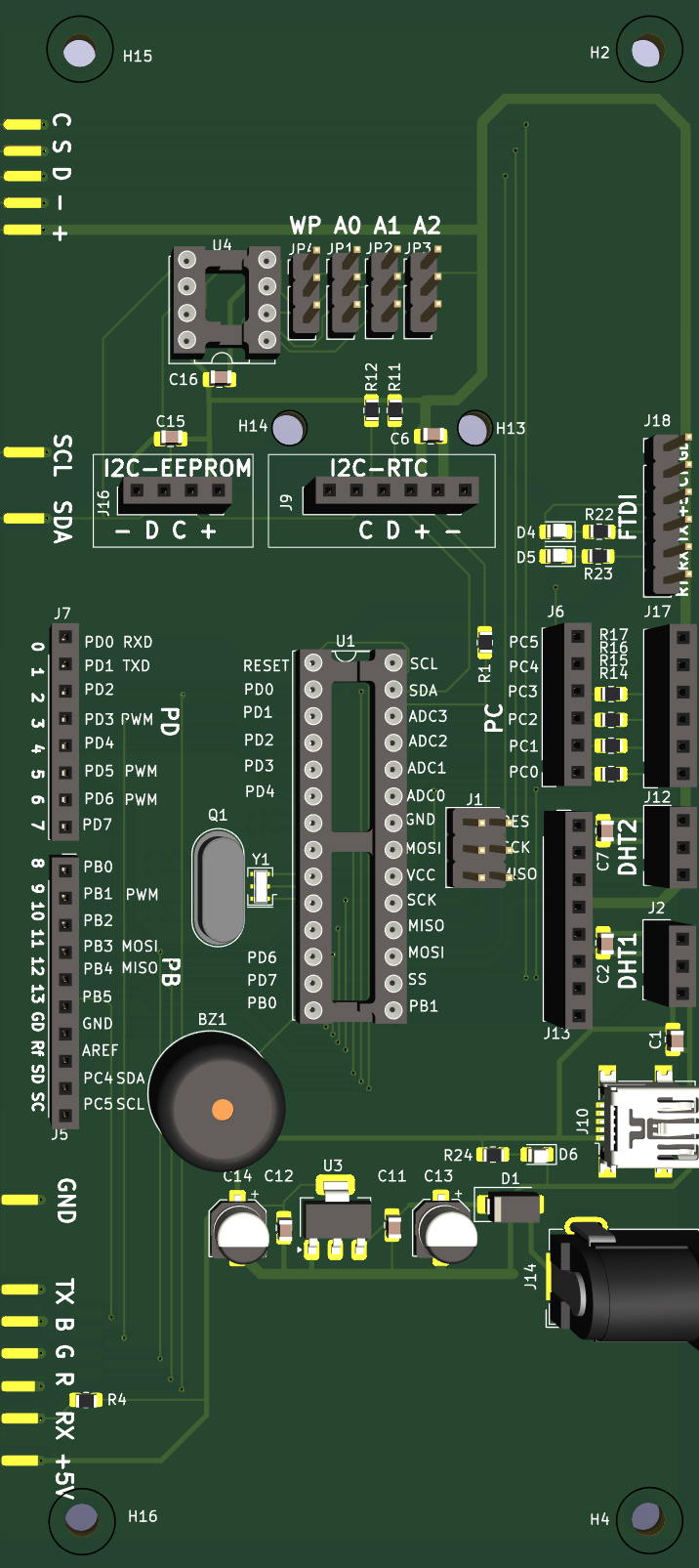
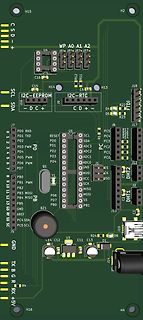
Leiterplatten-Layout eines Mikrocontroller-Boards
WP A0 A1 A2 U4 JP4 JP2 JP3 C16 R12 R11 H14 C6 H13 J18 I2C-EEPROM I2C-RTC J9 - D C + C D + - D4 D5 R22 R23 J6 J17 PC5 PC4 SDA PC3 PC2 PC1 PC0 R16 R14 R15 J12 DHT2 C7 DHT1 C2 J2 J13 PD0 RXD PD1 TXD RESET PD0 SCL PD2 ADC3 PD3 PWM SDA PD4 ADC2 PD5 PWM ADC1 PD6 PWM PD7 PB1 PWM MISO PB2 MOSI PB3 MOSI SCK PB4
in „Arduino: page-write in I2C eeprom verliert sporadisch ein Byte“ · Mikrocontroller und Digitale Elektronik · · Layouts
-
Datei
blynk.txt
value can be pushed from Arduino to the Blynk App. WARNING : For this example you'll need Adafruit DHT sensor libraries: https://github.com/adafruit/Adafruit_Sensor https://github.com/adafruit/DHT-sensor-library App project setup: Value Display widget attached to V5 Value Display widget attached to V6
in „Messwert wird vom esp32 nicht übertragen.“ · Mikrocontroller und Digitale Elektronik ·