-
Datei
MQTT.ino
PubSubClient mqtt(client); extern uint32_t lon_rx_count; extern uint32_t lon_crc_errors; int mqtt_last_publish_time = 0; int mqtt_lastConnect = 0; int mqtt_retries = 0; bool mqtt_fail = false; void callback(char* topic
in „LON Bus Windhager mitlesen/steuern“ · Haus & Smart Home ·
-
Datei
Program.txt
/Humidity" #define MQTT_PUB_Temp "ESP8266/Temperature" #define MQTT_PUB_LastUpdate "ESP8266/LastUpdate" #define MQTT_PUB_Error "ESP8266/Errors" #define MQTT_PUB_Messages "ESP8266/Messages" AsyncMqttClient mqttClient; Ticker
in „Leseprobleme mit dem DHT21 an einem D1 Mini V3“ · Mikrocontroller und Digitale Elektronik ·
-
Datei
ESP_IN-9-asyncMQTT.ino
WiFiEventStationModeGotIP& event); void onWifiDisconnect(const WiFiEventStationModeDisconnected& event); // MQTT AsyncMqttClient mqttClient; Ticker mqttReconnectTimer; void connectToMqtt(void); void onMqttConnect(bool sessionPresent); void onMqttDisconnect(AsyncMqttClientDisconnectReason reason); void onMqttSubscribe
in „ESP Frage zu Setup-Code, mit reconnect, etc.“ · Mikrocontroller und Digitale Elektronik ·
-
Datei
ESP_IN-9-asyncMQTT.ino
WiFiEventStationModeGotIP& event); void onWifiDisconnect(const WiFiEventStationModeDisconnected& event); // MQTT AsyncMqttClient mqttClient; Ticker mqttReconnectTimer; void connectToMqtt(void); void onMqttConnect(bool sessionPresent); void onMqttDisconnect(AsyncMqttClientDisconnectReason reason); void onMqttSubscribe
in „ESP8266 crash während updateWifi() - ist millis() das Problem?“ · Mikrocontroller und Digitale Elektronik ·
-
Datei
Fuellstandmesser.ino
iotWebConf(thingName, &dnsServer, &server, wifiInitialApPassword, CONFIG_VERSION); IotWebConfParameter mqttServerParam = IotWebConfParameter("MQTT server", "mqttServer", mqttServerValue, STRING_LEN); IotWebConfParameter mqttUserNameParam = IotWebConfParameter("MQTT user", "mqttUser", mqttUserNameValue, STRING_LEN); IotWebConfParameter mqttUserPasswordParam = IotWebConfParameter("MQTT password", "mqttPass", mqttUserPasswordValue, STRING_LEN, "password"); IotWebConfParameter mqttIntervallParam = IotWebConfParameter("mqttIntervall in s",
-
Datei
SiedleESP.ino
Serial.println(); cfg.wifiSSID = "SSID"; cfg.wifiPass = "password"; cfg.wifiHost = "TestESP"; cfg.mqttBroker = "192.168.178.10"; cfg.mqttPort = "1883"; cfg.mqttUser = ""; cfg.mqttPass = ""; cfg.mqttClient = "TestESP"; cfg.mqttTopic = "home/general/testesp"; app.debounceTime = 10000; app.openDuration
-
Datei
0.4.25_SD_Setup.diff
\" name=\"mqttPort\" value=\"{MQTT_PORT}\"/><label for=\"mqttUser\">Username (optional)</label><input type=\"text\" class=\"text\" name=\"mqttUser\" value=\"{MQTT_USER}\"/><label for=\"mqttPwd\">Password (optional
in „Wechselrichter Hoymiles HM-xxxx 2,4 GhZ Nordic Protokoll?“ · Mikrocontroller und Digitale Elektronik ·
-
Datei
0.4.25_SD_Setup_V2.diff
\" name=\"mqttPort\" value=\"{MQTT_PORT}\"/><label for=\"mqttUser\">Username (optional)</label><input type=\"text\" class=\"text\" name=\"mqttUser\" value=\"{MQTT_USER}\"/><label for=\"mqttPwd\">Password (optional
in „Wechselrichter Hoymiles HM-xxxx 2,4 GhZ Nordic Protokoll?“ · Mikrocontroller und Digitale Elektronik ·
-
Datei
sketch_feb24a.ino
char* ssid = "<ssid>"; const char* password = "<pw>"; const int wifiRetryInterval = 500; //-------MQTT infos --------- char* clientId = "Wassermelder1"; const char* mqttServerIp = "<mqtt_server_ip>"; const int mqttServerPort = 1883; const char* mqttUser = "<mqtt user>"; const char* mqttPassword = "<mqtt
in „ESP01-S Wassermelder“ · Mikrocontroller und Digitale Elektronik ·
-
Datei
siedle-client.ino
JsonObject& json = jsonBuffer.parseObject(buf.get()); json.printTo(Serial); if (json.success()) { strcpy(mqtt_server, json["mqtt_server"]); } else { Serial.println("failed to load json config"); } } } } WiFiManagerParameter custom_mqtt_server("server", "mqtt server", mqtt_server, 40); WiFiManager wifiManager
-
Datei
siedle-client.ino
JsonObject& json = jsonBuffer.parseObject(buf.get()); json.printTo(Serial); if (json.success()) { strcpy(mqtt_server, json["mqtt_server"]); } else { Serial.println("failed to load json config"); } } } } WiFiManagerParameter custom_mqtt_server("server", "mqtt server", mqtt_server, 40); WiFiManager wifiManager
-
Datei
arduino_client_-_Kopie.ino
serializeJson(json,Serial); if (error) { Serial.println("failed to load json config"); } else { strcpy(mqtt_server, json["mqtt_server"]); } } } } //read updated parameters strcpy(mqtt_server, custom_mqtt_server.getValue()); */ mqtt.setServer(mqtt_server, 1883); mqtt.setCallback(receivedMessage); mqtt.publish
-
Datei
mqtt.h
#include <Arduino.h> #include <SPI.h> #include "wifi.h" #include <ArduinoMqttClient.h> uint8_t checkAllPV(); //forward decl uint8_t HopRcvCh();//forward decl uint8_t MQTT = MQTT_ON; WiFiClient wifiClient; MqttClient mqttClient(wifiClient); const char MQTTbroker[] = MSERVER_IP
in „Wechselrichter Hoymiles HM-xxxx 2,4 GhZ Nordic Protokoll?“ · Mikrocontroller und Digitale Elektronik ·
-
Datei
espcode.txt
or battery IPAddress MQTT_HOST(192, 168, x, x); const int MQTT_PORT = 1883; const char* MQTT_CLIENTID = "miflora-client"; const char* MQTT_USERNAME = "xxx"; const char* MQTT_PASSWORD = "xxx"; const String MQTT_BASE_TOPIC = "
in „ESP 32: Smarthome Beet über MQTT: FAST fertig“ · Mikrocontroller und Digitale Elektronik ·
-
Datei
SiedleESP.h
WiFi name String wifiPass; // WiFi password String wifiHost; // WiFi hostname of this ESP String mqttBroker; // IP of MQTT broker String mqttPort; // Port of MQTT broker String mqttUser; // Username for MQTT broker String mqttPass; // Password for MQTT broker String mqttClient; // MQTT client id of
-
PDF
2016_AUPS.pdf
can subscribe. MQTT presents limited security support. In this paper we present a secure publish/sub- Publish & Subscribe scribe system extending MQTT by means of a key management framework and a policy MQTT enforcement
in „Wissenschaftiches Vorgehen/Methoden bei These-Antithese-Synthese“ · Ausbildung, Studium & Beruf ·
-
Datei
main.txt
max(0, val) ramp_start_time = None boost_active = False if target_pwm > 0: LED.on() else: LED.off() mqtt_log(f"Manuell → {val}") elif cmd == "on": target_pwm = PWM_MAX ramp_start_time = None boost_active = False LED.on() mqtt_log("Manuell → 100%") else: mqtt_log(f"Unbekannt: {cmd}") publish_all_pins(None) feed_watchdog() except Exception as e: mqtt_log(f"sub_cb error: {e}") def mqtt_connect(): try: # ANNAHME: Broker braucht keine Auth c = MQTTClient(client_id, mqtt_server, keepalive=300) c.set_callback(sub_cb) c.connect() mqtt_log("MQTT verbunden
in „PWM Webrowser Pumpenmonitor / Steuerung“ · Mikrocontroller und Digitale Elektronik ·
-
Datei
MQTT-Client-Broker-OTA_pub.ino
#=wildcard) // If you want a special topic change the string '#' to what you need. // Example: // mqtt.subscribe("tele/time", [](const char * topic, const char * payload); // mqtt.subscribe("#", [](const char * topic, const char * payload) { // payload might be binary, but PicoMQTT guarantees that it's
in „ESP32-MQTT-Client-Broker-OTA“ · Mikrocontroller und Digitale Elektronik ·
-
Datei
ESP32_TEST_MQTT.txt
WiFi.status() != WL_CONNECTED) { delay(50); } client.setServer(mqttserver, 1883); client.connect(deviceName,MQTT_USER,MQTT_PASSWORD); client.setKeepAlive(40); if (client.connected()) { client.publish("klingel/status", "MQTT connected."); } } void reconnect() { // Loop until we're reconnected while (!client.connected()) { Serial.print("Attempting MQTT connection..."); // Attempt to connect if (client.connect(deviceName,MQTT_USER,MQTT_PASSWORD)) { client.publish("klingel/status", "MQTT reconnected."); } else { Serial.print("failed, rc="); Serial.print
in „ESP32 reset über Funkgong?“ · Mikrocontroller und Digitale Elektronik ·
-
Datei
ahoy1500-Exzerpt.py
]}') # output to stdout if d: print(json.dumps(d, indent=4, separators=(", ", ": "))) # output to MQTT ''' if d: j = json.dumps(d) mqtt_client.publish(f"ahoy/{d['src']}/{d['name']}", j) if d['cmd']==2: mqtt_client.publish(f'ahoy/{d["src"]}/emeter/0/voltage', d['u_V']) mqtt_client.publish(f'ahoy/{d["src
in „Wechselrichter Hoymiles HM-xxxx 2,4 GhZ Nordic Protokoll?“ · Mikrocontroller und Digitale Elektronik ·
-
PDF
Smarthome-DIY-Endgeraete.pdf
mosquitto als IOBROKER MQTTbroker MQTT-Broker/Client MQTT MQTT als Client ESP32 MQTT per WLAN Heimnetz Zahlreiche Beispielprojekte im Netz! zigbee2mqtt.io by koenkk mosquitto als IOBROKER ptvoinfo zigbee2mqtt Zigbee zigbee2mqtt* MQTT MQTTbroker MQTT MQTT-Broker/Client firmware* firmware master als Client Konfigurierbare Ein- Ausgänge Temperatur Zigbee Luftfeuchte Licht CO2 Analog in geflasht mit CC debugger PWM OUT und TI smartrf flash-programmer ..
-
Datei
AlexaOut_NodeRed.txt
outputs":1,"noerr":0,"x":410,"y":210,"wires":[["d963476b.7851f8"]]},{"id":"5831d39f.580df4","type":"mqtt in","z":"e8d5030b.327f08","name":"MQTT AlexaOut/cmd/#","topic":"AlexaOut/cmd/#","qos":"2","broker":"9614757b.89fa18","x":140,"y":430,"wires":[["ca71d3ce.72aca"]]},{"id":"3b8a2fcd.dd8aa","type":"mqtt in","z":"e8d5030b.327f08","name":"MQTT AlexaOut/where/#","topic":"AlexaOut/where/#","qos":"2","broker":"9614757b.89fa18","x":150,"y":210,"wires":[["45311392.16b89c"]]},{"id":"36fbc352.c9646c","type":"mqtt in","z":"e8d5030b.327f08","name"
-
Datei
MQTT_Demo.txt
include <ESP8266WiFi.h> #include <WiFiClient.h> #include <PubSubClient.h> #include <DHT.h> // Add your MQTT Broker IP address, example: const char* mqtt_server = "datahub.010102.de"; // Enter MQTT Server here const char* mqttUser = "Carlo von Catzenstyn"; // Enter MQTT User here const char* mqttPassword =
in „Monitoring Lösung / Backend für den Tüftler“ · Offtopic ·
-
PDF
howto_-tasmota-sml.pdf
] Wifi password #undef MQTT_HOST #define MQTT_HOST "IPDESMQTTHOSTS" // [MqttHost] #undef MQTT_PORT #define MQTT_PORT 1883 // [MqttPort] MQTT port (10123 on CloudMQTT) #undef MQTT_USER #define MQTT_USER "MQTTUSER" // [MqttUser] Optional user #undef MQTT_PASS #define MQTT_PASS "MQTTPASSWORT" // [MqttPassword] Optional password 11 Optional Um evtl. Speicher zu sparen, lässt sich alles, was nicht benötigt wird auch abschalten: Dazu könnt ihr folgende
in „Wärmezähler über optische M-Bus-Schnittstelle auslesen“ · Haus & Smart Home ·
-
 Bild
Webinterface-Konfigurationseinstellungen eines SIP-Klingelinterfaces
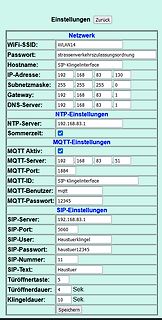
Subnetzmaske: 255 255 255 0 Gateway: 192 168 83 1 NTP-Einstellungen NTP-Server: 192.168.83.1 Sommerzeit: MQTT Aktiv: MQTT-Einstellungen MQTT-Server: 192 168 83 51 MQTT-Port: 1884 MQTT-ID: SIP-Klingelinterface MQTT-Benutzer: mqtt MQTT-Passwort: 12345 SIP-Einstellungen SIP-Server: 192.168.83.1 SIP-Port: 5060
in „Sipdial per ESP8266 an Fritzbox“ · Projekte & Code · · Screenshots
-
 Bild
Dokumentation der INI-Datei Konfiguration
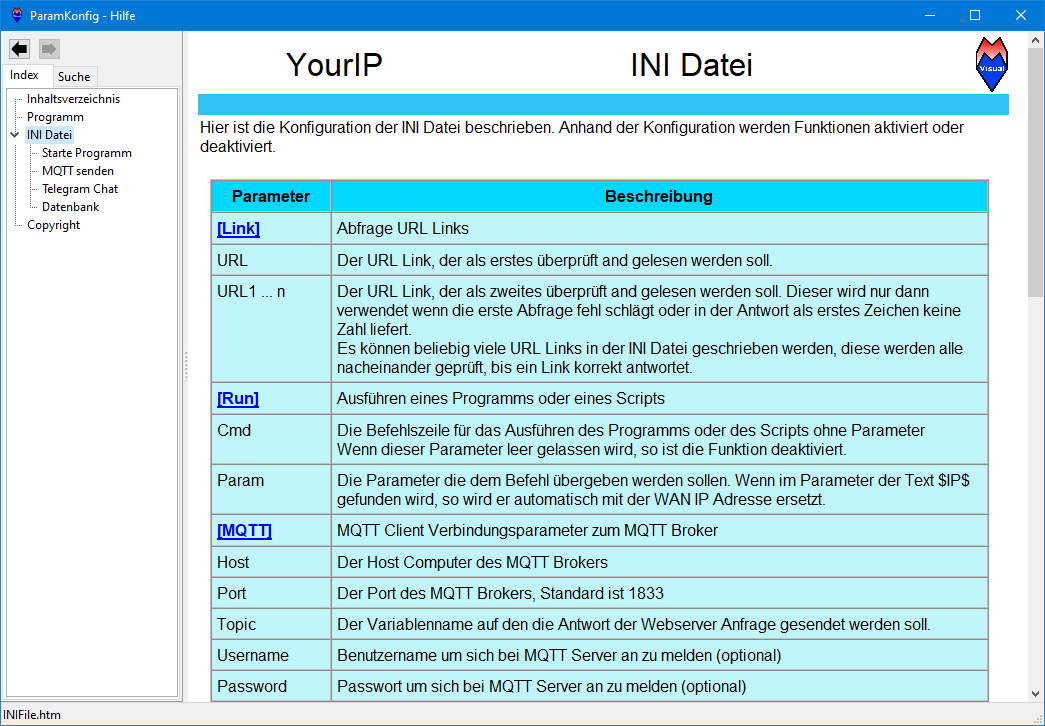
Wenn im Parameter Text $IP gefunden wird, so wird er automatisch mit der WAN IP Adresse ersetzt. [MQTT] MQTT Client Verbindungsparameter zum MQTT Broker Host Der Host Computer des MQTT Brokers Port Der Port des MQTT Brokers, Standard ist 1833 Topic Der Variablenname auf den die Antwort der Webserver Anfrage gesendet werden soll. Username Benutzername um sich bei MQTT Server an zu melden (optional) Password Passwort um sich bei MQTT Server an zu melden (optional)
in „Eigene WAN Adresse loggen - YourIP“ · PC Hard- und Software · · Screenshots

-
Datei
logger.py
# -*- coding: utf-8 -*- import os import json import paho.mqtt.client as mqtt from datetime import datetime # MQTT-Broker und Topics der Sensoren BROKER = os.getenv("MQTT_BROKER", "mosquitto") SENSOR_TOPICS = ["zigbee2mqtt/SNZB_Temp1", "zigbee2mqtt/Aquara"] def
in „Keine Verbindung zu Sensoren Zigbee2Mqtt nach Neustart“ · Haus & Smart Home ·
-
 Bild
Webinterface Konfigurationseinstellungen für Netzwerk, MQTT und SIP
WiFi-SSID: Passwort: Hostname: IP-Adresse: Subnetzmaske: Gateway: DNS-Server: NTP NTP-Server: Sommerzeit: MQTT MQTT Aktiv: MQTT-Server: MQTT-Port: MQTT-ID: MQTT-Benutzer: MQTT-Passwort: SIP SIP-Server: SIP-Port: SIP-User: SIP-Passwort: SIP-Nummer: SIP-Text: Türöffnertaste: Türöffnerdauer: Klingeldauer: Speichern
in „Sipdial per ESP8266 an Fritzbox“ · Projekte & Code · · Screenshots

-
Datei
MYSENSORS_GatewayClient_WORK_V3.ino
****************** * * REVISION HISTORY * Version 1.0 - Henrik Ekblad * * DESCRIPTION * The W5100 MQTT gateway sends radio network (or locally attached sensors) data to your MQTT broker. * The node also listens to MY_MQTT_TOPIC_PREFIX and sends out those messages to the radio network * * LED purposes
in „String Array verarbeiten / Arduino“ · Mikrocontroller und Digitale Elektronik ·
-
Datei
Wall-E_ESP8266_v1.15.ino
MqttClient; PubSubClient client(MqttClient); const char* mqtt_server = "10.20.30.40"; // defines the IP of the MQTT-Broker const int mqtt_port = 1883; // defines the PORT of the MQTT-Broker (standard = 1883) const char* mqtt_user = "user"; // defines the USERNAME for the MQTT-Broker const char* mqtt_password = "password"; // defines the PASSWORD for the MQTT-Broker const String main_topic = "Automower"; // defines the main
in „Automower G3 mit USB Diagnoseport fernsteuern?“ · Mikrocontroller und Digitale Elektronik ·
-
Datei
sketch_feb13a.ino
pinMode(25, INPUT); pinMode(26, INPUT); pinMode(27, INPUT); Serial.begin(115200); iot.begin(); iot.mqtt.onConnect(transmitStatus); //iot.mqtt.onPublish(suspendESP); } void transmitStatus(bool sessionPresent) { iot.mqtt.publish("klingel/test", 1, true, "start"); } void loop() { if(digitalRead(25)==HIGH){ iot.mqtt.publish("klingel/value", 1, true, "EG"); } if(digitalRead(26)==HIGH){ iot.mqtt.publish("klingel/value", 1, true, "OG1"); } if(digitalRead(27)==HIGH){ iot.mqtt.publish("klingel/value", 1, true, "OG2"
-
Datei
NRF24_SendRcvMIesp.ino
-------------------------------------------------- #ifdef WITHWIFI if (!checkWifi()) return; if (!MQTT) return; mqttClient.beginMessage(topic); mqttClient.print(value); mqttClient.endMessage(); #endif }//---SendMQTTMsg-----------------------------------------------------------------------------------
in „Wechselrichter Hoymiles HM-xxxx 2,4 GhZ Nordic Protokoll?“ · Mikrocontroller und Digitale Elektronik ·
-
Datei
NRF24_SendRcvMIesp.ino
-------------------------------------------------- #ifdef WITHWIFI if (!checkWifi()) return; if (!MQTT) return; mqttClient.beginMessage(topic); mqttClient.print(value); mqttClient.endMessage(); #endif }//---SendMQTTMsg-----------------------------------------------------------------------------------
in „Wechselrichter Hoymiles HM-xxxx 2,4 GhZ Nordic Protokoll?“ · Mikrocontroller und Digitale Elektronik ·
-
Datei
NRF24_SendRcvMIesp.ino
-------------------------------------------------- #ifdef WITHWIFI if (!checkWifi()) return; if (!MQTT) return; mqttClient.beginMessage(topic); mqttClient.print(value); mqttClient.endMessage(); #endif }//---SendMQTTMsg-----------------------------------------------------------------------------------
in „Wechselrichter Hoymiles HM-xxxx 2,4 GhZ Nordic Protokoll?“ · Mikrocontroller und Digitale Elektronik ·
-
Datei
NRF24_SendRcvMIesp.ino
-------------------------------------------------- #ifdef WITHWIFI if (!checkWifi()) return; if (!MQTT) return; mqttClient.beginMessage(topic); mqttClient.print(value); mqttClient.endMessage(); #endif }//---SendMQTTMsg-----------------------------------------------------------------------------------
in „Wechselrichter Hoymiles HM-xxxx 2,4 GhZ Nordic Protokoll?“ · Mikrocontroller und Digitale Elektronik ·
-
Datei
sdkconfig.h
CONFIG_ESP_RMAKER_ASSISTED_CLAIM 1 #define CONFIG_ESP_RMAKER_CLAIM_TYPE 2 #define CONFIG_ESP_RMAKER_MQTT_HOST "a1p72mufdu6064-ats.iot.us-east-1.amazonaws.com" #define CONFIG_ESP_RMAKER_MQTT_USE_BASIC_INGEST_TOPICS 1 #define CONFIG_ESP_RMAKER_MQTT_ENABLE_BUDGETING 1 #define CONFIG_ESP_RMAKER_MQTT_DEFAULT_BUDGET
in „ESP32 sdkconfig.h ändern, bloss wie?“ · Mikrocontroller und Digitale Elektronik ·
-
Datei
AVR-ENC-MQTT-FOST02.ino
dataPin A4 #define clockPin A5 SHT1x sht1x(dataPin, clockPin); EthernetClient ethClient; PubSubClient mqtt_client(server, 1883, 0, ethClient); void setup() { #ifdef DEBUG Serial.begin(57600); Serial.println("\r\nStart..."); #endif starttime = millis(); Ethernet.begin(mac, ip); if (mqtt_client.connect("ENC-Client
in „AVR-LAN-Sensor“ · Projekte & Code ·
-
Datei
ESC8266_2.txt
01","Uptime":"0T00:01:09","UptimeSec":69,"Heap":20,"SleepMode":"Dynamic","Sleep":50,"LoadAvg":19,"MqttCount":1,"Wifi":{"AP":1,"SSId":"Experimentelles Atomlabor","BSSId":"2C:91:AB:B7:E0:2E","Channel":11,"Mode":"11n","RSSI":100,"Signal":-50,"LinkCount":1,"Downtime":"0T00:00:03"}} 21:07:01.429 MQT: tele
in „eBZ Stromzähler liefert plötzlich keinen Verbrauch mehr“ · Haus & Smart Home ·
-
Datei
NRF24_SendRcvMIesp.ino
-------------------------------------------------- #ifdef WITHWIFI if (!checkWifi()) return; if (!MQTT) return; mqttClient.beginMessage(topic); mqttClient.print(value); mqttClient.endMessage(); #endif }//---SendMQTTMsg-----------------------------------------------------------------------------------
in „Wechselrichter Hoymiles HM-xxxx 2,4 GhZ Nordic Protokoll?“ · Mikrocontroller und Digitale Elektronik ·
-
Datei
NRF24_SendRcvMIesp.ino
-------------------------------------------------- #ifdef WITHWIFI if (!checkWifi()) return; if (!MQTT) return; mqttClient.beginMessage(topic); mqttClient.print(value); mqttClient.endMessage(); #endif }//---SendMQTTMsg-----------------------------------------------------------------------------------
in „Wechselrichter Hoymiles HM-xxxx 2,4 GhZ Nordic Protokoll?“ · Mikrocontroller und Digitale Elektronik ·
-
Datei
NRF24_SendRcvMIesp.ino
-------------------------------------------------- #ifdef WITHWIFI if (!checkWifi()) return; if (!MQTT) return; mqttClient.beginMessage(topic); mqttClient.print(value); mqttClient.endMessage(); #endif }//---SendMQTTMsg-----------------------------------------------------------------------------------
in „Wechselrichter Hoymiles HM-xxxx 2,4 GhZ Nordic Protokoll?“ · Mikrocontroller und Digitale Elektronik ·
-
Datei
NRF24_SendRcvMIesp.ino
-------------------------------------------------- #ifdef WITHWIFI if (!checkWifi()) return; if (!MQTT) return; mqttClient.beginMessage(topic); mqttClient.print(value); mqttClient.endMessage(); #endif }//---SendMQTTMsg-----------------------------------------------------------------------------------
in „Wechselrichter Hoymiles HM-xxxx 2,4 GhZ Nordic Protokoll?“ · Mikrocontroller und Digitale Elektronik ·
-
Datei
ESP8266_1.txt
","Uptime":"0T00:23:49","UptimeSec":1429,"Heap":20,"SleepMode":"Dynamic","Sleep":50,"LoadAvg":19,"MqttCount":1,"Wifi":{"AP":1,"SSId":"Experimentelles Atomlabor","BSSId":"2C:91:AB:B7:E0:2E","Channel":11,"Mode":"11n","RSSI":100,"Signal":-48,"LinkCount":1,"Downtime":"0T00:00:03"}} 21:04:22.438 MQT: tele
in „eBZ Stromzähler liefert plötzlich keinen Verbrauch mehr“ · Haus & Smart Home ·
-
 Bild
MQTT Explorer Software-Screenshot mit MQTT-Themenstruktur
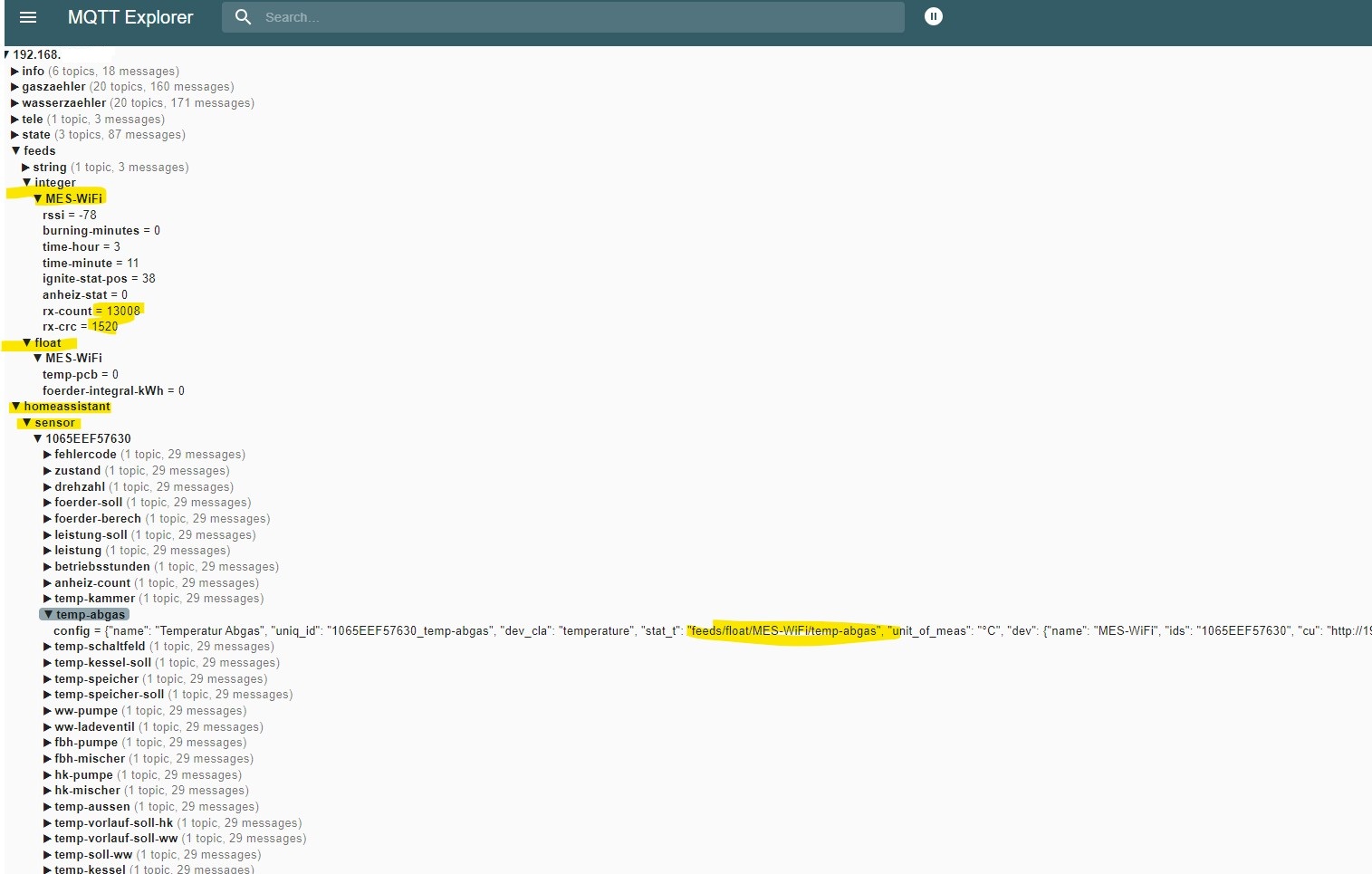
MQTT Explorer, Search, 192.168., info, gazzaehler, wasserzaehler, tele, state, feeds, string, integer, MES-WIFI, rssi = -78, burning-minutes = 0, time-hour = 3, time-minute = 11, ignite-stat-pos = 38, anhzeig-stat
in „LON Bus Windhager mitlesen/steuern“ · Haus & Smart Home · · Screenshots
-
 Bild
Diagramm zur Nutzung von IIoT Kommunikationsprotokollen
MQTT's Continued Leadership in IIoT Communication Protocols 2024 2023 56% 49% 32% 27% 30% 24% 8% 7% MQTT HTTP TCP/IP MQTT + Sparkplug More than half (56%) indicate that MQTT is their preferred IIoT communication
in „Eclipse-Entwicklerumfrage, MicroPython und Arduino-Cores auf Basis von Zephyr“ · Mikrocontroller und Digitale Elektronik · · Diagramme

-
Datei
JSON_MQTT_3er_Vorlage_ESP32.ino
include <PubSubClient.h> #include <ArduinoJson.h> #define wifi_ssid "" #define wifi_password "" #define mqtt_server "192.168.0.24" #define mqtt_port 1883 const char* on_cmd = "ON"; const char* off_cmd = "OFF"; const int BUFFER_SIZE = 300; int count = 0; String topicStr = "NULL"; byte brightness[3] = {255,255,255
in „ESP32 PWM Probleme“ · Mikrocontroller und Digitale Elektronik ·
-
Datei
NRF24_SendRcvMIesp.ino
-------------------------------------------------- #ifdef WITHWIFI if (!checkWifi()) return; if (!MQTT) return; mqttClient.beginMessage(topic); mqttClient.print(value); mqttClient.endMessage(); #endif }//---SendMQTTMsg-----------------------------------------------------------------------------------
in „Wechselrichter Hoymiles HM-xxxx 2,4 GhZ Nordic Protokoll?“ · Mikrocontroller und Digitale Elektronik ·
-
Datei
JSON_MQTT_Markus_Schreibtisch_ESP32_Forum.ino
PubSubClient.h> #include <ArduinoJson.h> const char* ssid = ""; const char* password = ""; const char* mqttServer = "192.168.0.24"; const int mqttPort = 1883; const char* on_cmd = "ON"; const char* off_cmd = "OFF"; const int BUFFER_SIZE = 300; int count = 0; int firstStart = 0; String topicStr = "NULL"; byte
in „ESP32 WIFI MQTT Verbindungsprobleme“ · Mikrocontroller und Digitale Elektronik ·
-
PDF
Projekt_VRSReplace_0.9.8.pdf
wieder als che: AP meldet. Wartezeit(ms): Wartezeit zwischen den einzelnen Verbindungsversuchen. MQTT aktiv? MQTT aktiv MQTT-Server: URL des MQTT-Servers. Der Term „mqtt://“ muss am Anfange der URL stehen. MQTT-Send Intervall für den Versand von MQTT-Nachrichten. intervall(ms): Small log In welchen
in „Regelung Solarthermie - Ersatz für auroMATIC 560“ · Projekte & Code ·
-
Datei
mqtt_esp8266.ino
/* Basic ESP8266 MQTT example This sketch demonstrates the capabilities of the pubsub library in combination with the ESP8266 board/library. It connects to an MQTT server then: - publishes "hello world" to the topic "outTopic
in „LED-Matrix mit ESP8266 und MAX7219 Modulen“ · Projekte & Code ·