1 | #include <Adafruit_GFX.h> // Core graphics library
|
2 | #include <Adafruit_ST7789.h> // Hardware-specific library for ST7789
|
3 | #include <SPI.h>
|
4 |
|
5 | // For the breakout board, you can use any 2 or 3 pins.
|
6 | // These pins will also work for the 1.8" TFT shield.
|
7 | #define TFT_CS 10
|
8 | #define TFT_RST 8 // Or set to -1 and connect to Arduino RESET pin
|
9 | #define TFT_DC 9
|
10 |
|
11 | // For 1.14", 1.3", 1.54", and 2.0" TFT with ST7789:
|
12 | Adafruit_ST7789 tft = Adafruit_ST7789(TFT_CS, TFT_DC, TFT_RST);
|
13 |
|
14 | float p = 3.1415926;
|
15 |
|
16 | void setup(void) {
|
17 | Serial.begin(9600);
|
18 | Serial.print(F("Hello! ST7789 TFT Test"));
|
19 |
|
20 | // OR use this initializer (uncomment) if using a 2.0" 320x240 TFT:
|
21 | tft.init(320, 480); // Init ST7789 320x240
|
22 |
|
23 | // SPI speed defaults to SPI_DEFAULT_FREQ defined in the library, you can override it here
|
24 | // Note that speed allowable depends on chip and quality of wiring, if you go too fast, you
|
25 | // may end up with a black screen some times, or all the time.
|
26 | //tft.setSPISpeed(40000000);
|
27 |
|
28 | Serial.println(F("Initialized"));
|
29 |
|
30 | uint16_t time = millis();
|
31 | tft.fillScreen(ST77XX_BLACK);
|
32 | time = millis() - time;
|
33 |
|
34 | Serial.println(time, DEC);
|
35 | delay(500);
|
36 |
|
37 | // large block of text
|
38 | tft.fillScreen(ST77XX_BLACK);
|
39 | testdrawtext("Hallo Welt! Stimmt dieser Text? ", ST77XX_WHITE);
|
40 | delay(1000);
|
41 |
|
42 | // tft print function!
|
43 | tftPrintTest();
|
44 | delay(4000);
|
45 |
|
46 | // a single pixel
|
47 | tft.drawPixel(tft.width()/2, tft.height()/2, ST77XX_GREEN);
|
48 | delay(500);
|
49 |
|
50 |
|
51 | tftPrintTest();
|
52 |
|
53 | Serial.println("done");
|
54 | delay(1000);
|
55 | }
|
56 |
|
57 | void loop() {
|
58 |
|
59 | }
|
60 |
|
61 | void testdrawtext(char *text, uint16_t color) {
|
62 | tft.setCursor(0, 0);
|
63 | tft.setTextColor(color);
|
64 | tft.setTextWrap(false);
|
65 | tft.print(text);
|
66 | }
|
67 |
|
68 | void tftPrintTest() {
|
69 | tft.setTextWrap(false);
|
70 | tft.fillScreen(ST77XX_BLACK);
|
71 | tft.setCursor(0, 30);
|
72 | tft.setTextColor(ST77XX_RED);
|
73 | tft.setTextSize(1);
|
74 | tft.println("Hello World!");
|
75 | tft.setTextColor(ST77XX_YELLOW);
|
76 | tft.setTextSize(2);
|
77 | tft.println("Hello World!");
|
78 | tft.setTextColor(ST77XX_GREEN);
|
79 | tft.setTextSize(3);
|
80 | tft.println("Hello World!");
|
81 | tft.setTextColor(ST77XX_BLUE);
|
82 | tft.setTextSize(4);
|
83 | tft.print(1234.567);
|
84 | delay(1500);
|
85 | tft.setCursor(0, 0);
|
86 | tft.fillScreen(ST77XX_BLACK);
|
87 | tft.setTextColor(ST77XX_WHITE);
|
88 | tft.setTextSize(0);
|
89 | tft.println("Hello World!");
|
90 | tft.setTextSize(1);
|
91 | tft.setTextColor(ST77XX_GREEN);
|
92 | tft.print(p, 6);
|
93 | tft.println(" Want pi?");
|
94 | tft.println(" ");
|
95 | tft.print(8675309, HEX); // print 8,675,309 out in HEX!
|
96 | tft.println(" Print HEX!");
|
97 | tft.println(" ");
|
98 | tft.setTextColor(ST77XX_WHITE);
|
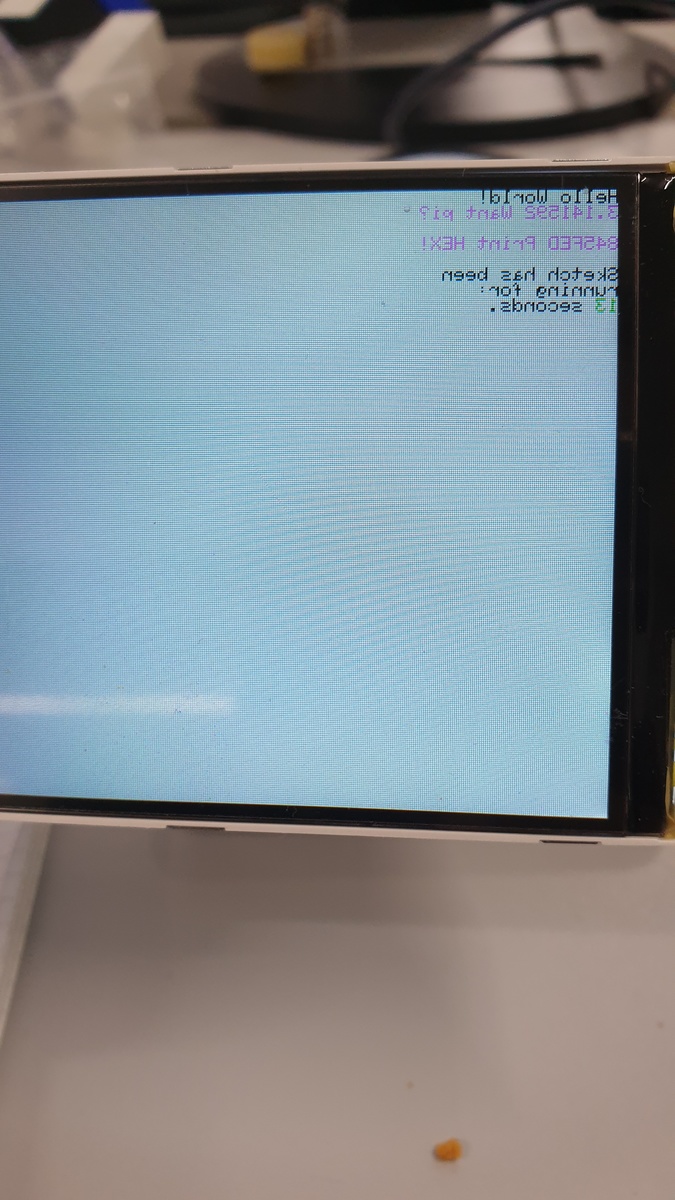
99 | tft.println("Sketch has been");
|
100 | tft.println("running for: ");
|
101 | tft.setTextColor(ST77XX_MAGENTA);
|
102 | tft.print(millis() / 1000);
|
103 | tft.setTextColor(ST77XX_WHITE);
|
104 | tft.print(" seconds.");
|
105 | }
|

 20200925_093848.jpg
(220 KB)
20200925_093848.jpg
(220 KB)