Attiny lässt sich nicht flashen

Gast #2470641
Lesenswert?

Hallo,

mein attiny2313 lässt sich nicht flashen. Ich benutze als Progger den 
mySmartUSB sowie das myMultiProg Board von myAVR auf einem Apple OSX 
10.7.2 System

Wenn ich im Terminal den Befehl: make flash angebe kommt nach ein paar 
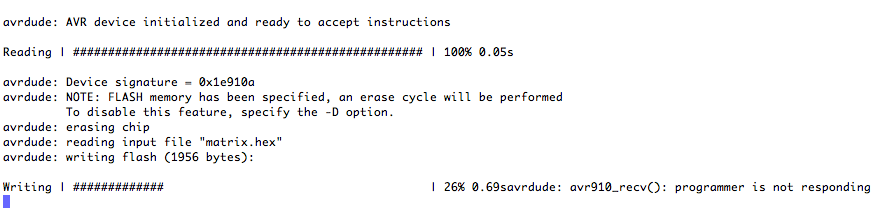
Sekunden die Meldung: avr910_rec(): programmer is not responding

Was muss ich ändern damit der attiny2313 wieder richtig bespielt wird?

Hier noch mal der Makefile für mein Projekt:
1
# Name: Makefile
2
# Author: <insert your name here>
3
# Copyright: <insert your copyright message here>
4
# License: <insert your license reference here>
5

6
# This is a prototype Makefile. Modify it according to your needs.
7
# You should at least check the settings for
8
# DEVICE ....... The AVR device you compile for
9
# CLOCK ........ Target AVR clock rate in Hertz
10
# OBJECTS ...... The object files created from your source files. This list is
11
#                usually the same as the list of source files with suffix ".o".
12
# PROGRAMMER ... Options to avrdude which define the hardware you use for
13
#                uploading to the AVR and the interface where this hardware
14
#                is connected.
15
# FUSES ........ Parameters for avrdude to flash the fuses appropriately.
16

17
DEVICE     = attiny2313
18
CLOCK      = 4000000
19
PROGRAMMER = -c avr910 -P /dev/tty.SLAB_USBtoUART 
20
# PROGRAMMER = -c usbtiny 
21
OBJECTS    = matrix.o
22
# Fuses: internal oscilator 4 MHz, no prescale, BOD 1.8V
23
FUSES      =  -U hfuse:w:0xDD:m -U lfuse:w:0xE2:m
24

25
# Tune the lines below only if you know what you are doing:
26

27
AVRDUDE = avrdude $(PROGRAMMER) -p $(DEVICE)
28
OBJDUMP = avr-objdump
29
COMPILE = avr-gcc -Wall -Os -DF_CPU=$(CLOCK) -mmcu=$(DEVICE)
30

31
# symbolic targets:
32
all:  matrix.hex matrix.lss
33

34
.c.o:
35
  $(COMPILE) -c $< -o $@
36

37
.S.o:
38
  $(COMPILE) -x assembler-with-cpp -c $< -o $@
39
# "-x assembler-with-cpp" should not be necessary since this is the default
40
# file type for the .S (with capital S) extension. However, upper case
41
# characters are not always preserved on Windows. To ensure WinAVR
42
# compatibility define the file type manually.
43

44
.c.s:
45
  $(COMPILE) -S $< -o $@
46

47
flash:  all
48
  $(AVRDUDE) -U flash:w:matrix.hex:i
49

50
fuse:
51
  $(AVRDUDE) $(FUSES)
52

53
# Xcode uses the Makefile targets "", "clean" and "install"
54
install: flash fuse
55

56
clean:
57
  rm -f matrix.hex matrix.elf $(OBJECTS)
58

59
# file targets:
60
matrix.elf: $(OBJECTS)
61
  $(COMPILE) -o matrix.elf $(OBJECTS)
62

63
matrix.hex: matrix.elf
64
  rm -f matrix.hex
65
  avr-objcopy -j .text -j .data -O ihex matrix.elf matrix.hex
66
# If you have an EEPROM section, you must also create a hex file for the
67
# EEPROM and add it to the "flash" target.
68

69
# Targets for code debugging and analysis:
70
disasm:  matrix.elf
71
  avr-objdump -d matrix.elf
72

73
%.lss: %.elf
74
  @echo
75
  $(OBJDUMP) -h -S $< > $@
76

77
cpp:
78
  $(COMPILE) -E matrix.c

Wäre super wenn ihr mir weiterhelfen könntet.

Vielen Dank im Voraus.

Gruß
Matthias
Angehängte Dateien:
Gast #2470695
Lesenswert?

Also wenn ich den Programme an den Mac anschließe dann leuchtet die 
grüne Power LED und sobald ich die make clean, make und make flash 
Befehle ins Terminal leuchtet auch die rote LED. Diese hört erst auch 
wieder auf zu leuchten wenn ich den Programme vom Mac trenne.

Stimmt evtl. etwas mit dem Makefile nicht.

Habe den Programme auch noch mal an meinen myAVR Board MK2 getestet und 
da funktioniert alles.

Oder muss ich den DIP Schalter am Programmer evtl. verändern.
Gast #2470726
Lesenswert?

Also wie gesagt wenn ich Ihn anschließe dann leuchtet die grüne und bei 
der Ausführung des make flash Befehls leuchtet die rote LED auf.

Das Terminal gibt dann folgenden Code aus:
1
avrdude -c avr910 -P /dev/tty.SLAB_USBtoUART  -p attiny2313 -U flash:w:matrix.hex:i
2

3
Found programmer: Id = "AVR ISP"; type = S
4
    Software Version = 2.5; Hardware Version = 2.0
5
Programmer supports auto addr increment.
6
Programmer supports buffered memory access with buffersize = 512 bytes.
7

8
Programmer supports the following devices:
9
    Device code: 0x01 = (unknown)
10
    Device code: 0x02 = (unknown)
11
    Device code: 0x03 = (unknown)
12
    Device code: 0x04 = (unknown)
13
    Device code: 0x05 = (unknown)
14
    Device code: 0x06 = (unknown)
15
    Device code: 0x07 = (unknown)
16
    Device code: 0x08 = (unknown)
17
    Device code: 0x09 = (unknown)
18
    Device code: 0x0a = (unknown)
19
    Device code: 0x0b = (unknown)
20
    Device code: 0x0c = (unknown)
21
    Device code: 0x0d = (unknown)
22
    Device code: 0x0e = (unknown)
23
    Device code: 0x0f = (unknown)
24
    Device code: 0x10 = (unknown)
25
    Device code: 0x11 = (unknown)
26
    Device code: 0x12 = (unknown)
27
    Device code: 0x13 = AT90S1200
28
    Device code: 0x14 = (unknown)
29
 Device code: 0x15 = (unknown)
30
    Device code: 0x16 = (unknown)
31
    Device code: 0x17 = (unknown)
32
    Device code: 0x18 = (unknown)
33
    Device code: 0x19 = (unknown)
34
    Device code: 0x1a = (unknown)
35
    Device code: 0x1b = (unknown)
36
    Device code: 0x1c = (unknown)
37
    Device code: 0x1d = (unknown)
38
    Device code: 0x1e = (unknown)
39
    Device code: 0x1f = (unknown)
40
    Device code: 0x20 = ATtiny84
41
    Device code: 0x21 = (unknown)
42
    Device code: 0x22 = (unknown)
43
    Device code: 0x23 = (unknown)
44
    Device code: 0x24 = (unknown)
45
    Device code: 0x25 = (unknown)
46
    Device code: 0x26 = (unknown)
47
    Device code: 0x27 = (unknown)
48
    Device code: 0x28 = AT90S4414
49
    Device code: 0x29 = (unknown)
50
    Device code: 0x2a = (unknown)
51
    Device code: 0x2b = (unknown)
52
    Device code: 0x2c = (unknown)
53
    Device code: 0x2d = (unknown)
54
    Device code: 0x2e = (unknown)
55
    Device code: 0x2f = (unknown)
56
    Device code: 0x30 = AT90S4433
57
    Device code: 0x31 = (unknown)
58
    Device code: 0x32 = (unknown)
59
    Device code: 0x33 = (unknown)
60
    Device code: 0x34 = AT90S2333
61
    Device code: 0x35 = (unknown)
62
    Device code: 0x36 = (unknown)
63
    Device code: 0x37 = (unknown)
64
    Device code: 0x38 = AT90S8515
65
    Device code: 0x39 = (unknown)
66
    Device code: 0x3a = ATMEGA8515
67
    Device code: 0x3b = (unknown)
68
    Device code: 0x3c = (unknown)
69
    Device code: 0x3d = (unknown)
70
    Device code: 0x3e = (unknown)
71
    Device code: 0x3f = (unknown)
72
    Device code: 0x40 = (unknown)
73
  Device code: 0x41 = ATMEGA103
74
    Device code: 0x42 = (unknown)
75
    Device code: 0x43 = ATMEGA128
76
    Device code: 0x44 = (unknown)
77
    Device code: 0x45 = ATMEGA64
78
    Device code: 0x46 = (unknown)
79
    Device code: 0x47 = (unknown)
80
    Device code: 0x48 = (unknown)
81
    Device code: 0x49 = (unknown)
82
    Device code: 0x4a = (unknown)
83
    Device code: 0x4b = (unknown)
84
    Device code: 0x4c = AT90S2343
85
    Device code: 0x4d = (unknown)
86
    Device code: 0x4e = (unknown)
87
    Device code: 0x4f = (unknown)
88
    Device code: 0x50 = (unknown)
89
    Device code: 0x51 = (unknown)
90
    Device code: 0x52 = (unknown)
91
    Device code: 0x53 = (unknown)
92
    Device code: 0x54 = (unknown)
93
    Device code: 0x55 = ATtiny12
94
    Device code: 0x56 = ATtiny15
95
    Device code: 0x57 = (unknown)
96
    Device code: 0x58 = (unknown)
97
    Device code: 0x59 = (unknown)
98
    Device code: 0x5a = (unknown)
99
    Device code: 0x5b = (unknown)
100
    Device code: 0x5c = (unknown)
101
    Device code: 0x5d = (unknown)
102
    Device code: 0x5e = ATtiny2313
103
    Device code: 0x5f = (unknown)
104
    Device code: 0x60 = ATMEGA161
105
    Device code: 0x61 = (unknown)
106
    Device code: 0x62 = (unknown)
107
    Device code: 0x63 = ATMEGA162
108
    Device code: 0x64 = ATMEGA163
109
    Device code: 0x65 = (unknown)
110
    Device code: 0x66 = (unknown)
111
    Device code: 0x67 = (unknown)
112
    Device code: 0x68 = AT90S8535
113
    Device code: 0x69 = ATMEGA8535
114
    Device code: 0x6a = (unknown)
115
    Device code: 0x6b = (unknown)
116
    Device code: 0x6c = AT90S4434
117
    Device code: 0x6d = (unknown)
118
  Device code: 0x6e = (unknown)
119
    Device code: 0x6f = (unknown)
120
    Device code: 0x70 = (unknown)
121
    Device code: 0x71 = (unknown)
122
    Device code: 0x72 = ATMEGA32
123
    Device code: 0x73 = (unknown)
124
    Device code: 0x74 = ATMEGA6450
125
    Device code: 0x75 = ATMEGA6490
126
    Device code: 0x76 = ATMEGA8
127
    Device code: 0x77 = (unknown)
128
    Device code: 0x78 = ATMEGA169
129
    Device code: 0x79 = (unknown)
130
    Device code: 0x7a = (unknown)
131
    Device code: 0x7b = (unknown)
132
    Device code: 0x7c = (unknown)
133
    Device code: 0x7d = (unknown)
134
    Device code: 0x7e = (unknown)
135
    Device code: 0x7f = (unknown)
136

137
avrdude: AVR device initialized and ready to accept instructions
138

139
Reading | ################################################## | 100% 0.05s
140

141
avrdude: Device signature = 0x1e910a
142
avrdude: NOTE: FLASH memory has been specified, an erase cycle will be performed
143
         To disable this feature, specify the -D option.
144
avrdude: erasing chip
145

146
avrdude: reading input file "matrix.hex"
147
avrdude: writing flash (1956 bytes):
148

149
Writing | #############                                      | 26% 0.69savrdude: avr910_recv(): programmer is not responding

Dann passiert einfach gar nicht mehr. Wo liegt da nur der Fehler????
Gast #2470743
Lesenswert?

Programmer is not responding kommt genau dann wenn er nicht im 
Programmer mode ist. Wie bereits gesagt die rote led rechts muss 
dauerhauft leuchten in dem mode. Es gibt ein C Prog unter:
https://github.com/b52/mysmartctl

Mit dem ist es moeglich den Programmer seinen current mode abzurufen und 
einen mode zu setzen. Ob das auf dem Mac auch funktioniert weiss ich 
nicht.

Gruss
Thomas
Gast #2470808
Lesenswert?

Irgendwie funktioniert das nicht :-(

Hat da jemand noch ne Idee?? Ist doch echt komisch oder liegt es an 
meinen Makefile???
Es ist komisch das alles funktioniert wenn ich den mySmartUSB Programme 
an meinen my AVR Board anschließe und dein den Atmega auf dem MK2 Board 
flashe.
Nur eben funktioniert das flashen nicht wenn ich den attiny2313 mit dem 
myMultiprog Board verwende.
Gast #2478638
Lesenswert?

Hallo,

ich habe exakt das gleiche Problem (OSX, avrdude, mySmartUSB, ATmega8) - 
und vielleicht ein paar zusätzliche Infos.

@ Matthias : Auf dem mySmartUSB darf nach dem anstecken nur die rote 
LED leuchten. Prüfe vielleicht Deine DIPs...

@ Thomas und alle :
Der Programmes ist im Programmer mode.
Bis 26% (bei mir 7%) klappt das beschreiben ja.
Auslesen des flash sowie fuses mit avrdude funktionieren auch.
UND : Kleine Programme wie "LED-blink" funktionieren einwandfrei!
(@ Matthias : bitte bestätige das.)

System:
OSX 10.7.2
avrdude 5.8cvs
mySmartUSB firmware 2.5
CP210x silabs.com for OSX (v2.9)

1
vinz$ avrdude -pm8 -c avr910 -P /dev/tty.SLAB_USBtoUART -v -e -b 19200 -U flash:w:LCD.hex:i
2

3
 ...
4

5
avrdude: avr910_devcode selected: 0x76
6
avrdude: AVR device initialized and ready to accept instructions
7

8
Reading | ################################################## | 100% 0.05s
9

10
avrdude: Device signature = 0x1e9307
11
avrdude: safemode: lfuse reads as F1
12
avrdude: safemode: hfuse reads as D9
13
avrdude: erasing chip
14
avrdude: reading input file "LCD.hex"
15
avrdude: writing flash (6484 bytes):
16

17
Writing | ####                                               | 7% 0.55savrdude: avr910_recv(): programmer is not responding


Ich habe eher das Gefühl hier gibt es ein Timing-Problem.
Oder - kaum vorstellbar - ein Problem im avrdude: 
http://myavr.info/myForum/viewtopic.php?p=8969#8969
Meinen Mega8 habe ich schon getauscht. ;-)

Ich finde im Moment keinen Ansatz!
Vinz

P.S:
Weitere Infos:
1
avrdude: Version 5.8cvs, compiled on Jan 15 2010 at 17:27:01
2
 ...
3

4
         System wide configuration file is "/usr/local/CrossPack-AVR-20100115/etc/avrdude.conf"
5
         User configuration file is "/Users/vinz/.avrduderc"
6
         User configuration file does not exist or is not a regular file, skipping
7

8
         Using Port                    : /dev/tty.SLAB_USBtoUART
9
         Using Programmer              : avr910
10
         avr910_devcode (avrdude.conf) : 0x76
11
         Overriding Baud Rate          : 19200
12
         AVR Part                      : ATMEGA8
13
         Chip Erase delay              : 10000 us
14
         PAGEL                         : PD7
15
         BS2                           : PC2
16
         RESET disposition             : dedicated
17
         RETRY pulse                   : SCK
18
         serial program mode           : yes
19
         parallel program mode         : yes
20
         Timeout                       : 200
21
         StabDelay                     : 100
22
         CmdexeDelay                   : 25
23
         SyncLoops                     : 32
24
         ByteDelay                     : 0
25
         PollIndex                     : 3
26
         PollValue                     : 0x53
#2479420
Lesenswert?

Liest hier noch jemand mit?

Zwischenstand:
1) avrdude mit homebrew aktualisiert. -> Genau gleicher Fehler wie oben.
1
avrdude: Version 5.11.1, compiled on Dec 31 2011 at 14:59:55

2) avrdude von den Quellen installiert
1
avrdude: Version 5.11svn-20111019, compiled on Dec 31 2011 at 15:25:56

Yess !! - er überträgt vollständig!
Aber seht selbst:

Ich weiss nicht mehr weiter. :(
Vinz
1
$ avrdude -pm8 -c avr910 -P /dev/tty.SLAB_USBtoUART -v -e -b 19200 -U flash:w:LCD.hex:i
2

3
avrdude: Version 5.11svn-20111019, compiled on Dec 31 2011 at 15:25:56
4

5
 ...
6

7
avrdude: avr910_devcode selected: 0x76
8
avrdude: AVR device initialized and ready to accept instructions
9

10
Reading | ################################################## | 100% 0.05s
11

12
avrdude: Device signature = 0x1e9307
13
avrdude: safemode: lfuse reads as F1
14
avrdude: safemode: hfuse reads as D9
15
avrdude: erasing chip
16
avrdude: reading input file "LCD.hex"
17
avrdude: writing flash (6484 bytes):
18

19
Writing | ################################################## | 100% 7.75s
20

21
avrdude: 6484 bytes of flash written
22
avrdude: verifying flash memory against AnaLCD.hex:
23
avrdude: load data flash data from input file AnaLCD.hex:
24
avrdude: input file LCD.hex contains 6484 bytes
25
avrdude: reading on-chip flash data:
26

27
Reading | ################################################## | 100% 4.18s
28

29
avrdude: verifying ...
30
avrdude: verification error, first mismatch at byte 0x0001
31
         0x80 != 0xc0
32
avrdude: verification error; content mismatch
33

34
avrdude: safemode: lfuse reads as F1
35
avrdude: safemode: hfuse reads as D9
36
avrdude: safemode: Fuses OK
37

38
avrdude done.  Thank you.

Antwort schreiben

Bitte melde dich an, um einen Beitrag zu schreiben.

oder

Mit Google-Account einloggen

Die Registrierung ist kostenlos und dauert nur eine Minute.

Jetzt registrieren