-
Datei
Errors.txt
============= Environment Status Duration -------------------------------- -------- ------------ esp8266-release SUCCESS 00:00:31.520 esp8266-release-prometheus SUCCESS 00:00:32.933 esp8266-debug FAILED 00:00:34.745 esp8285-release SUCCESS 00:00:30.784 esp8285-debug FAILED 00:00:34.132 esp32-wroom32-
in „Wechselrichter Hoymiles HM-xxxx 2,4 GhZ Nordic Protokoll?“ · Mikrocontroller und Digitale Elektronik ·
-
Datei
Errors2.txt
============= Environment Status Duration -------------------------------- -------- ------------ esp8266-release SUCCESS 00:01:35.047 esp8266-release-prometheus SUCCESS 00:01:34.866 esp8266-debug FAILED 00:00:40.716 esp8285-release SUCCESS 00:01:33.922 esp8285-debug FAILED 00:00:40.286 esp32-wroom32-
in „Wechselrichter Hoymiles HM-xxxx 2,4 GhZ Nordic Protokoll?“ · Mikrocontroller und Digitale Elektronik ·
-
Datei
FC10_Split_text.ino
/* LICENCE see end of file! */ /* Environemental note The program is created for Arduino/ESP8266 and is tested on WIN10 only! */ /* --->>> READ THIS: <<<--- Developer, don't forget to update the version number here! */ // File main control -----------------------------------------------------
in „Flexible SplitText() Klasse (Anfänger)“ · Projekte & Code ·
-
Datei
weather.cpp
----------------------------------------------------------------------------------- */ #include <ESP8266WiFi.h> #include "weather.h" #include "base.h" WiFiClient openweather_client; static int round_up (char * degree) { int deg; int i; bool round_up = false; for (i = 0; degree[i]; i++) { if (degree[i
-
Datei
main.c
const char KEY_SETRGB[] = "setRGB"; const char KEY_FADE[] = "fade"; const char INITIAL_ACK[] = "ESP8266 UP AND RUNNING"; const char MSG_FINISHED[] = "ESP_FINISHED\r\n"; int isinitcomplete = 0; //global variables for color fader int hue = 0; int saturation = 0; int intensity = 0; /** * Pins auf Output
in „ATMEGA328 Led-Fader Projekt instabil“ · Mikrocontroller und Digitale Elektronik ·
-
Datei
configFS.h
" #define __SENSOR3 "n_sens3" #define __SENSOR4 "n_sens4" /***** class for save data intern into ESP8266 *****/ class configFS { private: String TARGET_URL="http://yourServer/temperature.php"; String NAME_IoT="Temp-Control"; String Sensor1="Sensor 1"; String Sensor2="Sensor 2"; String Sensor3="Sensor
in „ESP Temperaturmodul mit DS18B20 und Web-Ansicht“ · Mikrocontroller und Digitale Elektronik ·
-
Datei
configDTZ.h
PostHash "hash" #define PostUrl "url" #define PostChecked "LEO" /***** class for save data intern into ESP8266 *****/ class configDTZ { private: String USER; String PW; String TARGETURL; String NAMEDTZ; uint32_t USERID = 0; bool MOUNTED = false; void decodeConfig(String s); int calculateFreeSpaceFS(); String
in „DTZ541 mMe Datenlogger mit ESP (WEB-Sicht)“ · Mikrocontroller und Digitale Elektronik ·
-
Datei
configPWR.h
masla" #define UpdateUrl "upser" #define ErrorWait "error" /***** class for save data intern into ESP8266 *****/ class configPWR { private: String TARGET_METER; String UPDATE_SERVER; String NAME_PWR; int VALUE_ACTION_ON = 0; int VALUE_ACTION_OFF = 0; int WAIT_TIME_ACTION = 1; int ERROR_WAIT = 0; int SCAN_METER
in „Schaltsteckdose für StromLog ESP“ · Mikrocontroller und Digitale Elektronik ·
-
Datei
configDTZ.h
crc_one_byte(uint16_t crcR, uint16_t oneByte, uint16_t poly); /***** class for save data intern into ESP8266 *****/ class configDTZ { private: String USER; String PW; String TARGET_URL; String NAMEDTZ; uint32_t USERID = 0; int RESTDAY = 0; int WFACTOR = 1; bool MOUNTED = false; void loadConfig(String s);
in „Digitale Stromzähler auslesen und in DB speichern“ · Mikrocontroller und Digitale Elektronik ·
-
Datei
oled.h
ifndef OLED_H #define OLED_H #include <stdint.h> // You may change the communication speed here // On ESP8266, the result would be: //#define OLED_I2C_DELAY delayMicroseconds(3) // 68kHz@80Mhz or 83kHz@160Mhz //#define OLED_I2C_DELAY delayMicroseconds(2) // 85kHz@80Mhz or 110kHz@160Mhz #define OLED_I2C_DELAY
in „Zeichnen eines Punktes mit LCD_Plot_Point“ · Mikrocontroller und Digitale Elektronik ·
-
Datei
oled.h
ifndef OLED_H #define OLED_H #include <stdint.h> // You may change the communication speed here // On ESP8266, the result would be: //#define OLED_I2C_DELAY delayMicroseconds(3) // 68kHz@80Mhz or 83kHz@160Mhz //#define OLED_I2C_DELAY delayMicroseconds(2) // 85kHz@80Mhz or 110kHz@160Mhz #define OLED_I2C_DELAY
in „Arduino Bibliothek - Methoden bzw. Funktionen en Detail erklärt - gesucht“ · Mikrocontroller und Digitale Elektronik ·
-
Datei
configDTZ.h
PostHash "hash" #define PostUrl "url" #define PostChecked "LEO" /***** class for save data intern into ESP8266 *****/ class configDTZ { private: String USER; String PW; String TARGETURL; String NAMEDTZ; uint32_t USERID = 0; bool MOUNTED = false; void decodeConfig(String s); int calculateFreeSpaceFS(); String
in „DTZ541 mMe Datenlogger mit ESP (WEB-Sicht)“ · Mikrocontroller und Digitale Elektronik ·
-
Datei
configDTZ.h
crc_one_byte(uint16_t crcR, uint16_t oneByte, uint16_t poly); /***** class for save data intern into ESP8266 *****/ class configDTZ { private: String USER; String PW; String TARGETURL; String NAMEDTZ; String HASHKEY; // its for encrypt password by encryptPW2Hash uint32_t USERID = 0; bool MOUNTED = false;
in „Digitale Stromzähler auslesen und in DB speichern“ · Mikrocontroller und Digitale Elektronik ·
-
Datei
oled.h
ifndef OLED_H #define OLED_H #include <stdint.h> // You may change the communication speed here // On ESP8266, the result would be: //#define OLED_I2C_DELAY delayMicroseconds(3) // 68kHz@80Mhz or 83kHz@160Mhz //#define OLED_I2C_DELAY delayMicroseconds(2) // 85kHz@80Mhz or 110kHz@160Mhz #define OLED_I2C_DELAY
in „OLED Display mit I2C Bus am Slave betreiben“ · Mikrocontroller und Digitale Elektronik ·
-
Datei
configDTZ.h
crc_one_byte(uint16_t crcR, uint16_t oneByte, uint16_t poly); /***** class for save data intern into ESP8266 *****/ class configDTZ { private: String USER; String PW; String TARGETURL; String NAMEDTZ; uint32_t USERID = 0; bool MOUNTED = false; void decodeConfig(String s); int calculateFreeSpaceFS(); String
in „Digitale Stromzähler auslesen und in DB speichern“ · Mikrocontroller und Digitale Elektronik ·
-
Datei
Wetterstation.ino
------- Mobile WLAN Wetterstation --------------------------------------------------*/ #include <ESP8266WiFi.h> #include <Wire.h> #include <Adafruit_Sensor.h> #include <Adafruit_BME280.h> // WLAN definitions const char* ssid = "Wetterstation"; const char* password = ""; // set to "" for open access point
in „ESP8266 arduino maximale String grösse ?“ · Mikrocontroller und Digitale Elektronik ·
-
Datei
Wetterstation.ino
------- Mobile WLAN Wetterstation --------------------------------------------------*/ #include <ESP8266WiFi.h> #include <Wire.h> #include <Adafruit_Sensor.h> #include <Adafruit_BME280.h> #include "FS.h" // WLAN definitions const char* ssid = "Wetterstation"; const char* password = ""; // set to "" for
in „ESP8266 arduino maximale String grösse ?“ · Mikrocontroller und Digitale Elektronik ·
-
Datei
configDTZ.h
crc_one_byte(uint16_t crcR, uint16_t oneByte, uint16_t poly); /***** class for save data intern into ESP8266 *****/ class configDTZ { private: String USER; String PW; String TARGETURL; String NAMEDTZ; String HASHKEY; // its for encrypt password by encryptPW2Hash uint32_t USERID = 0; bool MOUNTED = false;
in „Digitale Stromzähler auslesen und in DB speichern“ · Mikrocontroller und Digitale Elektronik ·
-
Datei
web_services.cpp
WiFi.softAPIP(); Serial.println(); Serial.print("AP IP address: "); Serial.println(IP); // // Print ESP8266 Local IP Address // Serial.println(WiFi.localIP()); // Route for root / web page server.on("/", HTTP_GET, [](AsyncWebServerRequest *request){ state = WAIT4RES; String head = String(header_html); String
in „Absturz beim ESP8266“ · Mikrocontroller und Digitale Elektronik ·
-
PDF
Inhalt2017.pdf
. . . . . . . . . . . . . . . . . . . . . . . . . . . . . . . . . . 03 50 Heizkesselmonitor mit ESP8266 . . . . . . . . . . . . . . . . . . . . . . . . 01 40 BBC micro:bit für Elektroniker . . . . . . . . . . . . . . . . . . . . . . . . . . 05 20 IoT-Gateway und drahtlose Endknoten (1) . . . . . . .
in „Elektor-Hefte Jahrgang 1985/86/87“ · Mikrocontroller und Digitale Elektronik ·
-
Datei
fermenting-control.ino
/* LICENCE see end of file! */ /* Environemental note The program is created for Arduino/ESP8266 and is tested on WIN10 only! */ /* --->>> READ THIS: <<<--- Developer, don't forget to update the version number here! */ // Values visible in THIS file only! // namespace SelfValues { // static constexpr
in „Flexible SplitText() Klasse (Anfänger)“ · Projekte & Code ·
-
Datei
sip_klingel_ND.ino
SUCH DAMAGE. * * ====================================================================*/ #include <ESP8266WiFi.h> #include <WiFiUdp.h> #define DEBUGLOG //------------------------------------------------ // configuration with fix ip //------------------------------------------------ // wlan param const
-
Datei
code_z.ino
#define MY_NTP_SERVER "ch.pool.ntp.org" #define MY_TZ "CET-1CEST,M3.5.0/02,M10.5.0/03" #include <ESP8266WiFi.h> #include <time.h> #include <Adafruit_NeoPixel.h> Adafruit_NeoPixel pixels(NUM_LEDS, PIN, NEO_GRB + NEO_KHZ800); byte alteMinute = 100; // Variabeln zum Speichern der aktuell angezeigten Minute
in „SK6812 LED leuchten falsch“ · Mikrocontroller und Digitale Elektronik ·
-
 Bild
Bild
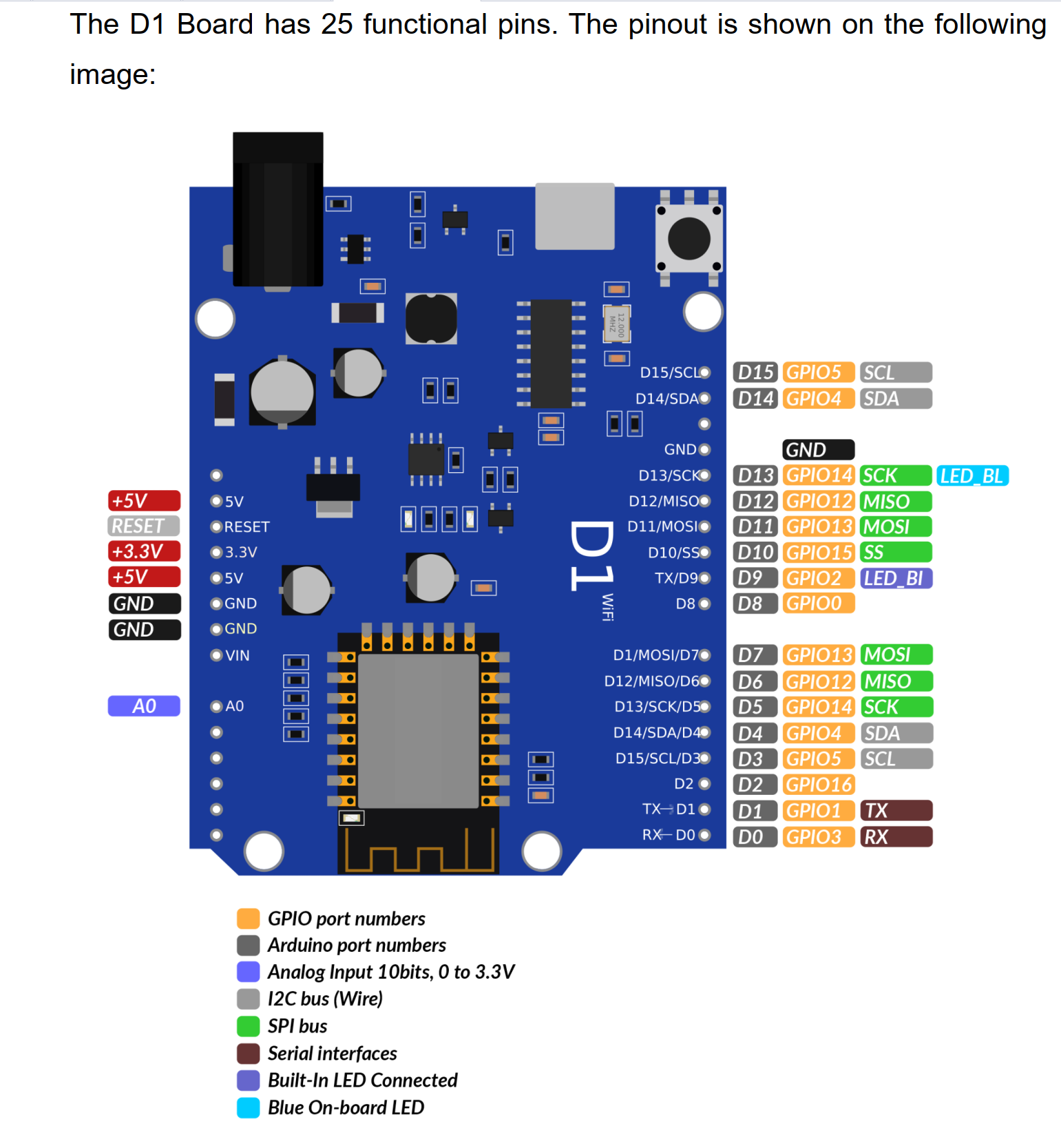
Pinbelegung einer D1 Board Leiterplatte
The D1 Board has 25 functional pins. The pinout is shown on the following image: D15/SCL D15 GPIO5 SCL D14/SDA D14 GPIO4 SDA GND GND D13/SCK D13 GPIO14 SCK LED_BL D12/MISO D12 GPIO12 MISO D11/MOSI D11 GPIO13 MOSI D10/SS D10 GPIO15 SS TX/D9 D9 GPIO2 LED_BI D8 D8 GPIO0 D7 D7 GPIO13 MOSI D1/MOSI/D7 D12/MISO/D6 D13/SCK/D5 D14/SDA/D4 D15/SCL/D3 D2 D2 GPIO16 TX-D1 D1 GPIO1 TX RX-D0 D0 GPIO3 RX +5V 5V RESET RESET +3.3V 3.3V +5V 5V GND GND GND VIN A0 A0 GPIO port numbers Arduino port numbers Analog Input 10bits, 0 to 3.3V I2C bus (Wire) SPI interfaces Serial interfaces Built-In LED Connected Blue On-board
in „AZ Delivery D1 Board ESP8266 mit SD Card verbinden“ · Mikrocontroller und Digitale Elektronik · · Layouts
-
Datei
sip_klingel_ND.ino
OF SUCH DAMAGE. ====================================================================*/ #include <ESP8266WiFi.h> #include <WiFiUdp.h> #define DEBUGLOG //------------------------------------------------ // configuration with fix ip //------------------------------------------------ // wlan param const
-
Datei
sipdial.ino
SUCH DAMAGE. * * ====================================================================*/ #include <ESP8266WiFi.h> #include <WifiUdp.h> //------------------------------------------------ // configuration with fix ip //------------------------------------------------ // wlan param const char* ssid = "ssid
-
Datei
10.split_text.058.ino
/* LICENCE see end of file! */ /* Environemental note The program is created for Arduino/ESP8266 and is tested on WIN10 only! */ /* --->>> READ THIS: <<<--- Developer, don't forget to update the version number in the private section of the class! */ #ifndef DUMMY // Mandatory Preprocessor Items
in „Flexible SplitText() Klasse (Anfänger)“ · Projekte & Code ·
-
Datei
irsnd.c
STM32 with Hal Library //Nothing here to do here -> See irsndconfig.h #elif defined (__xtensa__) // ESP8266 //Nothing here to do here -> See irsndconfig.h /*---------------------------------------------------------------------------------------------------------------------------------------------------
in „IR Fernbedienung mit IRSND“ · Mikrocontroller und Digitale Elektronik ·
-
Datei
obegransad_usec.ino
propper brightness control // By Stefan Mahrhold #include <Arduino.h> #include <pgmspace.h> #include <ESP8266WiFi.h> #define STASSID "JSHomeWLAN" #define STAPSK "LiET91z5JUw_pciF1vVt" #define P_EN D5 // ORANGE #define P_DI D6 // YELLO #define P_CLK D7 // BLUE #define P_CLA D8 // LILA #define P_KEY D4 // ROT
in „LEDs flackern unregelmäßig bei geringer Helligkeit“ · Mikrocontroller und Digitale Elektronik ·
-
Datei
_P168_ThermOLED.ino
modification to Plugin_036 with graphics library provided from squix78 github https://github.com/squix78/esp8266-oled-ssd1306 Features : - Displays and use current temperature from specified Device/Value (can be a Dummy for example) - Displays and maintains setpoint value - on power down/up this plugin maintains
in „ESPEasy Sketch Kompilierungsfehler“ · Mikrocontroller und Digitale Elektronik ·
-
Datei
main.asm
Min aufwachen ; - Spannung prüfen (ADC0) ; - div. Temp. und Luftfeuchtigkeit messen ; - Werte an ESP8266 senden (UART TX-RX) #define debug ;zusätzliche Ausgaben aktiviren .equ clock=16000000 ;Taktfrequenz des AVRs in Hz (Quarzfrequenz) .equ baud=2400 ;Baudrate fuer UART .equ ubrr=clock/16/baud-1 ;Wert
in „ATMega328 + Si7021 + I2C (Assembler)“ · Mikrocontroller und Digitale Elektronik ·
-
Datei
wordclock_esp.txt
Stromaufnahme im Debug-Monitor - Uhr wird ohne WLAN-Verbindung zum Access Point */ //Bibliotheken #include <ESP8266WiFi.h> #include <WiFiUdp.h> #include <Adafruit_NeoPixel.h> #include <Wire.h> //Anzahl LED's und Ausgang vom ESP festlegen #define PIN 04 #define NUMBERS 110 //*************************************
in „ESP8266 startet nicht“ · Mikrocontroller und Digitale Elektronik ·
-
PDF
Report.pdf
1of 96 TESTING No. L2264 Part 15C TEST REPORT Product Name Wi-Fi Internet of Things Module Model ESP8266EX Brand Name WROOM FCC ID 2AC7Z-ESP8266EX Applicant ESPRESSIF SYSTEMS (SHANGHAI) PTE LTD ESPRESSIF SYSTEMS (SHANGHAI) PTE LTD Manufacturer Date of issue October 28, 2014 TA Technology (Shanghai) Co
in „Wlan2Serial Modul für 5 euro“ · Mikrocontroller und Digitale Elektronik ·
-
Datei
newSDWebServer_GPIO16_Touchn5b.ino
/* SDWebServer - Example WebServer with SD Card backend for esp8266 Copyright (c) 2015 Hristo Gochkov. All rights reserved. This file is part of the ESP8266WebServer library for Arduino environment. This library is free software; you can redistribute it and/or modify
in „Arduino_IDE mit ESP8266 und Ucglib unter Win7-64bit“ · Mikrocontroller und Digitale Elektronik ·
-
Datei
irmp.c
defined (TEENSY_ARM_CORTEX_M4) // TEENSY pinMode(IRMP_PIN, INPUT); #elif defined(__xtensa__) // ESP8266 pinMode(IRMP_BIT_NUMBER, INPUT); // select pin function # if (IRMP_BIT_NUMBER == 12) PIN_FUNC_SELECT(PERIPHS_IO_MUX_MTDI_U, FUNC_GPIO12); // doesn't work for me: // # elif (IRMP_BIT_NUMBER == 13)
in „IRMP - Infrared Multi Protocol Decoder“ · Projekte & Code ·
-
Datei
irmp.c
defined (TEENSY_ARM_CORTEX_M4) // TEENSY pinMode(IRMP_PIN, INPUT); #elif defined(__xtensa__) // ESP8266 pinMode(IRMP_BIT_NUMBER, INPUT); // select pin function # if (IRMP_BIT_NUMBER == 12) PIN_FUNC_SELECT(PERIPHS_IO_MUX_MTDI_U, FUNC_GPIO12); // doesn't work for me: // # elif (IRMP_BIT_NUMBER == 13)
in „IRMP - Infrared Multi Protocol Decoder“ · Projekte & Code ·