VPULSE einstellen

Gast #1954556
Lesenswert?
• ▲
▼
Hallo,

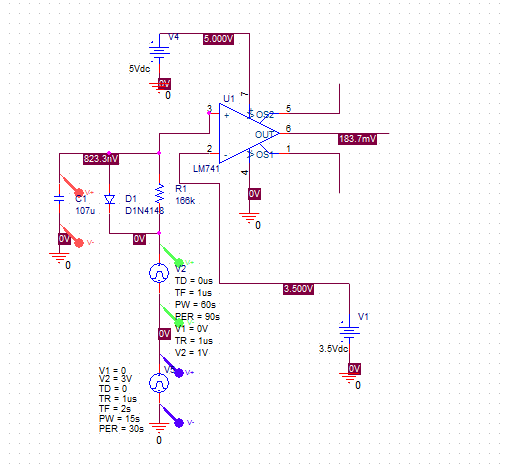
kennt sich jemand mit OrCad aus?
i hab ne frage zum VPULSE:

Einstellungen:
zB 15 sec 3.4V, 1 sec 3.6V

wie stell ich das ein?

Ich hab kapiert wie ich 15 sec auf 3.4V einstell und 15 sec auf 0
aber wie mach ich das im VPulse mit 1 sec 3.6V

Siehe Bild:
es geht um den untern V5
Angehängte Dateien:
#1954656
Lesenswert?
• ▲
▼
# V1 is the value when the pulse is not "on." So for a square wave, the 
value when the wave is 'low'. This can be zero or negative as required. 
For a pulsed current source, the units would be "amps" instead of 
"volts."
# V2 is the value when the pulse is fully turned 'on'. This can also be 
zero or negative. (Obviously, V1 and V2 should not be equal.) Again, the 
units would be "amps" if this were a current pulse.
# TD is the time delay. The default units are seconds. The time delay 
may be zero, but not negative.
# TR is the rise time of the pulse. PSpice allows this value to be zero, 
but zero rise time may cause convergence problems in some transient 
analysis simulations. The default units are seconds.
# TF is the fall time in seconds of the pulse.
# TW is the pulse width. This is the time in seconds that the pulse is 
fully on.
# PER is the period and is the total time in seconds of the pulse.

Also
V1 auf 3.4 V
V2 auf 3.6 V
TD auf 0
TR = TF = 1us oder sowas
und nun:
TW = 1
PER = 16 (15+1)

So müsste es gehen, kanns grad leider nicht testen.

Schönen Abend,
Benni

Antwort schreiben

Hinweis: der ursprüngliche Beitrag ist mehr als 6 Monate alt. Bitte hier nur auf die ursprüngliche Frage antworten, für neue Fragen einen neuen Beitrag erstellen.

Formatierung
  • [c]C-Code[/c]
  • [code]Code in anderen Sprachen, ASCII-Zeichnungen[/code]
  • [math]Formel in LaTeX-Syntax[/math]
  • [[Titel]] – Link zu einem Artikel
  • Verweis auf einen anderen Beitrag: Rechtsklick auf dessen Beitrags-ID (#8078628), „Adresse kopieren“, in den Text einfügen

Mehr zur Formatierung

Längeren Sourcecode als Anhang, nicht in den Text. JPG nur für Fotos und Scans; Zeichnungen und Screenshots als PNG oder GIF. Siehe Bildformate.

Schon registriert? Anmelden

Wird nicht angezeigt. Wir schicken dir einen Link; sobald du damit bestätigst, erscheint dein Beitrag.

Mit dem Abschicken legst du einen kostenlosen Account an und erkennst die Nutzungsbedingungen und die Datenschutzerklärung an.