Projekte & Code
›
Thread
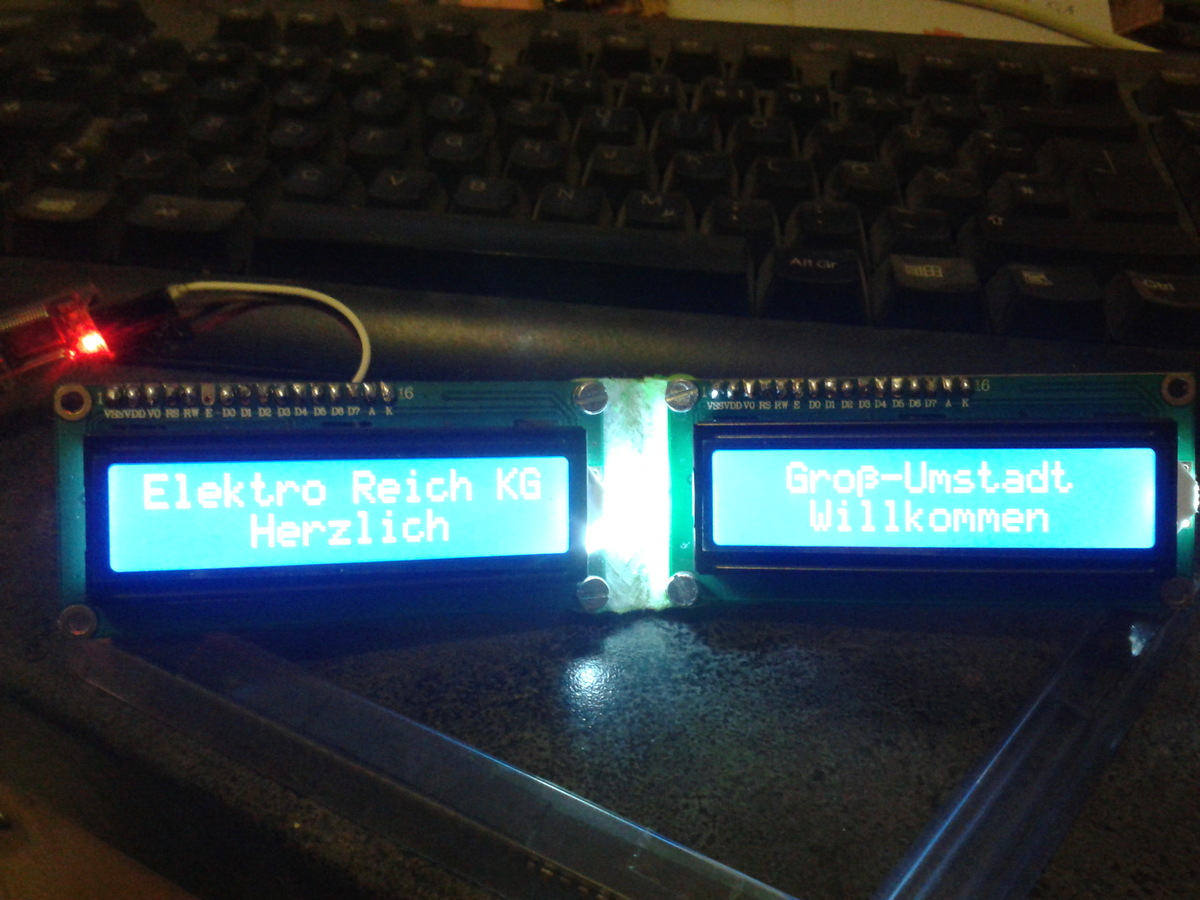
Seriel to 2x 2x16 Displays als 2x32
CR
Christof Rieger
Gast
12.12.2015 16:56 #4386252
Ein Arduinocode zur Ansteuerung von 2x 2x16 Displays als 2x32 über
Serielle Schnittstelle mit teilweise ASCII Steuerung. Brauche es für die
Kundenanzeige einer Kasse.

LG Christof
1 /*
2 The circuit:
3 * LCD Enable links pin to digital pin A4
4 * LCD Enable rechts pin to digital pin 8
5 * LCD RS pin to digital pin A5
6 * LCD D0 pin to digital pin A0
7 * LCD D1 pin to digital pin A1
8 * LCD D2 pin to digital pin A2
9 * LCD D3 pin to digital pin A3
10 * LCD D4 pin to digital pin 4
11 * LCD D5 pin to digital pin 5
12 * LCD D6 pin to digital pin 6
13 * LCD D7 pin to digital pin 7
14 * LCD R/W pin to ground
15 * LED links 10 PWM
16 * LED rechts 9 PWM
17 * LCD Vo 11 PWM (Kontrast)
18 */
19 #include <LiquidCrystal.h>
20 #include <avr/pgmspace.h>
21
22 LiquidCrystal lcdL ( A5 , A4 , A0 , A1 , A2 , A3 , 4 , 5 , 6 , 7 );
23 LiquidCrystal lcdR ( A5 , 8 , A0 , A1 , A2 , A3 , 4 , 5 , 6 , 7 );
24
25 // make some custom characters:
26 // \ ~ Ä Ö § ß €
27 const byte charDF [] PROGMEM = {
28 0 b00000000 , 0 b00001000 , 0 b00010001 , 0 b00010001 , 0 b00001110 , 0 b00000000 , 0 b00000110 ,
29 0 b00010000 , 0 b00010101 , 0 b00000100 , 0 b00001110 , 0 b00011001 , 0 b00001110 , 0 b00001001 ,
30 0 b00001000 , 0 b00000010 , 0 b00001010 , 0 b00010001 , 0 b00010100 , 0 b00010001 , 0 b00011100 ,
31 0 b00000100 , 0 b00000000 , 0 b00010001 , 0 b00010001 , 0 b00001010 , 0 b00010110 , 0 b00001000 ,
32 0 b00000010 , 0 b00000000 , 0 b00011111 , 0 b00010001 , 0 b00000101 , 0 b00010001 , 0 b00011100 ,
33 0 b00000001 , 0 b00000000 , 0 b00010001 , 0 b00010001 , 0 b00010011 , 0 b00010110 , 0 b00001001 ,
34 0 b00000000 , 0 b00000000 , 0 b00010001 , 0 b00001110 , 0 b00001110 , 0 b00010000 , 0 b00000110 ,
35 0 b00000000 , 0 b00000000 , 0 b00000000 , 0 b00000000 , 0 b00000000 , 0 b00010000 , 0 b00000000
36 };
37 // PW-Point
38 byte charPT [ 8 ] = {
39 0 b00000000 ,
40 0 b00000000 ,
41 0 b00001110 ,
42 0 b00011111 ,
43 0 b00011111 ,
44 0 b00001110 ,
45 0 b00000000 ,
46 0 b00000000 ,
47 };
48 // Anschaltmeldung 2. Zeile die erste Zeile steht ganz unten in der Subroutine
49 // 0123456789ABCDEF0123456789ABCDEF
50 const byte DLine [] PROGMEM = " Herzlich Willkommen " ;
51 byte charLN [ 32 ];
52
53 byte xpos = 0 ;
54 byte tab = 4 ;
55 byte line = 0 ;
56 byte last = 0 ;
57 boolean newline = true ;
58 boolean lastline = true ;
59 boolean formfeed = false ;
60 boolean Druck = true ;
61
62 void setup () {
63 // put your setup code here, to run once:
64 Serial . begin ( 19200 );
65 lcdL . begin ( 16 , 2 );
66 lcdR . begin ( 16 , 2 );
67 analogWrite ( 10 , 200 ); //LED links
68 analogWrite ( 9 , 200 ); //LED rechts
69 analogWrite ( 11 , 40 ); //Kontrast
70
71 lcdL . createChar ( 7 , charPT );
72 lcdR . createChar ( 7 , charPT );
73 for ( byte y = 0 ; y < 7 ; y ++ ) {
74 for ( byte x = 0 ; x < 8 ; x ++ ) {
75 charPT [ x ] = pgm_read_byte_near ( charDF + x * 7 + y );
76 }
77 lcdL . createChar ( y , charPT );
78 lcdR . createChar ( y , charPT );
79 }
80 starttext ();
81 }
82
83 void loop () {
84 // put your main code here, to run repeatedly:
85 if ( Serial . available ())
86 {
87 byte inByte = ( byte ) Serial . read ();
88 Druck = true ;
89 switch ( inByte ) {
90 case 0x08 : //Backspace
91 if ( xpos > 0 ){
92 xpos -- ;
93 line = 0 ;
94 if ( lastline ){ line = 1 ;}
95 if ( xpos < 16 ){
96 lcdL . setCursor ( xpos , line );
97 lcdR . setCursor ( 0 , line );
98 lcdL . write ( 32 );
99 lcdL . setCursor ( xpos , line );
100 } else {
101 lcdL . setCursor ( 0 , line );
102 lcdR . setCursor ( xpos - 16 , line );
103 lcdR . write ( 32 );
104 lcdR . setCursor ( xpos - 16 , line );
105 }
106 }
107 Druck = false ;
108 break ;
109 case 0x09 : //Tab
110 line = xpos % tab ;
111 if (( line > 0 ) || ( last == 0x09 ) || ( xpos == 0 )) {
112 line = xpos - line ;
113 xpos = line + tab ;
114 if ( lastline ){ line = 1 ;} else { line = 0 ;}
115 if ( xpos < 16 ){
116 lcdL . setCursor ( xpos , line );
117 lcdR . setCursor ( 0 , line );
118 } else {
119 lcdL . setCursor ( 0 , line );
120 lcdR . setCursor ( xpos - 16 , line );
121 }
122 }
123 Druck = false ;
124 break ;
125 case 0x0A : //Linefeed
126 newline = true ;
127 Druck = false ;
128 break ;
129 case 0x0C : //Clear Display (Formfeed)
130 formfeed = true ;
131 Druck = false ;
132 break ;
133 case 0x0D : //CR (Pos1)
134 if ( lastline ){
135 lcdL . setCursor ( 0 , 1 );
136 lcdR . setCursor ( 0 , 1 );
137 } else {
138 lcdL . setCursor ( 0 , 0 );
139 lcdR . setCursor ( 0 , 0 );
140 }
141 xpos = 0 ;
142 Druck = false ;
143 break ;
144 case 0x11 : //Helligkeit Display links
145 Serial . readBytes ( charPT , 1 );
146 analogWrite ( 10 , charPT [ 0 ]);
147 Druck = false ;
148 break ;
149 case 0x12 : //Helligkeit Display rechts
150 Serial . readBytes ( charPT , 1 );
151 analogWrite ( 9 , charPT [ 0 ]);
152 Druck = false ;
153 break ;
154 case 0x13 : //Kontrast
155 Serial . readBytes ( charPT , 1 );
156 analogWrite ( 11 , charPT [ 0 ]);
157 Druck = false ;
158 break ;
159 case 0x14 : //Tab-Weite (Default 4)
160 Serial . readBytes ( charPT , 1 );
161 tab = charPT [ 0 ];
162 Druck = false ;
163 break ;
164 case 0x18 : //Startzustand (Chancel)
165 xpos = 0 ;
166 tab = 4 ;
167 newline = true ;
168 lastline = true ;
169 lcdL . clear ();
170 lcdR . clear ();
171 starttext ();
172 Druck = false ;
173 break ;
174 case 0x5C : //Anpassungen zur Zeichentabelle
175 inByte = 0 ;
176 break ;
177 case 0x7E :
178 inByte = 1 ;
179 break ;
180 case 0x80 :
181 inByte = 6 ;
182 break ;
183 case 0xA7 :
184 inByte = 4 ;
185 break ;
186 case 0xB5 :
187 inByte = 0xE4 ;
188 break ;
189 case 0xC4 :
190 inByte = 2 ;
191 break ;
192 case 0xD6 :
193 inByte = 3 ;
194 break ;
195 case 0xDC :
196 inByte = 0xF5 ;
197 break ;
198 case 0xDF :
199 inByte = 5 ;
200 break ;
201 case 0xE4 :
202 inByte = 0xE1 ;
203 break ;
204 case 0xF6 :
205 inByte = 0xEF ;
206 break ;
207 case 0xFC :
208 inByte = 0xF5 ;
209 break ;
210 default:
211 break ;
212 }
213
214 if ( Druck ){
215 if ( formfeed ){
216 lcdL . clear ();
217 lcdR . clear ();
218 if ( xpos < 16 ){
219 lcdL . setCursor ( xpos , 0 );
220 lcdR . setCursor ( 0 , 0 );
221 } else {
222 lcdL . setCursor ( 0 , 0 );
223 lcdR . setCursor ( xpos - 16 , 0 );
224 }
225 lastline = false ;
226 formfeed = false ;
227 newline = false ;
228 }
229 if ( newline ){
230 if ( lastline ){
231 lcdL . clear ();
232 lcdR . clear ();
233 lcdL . setCursor ( 0 , 0 );
234 lcdR . setCursor ( 0 , 0 );
235 for ( byte x = 0 ; x < 16 ; x ++ ) {
236 lcdL . write ( charLN [ x ]);
237 lcdR . write ( charLN [ x + 16 ]);
238 charLN [ x ] = ' ' ;
239 charLN [ x + 16 ] = ' ' ;
240 }
241 } else {
242 lastline = true ;
243 }
244 if ( xpos < 16 ){
245 lcdL . setCursor ( xpos , 1 );
246 lcdR . setCursor ( 0 , 1 );
247 } else {
248 lcdL . setCursor ( 0 , 1 );
249 lcdR . setCursor ( xpos - 16 , 1 );
250 }
251 newline = false ;
252 }
253 // lcdL.setCursor(0, 0);
254 // lcdL.print(inByte);
255 // lcdL.print(" ");
256 charLN [ xpos ] = inByte ;
257 if ( xpos < 16 ){ lcdL . write ( inByte );} else { lcdR . write ( inByte );}
258 xpos ++ ;
259 }
260 last = inByte ;
261 }
262 }
263 void starttext (){
264 lcdL . setCursor ( 0 , 0 );
265 lcdL . print ( "Elektro Reich KG" );
266 lcdR . setCursor ( 2 , 0 );
267 lcdR . print ( "Gro" );
268 lcdR . write ( 5 );
269 lcdR . print ( "-Umstadt" );
270 lcdL . setCursor ( 0 , 1 );
271 lcdR . setCursor ( 0 , 1 );
272 for ( byte x = 0 ; x < 16 ; x ++ ) {
273 charLN [ x ] = pgm_read_byte_near ( DLine + x );
274 charLN [ x + 16 ] = pgm_read_byte_near ( DLine + x + 16 );
275 lcdL . write ( charLN [ x ]);
276 lcdR . write ( charLN [ x + 16 ]);
277 }
278 lcdL . setCursor ( 0 , 1 );
279 lcdR . setCursor ( 0 , 1 );
280 }
--

Durch Verwenden der [ c ] [ /c ] - Tags wird es etwas lesbarer.

In Zukunft Code bitte als Dateianhang und nicht im Text einfügen
(warum wohl steht das über dem Eingabefeld hier?)

-rufus
CR
Christof Rieger
Gast
12.12.2015 17:09 #4386275
CR
Christof Rieger
Gast
13.12.2015 09:19 #4386719
@rufus
Danke für die Korrektur ich war da etwas zu schnell. Ich muss mir mal
ein Account zulegen. Dann kann ich sowas selbst korrigieren.
Entschuldige für die Mühe.
Was Du Dir noch ansehen könntest, ist Codeformatierung . Wann wird
warum wie eingerückt, und wozu ist das gut?
↑ Nach oben← Zurück zu Projekte & Code
Antwort schreiben
Eine eigene Frage?
Dieser Thread ist über 10 Jahre alt.
Stell sie in einem eigenen Thread – dort lesen mehr Leute mit, und sie wird öfter und schneller beantwortet.
Neuen Thread starten
Eine Lösung, Ergänzung oder Rückmeldung zu diesem Thread? Dann antworte hier.