Alpha RF TRX 433S Transceiver

OP #4483829
For a research project I am working with the transceiver modules 
ALPHA-TRX433S from RF Solutions 
(https://www.rfsolutions.co.uk/radio-modules-c10/alpha-trx-low-cost-high-performance-transceiver-module-p383).

The datasheet was quite general concerning getting the modules to work. 
The sample *.asm-code given on the website is not easy to understand. 
Besides that I needed some fine tuning in my code getting the modules to 
work. This was mainly trial and error work and depends in my opinion on 
the module settings (e.g. data rate).

I want to show the comunity my results of getting the modules to work in 
the hope that more people work on the devices, getting more people to 
work on the modules and to initiate a broad discussion about them. My 
general idea behind this is to learn more about HF devices and the 
programming of embedded devices.

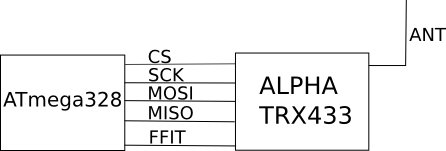
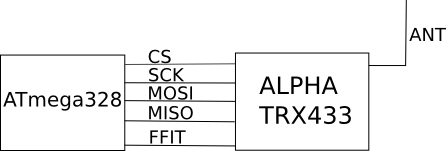
For the connection between the uC and the modules see attachment 
"circuitry.png".
Angehängte Dateien:
OP
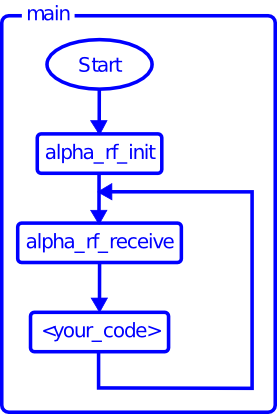
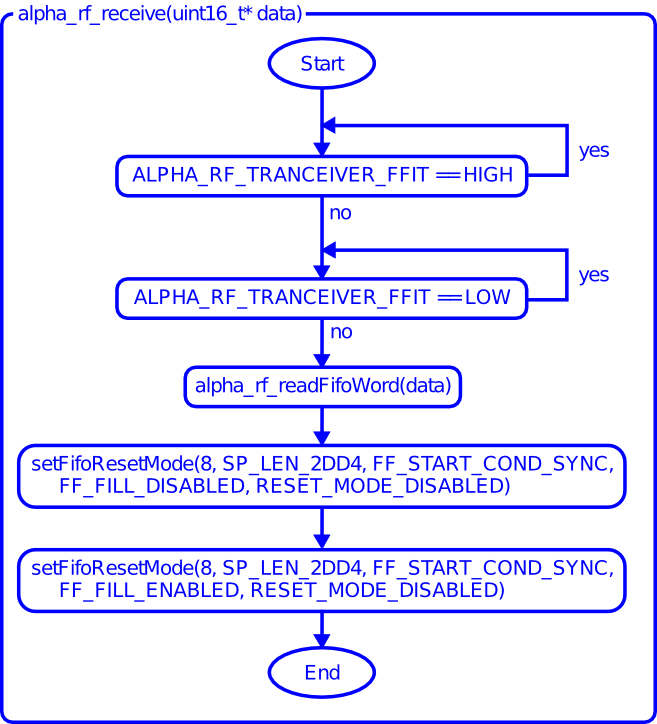
The main loop comprises the receiving routine. The receiving is 
initiated by the FFIT line. Every time the module receives data it 
generates an IRQ on the FFIT line. This kept my uC very busy even when I 
did not want to receive something. Therefore I designed a state machine 
which either receives data or processes them. In case you have parallel 
execution nothing objects against an IRQ handler with the receiving 
routine and parallel data processing in the main loop. For simplicity 
reasons I use the state machine. The main routine is shown in image 
"main.png".
Angehängte Dateien:
OP
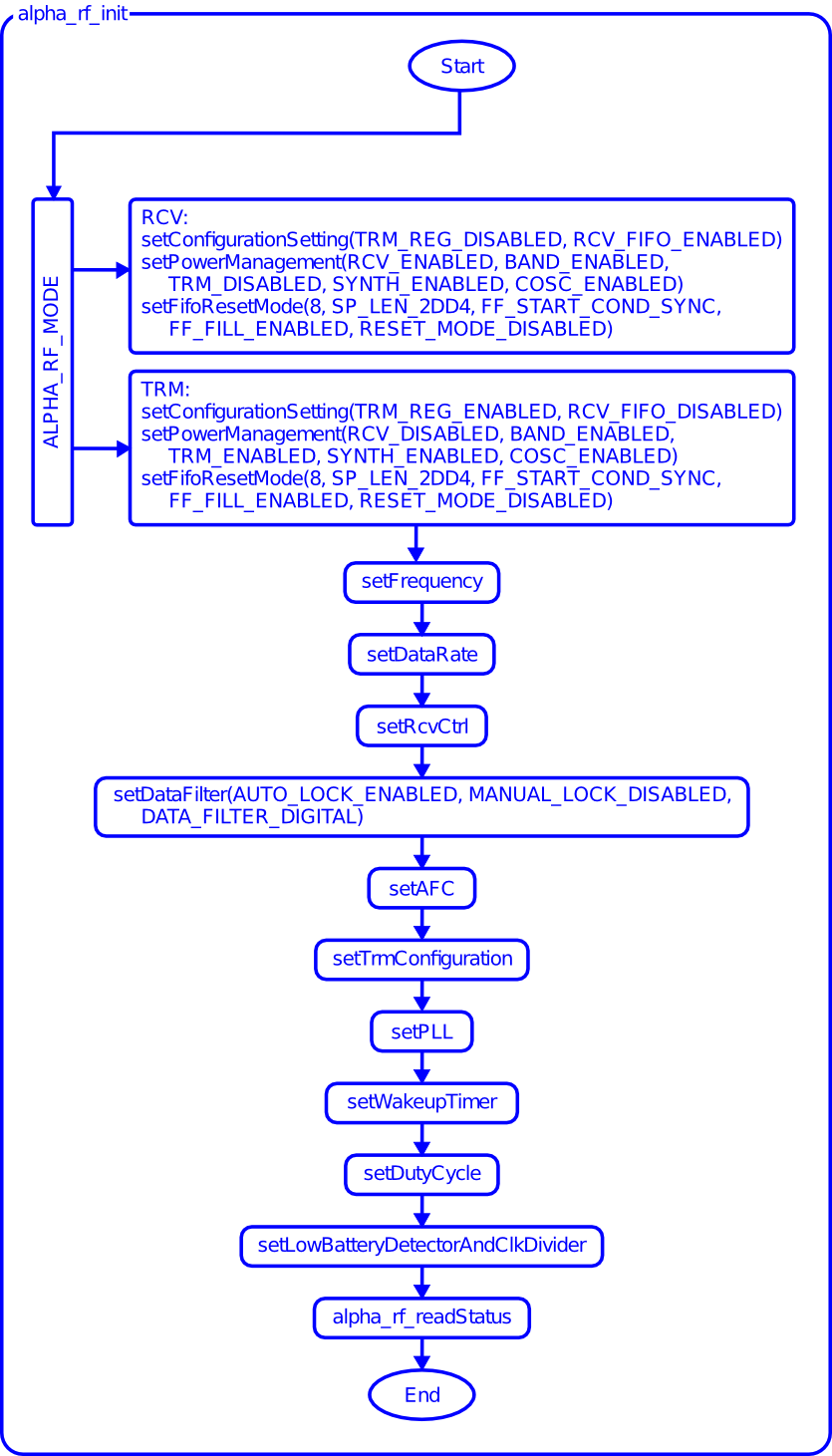
Before the modules can be used, they need to be initialised. For this 
see image "alpha_rf_init.png".
In the initialisation routine it is adjusted if the module is used as 
transmitter or receiver.
Frequency: use a frequency with low utilisation. Otherwise there is the 
risk of receiving false data.
Settings for data rate: DR_CS_ENABLED, 0x1F
Setting RCV Ctrl: P16_VDI_OUTPUT, RSP_TIME_SLOW, BANDWIDTH_340, 
LNA_GAIN_20, DRSSI_97
The WAIT_US in the transmitting routine depends on the settings above I 
suppose (from trial and error).
The other settings are arbitrary.
Angehängte Dateien:
OP
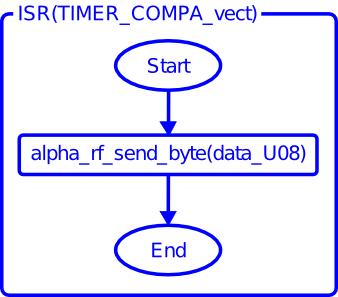
For successful reception of data a periodic data transmission is 
required. Therefore the transmission is done with a timer IRQ handler as 
shown in "TIMER_COMPA_vect.png". With the timer settings the actual data 
transmission rate is adjusted. The settings used above are valid for 
calling the timer handler with 20 Hz.
Angehängte Dateien:
OP
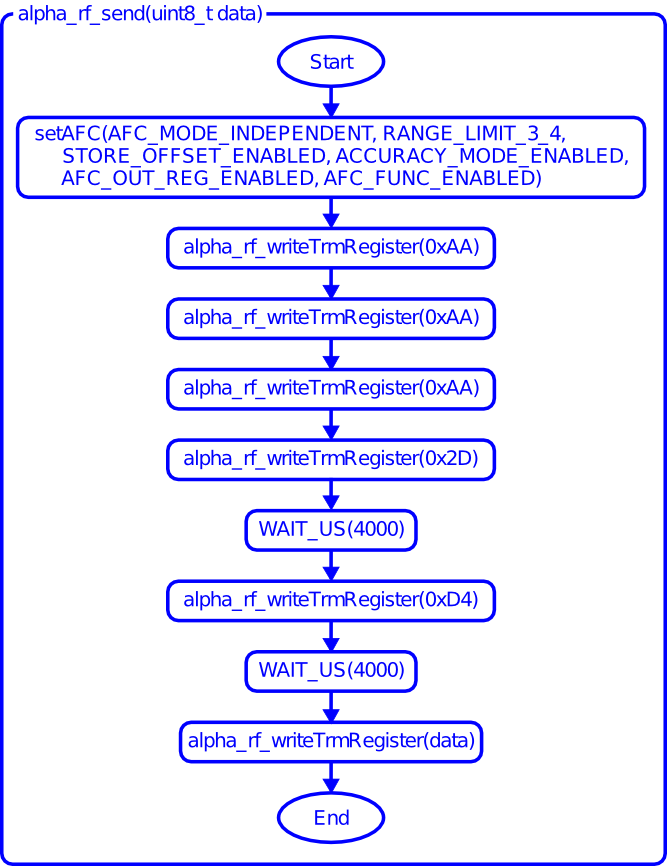
Image "alpha_rf_send.png" shows the transmission routine which is 
straight forward. The WAIT_US(4000) depends on initialisation settings, 
I suppose. I had to work it out by trial and error.

I appretiate any help, hints and improvements in my approach of the 
modules' usage. As well, I am looking forward to getting to know other 
embedded engineering enthusiasts.


/***********/

The information above does not claim to be complete. I do not give any 
warranty that our system works with this description. See the 
explanation above as a well-meant help, "fine tuning" might be necessary 
for settings different from mine.
You work with electricity on your own risk.
Angehängte Dateien:

Antwort schreiben

Eine eigene Frage? Dieser Thread ist über 10 Jahre alt. Stell sie in einem eigenen Thread – dort lesen mehr Leute mit, und sie wird öfter und schneller beantwortet.

Neuen Thread starten

Eine Lösung, Ergänzung oder Rückmeldung zu diesem Thread? Dann antworte hier.

Formatierung
  • [c]C-Code[/c]
  • [code]Code in anderen Sprachen, ASCII-Zeichnungen[/code]
  • [math]Formel in LaTeX-Syntax[/math]
  • [[Titel]] – Link zu einem Artikel
  • Verweis auf einen anderen Beitrag: Rechtsklick auf dessen Beitrags-ID (#8078628), „Adresse kopieren“, in den Text einfügen

Mehr zur Formatierung

Längeren Sourcecode als Anhang, nicht in den Text. JPG nur für Fotos und Scans; Zeichnungen und Screenshots als PNG oder GIF. Siehe Bildformate.

Schon registriert? Anmelden

Wird nicht angezeigt. Wir schicken dir einen Link; sobald du damit bestätigst, erscheint dein Beitrag.

Mit dem Abschicken legst du einen kostenlosen Account an und erkennst die Nutzungsbedingungen und die Datenschutzerklärung an.