
Hallo,
Ich habe einen ESHS30 EMI Messempfänger von Rohde & Schwarz sowie einen
Agilent USB / GPIB Adapter.

Das ganze wurde bereits Erfolgreich mit einem NI GPIB/USB Adapter zum
laufen gebracht. Nun musste allerdings ein Agilent her da der NI Adapter
nichtmehr verfügbar ist. Leider gibt die R&S Software als Fehlermeldung
nur "Der Receiver reagiert nicht" aus.
Es werden vermutlich relative wenige explizit mit diesem Problem
vertraut sein aber eventuell an generellen Problemen mit dem Agilent
Adapter?

Ein Neukauf ist eher eine schlechte Option.

Der Receiver reagiert auf normale SCPI Kommandos und hat die Adresse
GPIB0 18
Was auch in der Software unverändert eingestellt ist.

Eventuell weiß jemand Rat oder hat Tipps?

Lg,
Max
Hallo,

hast Du den "Agilent Connection Expert" installiert?

Hier ist eine Anleitung für LeCroy für den Agilent Adapter:

Topic:
Remote Control: Using ScopeExplorer with Agilent GPIB adapters

Problem:
How do you get ScopeExplorer to work with Agilent GPIB adapters?

Solution:
ScopeExplorer was designed to work with National Instruments GPIB
adapters, but can work with the Agilent 82357A USB to GPIB adapter by
enable the 82357A to emulate a National Instruments GPIB device. Here's
how:
1) These instructions where written based on version 15.1 of Agilent's
I/O Libraries Suite and assume that both software packages have been
installed as well as the UBS/GPIB device.
2) Run Agilent Connection Expert.
3) The USB/GPIB device should be detected. Right click on the USB/GPIB
selection.
4) Select Tools -> Agilent 488....
5) A new window should open called "Agilent Connection Expert Options".
Select the "Agilent 488 Options" tab.
6) Check the box to "Enable Agilent GPIB cards for 488 Programs". Note:
Enabling this option allows Agilent GPIB cards to work in
NI-488.2-compatible programs.
7) Select the OK button and follow the remaining steps as
drivers/software are loaded.
8) Close Agilent connection Expert.
9) Fire up ScopeExplorer; it should now detect any LeCroy compatible
scopes.
(Note: This solution is provided by a customer, and has not been
verified by LeCroy Technical Support. Please email
technical.support@lecroy.com if you find this procedure needs
modification.)
Hallo,

ich habe da ein gang aehnliches Problem. Ich möchte einen R&S CMS54
Funkmessplatz über den USB/GPIB Adapter anschliessen. Der Adapter hat
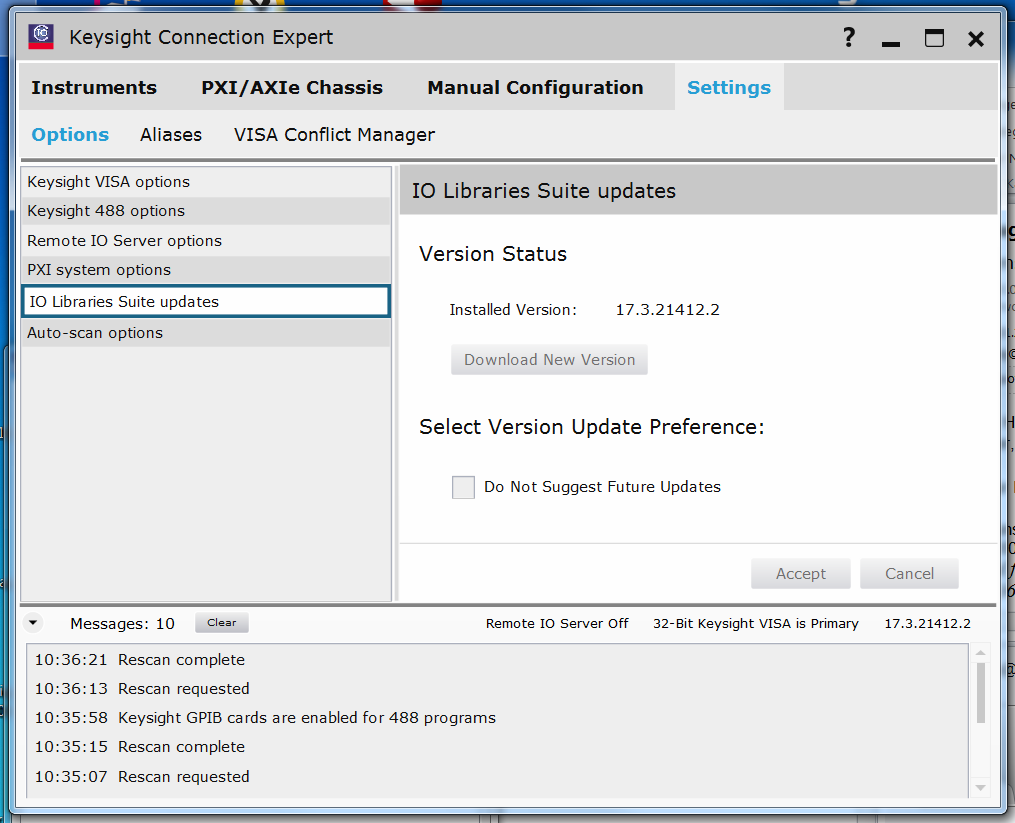
sich beim ersten Anschließen installiert. Den Connection Expert und die
IO Library habe ich installiert (Screenshot). Jetzt komme ich aber nicht
weiter. Offenbar wird der Adapter nicht erkannt.
Angehängte Dateien:
-
 Agilent_82357B.PNG
(78 KB)
Agilent_82357B.PNG
(78 KB)
Hallo,

inzwischen habe ich den Adapter über IEEE488 an den R&S CMS54
angeschlossen. Das hat mich zumindest etwas weiter gebracht. Im
Connection Expert wird der jetzt korrekt erkannt.
Im Command Expert wird der unter "New Instrument" auch erkannt. Als
Command Set wird lediglich SPI-99 und N6700 angeboten. Wenn ich dann
SPI-99 versuchsweise auswähle, bekomme ich die Meldung:
c:\ProgramData\Keysight\CommandExpert\instruments.xml
Access Denied
Den Pfad gibt es auf meinem Rechner. Die .xml Datei ist aber nicht
vorhanden.
Ich habe das Gleiche auch mit meinem Oszilloskop HP54815A versucht. Das
Ergebnis ist das Gleiche.
Im BenchVue werden die Instrumente auch als "unsupported" angezeigt.
Antwort schreiben
Bitte melde dich an, um einen Beitrag zu schreiben.