-
PDF
Umbau_LSC_Remote_V1.pdf
WiFi-Modul erweitern Die Einschaltzeit von vier Sekunden reicht nicht aus, um alle nötigen Infos einem MQTT- Server (FHEM) mitzuteilen. Denn schließlich muss zuerst die WLAN-Verbindung und dann noch die zum MQTT-Server hergestellt werden. Bei guten WLAN-Verhältnissen funktioniert das in etwa 6-7 Sekunden.
in „LSC Smart Connect - neues Smart Home System bei Action“ · Haus & Smart Home ·
-
PDF
Untitled_document.pdf
direkt am PIN 7 18V und PIN 3 (GND) des AUX1 am Mäher bestromen. Jetzt Configure OTher, Configure MQTT und Configure Module durchgehn. Hintergrundlinks: 1CH: https://templates.blakadder.com/sonoff_1channel.html (4CH: https://templates.blakadder.com/ewelink_4CH.html ) Ansonsten direkt meine config: Ich
in „Automower G3 mit USB Diagnoseport fernsteuern?“ · Mikrocontroller und Digitale Elektronik ·
-
Datei
new_1.txt
build/mbedtls/port/esp8266/sha512.o AR build/mbedtls/libmbedtls.a AR build/mdns/libmdns.a CC build/mqtt/esp-mqtt/mqtt_client.o CC build/mqtt/esp-mqtt/lib/platform_idf.o CC build/mqtt/esp-mqtt/lib/mqtt_msg.o CC build/mqtt/esp-mqtt/lib/mqtt_outbox.o AR build/mqtt/libmqtt.a CC build/newlib/newlib/port/select.o
in „flash esp8266“ · Mikrocontroller und Digitale Elektronik ·
-
PDF
RUT240_Datasheet-v1.1.pdf
DCBA (little-endian), CDAB, Supported data formats BADC) MODBUS DATA TO SERVER Protocol HTTP(S), MQTT, Azure MQTT MQTT GATEWAY MQTT gateway Allows sending commands and receiving data from Modbus Master through MQTT broker MONITORING & MANAGEMENT WEB UI HTTP/HTTPS, status, configuration, FW update, CLI
in „[V] gebrauchter Industrie LTE Router Teltonika RUT240 (OpenWRT, Wifi, LAN, WAN, Schaltausgänge) 50€“ · Markt ·
-
Datei
hoymiles_dash.js
start: v.timeRangeStart, stop: v.timeRangeStop)\n |> filter(fn: (r) => (\n r[\"_measurement\"] == \"mqtt_consumer\" and exists r.string and\n r[\"location\"] =~ /${location:regex}/ and\n r[\"type\"] == \"total\" and r[\"_field\"] == \"value\"))\n |> difference(columns: [\"_value\"])\n |> group(columns:
in „Wechselrichter Hoymiles HM-xxxx 2,4 GhZ Nordic Protokoll?“ · Mikrocontroller und Digitale Elektronik ·
-
PDF
Installation_HT3_URBANsUNITED.pdf
nano /boot/config.txt hinzugefügt am Ende dtoverlay=pi3-disable-bt # reboot 3.1.1 Komponenten für MQTT Key für zukünftige Updates holen / installieren $ sudo wget http://repo.mosquitto.org/debian/mosquitto-repo.gpg.key $ sudo apt-key add mosquitto-repo.gpg.key $ cd /etc/apt/sources.list.d $ sudo wget
in „Heatronic 3 Adapter (Junkers Heizung) fuer Raspberry Pi“ · Haus & Smart Home ·
-
Datei
Cerasmarter.txt
17:33:12.947 -> [1;32mWiFi AP launched. Find me @ 192.168.4.1 17:33:12.947 -> [0mCan't connect to MQTT broker. [No Network] 17:33:12.947 -> Can't connect to MQTT broker. [No Network] 17:33:12.947 -> Can't connect to MQTT broker. [No Network] 17:33:12.947 -> Can't connect to MQTT broker. [No Network]
-
Bild
Benutzeroberfläche eines MQTT-Clients
MQTT Client ClientID: TestClient1 Verbinde Trenne Log Ping Adresse: 192.168.81.20 Port: 1883 User: Benutzer Name Passwort: Passwort Publish - Schreibe einen Wert Subscribe - Registrierung für Empfang Test
in „Ein MQTT Client“ · Projekte & Code · · Screenshots
-
Bild
Screenshot eines MQTT-Clients
MQTT Client ClientID: TestClient1 Verbinde Trenne Log Ping Adresse: 192.168.81.20 Port: 1883 RecCnt: 47 SendCnt: 51 User: Benutzer Name Passwort: Passwort Publish - Schreibe einen Wert Subscribe - Registrierung
in „Project EleLa RS232 / RS485 Magazin LED Register“ · Mikrocontroller und Digitale Elektronik · · Screenshots
-
Bild
MQTT Datenprotokoll einer Batterieüberwachung
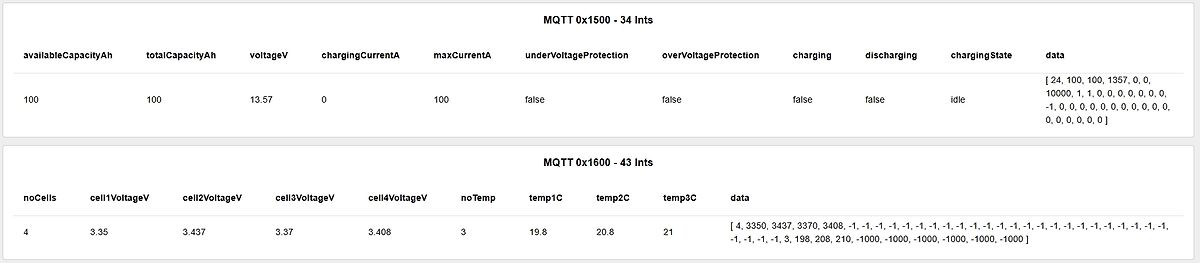
MQTT 0x1500 - 34 Ints availableCapacityAh totalCapacityAh voltageV chargingCurrentA maxCurrentA underVoltageProtection overVoltageProtection charging discharging chargingState data 100 100 13.57 0 100 false false false idle [ 24, 100, 100, 1357, 0, 0, 10000, 1, 1, 0, 0, 0, -1, 0, 0, 0, 0] MQTT 0x1600 - 43 Ints noCells cell1VoltageV cell2VoltageV cell3VoltageV cell4VoltageV noTemp temp1C temp2C temp3C data 4 3.35 3.437 3.37 3.408 3 19.8 20.8 21 [ 4, 3350, 3437, 3408, -1, -1, -1, 198, 208,
in „Akku Eco-Worthy 12,8V 100Ah und sein RS485-Protokoll“ · Haus & Smart Home · · Screenshots
-
Bild
Screenshot eines MQTT-Clients
MQTT Client ClientID: TestClient1 Verbinde Trenne Log Ping Halt Adresse: localhost Port: 1883 RecCnt: 152 SendCnt: 201 User: Benutzer Name Passwort: Passwort Publish - Schreibe einen Wert EleLaRx3 Subscribe
in „Ein MQTT Client“ · Projekte & Code · · Screenshots
-
PDF
pH4502.pdf
R6 offen lassen. Neu kalibrieren. Die Redox-Sonde in die 650 mV Pufferlösung legen. Unter Zigbee2MQTT | redoxpool | Expose Funktionen | Voltage sieht man die Spannung 0,47 V. 650 : 0,47 = 1383 ist der Wert der unter: Einstellungen | Geräte & Dienste | Helfer | Redox | Einstellungen | Optionen für Template
in „Automatisierte Ozon-Wasseraufbereitung für Whirlpool“ · Haus & Smart Home ·
-
Bild
Tabelle mit Sensorwerten und MQTT-Topics
Item Typ Wert Topic In / Out beet0.battery num 0 in : beet0/5C:85:7E:12:CE:66/battery beet0.feuchtigkeit num 0 in : beet0/5C:85:7E:12:CE:66/moisture beet0.helligkeit num 38456 in : beet0/5C:85:7E:12:CE:66/light beet0.motor bool False out: beet0/motor beet0.motor.direction bool False out: beet0/dir beet0.pumpe bool False out: beet0/pumpe beet0.read bool False out: beet0/MiFloraRead beet0.readbatt bool False out: beet0/MiFloraBatt beet0.relay4 bool True out: beet0/nn beet0.temperatur num 27.8 in : beet0/5C:85:7E:12:CE:66/temperature beet0.uvlight bool True out: beet0/light beet0.wasser bool False in
in „ESP 32: Smarthome Beet über MQTT: FAST fertig“ · Mikrocontroller und Digitale Elektronik · · Screenshots
-
Bild
Screenshot der Software MQTT Explorer
MQTT Explorer Application Edit View DISCONNECT 192.168.188.21 SYS (44 topics, 417299 messages) hargassner_hv30 (188 topics, 1063200 messages) hargassner_hkr_touch TA_Gem = 19.0 TK = 15.9 Quellentemp = -1
in „Hargassner Pelletheizung Betriebsdatenerfassung“ · Haus & Smart Home · · Screenshots
-
Bild
Screenshot einer LabVIEW-Benutzeroberfläche mit Waveform Chart
Serializer.UnMarshall.lvclass:4390003->OpenSerializer.lvlib:Serializer.lvclass:UnMarshall (binary).vi:6550002->MQTT Base.lvlib:MQTT_Client.lvclass:Decode Publish Package.vi:2830001->MQTT Client.lvlib:Client.lvclass:Decode Application Message (Type)->SubscriberDD.vi
in „Fehler beim "Serializing" von Temperaturdaten“ · Mikrocontroller und Digitale Elektronik · · Screenshots
-
Bild
Screenshot der Hilfe-Seite des Tools YourIP
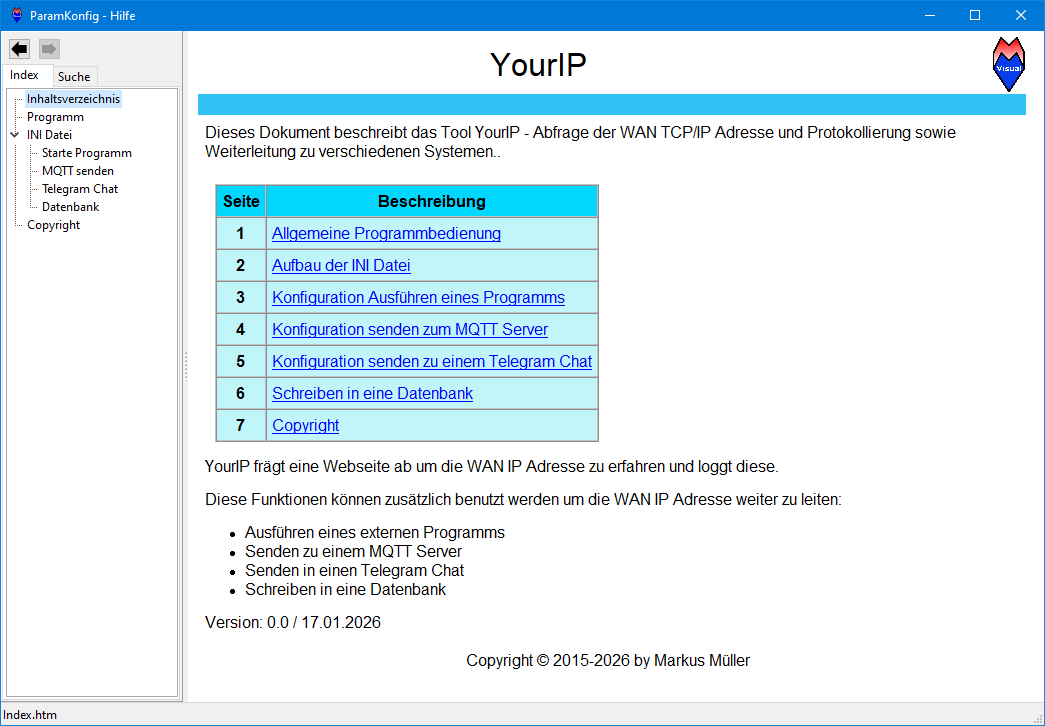
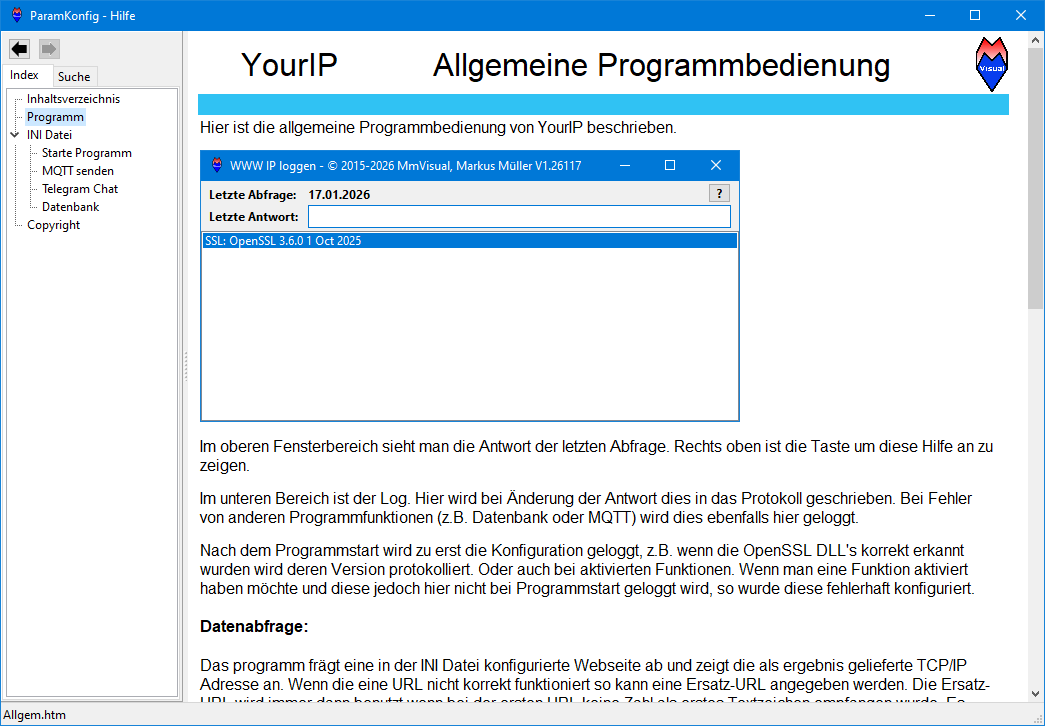
ParamKonfig - Hilfe Index Suche Inhaltsverzeichnis Programm Datei Starte Programm MQTT senden Telegram Chat Datenbank Copyright YourIP Dieses Dokument beschreibt das Tool YourIP - Abfrage der WAN TCP/IP Adresse und Protokollierung sowie Weiterleitung zu verschiedenen Systemen.. Seite
in „Eigene WAN Adresse loggen - YourIP“ · PC Hard- und Software · · Screenshots
-
Bild
Konfigurationssoftware ebyte network configtool V5.5
192.168.178.78 Local port 0 Network mode TCP server Mask 255.255.255.0 Remote IP 192.168.3.3 Remote port 8888 MQTT client parameters HTTP parameters MQTT server typical MQTT 3.1.1 Keepalive cycle 120sec ClientID test-iot UserName 1234/all Password 123456789 123456 Subscribe topic all/00000009000000094411/sub Qos
in „Datenübertragung RS485 über Ethernet via Ebyte NB114“ · Mikrocontroller und Digitale Elektronik · · Screenshots
-
Bild
Webinterface einer Temperaturüberwachung mit Graphen
- SP1 Wochentags 05:00 MO TU WE TH FR SA SO 38" - SP1 Solar 200s 40s 22" 70" - SP2 SDCard: aktiv MQTT: On Setup Update Current: KOL1: 38 °C SP1: 40 °C SP2: 35 °C Log (last 10): 30.03.2025 09:14:10 OK MQTT started "mqtt://192.168.1.91" 30.03.2025 09:14:41 OK Settings saved 30.03.2025 09:14:50 OK Settings
in „Regelung Solarthermie - Ersatz für auroMATIC 560“ · Projekte & Code · · Screenshots
-
Datei
sketch_jan16a.ino
esp_sleep_get_ext1_wakeup_status())); char __pin[sizeof(pin)]; pin.toCharArray(__pin, sizeof(__pin)); iot.mqtt.publish("klingel/test", 1, true, __pin); } } int print64(uint64_t number) { int pin=0; for (int i = 0; i < 64; i++) { bool bitt = number & 0x8000000000000000; if(bitt==true){ pin=i; } Serial.print(bitt
-
Datei
recsensors.py
import serial import sys import os import rrdtool import time import feuchte import logging import mqtt # directories BASEDIR='/opt/klima' LOGDIR=BASEDIR+'/log' DATADIR=BASEDIR+'/data' logging.basicConfig(filename=LOGDIR+'/recsensors.log', format='%(asctime)s %(levelname)s: %(message)s', level=logging.INFO
in „SDR-Dekoder für TFA KlimaLogg Pro/IT+ Temperatursensoren“ · Projekte & Code ·
-
Datei
Mixed_Reality_Space_Forum.txt
include <Wire.h> MPU6050 mpu6050(Wire); const char* ssid = ""; const char* password = ""; const char* mqtt_server = ""; WiFiClient espClient; PubSubClient client(espClient); long lastMsg = 0; char msg[50]; int value = 0; char angle_val[8]; int val = 0; void setup_wifi() { Serial.println(); Serial.print("
in „char in int umwandeln“ · Mikrocontroller und Digitale Elektronik ·
-
Datei
main.py.txt
Pin(12, Pin.IN, Pin.PULL_UP) dataQueue = [] WIFI_SSID = 'WLAN1' WIFI_PASSWORD = 'aftgr3en61022412' mqtt_client_id = 'testclient' # Just a random client ID ADAFRUIT_IO_URL = '10.28.1.119' ADAFRUIT_USERNAME = '' ADAFRUIT_IO_KEY = '' TOGGLE_FEED_ID = 'TOPIC' async def SendData(): while True: print(len(dataQueue
in „esp8266 sleep -> interrupt -> hochzähler -> wieder sleep“ · Mikrocontroller und Digitale Elektronik ·
-
Datei
build.py
#################################################################### # /IOTstack/.templates/tfrec-mqtt/build.py ################################################################################ issues = {} # Returned issues dict buildHooks = {} # Options, and others hooks haltOnErrors = True # Main wrapper
in „SDR-Dekoder für TFA KlimaLogg Pro/IT+ Temperatursensoren“ · Projekte & Code ·
-
Datei
kwb23.ino
Netzwerkschnittstelle in der IDE #define STASSID "xxx" // Wlan SSID #define STAPSK "yyyy" // Wlan PW const char* mqtt_server = "192.168.xx.yy"; // IP des MQTT Servers - z.B. fhem // Ende Individualisierungen #include <ESP8266WiFi.h> #include <ESP8266mDNS.h> #include <WiFiUdp.h> #include <ArduinoOTA.h> #include <PubSubClient.h
-
Datei
kwb13.ino
Das Programm liest Control und Sense Daten vom Bus // eines KWB Easyfire mit und sendet diese per MQTT an // fhem. Updates können OTA durchgeführt werden. // Ist bestimmt nicht fehlerfrei läuft aber seit einer Weile stabil // Hardware // Webmos d1 mini Pro + HER MAX485 module // Stromversorgung über
-
Bild
Screenshot der Software MQTT Explorer
MQTT Explorer Application Edit View 192.168.2.1 $state = ready $update (1 topic, 154 messages) heartbeat (9 topics, 72 messages) all = ("topic":"time","now":"2024-01-31T11:07:12.804","tzo":-60,"ms":1706695632804
in „Welches Protokoll?“ · Mikrocontroller und Digitale Elektronik · · Screenshots
-
Bild
Konfigurationsmenü für MQTT-Einstellungen
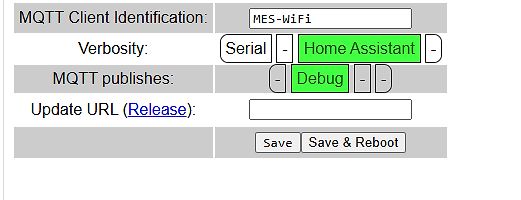
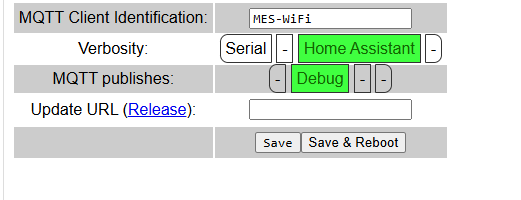
MQTT Client Identification: MES-Wifi Verbosity: Serial - Home Assistant - MQTT publishes: - Debug - - Update URL (Release): Save Save & Reboot
in „LON Bus Windhager mitlesen/steuern“ · Haus & Smart Home · · Screenshots
-
Datei
Makefile.txt
access point. Else it will stay in AP+STA mode. CHANGE_TO_STA ?= yes # Optional Modules #NDMODULES ?= mqtt rest MODULES ?= # --------------- esphttpd config options --------------- # If GZIP_COMPRESSION is set to "yes" then the static css, js, and html files will be compressed # with gzip before added to
-
Datei
espinclude.h
####### //#################################################################### // Reconnected den MQTT, wenn er nicht mehr verbunden ist void mqttreconnect() { int i; i = 5; // loopcount until we're reconnected while (i-- && !client.connected()) { //Serial.print("Attempting MQTT connection..."); if (
-
Bild
LabVIEW Blockdiagramm einer MQTT-Implementierung
1883 TCP SERVER Create Server Public Events.vi Ereignisse registriere Benutzerereignis MQTT <MQTT Server.Pub [1] -1 Kein Fehler NbConnections NbConnections I error server
in „Fehler beim "Serializing" von Temperaturdaten“ · Mikrocontroller und Digitale Elektronik · · Screenshots
-
Bild
Technische Spezifikationen des Nethix WE152
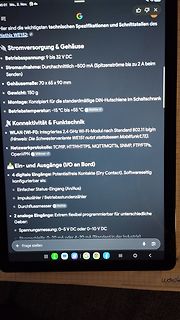
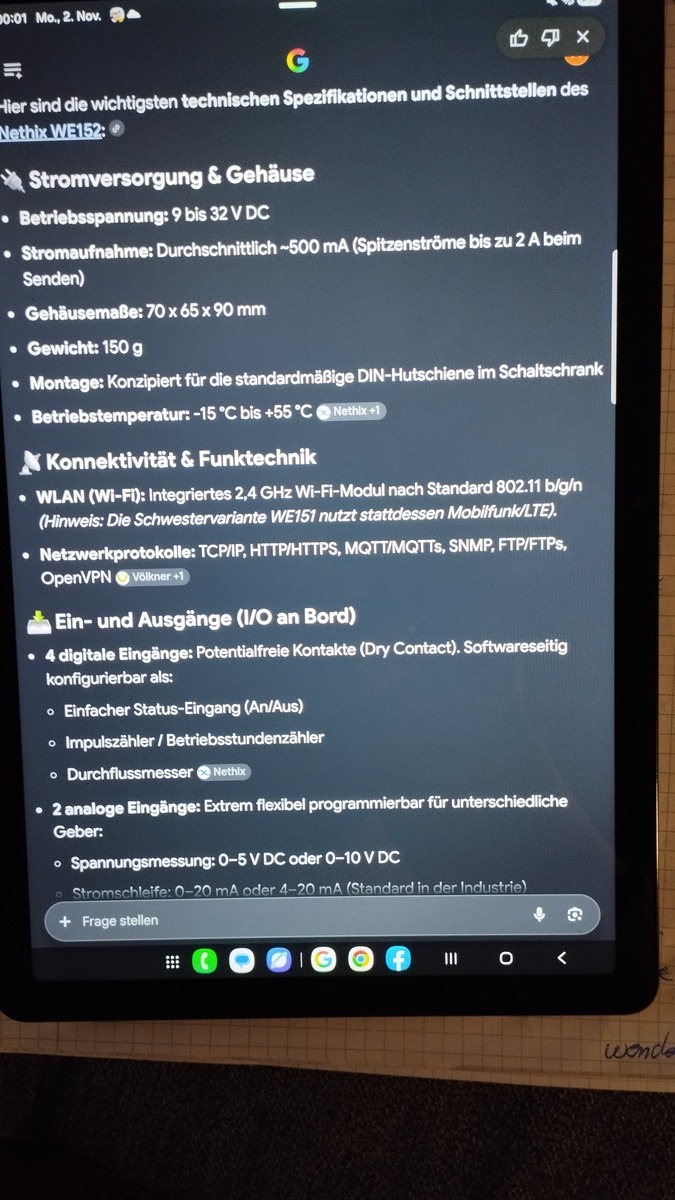
°C bis +55 °C, Konnektivität & Funktechnik, WLAN (Wi-Fi), Netzwerkprotokolle: TCP/IP, HTTP/HTTPS, MQTT/MQTTS, SNMP, FTP/FTPS, OpenVPN, Ein- und Ausgänge (I/O an Bord), 4 digitale Eingänge, 2 analoge Eingänge, Spannungsmessung: 0-5 V DC oder 0-10 V DC, Strommessung: 0-20 mA oder 4-20 mA
in „NETHIX WE152 IIoT- Modul“ · Markt · · Fotos
-
Bild
Diagramme zu IoT-Plattform-Präferenzen und Kommunikationsprotokollen
Communication protocols at the edge What communication protocol(s) do you use in your IoT/edge deployments? MQTT v5 28% MQTT v3 27% WebSockets 24% HTTP/1.1 17% Proprietary protocols 15% CoAP 10% OPC UA 10% ECLIPSE FOUNDATION Copyright Eclipse Foundation AISBL and contributors. Made available under CC-BY-SA 4.0
in „Arduino Ventuno Q, Marktanalyse des Embeddedbereichs, neue Chips uvam“ · Mikrocontroller und Digitale Elektronik · · Diagramme
-
Bild
Benutzeroberfläche eines SIP-Klingelinterface Firmware V. 1.49
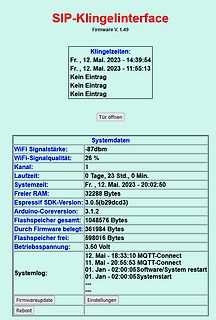
belegt: 361984 Bytes Flashspeicher frei: 598016 Bytes Betriebsspannung: 3.50 Volt 12. Mai - 18:33:10 MQTT-Connect 11. Mai - 20:55:53 MQTT-Connect 01. Jan - 02:00:05 Software/System restart 01. Jan - 02:00:05 Systemstart Systemlog: Firmwareupdate Einstellungen Reboot
in „Sipdial per ESP8266 an Fritzbox“ · Projekte & Code · · Screenshots
-
Bild
Screenshot einer Software-Hilfeseite von YourIP
YourIP Allgemeine Programmbedienung Index Suche Inhaltsverzeichnis Programm INI Datei Starte Programm MQTT senden Telegram Chat Datenbank Copyright WWW IP loggen - © 2015-2026 MmVisual, Markus Müller V1.26117 Letzte Abfrage: 17.01.2026 Letzte Antwort: SSL: OpenSSL 3.6.0 1 Oct 2025 Im oberen Fensterbereich
in „Eigene WAN Adresse loggen - YourIP“ · PC Hard- und Software · · Screenshots
-
Bild
Screenshot von Logdaten eines Tasmota-Geräts
start 08:44:03.693 wakeup end 08:44:03.695 wait for the meter 08:44:04.049 request data 08:44:33.079 MQTT: tele/tasmota_1C90DB/STATE = {"Time":"2024-11-28T08:44:33","Uptime":"0T16:09:38"} 08:44:33.088 MQTT: tele/tasmota_1C90DB/SENSOR = {"Time":"2024-11-28T08:44:33","WP_WMZ":{"Energie_total":"} 08:46:00.071
in „Wärmezähler über optische M-Bus-Schnittstelle auslesen“ · Haus & Smart Home · · Screenshots
-
Bild
Präsentationsfolie zur Espressif Component Registry
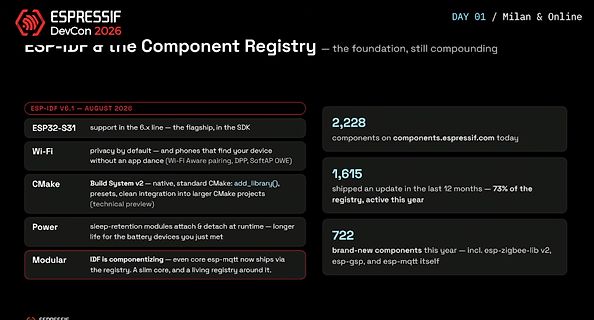
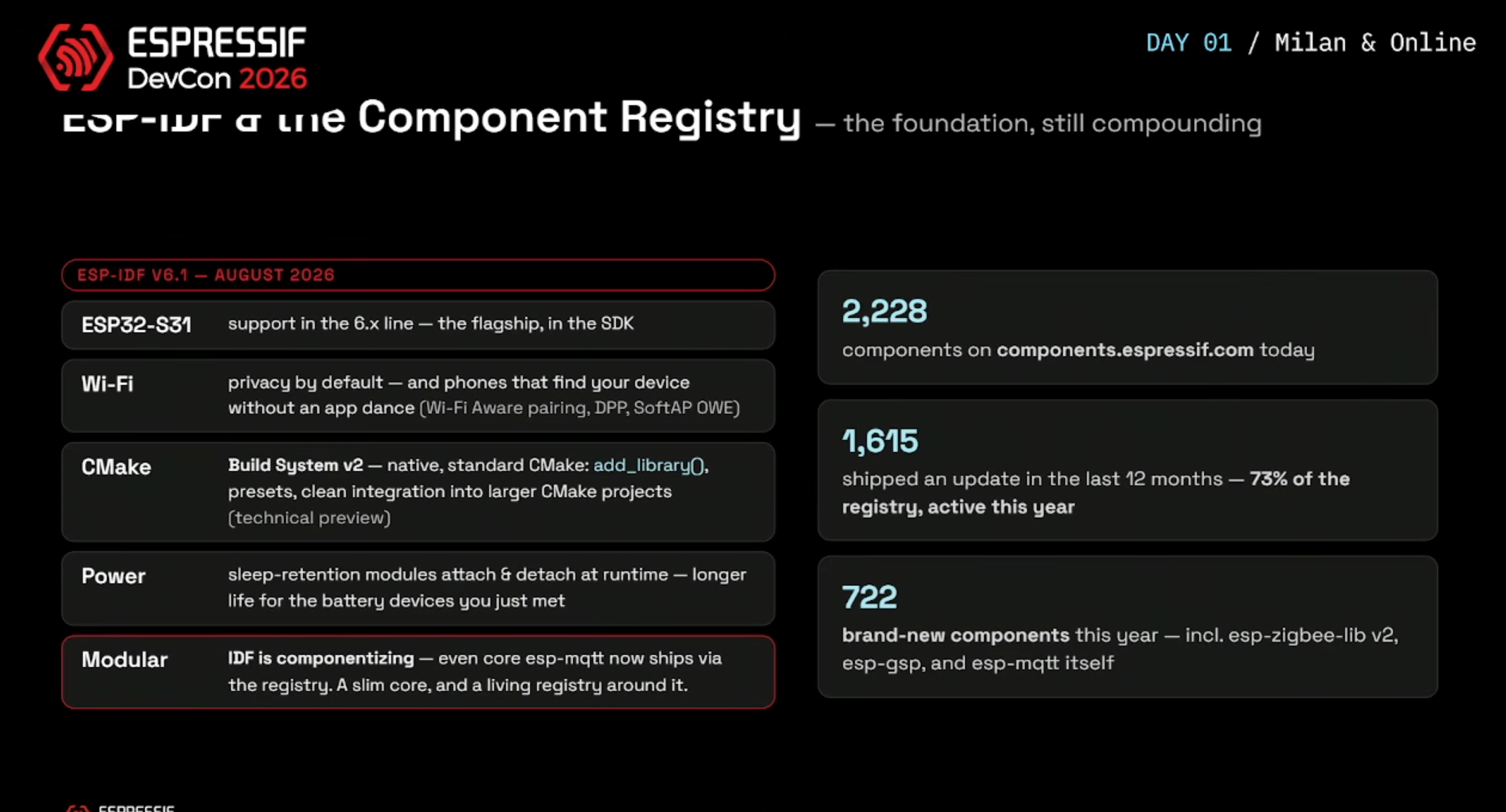
– longer life for the battery devices you just met Modular IDF is componentizing – even core esp-mqtt now ships via the registry. A slim core, and a living registry around it. 2,228 components on components.espressif.com today 1,615 shipped an update in the last 12 months – 73% of the registry, active this year 722 brand-new components this year – incl. esp-zigbee-lib v2, esp-gsp, and esp-mqtt itself
in „Superkongresstag – Espressif DevCon x STM Summit“ · Mikrocontroller und Digitale Elektronik · · Screenshots
-
Bild
Werbebild für ein Arduino-Fachbuch
Zubehörteilen wie Sensoren, Aktoren, Displays und Shields werden auch fortgeschrittene Themen wie moderne MQTT Smart Home Systeme, Arduino-Roboter und die Datenverarbeitung und Steuerung über Processing-Programme am PC behandelt. So können Sie die Möglichkeiten des Arduino voll ausnutzen! Ihr neues Buch im Überblick
in „[V] Bücher zum Arduino“ · Markt · · Sonstiges
-
Datei
lsltrR.log.txt
build: insgesamt 29 drwxrwxrwx 1 root root 0 1月 11 20:23 mqtt drwxrwxrwx 1 root root 0 1月 11 20:23 rest drwxrwxrwx 1 root root 0 1月 11 20:23 httpd drwxrwxrwx 1 root root 0 1月 11 20:23 user drwxrwxrwx 1 root root 0 1月 11 20:23 serial drwxrwxrwx 1 root root 0 1月
-
Bild
Liste technischer Features eines Mikrocontrollers
Transmission Control Protocol/Internet Protocol (TCP/IP)-Based Connectivity Protocols Along with SSL and MQTT Capabilities. • Supports STA Mode and Soft AP Functionality in IEEE 802.11 Infrastructure and IBSS Networks • Protected Management Frame (PMF) Handled in Hardware, WPA3 Support • Integrated Power Amplifier
in „Neue Bauteile: LEDs, Hochstrom-Schaltregler, MQTT-Module uvm“ · Mikrocontroller und Digitale Elektronik · · Screenshots
-
Datei
WAERME.txt
then done=0 print done reset endif if (sml[2]>0 and sml[10]>0) and smlj==0 then smlj=1 print enabled MQTT endif if (sml[2]==0 or sml[10]==0) and smlj==1 then smlj=0 print disabled MQTT endif #readmeter print wakeup start ;set serial protocol sml(-1 1 "2400:8N1") ;send 0x55 for 2,2 seconds with 8N1 (53x)
in „Wärmezähler über optische M-Bus-Schnittstelle auslesen“ · Haus & Smart Home ·
-
Datei
espinclude.h
####### //#################################################################### // Reconnected den MQTT, wenn er nicht mehr verbunden ist void mqttreconnect() { int i; i = 5; // loopcount until we're reconnected while (i-- && !client.connected()) { Serial.print("Attempting MQTT connection..."); // Create
-
Bild
Screenshot der MQTT Explorer Software mit Sensordaten
MQTT Explorer 192.168.2.49 SSYS broker (51 topics, 3124 messages) homeassistant UVR16x2 Sensor1 = 23.80 Ausgang1 = 0 Ausgang2 = 0 Ausgang3 = 0 Ausgang4 = 0 Ausgang5 = 0 Ausgang6 = 0 Ausgang7 = 0 Ausgang8
in „UVR 1611 (TA), Auswertung DL, Mega88, WinAVR“ · Projekte & Code · · Screenshots
-
Bild
Screenshot eines MQTT-Explorers mit Sensordaten-Verlauf
MQTT Explorer DISCONNECT mosquitto.org Topic sensor_data Value QoS: 0 02.02.2024 10:02:04 26.65 26.69 Comparing with previous message + 1 line, - 1 line History 26.6 26.4 26.2 26 25.8 02.02.2024 10:02:04
in „Fehler beim "Serializing" von Temperaturdaten“ · Mikrocontroller und Digitale Elektronik · · Screenshots
-
PDF
Technical-Information-Data-communication-with-Victron-Energy-products_DE.pdf
/v2/docs Nebendieser API ist auch MQTT verfügbar. Weitere Informationen sind hier erhältlich: https://github.com/victronenergy/dbus- mqtt/blob/master/README.md Integration in ein Marine NMEA 2000-Netzwerk? Siehe unseren Integrationsleitfaden
-
Datei
log.txt
http://192.168.115.49/webhook?event={presence}&tag={device} [WIFI] AP disconnected from a function. [MQTT] Wifi connection is 1 [WIFI] STA Connected. STA SSID: matap STA IPv4: 192.168.115.206, GW: 192.168.115.1, Mask: 255.255.255.0, DNS: 192.168.115.1 [HTTPCLIENT] URL is called with GET method: http://192.168.115.49
in „ESP32 sporadischer reboot alle 2h“ · Mikrocontroller und Digitale Elektronik ·
-
PDF
ct_Heizkosten.pdf
ändernSiedabeidieIP wenn Sie Änderungen an der Konfigura- legen wollen, vergeben Sie einen spre- IhresMQTT-Brokers): tionvornehmen. chenden Namen ( name) und geben die ID Umlivedabeizusein,wennWmbus - (id)an.SollteauchIhrAnbietereinMuster shell=/usr/bin/mosquitto_pub -h meters Daten empfängt, beobachten
in „Heizungszähler zählt, obwohl Heizung aus“ · Mechanik, Gehäuse, Werkzeug ·
-
Datei
Tasmota_SML_Script___Chart___PV.txt
=0 ; -- BOOT -- >B =>sensor53 r is(0 "Jan|Feb|Mär|Apr|Mai|Jun|Jul|Aug|Sep|Okt|Nov|Dez|") ;disable mqtt at boot prevents sending 0 smlj=0 ; -- SUBS -- ; reset 24h chart #rst24h for tmp 1 sday[-1] 1 sday[tmp]=0 next ; daily consumption month table #daysub wcs <div id="day" style="text-align:center;width
in „Smartmeter SML Tasmota negative Momentanleistung mit signed Wert von Zähler DVSB20.2TH“ · Haus & Smart Home ·
-
Bild
Textliste von Sensorwerten und Statusparametern
ch_Treturn = 61.3 dhw_boost_charge = 0 dhw_charge_once = 0 dhw_generating = 0 dhw_pump_circulation = 0 dhw_pump_cylinder = 0 dhw_runtime_ch = 3347.716666666667 dhw_starts_ch = 10563 dhw_Tcylinder = 43.4 dhw_Tdesired = 50 dhw_thermal_desinfection = 0 dhw_Tmeasured = 43.4 dhw_Tok = 0 dhw_Tsetpoint_max = 50 hc1_mixerposition = 0
in „Heizungs-Datenerfassung (HT3)“ · Projekte & Code · · Screenshots
-
PDF
G4_Digital_DC.pdf
logic groov RIO ® flowsfrompre-built nodes groov RIO edge I/O offers a single, compact, • EfficientMQTT datacommunications PoE-powered industrial package with web- with string or Sparkplug data formats based configuration and IIoT software built • Multiple OPCUAserver options in, supportfor multiple OTand
-
Bild
ZigBee Smart Hub Produktpräsentation
Zigbee2MQTT zigbee 3.0 TASMOTA ZigBee Smart Hub Hey Google 120+ Sub-devices 200M+ Transmit distance 240MHz ESP32 CPU
in „ZB-GW03 Zigbee tasmota hub“ · Haus & Smart Home · · Fotos