-
Datei
bmp280.c
/* $Id: bmp280.c 956 2015-05-12 08:53:43Z michi $ * $URL: https://svn.trisoft.at/AVR/BMP280/bmp280.c $ * * interface to Bosch BMP280 * * Copyright (C) 2015 Michael Reinelt <michael@reinelt.co.at> * */ #include
in „'var' may be uninitialized“ · Mikrocontroller und Digitale Elektronik ·
-
PDF
BMP280_2018.pdf
Data sheet BMP280 Digital Pressure Sensor Bosch Sensortec BMP280: Data sheet Document revision 1.19 Document release date January 8th, 2018 Document number BST-BMP280-DS001-19 Technical reference code(s) 0273 300
in „BME680 Berechnung Temperatur Luftfeuchtigkeit Druck Gas Fragen Initialisierung Assembler ASM ATmega8“ · Mikrocontroller und Digitale Elektronik ·
-
Datei
ESP32_BMP280_espNowDeepSleep3.ino
/* ESP32 BMP280 sender with DEEP SLEEP (3 seconds) BMP280 and BME280 sensor can be used: Enable it with the #define in the code You have also to adapt the receiver MAC in the code. external libraries: Temperature
-
Datei
main.c
.i2c_addr = 0x76; BMP280.config.t_sb = 1; // t_standby 62.5ms BMP280.config.filter = 4; // Filter coefficient 16 BMP280.config.unused = 0; // dummy BMP280.config.spi3w_en = 0; // we don't use SPI BMP280.ctrl.osrs_t = 2; // temperature oversampling 2x BMP280.ctrl.osrs_p = 5; // pressure oversampling 16x BMP280.ctrl.mode = 3; // normal mode BMP280_init(&BMP280); _delay_ms(100); while (1) { float T, P; BMP280_read(&BMP280, &T, &P); uart_printf("T=%.2f
in „'var' may be uninitialized“ · Mikrocontroller und Digitale Elektronik ·
-
Datei
ESP32_BMP280_espNowDeepSleep4.ino
/* ESP32 BMP280 sender with DEEP SLEEP (3 seconds) BMP280 and BME280 sensor can be used: Enable it with the #define in the code You have also to adapt the receiver MAC in the code. external libraries: Temperature
-
Datei
main.cpp
"); } else if (type == SENSOR_BMP280) { if (bmp.begin(addr, chipId)) { bmp.setSampling(Adafruit_BMP280::MODE_FORCED, Adafruit_BMP280::SAMPLING_X1, Adafruit_BMP280::SAMPLING_X1, Adafruit_BMP280::FILTER_OFF, Adafruit_BMP280::STANDBY_MS_1000); detectedSensor = SENSOR_BMP280; detectedAddr = addr; Serial.println("BMP280 initialized (temp + pressure, no humidity)."); return true; } Serial.println("BMP280 library init failed!"); } } Serial.println("No BME280/BMP280 found
in „Datenlogger Pendeluhr“ · Mikrocontroller und Digitale Elektronik ·
-
Datei
bmp280.h
/* $Id: bmp280.h 956 2015-05-12 08:53:43Z michi $ * $URL: https://svn.trisoft.at/AVR/BMP280/bmp280.h $ * * interface to BMP280 * * Copyright (C) 2015 Michael Reinelt <michael@reinelt.co.at> * */ #ifndef _BMP280
in „'var' may be uninitialized“ · Mikrocontroller und Digitale Elektronik ·
-
Datei
i2c_BMP280.ino
#include <Wire.h> #include "i2c.h" #include "i2c_BMP280.h" BMP280 bmp280; void setup() { Serial.begin(115200); Serial.print("Probe BMP280: "); if (bmp280.initialize()) Serial.println("Sensor found"); else { Serial.println("Sensor missing"); while (1) {} } // onetime-measure: bmp280.setEnabled(0); bmp280.triggerMeasurement(); } void loop() { bmp280.awaitMeasurement(); float temperature; bmp280.getTemperature(temperature); float pascal; bmp280.getPressure(pascal); static float
in „Arduino iLib und BMP280“ · Mikrocontroller und Digitale Elektronik ·
-
Datei
i2c_BMP280.h
#ifndef i2c_bmp280_h #define i2c_bmp280_h #include "i2c.h" #include "i2c_Sensor.h" /** ###################################################################### Driver for the BMP280-Sensor CONSUMPTION: standby 0.5 µA
in „Arduino iLib und BMP280“ · Mikrocontroller und Digitale Elektronik ·
-
PDF
wettersensor-bme280.pdf
raturistauf±1.0°Cexakt–sagtdas geradeeinmal0,1µA.DieAntwort- für die Signale und ein 3,3-Volt- Bezeichnung BMP280 gegeben Datenblatt-unddieErmittlungdes zeitdesSensorsaufeineMessanfrage Regler bereits vorhanden. Zudem - ausgestattet mit einer höheren Luftdrucks gelingt mit einer Auf- dauertetwa1Sekunde-somitsind
in „Welches ist jetzt eigentlich die beste CO2-Ampel?“ · Mikrocontroller und Digitale Elektronik ·
-
PDF
BME280_Datasheet.pdf
when they are read. For details on the interface, consult chapter 6. 5.2 Register compatibility to BMP280 The BME280 is downward register compatible to the BMP280, which means that the pressure and temperature control and readout is identical to BMP280. However, the following exceptions have to be considered: Table 17: Register incompatibilities between BMP280 and BME280 Register Bits Content BMP280 BME280 Read value is 0xD0 “id” 7:0 chip_id 0x56 / 0x57 (samples) Read value is 0x60 0x58 (mass production) ‘110’: 2000 ms ‘110’: 10 ms 0xF5 “config” 7:5 t_sb
in „PIC18F, Sensor auslesen I2C“ · Mikrocontroller und Digitale Elektronik ·
-
Datei
Capture.TXT
1] ACK: 1168 SEQ: 23260 -> 0 bytes in HTTP: SEQ-SEQ_OFFSET_DATA = 1092 76gen bmp...y: 27x: 176 ret= 0 last data byte sent = 1714 TCP : socket[ 1] ACK: 1714 SEQ: 23260 -> 0 bytes in HTTP: SEQ-SEQ_OFFSET_DATA = 1638 76gen bmp...y: 42x: 224 ret= 11- Ò Ò zÒ ºj€ þ last data byte sent
in „winziger Webserver mit enc28j60+mega32“ · Mikrocontroller und Digitale Elektronik ·
-
 Bild
Bild
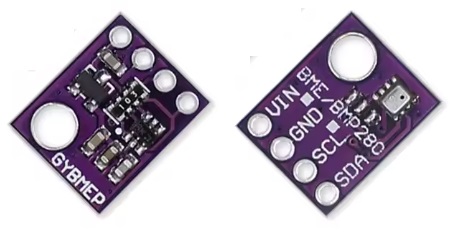
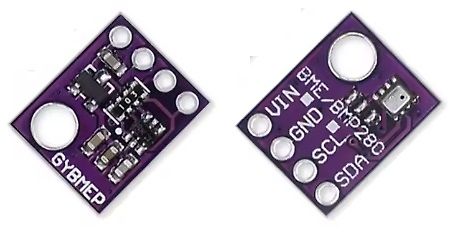
Zwei BME280 Sensormodule auf Leiterplatten
GYBMEP VIN BME/BMP280 GND SCL SDA
in „GY-BME280 mit Arduino benutzenIch möchte den Wettersensor GY-BME280 mit Arduino benutzen“ · Mikrocontroller und Digitale Elektronik · · Platinenfotos
-
 Bild
Bild
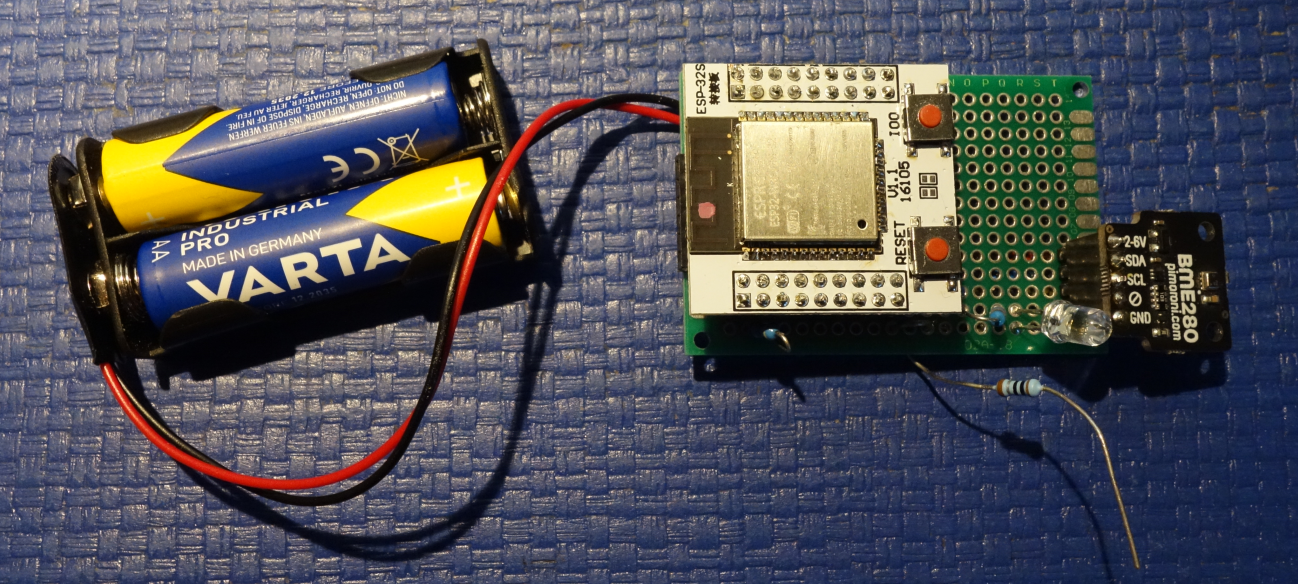
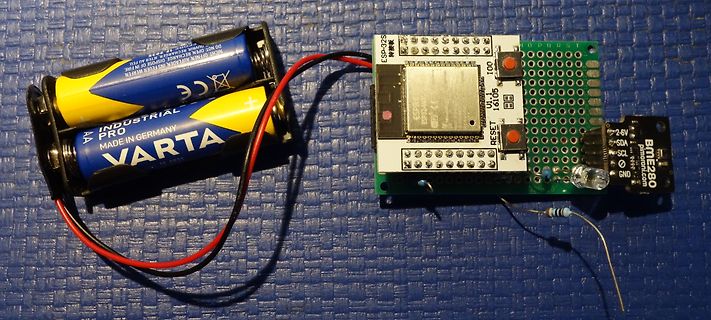
ESP-32S Modul mit Batterien und BME280 Sensor
INDUSTRIAL PRO VARTA MADE IN GERMANY AA ESP-32S U.1.1 16105 RESET BME280 2-6V SDA SCL GND
in „Micropython Wetterstation“ · Projekte & Code · · Platinenfotos
-
Datei
platformio.ini
board_build.filesystem = littlefs ; Serial monitor monitor_speed = 115200 ; Libraries lib_deps = adafruit/Adafruit BME280 Library@^2.2.4 adafruit/Adafruit BMP280 Library@^2.6.8 adafruit/Adafruit Unified Sensor@^1.1.14 mathieucarbou/ESPAsyncWebServer@^3.6.0 mathieucarbou/AsyncTCP@^3.3.2 bblanchon/ArduinoJson@^7.1.0 ; Build
in „Datenlogger Pendeluhr“ · Mikrocontroller und Digitale Elektronik ·
-
Datei
BME280.c
sensor registers / bytes /* ** Private enums. */ enum BME280_OSR // (Over-Sampling-Rate) { BME280_OSR_Off = 0, BME280_OSR_X1 = 1, BME280_OSR_X2 = 2, BME280_OSR_X4 = 3, BME280_OSR_X8 = 4, BME280_OSR_X16 = 5 }; enum BME280_Mode { BME280_Mode_Sleep = 0, BME280_Mode_Forced
in „BME280 Sensor - Code für ATmega328 in C“ · Projekte & Code ·
-
Datei
config.h
BMA180 //#define Bobs_9DOF_V1 // BobsQuads 9DOF V1 with ITG3200, BMA180 & HMC5883L //#define Bobs_10DOF_BMP_V1 // BobsQuads 10DOF V1 with ITG3200, BMA180, HMC5883L & BMP180 - BMP180 is software compatible with BMP085 //#define FLYDUINO_MPU // MPU6050 Break Out onboard 3.3V reg //#define CRIUS_AIO_PRO_V1 /
in „Problem mit meinem Projekt (Quadrocopter)“ · Mikrocontroller und Digitale Elektronik ·
-
 Bild
Bild
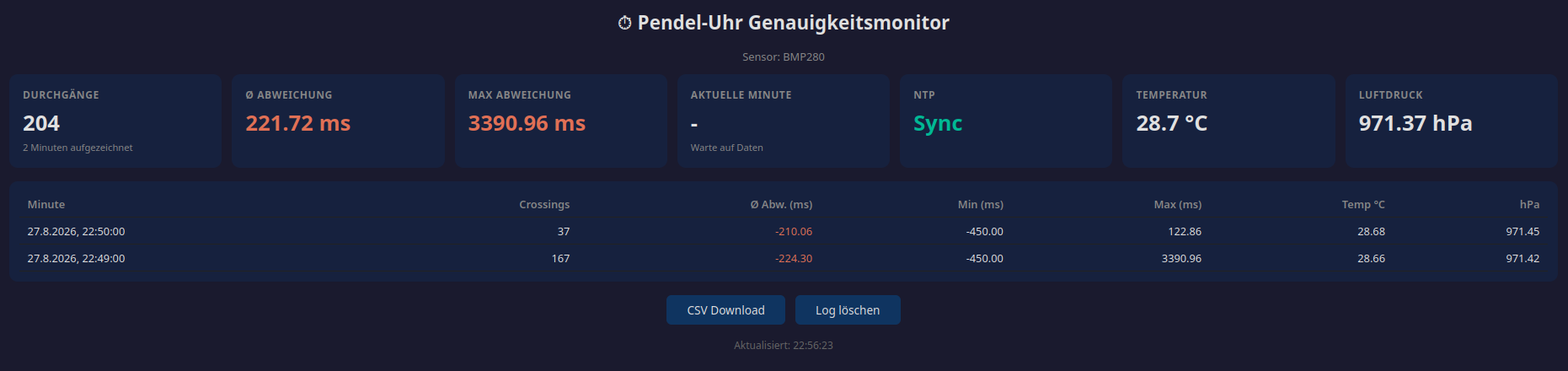
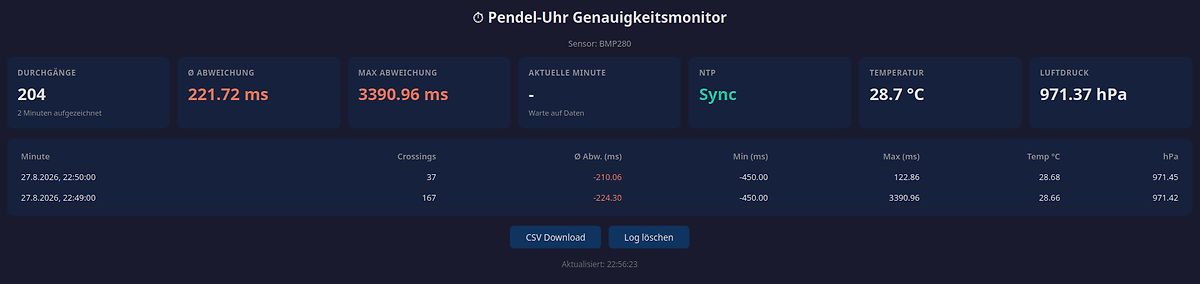
Dashboard eines Pendel-Uhr Genauigkeitsmonitors
Pendel-Uhr Genauigkeitsmonitor Sensor: BMP280 DURCHGÄNGE 204 Ø ABWEICHUNG 221.72 ms MAX ABWEICHUNG 3390.96 ms AKTUELLE MINUTE - Sync TEMPERATUR 28.7 °C LUFTDRUCK 971.37 hPa Minute Crossings Ø Abw. (ms) Min (ms) Max (ms) Temp °C hPa 27.8.2026
in „Datenlogger Pendeluhr“ · Mikrocontroller und Digitale Elektronik · · Screenshots
-
 Bild
Bild
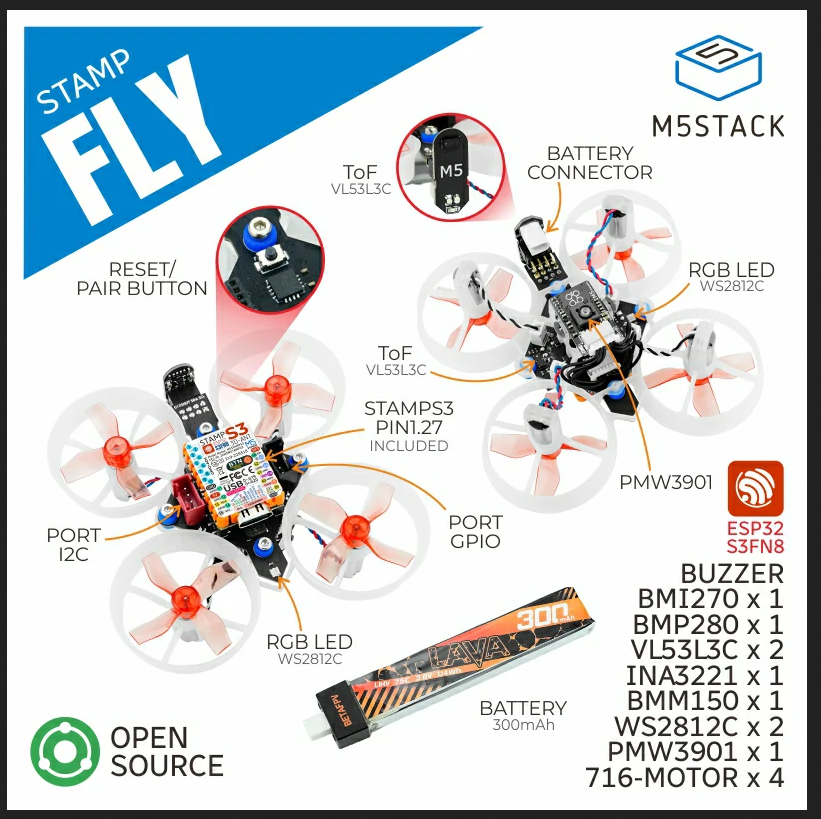
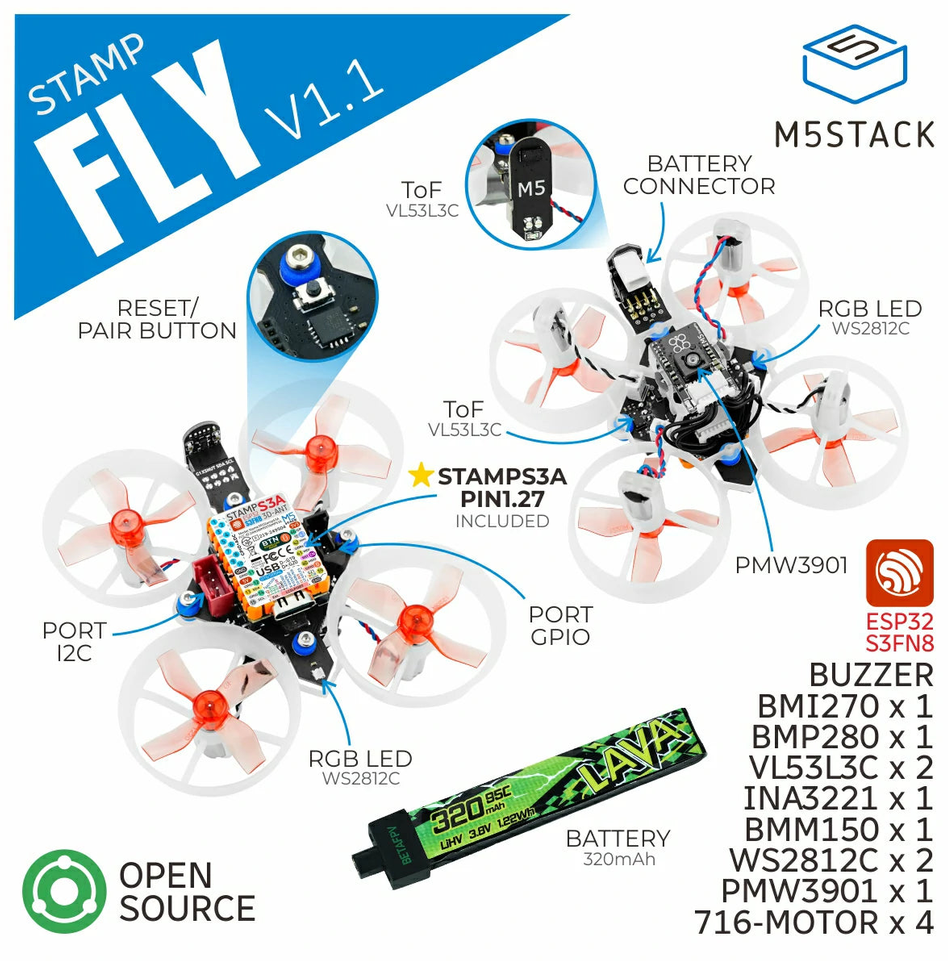
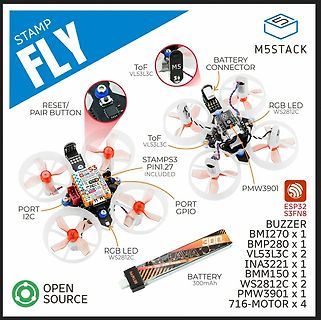
Produktübersicht M5STACK STAMP FLY Drohne
PIN1.27 INCLUDED PORT I2C PORT GPIO RGB LED WS2812C PMW3901 BATTERY 300mAh ESP32 S3FN8 BUZZER BMI270 x 1 BMP280 x 1 VL53L3C x 2 INA3221 x 1 ISM150 x 1 WS2812C x 2 PMW3901 x 1 716-MOTOR x 4 OPEN SOURCE
in „Bauteil-Roundup: Drohnenkit bis Piezoputzanlage“ · Mikrocontroller und Digitale Elektronik · · Sonstiges
-
 Bild
Bild
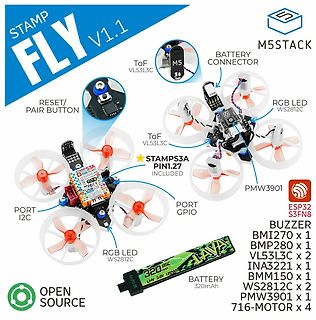
Produktübersicht M5Stack STAMP FLY V1.1 Drohne
ToF VL53L3C STAMPS3A PIN1.27 INCLUDED PORT I2C PORT GPIO RGB LED WS2812C PMW3901 BUZZER BMI270 x 1 BMP280 x 1 VL53L3C x 2 INA3221 x 1 BMM150 x 1 WS2812C x 2 PMW3901 x 1 716-MOTOR x 4 LAVA 320mAh LIHV 3.8V USB OPEN SOURCE ESP32 S3FN8
in „Neue Bauteile: Hochgeschwindigkeitsfunk, Löttechnik und die Rückkehr der QWERTZ-Tastatur“ · Mikrocontroller und Digitale Elektronik · · Sonstiges
-
 Bild
Bild
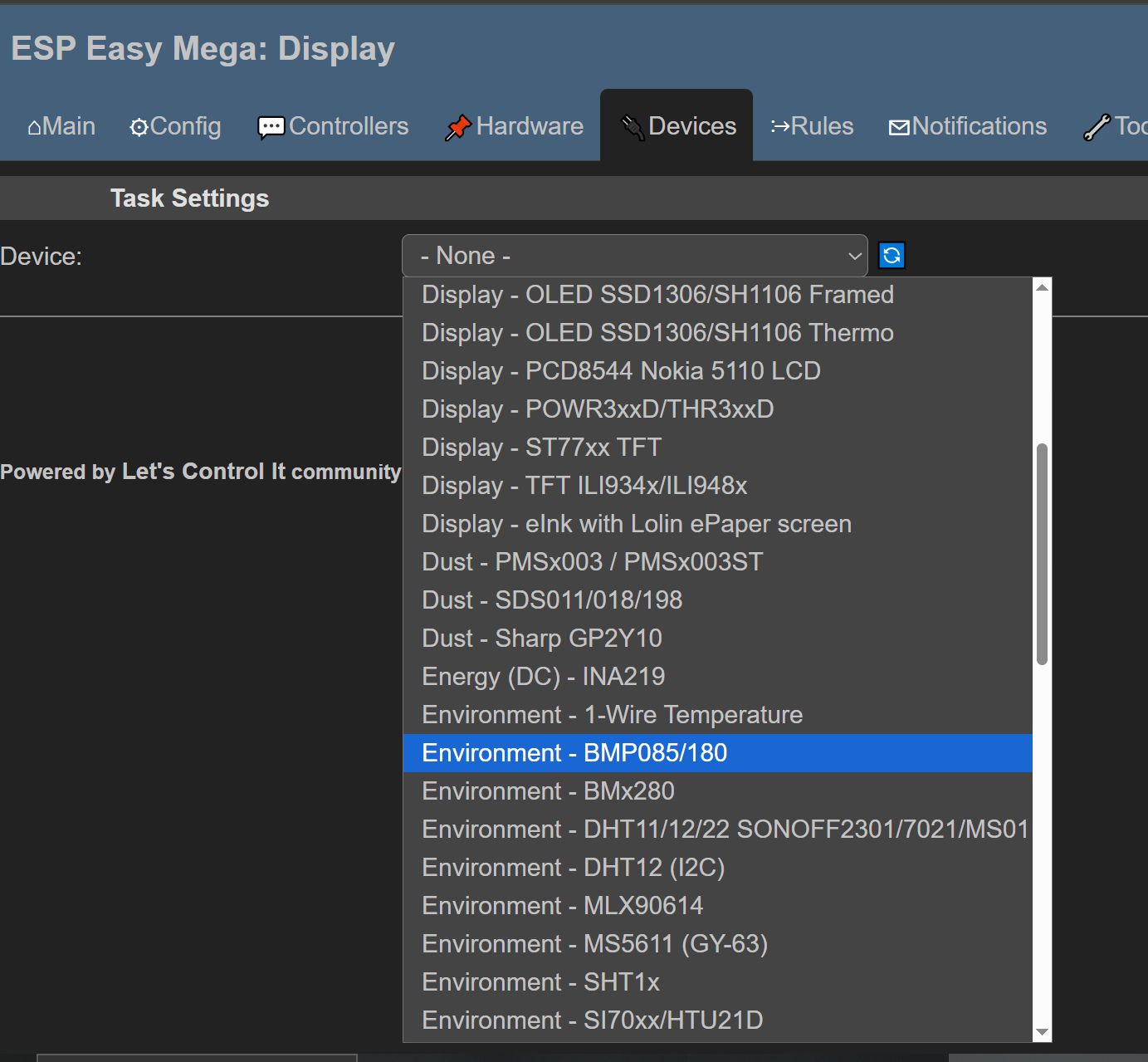
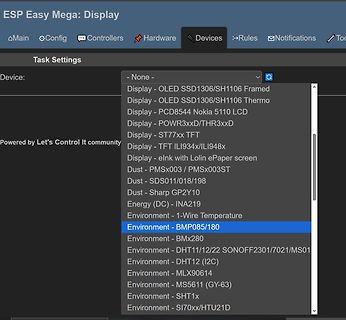
Dropdown-Menü für Geräteeinstellungen in einer Software
SDS011/018/198 Dust - Sharp GP2Y10 Energy (DC) - INA219 Environment - 1-Wire Temperature Environment - BMP085/180 Environment - BMx280 Environment - DHT11/12/22 SONOFF2301/7021/MS01 Environment - DHT12 (I2C) Environment - MLX90614 Environment - MS5611 (GY-63) Environment - SHT1x Environment - SI70xx/HTU21D
in „Günstiges und einfaches Mini-Controller Board, was würdet ihr heute nehmen?“ · Mikrocontroller und Digitale Elektronik · · Screenshots
-
PDF
DiscoveryF3_adap.pdf
1PIU9S10 Y4 PIU901 PITP101 Label: A8 9 PIP20109 PC15 PIU9S2 Y5 PIU905 PITP101 Label: A5 PD15_OUT4 R2PIR280PIR2801 P10 110PIP20101 MS5611-01BA03 Y6 PIU902 PITP1201Label: A7 12 PIP201012 PC4_ADC2_IN5 3PIU9Z3 Y7 PIU904 PITP1301Label: A6 PA1_OUT5 R2PIR290PIR2901 P13 140PIP201014 GND 1PIU9VCC_PAD 15 PIP201015
in „[V] STM32F3 Discovery + Adapterboard für ein FlyingF3 (FlightControl) mit der Taulabssoftware“ · Markt ·
-
PDF
SAT-L1_Flight_Controller.pdf
MPU_SCL 4 I D SCK D V ESP_EN ESP32-WROOM-32E ESP_IO0 MPU_SDA 3 D 2 SDI V U3 5 3 D 25 ESP_IO0 GND SDO BMP280 A J1 EN V IO0 +3.3V +3.3V 2 D D A 35 ESP_TX +3.3V CSB N N Conn_01x02_Pin TXD0/IO1 G G 1 V_AKKU ESP_EN 4 24 SENSOR_VP IO2 1 7 2 D 5 34 ESP_RX N SENSOR_VN RXD0/IO3 G C6 26 8 1 IO4 10µF 29 C D GND PWR_FLAG
in „Prüfung Schaltplan Flight Controller“ · Mikrocontroller und Digitale Elektronik ·
-
PDF
Elektronik_Sortimente.pdf
Radar Sensor Switch 5x Temperatur- / Luftfeuchtigkeitssensor DHT22 / AM2302 / AM2321 / Si7021 / BME280 / HDC1080 5x Helligkeitssensor BH1750 5x Luftdrucksensor BMP180 5x Gas-Sensoren je: MQ-7, MQ-9, MQ-131, MQ-135, MQ-137 und MH-Z19 2x Heart Sensor: XD-58C 5x Soil Moisture Sensor Hygrometer 5x Digital
in „Einkaufsliste für die Einrichtung eines Elektronik-Labors“ · Mikrocontroller und Digitale Elektronik ·
-
Datei
BME680_Defs.h
short Check_Result_Gas(); // void Avrg_Calc() ; // void Show_Avrg(unsigned short Target); // short BMP280_readPressure(double *pres) ; // aus Inet void Show_ChipID() ; // void Set_BME680_Parameter() ; // void Show_Gas_IAC() ; // // Lcd pinout settings sbit LCD_RS at RB4_bit; sbit LCD_EN at RB5_bit; sbit
in „BME680 Druckberechnung viel zu hoch“ · Mikrocontroller und Digitale Elektronik ·
-
PDF
Oszilloskop_2024A.pdf
ausführen soll. Siehe hierzu “So speichern Sie Setup-Dateien" auf Seite 239. • 8-Bit Bitmap-Bild (*.bmp) — das vollständige Bildschirmbild in einem farbreduzierten Bitmapformat (8-bit). Siehe hierzu “So speichern Sie BMP- oder PNG-Bilddateien" auf Seite 239. • 24-Bit Bitmapbild (*.bmp) — Das vollständige
in „Genauigkeit eines Oszilloskop“ · Mikrocontroller und Digitale Elektronik ·
-
PDF
13504_TM_X19AQ00214.pdf
andmustbeconfiguredtoworkwithyourdisplayhardware.Consultdocumentationfortheprogram 13504CFG.EXE which can be used to configure 13504BMP. 13504BMP is not supported on non-PC platforms. Installation Copy the file 13504BMP.EXE to a directory that is in the DOS path on your hard drive. Usage At the prompt, type 13504bmp bmp file [/a] [/lcd] [/crt] [/?]. Where: bmp file displays the bmp format file /a automatically exits after 5 seconds /lcd displays the image on a LCD /crt displays the image on a CRT /? displays the Help screen Comments 13504BMP only currently
in „[V] Displaycontroller Epson SED1354 (800*600)“ · Markt ·
-
PDF
uniTFT050-A.pdf
Screenshots/HardcopiesdesDisplaysoder desVideo-Inputs. Eingabe Definition Speicherbedarf / Ausführungszeit 1 BMP 24Bit → TrueColor sehr hoch 2 BMP 16Bit → HighColor hoch 3 BMP 8Bit grey → Graustufenbild gering 11 epg32Bit → TrueColormit Alphakanal sehr hoch 12 epg16Bit → HighColor hoch 13 epg8Bit grey → Graustufenbild
in „Probleme mit übertragung“ · Mikrocontroller und Digitale Elektronik ·
-
PDF
Datenblatt_uniTFT_050-A.pdf
Screenshots/HardcopiesdesDisplaysoder desVideo-Inputs. Eingabe Definition Speicherbedarf / Ausführungszeit 1 BMP 24Bit → TrueColor sehr hoch 2 BMP 16Bit → HighColor hoch 3 BMP 8Bit grey → Graustufenbild gering 11 epg32Bit → TrueColormit Alphakanal sehr hoch 12 epg16Bit → HighColor hoch 13 epg8Bit grey → Graustufenbild
in „Display am Attiny 841“ · Mikrocontroller und Digitale Elektronik ·
-
Datei
TECHLIB_APR07_Dir.txt
Directory of I:\cdstart 12.03.2007 16:48 <DIR> . 12.03.2007 16:49 <DIR> .. 12.03.2007 16:38 610.254 splash.bmp 1 File(s) 610.254 bytes Directory of I:\datasheets 12.03.2007 16:48 <DIR> . 12.03.2007 16:49 <DIR> .. 12.03.2007 16:49 <DIR> pdf_avr 12.03.2007 16:42 71.623 index.html 12.03.2007 16:42 33.772 index_graph.html
in „STK500 CD ISO Image“ · Mikrocontroller und Digitale Elektronik ·
-
PDF
DW-65054-dg_at_2006--10_r17a.pdf
when converting the text. The command will only convert the amount of text that fits in the given BMP size. When the conversion is done the ME will send the bitmap in one or many AT commands to the accessory. Execution command: AT*SETBC= <bmp_width>, <bmp_height>, <quality>, <string> Response: *SETBC
in „Wie mit GPRS über AT Commands verbinden?“ · Mikrocontroller und Digitale Elektronik ·
-
Datei
main.lst
BL OLEDbgcolor 383 OLEDdrawpic(verbindung_43x31,sizeof(verbindung_43x31),45,45,88,76);//Verbindung BMP \ 0000008C 4C20 MOV R0,#+76 \ 0000008E 01B4 PUSH {R0} \ 00000090 5820 MOV R0,#+88 \ 00000092 01B4 PUSH {R0} \ 00000094 2D23 MOV R3,#+45 \ 00000096 2D22 MOV R2,#+45 \ 00000098 .... LDR R1,??DataTable365
in „LPC2103 Speicherproblem“ · Mikrocontroller und Digitale Elektronik ·
-
PDF
S1D13504_MF1072-04.pdf
configuration address using the 13504CFG configuration program. UTILITIES (S19A-B-001-03) EPSON 3-23 6: 13504BMP DEMONSTRATION PROGRAM 6 13504BMP D EMONSTRATION P ROGRAM 13504BMP demonstrates S1D13504 display capabilities by rendering bitmap images on the display. The 13504BMP display utility is designed to operate
in „[V] Displaycontroller Epson SED1354 (800*600)“ · Markt ·
-
PDF
SMD_Catalog.pdf
7GHz RDs BFR180W Sie N SOT323 npn RF 8V 4mA fT 7GHz REs BFS480 Sie DJ SOT363 dual RF npn fT 7GHz BFR280 Sie N SOT23 npn RF 8V 8mA fT 7.5GHz REs REs BFR280W Sie N SOT323 npn RF 8V 8mA fT 7.5GHz REs BFP280 Sie X SOT143 npn RF 8V 8mA fT 7.5GHz REs BFP280W Sie WQ SOT343 npn RF 8V 8mA fT 7.5GHz RE 2SC3357
in „Hilfe bei Bauteilsuche für Mainboard“ · PC Hard- und Software ·
-
PDF
IL3829.pdf
.............................................................7 FIGURE 5-1 - IL3829ZD F LOOR P LAN (BMP FACE UP ....)........................................................................................8 FIGURE 7-1 : ATA READ BACK PROCEDURE INSERTION OF DUMMY READ ..................................
in „IL3829 - E-Paper Display Treiber“ · Mikrocontroller und Digitale Elektronik ·
-
PDF
wr2_rcm_revb.pdf
plot_pens>, PSIZE,<paper_size> CMDIV, <cmdiv>,AUTO,<auto>,FORMAT,<format> ,BCKG,<bckg> <device> : = { BMP, BMPCOMP,CANONCOL, EPSON, EPSONCOL, HPDJ, HPDJBW, HPPJ, HPTJ, HPLJ, HP7470A, HP7550A, TIFF, TIFFCOL TIFFCOMP} <port> : = { GPIB, RS, CENT, FLPY, CARD, HDD, PRT} <page_feed> : = { OFF, ON} <plot_pens
in „Oszi einstellen“ · Mikrocontroller und Digitale Elektronik ·
-
PDF
BME680.pdf
1110110 (0x76); connection it to V DDIOresults in slave address 1110111 (0x77), which is the same as BMP280’s I²C address. The SDO pin cannot be left floating; if left floating, the I²C address will be undefined. Modifications reserved |Data subject not change without notice | Printed in GermanyDocument
in „PIR-Sensor wird von BME680 gestört, warum?“ · Mikrocontroller und Digitale Elektronik ·
-
PDF
BME680.pdf
1110110 (0x76); connection it to V DDIOresults in slave address 1110111 (0x77), which is the same as BMP280’s I²C address. The SDO pin cannot be left floating; if left floating, the I²C address will be undefined. Modifications reserved |Data subject not change without notice | Printed in GermanyDocument
in „BME680 Berechnung Temperatur Luftfeuchtigkeit Druck Gas Fragen Initialisierung Assembler ASM ATmega8“ · Mikrocontroller und Digitale Elektronik ·
-
PDF
GIMP_Handbuch_de.pdf
279 9.10.27.Ebenenmaske anwenden . . . . . . . . . . . . . . . . . . . . . . . . . . . . . . . . . 280 9.10.28.Ebenenmaske loschen . . . . . . . . . . . . . . . . . . . . . . . . . . . . . . . . . . . 280 9.10.29.Auswahl aus Maske . . . . . . . . . . . . . . . . . . . . . . . . . . . . . . . . . . .
in „Wie zwei Bilder wie Folien übereinanderlegen ?“ · PC Hard- und Software ·
-
PDF
Agilent_6000_Userguide.pdf
Utility& Print Config& Print to. You can create an image file in one of the following file formats: BMP (8-bit) image file — The screen image is converted to a smaller, lower resolution bitmap file of the complete screen, including the status line and softkeys. BMP (24-bit) image file — This is a larger
in „Wittig(welec) DSO W20xxA Open Source Firmware (Teil2)“ · Mikrocontroller und Digitale Elektronik ·
-
PDF
SDS1000X-E_UserManual_UM0101E-E03B.pdf
channel is you select channel. At recall, the data will be displayed on the screen by REFA or REFB. 3. BMP The oscilloscope saves the screen image in external memory in “*.bmp” format. You can specify the file name and saving directory under the same directory using the same file name. The recall of image
in „Lieber SIGLENT SDS1104X-E als RIGOL DS1054Z“ · Analoge Elektronik und Schaltungstechnik ·
-
PDF
SDS1000X-E_UserManual_UM0101E-E03B.pdf
channel is you select channel. At recall, the data will be displayed on the screen by REFA or REFB. 3. BMP The oscilloscope saves the screen image in external memory in “*.bmp” format. You can specify the file name and saving directory under the same directory using the same file name. The recall of image
in „*DSO* : Bedienung“ · Analoge Elektronik und Schaltungstechnik ·
-
PDF
SMD-PHILIPS_1999.pdf
BSR42 AR3 SC-62/SOT89 BF822W 1Wt; 1W- SC-70/SOT323 BSR43 AR4 SC-62/SOT89 BF823 1Yp; 1Yt SOT23 BSS63 BMp; BMt SOT23 BF824 F8p; F8t SOT23 BSS64 AMp; AMt SOT23 BF824W F8t; F8- SC-70/SOT323 BST15 BT1 SC-62/SOT89 BF840 NCp; NCt SOT23 BST16 BT2 SC-62/SOT89 BFS19 F2p; F2t SOT23 BST39 AT1 SC-62/SOT89 BFS20 G1p
in „Datenbuch Valvo 1977 gesucht“ · Analoge Elektronik und Schaltungstechnik ·
-
Datei
config-mod-LK511-mt7623n-BPiR2.txt
# CONFIG_BMA180 is not set # CONFIG_BMA220 is not set # CONFIG_BMC150_ACCEL is not set # CONFIG_DA280 is not set # CONFIG_DA311 is not set # CONFIG_DMARD06 is not set # CONFIG_DMARD09 is not set # CONFIG_DMARD10 is not set # CONFIG_IIO_CROS_EC_ACCEL_LEGACY is not set # CONFIG_IIO_ST_ACCEL_3AXIS is not
in „Linux Kernel 5.1.1. auf dem BPi-R2“ · PC Hard- und Software ·
-
PDF
sm_xpress_sl-c48x.pdf
where you are. 4,000m (13,123ft) 1 3,000m (9,842ft) 2 2,000m (6,561ft) 3 1 High 3 1,000m 2 High 2 (3,280ft) 4 3 High 1 0 4 Normal You can set the altitude value from Device Settings in Samsung Easy Printer Manager program. • For Windows and Macintosh users, you set from Samsung Easy Printer Manager > Switch
in „Laserdrucker druckt rote Punkte/Streifen/Flecken“ · PC Hard- und Software ·
-
PDF
Samsung_Service_Manual_clx4195n.pdf
where you are. 4,000m (13,123ft) 1 3,000m (9,842ft) 2 2,000m (6,561ft) 3 1 High 3 1,000m 2 High 2 (3,280ft) 3 High 1 4 0 4 Normal You can set the altitude value from Device Settings in Samsung Easy Printer Manager program. 4-12 Copyright© 1995-2012 SAMSUNG. All rights reserved. Downloaded from www.Manualslib.com
in „Drucker Samsung CLX-4195FW: Display hängt“ · PC Hard- und Software ·
-
Datei
EMS_Adapter.xml
Radwr0Ke3rxa0FsWj9JPEIdkiZ/gVqOTlT3B3eALIQK5b9dnYgfDRSD+v3pgV3ZN/JR2yrHzX6EqUUvub6SX7JyfW9KGbeGRvOni37efb8hU280n9bjbdT8vpTJGyUTm2wpOR8mzb/BwuYXn4GyNWsMxIALFXtFySmNvpWSU3MmZy2o8usF6lx7N93yl6+En1U2T6upKRfTkmGZKpsFj2DlXbPGkTXUjXRVkqrbFc3y8VwT1+3Pw7wSFIFGKYYngyGb6ct2tArgR6pw8qY6jxYHLkKxvNrpSKKKHCGL/5+RyQAuQ5Jh9KSpJTc
-
Datei
EMS_Adapter.xml
Radwr0Ke3rxa0FsWj9JPEIdkiZ/gVqOTlT3B3eALIQK5b9dnYgfDRSD+v3pgV3ZN/JR2yrHzX6EqUUvub6SX7JyfW9KGbeGRvOni37efb8hU280n9bjbdT8vpTJGyUTm2wpOR8mzb/BwuYXn4GyNWsMxIALFXtFySmNvpWSU3MmZy2o8usF6lx7N93yl6+En1U2T6upKRfTkmGZKpsFj2DlXbPGkTXUjXRVkqrbFc3y8VwT1+3Pw7wSFIFGKYYngyGb6ct2tArgR6pw8qY6jxYHLkKxvNrpSKKKHCGL/5+RyQAuQ5Jh9KSpJTc
-
Datei
Google_Uebersetzer-Prescaler_12_Ghz.html
rgba(100,100,100,0.4)}.gb_fc{display:block;padding:10px 20px}.gb_Zb{outline:0;padding:14px 41px;width:280px}.gb_Zb:hover{background-color:#f7f8f8}.gb_Zb:focus,.gb_Zb:hover:focus{background-color:#f4f4f4}.gb_Zb:active,.gb_Zb:focus:active{background-color:#e8e8e9}.gb_gc{display:inline-block;vertical-align
in „Vorverstärker und Vorteiler für Frequenzzähler“ · HF, Funk und Felder ·
-
PDF
IMOR100E-01E_010.pdf
Output over the FAX modem. Setting Screen SYSTEM Record to the built-in Output to FAX Save the data in BMP format printer to the flash ATA card 12-4 IM OR100E-01E 12.2 Taking a Hard Copy Operating Procedure 1. Selecting the output method At the screen that appears when the “SYSTEM” key is pressed, select
in „Yokogawa OR100E/OR122 wofür?“ · Mechanik, Gehäuse, Werkzeug ·