-
 Bild
Bild
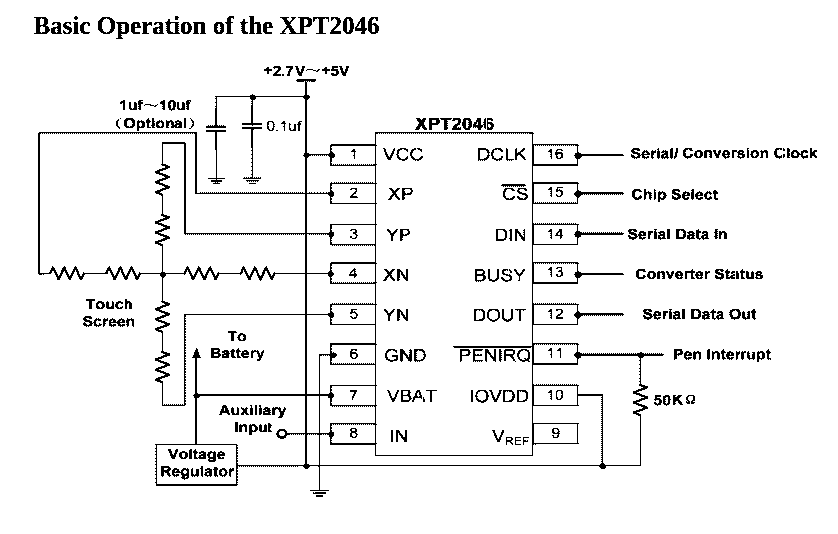
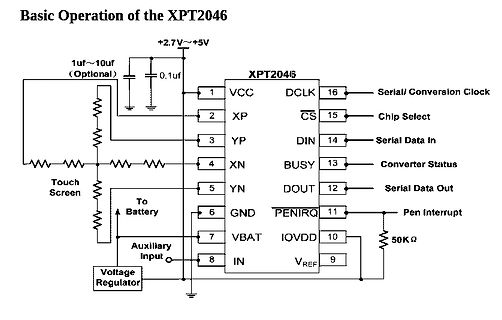
Schaltplan des XPT2046 Touchscreen-Controllers
Basic Operation of the XPT2046 +2.7V~+5V 1uf~10uf (Optional) 0.1uf XPT2046 1 VCC DCLK 16 Serial/ Conversion Clock 2 XP CS 15 Chip Select 3 YP DIN 14 Serial Data In 4 XN BUSY 13 Converter Status 5 YN DOUT 12 Serial Data Out 6
in „Hilfe 2.8" LCD Problem“ · Mikrocontroller und Digitale Elektronik · · Schaltpläne
-
Datei
touchXPT2046.cpp
200 #define XPT2046_Y_MIN 260 #define XPT2046_X_MAX 3750 #define XPT2046_Y_MAX 3860 #define XPT2046_AVG 4 #define XPT2046_INV 0 #define XPT2046_XY_SWAP 0 #define XPT2046_X_INV 1 #define XPT2046_Y_INV 1 #define XPT2046
in „littlevGL Graphiclib, benutzt die hier jemand?“ · Mikrocontroller und Digitale Elektronik ·
-
Datei
xpt2046.c
/* * xpt2046.c * * Created on: Jul 21, 2018 * Author: Dimitris Tassopoulos */ #include "xpt2046.h" #include "stm32f10x_gpio.h" #include "stm32f10x_exti.h" #define XPT2046_IRQ_PIN GPIO_Pin_8 #define XPT2046_IRQ_PORT
in „C Code Verständnis Problem“ · Mikrocontroller und Digitale Elektronik ·
-
Datei
xpt2046.c
#define xpt2046_CS_PIN 3 #define xpt2046_CS_PORT PORTB #define xpt2046_CS_DDR DDRB #define xpt2046_INT 2 #define xpt2046_INT_PIN PIND #define xpt2046_INT_DDR DDRD void xpt2046_spi_init(void)//set spi speed and
in „XPT2046 Probleme beim Auslesen“ · Mikrocontroller und Digitale Elektronik ·
-
Datei
touchXPT2046.h
#ifndef __touchXPT2046_h__ #define __touchXPT2046_h__ #include "mbed.h" #include "lvgl.h" #ifdef __cplusplus extern "C" { #endif void initTouchXPT2046(); bool readTouchXPT2046(lv_indev_drv_t * indev_drv, lv_indev_data_t * data); #ifdef __cplusplus } #endif #endif // __touchXPT2046_h__
in „littlevGL Graphiclib, benutzt die hier jemand?“ · Mikrocontroller und Digitale Elektronik ·
-
PDF
Interface_Definition.pdf
19 LED_A Backlight anode 20 NC Null 21-28 DB0-DB7 Lower 8-bit data bus 29 T_CLK Touch controller (XPT2046) clock 30 T_CS Touch controller (XPT2046) Chip Select 31 T_DIN Touch controller (XPT2046) data entry (ie MOSI) 32 NC Null 33 T_DO Touch controller (XPT2046) data out (ie MISO) Touch controller (XPT2046) data interrupt (usually 34 T_IRQ high, touched low) 35 SD_DO MISO SD card interface 36 SD_CLK SD card interface clock 37 SD_DIN MOSI SD card interface 38 SD_CS SD card interface chip select 39
in „LCD ILI9325 an SAME70-XPLD“ · Mikrocontroller und Digitale Elektronik ·
-
Datei
touch.h
----------------------------------- int16_t TPLx,TPLy; //globale x,y-Koordinaten #if USE_TOU & TOU_XPT //################################################ //# TOUCHPANEL mit ADS7843(XPT2046) # //################################################ // Achtung, PEN_IRQ funktioniert nicht, wenn das LSB != 0
in „Touch - wie kalibrieren in C?“ · Mikrocontroller und Digitale Elektronik ·
-
Datei
TouchPanel.h
#ifndef __TOUCHPANEL_H #define __TOUCHPANEL_H /* ADS7843/7846/UH7843/7846/XPT2046/TSC2046 ÖžÁ */ #define CMD_RDY 0X90 //0B10010000ŒŽÓòî·Ö·œÊœ¶ÁX×ø±ê #define CMD_RDX 0XD0 //0B11010000ŒŽÓòî·Ö·œÊœ¶ÁY×ø±ê /* ʹÄÜ24LC02 */ //#define ADJ_SAVE_ENABLE /*Ž¥ÃþÆÁПƬÁ¬œÓÒýœÅÅäÖà */
in „ADS7843 Werte berechnen“ · Mikrocontroller und Digitale Elektronik ·
-
Datei
touch.c
; flag &= ~TOUCH; deltim = (4000*SYSTICK)/1000; //4 Sekunden } } TFT_ClrScr(); } #if USE_TOU & TOU_XPT //################################################ //# TOUCHPANEL mit ADS7843(XPT2046) # //################################################ //--------------------------------------------------------
in „Touch - wie kalibrieren in C?“ · Mikrocontroller und Digitale Elektronik ·
-
Datei
Solar_v2.5_OTA_ext_LOLIN.ino
define TS_CS D3 #define TFT_RST -1 Adafruit_ILI9341 tft = Adafruit_ILI9341(TFT_CS, TFT_DC, TFT_RST); XPT2046_Touchscreen ts(TS_CS); #else // Pins for the ILI9341 and ESP8266 (D1 mini) #define TFT_DC D2 #define TFT_CS D1 #define TFT_LED D8 #define TOUCH_CS D3 #define TOUCH_IRQ D4 Adafruit_ILI9341 tft = Adafruit_ILI9341(TFT_CS, TFT_DC) ; // instance for the tft-screen XPT2046_Touchscreen ts(TOUCH_CS, TOUCH_IRQ) ; // instance for touch-screen #endif // all my known colors for ILI9341 TFT (but not all used in program) #define B_DD6USB 0x0006 // 0, 0, 4 my preferred background
in „Unerwartet Kompilierungsfehler ESP8266 / Funkwetteranzeige treibt mich in den Wahnsinn“ · Mikrocontroller und Digitale Elektronik ·
-
 Bild
Bild
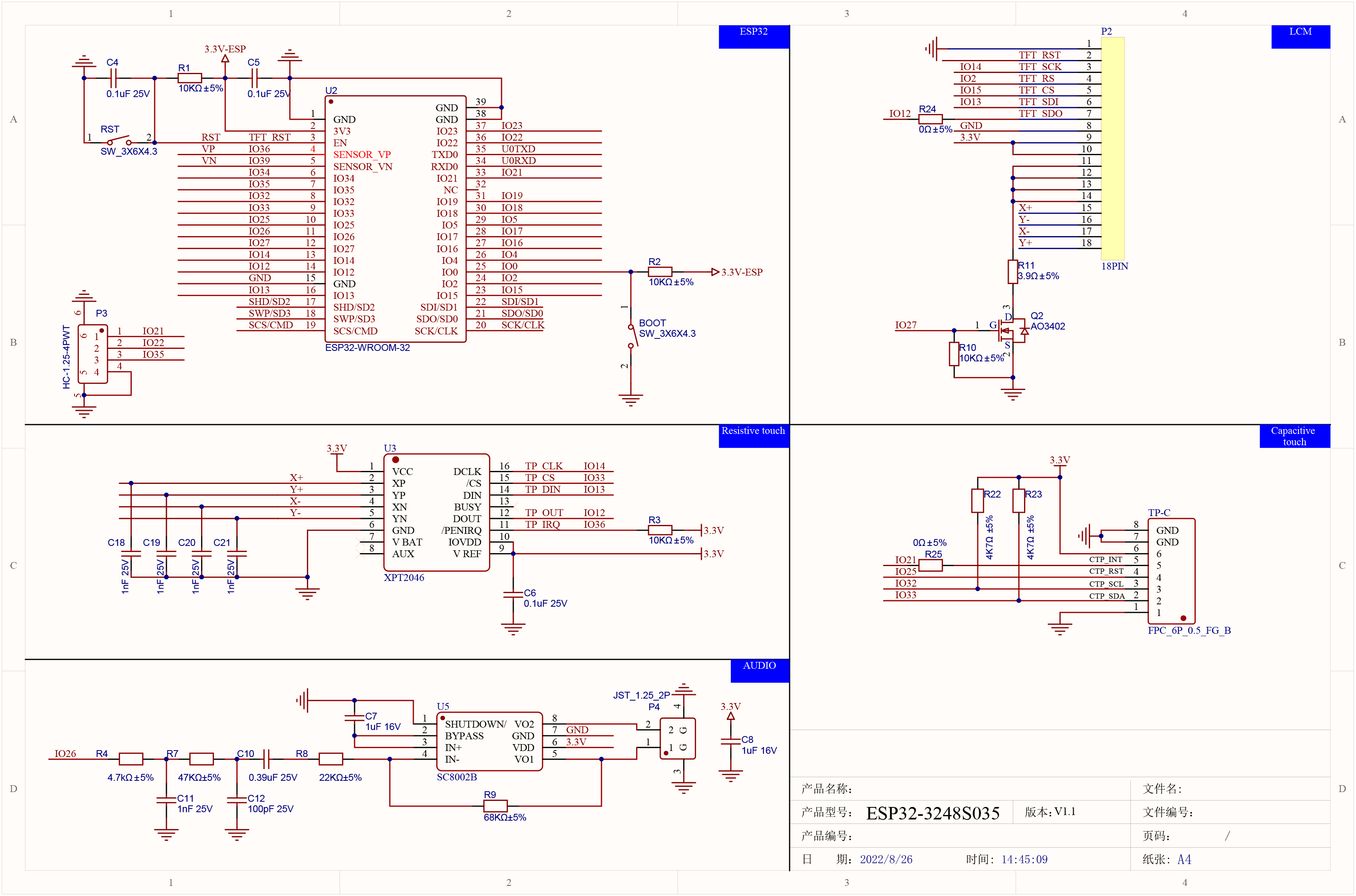
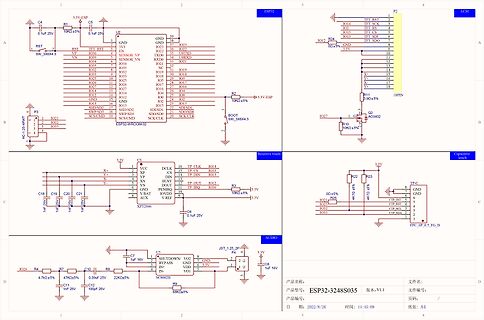
Schaltplan mit ESP32, LCD und Touch-Controller
ESP32, WROOM-32, LCD, P2, P3, XPT2046, SC1002B, 10k, 0.1uF, 1uF, 22k, 4.7k, 47k, 68k, 3.3V, GND, IO21 bis IO38, R1 bis R11, C1 bis C12, U1 bis U5
in „Cheap Yellow Display“ · Mikrocontroller und Digitale Elektronik · · Schaltpläne
-
 Bild
Bild
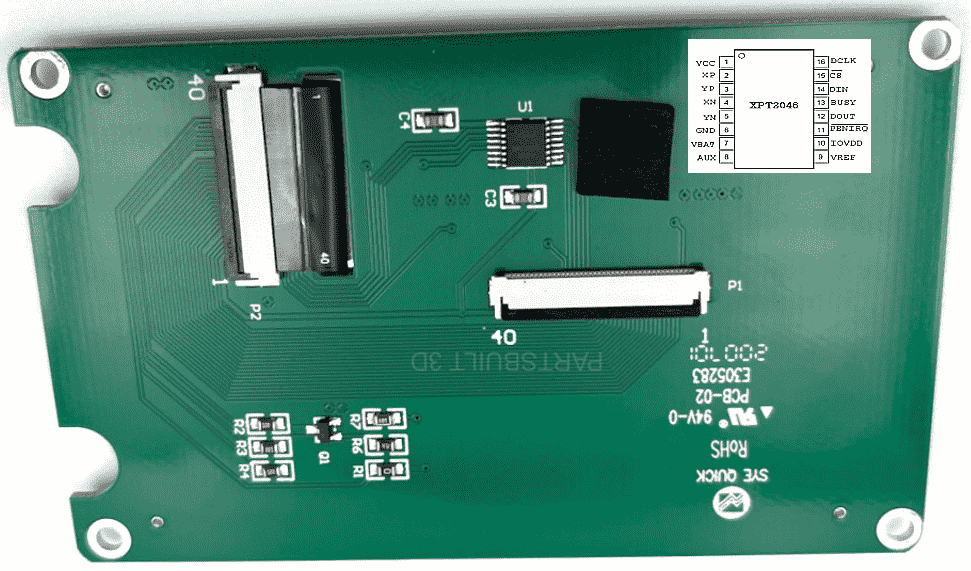
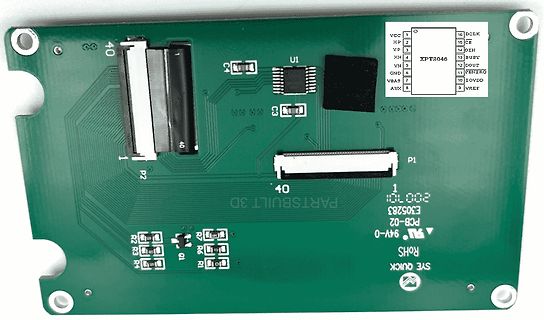
Grüne Leiterplatte mit Steckverbindern und IC
AUX 9, DCLK 16, CB 15, DIN 14, BUSY 13, DOUT 12, PENIRQ 11, IOVDD 10, VREF 5, P2, P1, 40, 40, U1, XPT2046, E305283, 200710, PARTSBUILT 3D, PCB-02, 94V-0, ROHS, SYE QUICK
in „Steuerelektronik für TFT gesucht“ · Mikrocontroller und Digitale Elektronik · · Platinenfotos
-
 Bild
Bild
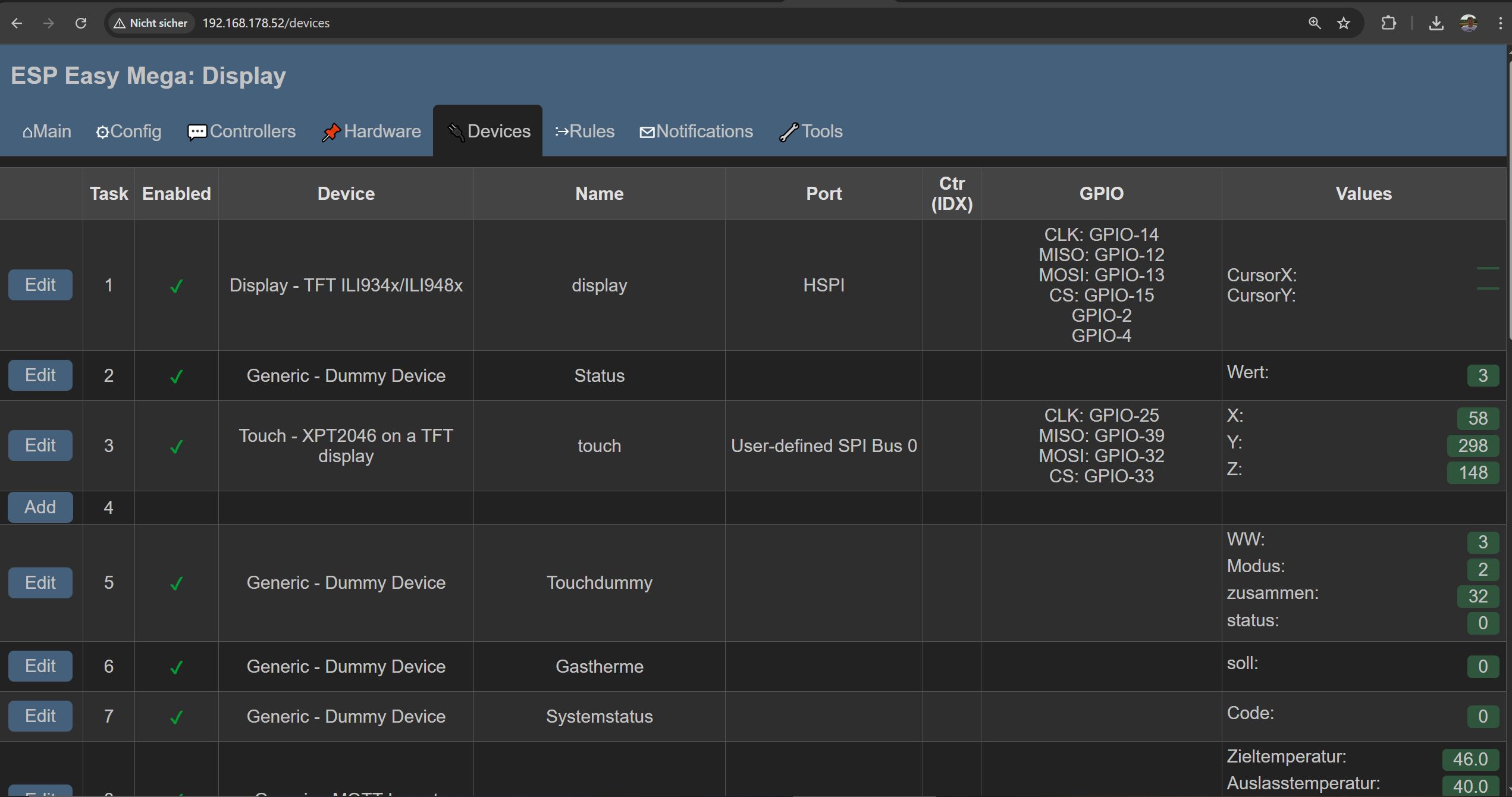
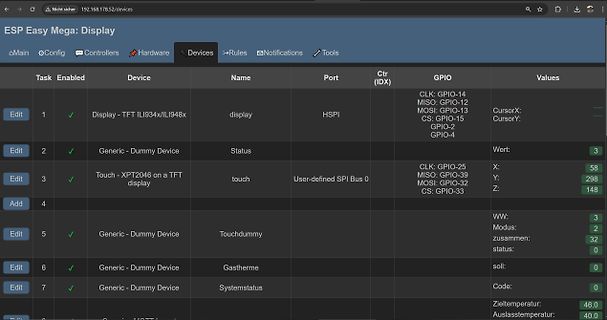
Webinterface ESP Easy Mega Display Konfiguration
GPIO-15 GPIO-2 GPIO-4 CursorX: CursorY: Edit 2 Generic - Dummy Device Status Wert: 3 Edit 3 Touch - XPT2046 on a TFT display touch User-defined SPI Bus 0 CLK: GPIO-25 MISO: GPIO-39 MOSI: GPIO-32 CS: GPIO-33 X: 58 Y: 298 Z: 148 Add 4 Edit 5 Generic - Dummy Device Touchdummy WW: 3 Modus: 2 zusammen: 32
in „Günstiges und einfaches Mini-Controller Board, was würdet ihr heute nehmen?“ · Mikrocontroller und Digitale Elektronik · · Screenshots
-
PDF
Datasheet_AZ-Touch_MOD_Rev_B.pdf
x 240 pixel resolution ● SPI display controller ILI9341 ● Resitive touch with SPI touch controller XPT2046 ● Integrated 5V/1.4A voltage regulator (Vin 9...35V DC) ● Integrated prototyping area ● 6-pin removable terminal block for prototyping area & power supply ● Marked and connected GPIO & power pins
in „Stromversorgung ArduiTouch MOD“ · Mikrocontroller und Digitale Elektronik ·
-
Datei
ili9341.c
req_samples = 1; break; case itnNormalized: req_samples = __ILI9341_TOUCH_NORM_SAMPLES__; break; } // XPT2046 8-bit command patterns static uint8_t x_cmd[] = { 0xD3 }; static uint8_t y_cmd[] = { 0x93 }; static uint8_t sleep[] = { 0x00 }; uint32_t x_avg = 0U; uint32_t y_avg = 0U; uint16_t sample = req_samples; uint16_t num_samples = 0U; // change SPI clock to 2MHz, max rate supported by XPT2046 // TODO: based on STM32G4, which is clocked at 170MHz. support other chips. //MODIFY_REG(lcd->spi_hal->Instance->CR1, SPI_CR1_BR, SPI_BAUDRATEPRESCALER_128); ili9341_spi_touch_select(lcd); while
in „STM32U575 und ILI9341 SPI DMA Problem“ · Mikrocontroller und Digitale Elektronik ·
-
Datei
ESP32_32E_Tasten_ok.ino
/* 2.8" ESP32-32E ILI9341 20-Tasten Touch Keyboard 16 normale Tasten + 4 Sondertasten Touch: XPT2046 / TFT_Touch Ausgabe: Display + Serial Basis: funktionierender Hersteller-Demo-Code */ #include <Arduino.h> #include "TFT_eSPI.h" #include <TFT_Touch.h> // ---------------------------------------
-
Datei
compile_Tasmota_stable_in_docker_container_versuch3.txt
pio/build/tasmota/lib62d/Joba_Tsl2561-2.0.10/Tsl2561Util.cpp.o Compiling .pio/build/tasmota/lib48e/XPT2046_Touchscreen/XPT2046_Touchscreen.cpp.o Archiving .pio/build/tasmota/lib73d/libAdafruit_SSD1351-gemu-1.0.a Indexing .pio/build/tasmota/lib73d/libAdafruit_SSD1351-gemu-1.0.a Compiling .pio/build/tasmota
in „Dlock 11827 und Tasmota - compilieren für FW-Update“ · Haus & Smart Home ·
-
PDF
SCH.pdf
TPS61040 28V C18 7 VBAT VREF 9 VCC+3.3V C17 R6 10UF/50V 8 6 C14 2 200pF 22 VUX GND A LCD_BL_ADJ CON2 XPT2046 C10 10UF/16V A 104 1 2 3 4 5 6 7 8
in „Open407I-C (Board für STM32) mit OV9655 (Kameramodul) auf 5"-Touchdisplay“ · Mikrocontroller und Digitale Elektronik ·
-
Datei
_4.0_User_Setup.h
80000000 //#define SPI_READ_FREQUENCY 20000000 // Optional reduced SPI frequency for reading TFT // The XPT2046 requires a lower SPI clock rate of 2.5MHz so we define that here: #define SPI_TOUCH_FREQUENCY 2500000 // Comment out the following #define if "SPI Transactions" do not need to be // supported. When
in „Esp32 Display“ · Mikrocontroller und Digitale Elektronik ·
-
Datei
Touch.c
if(num&0x80)TDIN=1; else TDIN=0; num<<=1; TCLK=0;//ÉÏÉýÑØÓÐЧ TCLK=1; } } //SPI¶ÁÊýŸÝ //ŽÓ7846/7843/XPT2046/UH7843/UH7846¶ÁÈ¡adcÖµ uint16_t ADS_Read_AD(uint8_t CMD) { uint8_t i; uint8_t count=0; uint16_t Num=0; TCLK=0;//ÏÈÀµÍʱÖÓ TCS=0; //Ñ¡ÖÐADS7843 ADS_Write_Byte(CMD);//·¢ËÍÃüÁî×Ö for(i=100;i>0;i--
in „STM32 Interruptproblem - Interrupt geht, aber Main nicht -“ · Mikrocontroller und Digitale Elektronik ·
-
Datei
User_Setup.h
80000000 // Optional reduced SPI frequency for reading TFT #define SPI_READ_FREQUENCY 20000000 // The XPT2046 requires a lower SPI clock rate of 2.5MHz so we define that here: #define SPI_TOUCH_FREQUENCY 2500000 // The ESP32 has 2 free SPI ports i.e. VSPI and HSPI, the VSPI is the default. // If the VSPI
in „Powerpins am ESP32-DevKitC, WDT_RTC_RESET“ · Mikrocontroller und Digitale Elektronik ·
-
Datei
mp3_audio.c
MP3Sample.c" #include "ff.h" #include "diskio.h" #include "GLCD.h" #include "fmc_sdram.h" #include "xpt2046.h" #include "ft5x06.h" #include "ts_calibrate.h" #include "Param.h" /* Private define ------------------------------------------------------------*/ #define READBUF_SIZE (5 * 1024) /* Value must
in „STM32F429 WM8789 MP3“ · Mikrocontroller und Digitale Elektronik ·
-
Datei
mp3_audio.c
MP3Sample.c" #include "ff.h" #include "diskio.h" #include "GLCD.h" #include "fmc_sdram.h" #include "xpt2046.h" #include "ft5x06.h" #include "ts_calibrate.h" #include "Param.h" /* Private define ------------------------------------------------------------*/ #define READBUF_SIZE (5 * 1024) /* Value must
in „STM32F429 WM8789 MP3“ · Mikrocontroller und Digitale Elektronik ·
-
Datei
compile_Tasmota_stable_in_docker_container.txt
a Indexing .pio/build/tasmota32-DE/libd18/libExt-printf.a Compiling .pio/build/tasmota32-DE/lib48e/XPT2046_Touchscreen/XPT2046_Touchscreen.cpp.o Compiling .pio/build/tasmota32-DE/lib675/TTGO_TWatch_Library/axp20x.cpp.o Archiving .pio/build/tasmota32-DE/libc06/libTasmotaModbus-3.4.0.a Indexing .pio/build
in „Dlock 11827 und Tasmota - compilieren für FW-Update“ · Haus & Smart Home ·
-
Datei
Geigerzaehler_GC20.ino
<Fonts/FreeSans9pt7b.h> #include <Fonts/FreeSans12pt7b.h> #include "Adafruit_ILI9341.h" #include <XPT2046_Touchscreen.h> #define CS_PIN D2 XPT2046_Touchscreen ts(CS_PIN); #define TS_MINX 250 #define TS_MINY 200 // calibration points for touchscreen #define TS_MAXX 3800 #define TS_MAXY 3750 #define TFT_DC
in „Hilfe 2.8" LCD Problem“ · Mikrocontroller und Digitale Elektronik ·
-
PDF
landtiger_v2.0_-_manual__v1.1.pdf
Characteristics of the LCDs Characteristic Type LCD Controller SSD1289 (Chip on Glass) Touch Screen Controller XPT2046 LCD Type TFT LCD Interface 16-bit parallel Touch Screen Interface SPI Backlight LED Colors 65536 Resolution 320 * 240 DOTS Backpanel illumination LED Backlight voltage generator RT9293 (HY32C only
-
Datei
Configuration.h
3 v2 OEM display. A DWIN display with Rotary Encoder. // //#define DWIN_CREALITY_LCD // // ADS7843/XPT2046 ADC Touchscreen such as ILI9341 2.8 // //#define TOUCH_SCREEN #if ENABLED(TOUCH_SCREEN) #define BUTTON_DELAY_EDIT 50 // (ms) Button repeat delay for edit screens #define BUTTON_DELAY_MENU 250 //
in „Ender3 Z-Achse fährt mit Marlin nur nach oben“ · Mechanik, Gehäuse, Werkzeug ·
-
PDF
kicad_8450_dcm_liste_neu_v3.pdf
, For CCD Digitizers UVC3101 High Speed 30MHz Flash 8-bit ADC 10MHz 10-bit DAC, For CCD Digitizers XPT2046QF Single-supply, 12bit, 4 ch, touch screen driver, 2.2 - 5.25 VDD, -40 to +85 C, QSPI, SPI, 3-wire serial interface, QFN-16 XPT2046TS Single-supply, 12bit, 4 ch, touch screen driver, 2.2 - 5.25
in „KiCAD Eeschema, Bibliotheksdokumentation *.dcm als PDF-Datei“ · Platinen ·
-
Datei
newSDWebServer_GPIO16_Touchn5b.ino
static unsigned long long ToUInt64( unsigned int value )*/ #include <Ucglib.h> // Required #include <XPT2046.h> #define BUFFPIXEL 20 // Modify the following two lines to match your hardware // Also, update calibration parameters below, as necessary Ucglib_ILI9341_18x240x320_HWSPI ucg(/*cd=*/ 2 , /*cs=*/ 5, /*reset=*/ -1); // *reset=rst XPT2046 touch(/*cs=*/ 15, /*irq=*/ 0); extern prog_char ascii_7x11[95][14]; // font.c extern prog_char intro[17380]; extern const char engine1[8030]; // picture1.c extern static const //extern const char
in „Arduino_IDE mit ESP8266 und Ucglib unter Win7-64bit“ · Mikrocontroller und Digitale Elektronik ·
-
PDF
PicoMite_User_Manual.pdf
purchased as a TFT LCD panel with 8080 interface, 800x480 pixel LCD, SSD1963 display controller and XPT2046 touch controller. Note that the EastRising panels use a non-standard interface connector pin-out so you will need to refer to their data sheets when connecting these to the PicoMite. A suitable
in „allgemeine PicoMite Anfängerfragen“ · Mikrocontroller und Digitale Elektronik ·
-
PDF
PicoMite_User_Manual_4_.pdf
purchased as a TFT LCD panel with 8080 interface, 800x480 pixel LCD, SSD1963 display controller and XPT2046 touch controller. Note that the EastRising panels use a non-standard interface connector pin-out so you will need to refer to their data sheets when connecting these to the PicoMite. A suitable
in „Qual der Wahl - Sensoren Auswertung auf Display ("Analog")“ · Mikrocontroller und Digitale Elektronik ·