AVR Studio zerschossen?

Gast #2652869
Lesenswert?

Hallo allerseits,
ich habe mein AVR Studio4 von 4.16 auf 4.19 upgedatet.
Nun habe ich das Problem, ich kann weder alte noch neue Projekte 
compilieren.
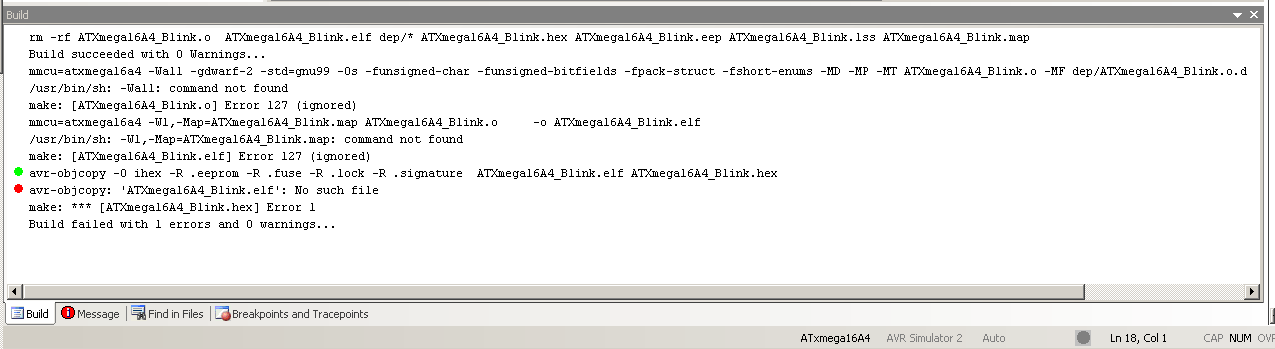
Mache ich "build" bekomme ich diese Fehlermeldung, siehe Bild.
Wenn ich ein altes Projekt öffne und dann build mache,
werden im Mein_projekt\default Ordner die Dateien mit den Endungen
Mein_projekt.eep
Mein_projekt.elf
Mein_projekt.hex
Mein_projekt.Iss
Mein_projekt.map
Mein_projekt.o

gelöscht.
Nur die Datei makefile bleibt da.

Was tun?
Woran kann das liegen?
Angehängte Dateien:
Gast #2652880
Lesenswert?

Das löschen ist schon ok, aber beim Compileraufruf fehlt anscheinend der 
eigentliche Compileraufruf, da stehen nur die Optionen in der 
Kommmandoszeile.

Im Zweifel mal komplett deinstallieren, und dann neu installieren.

Oliver
Gast #2653090
Lesenswert?

> Kann es sein, das AVR Studio vergessen hat, das ich den GCC Compiler
> habe?

Sieht fast so aus.

Da fehlen im Aufruf der Toolchain (Zeilen nach dem Löschen der alten 
Ausgabedateien mit rm) der Name des ausführbaren Programms vor den 
Kommandozeilenoptionen. Make bzw. die Shell versucht dann die erste 
Kommandozeilenoption als Programm zu starten. Das geht natürlich schief.

Leider fehlt mir mit den bisherige Infos der Plan, wie das zu 
korrigieren ist. Vielleicht hilft es, wenn du mal das Makefile anhängst 
und ggf. ein kleines gezipptes Projekt.
Gast #2653102
Lesenswert?

Eventuell auch mal Frau Google fordern mit der Anfrage nach
"avr-studio" 4.19 "command not found"

http://www.avrfreaks.net/index.php?name=PNphpBB2&file=printview&t=114162&start=20
"RobDD - Apr 02, 2012 - 01:38 AM
Post subject: Re: RE: Issue with AVR Studio 4
clawson wrote:
This seems to be something that the half-brains at Atmel have gone out 
of their way to ruin in Studio 4.19. Originally Studio had a mechanism 
where it would look for an find WinAVR if it was installed. Then Atmel 
started making a half-baked rip-off of WinAVR called "Toolchain" so they 
modified Studio so it would look for both (and annoyingly it found their 
crap in preference to WinAVR). It now appears in 4.19 (which is the 
latest) that they don't even try to look for WinAVR any more. This just 
shows how shorted sighted Atmel are. When you create a GCC project now 
you need to go to Project-Configuration Options then on the 5th tab 
("Custom options") set the path to avr-gcc to be /winavr/bin/avr-gcc.exe 
and the path to "make" to be /winavr/utils/bin/make.exe and THEN you 
should be able to build OK.

(what a cock up! though I fear this was not a mistake but deliberate)


Why do they do this stuff! Thanks for saving me some work.
Rob"
Gast #2653233
Lesenswert?

Krapao schrieb:
> go to Project-Configuration Options then on the 5th tab
> ("Custom options") set the path to avr-gcc to be /winavr/bin/avr-gcc.exe
> and the path to "make" to be /winavr/utils/bin/make.exe and THEN you
> should be able to build OK.

@Krapao (Gast): ymmd ganz vielen Dank.
Kann ich dich zu ner Pizza und Rotwein bei Stressa einladen?!
Gast #2653250
Lesenswert?

Zwar geht jetzt alles (ich kann build machen und den µC programmieren)
aber ich bekomme nach build nicht mehr die Info wieviel Byte Programm 
und Daten brauchen.
Wo kann man das nur wieder einstellen????????

Antwort schreiben

Bitte melde dich an, um einen Beitrag zu schreiben.

oder

Mit Google-Account einloggen

Die Registrierung ist kostenlos und dauert nur eine Minute.

Jetzt registrieren