
Hallo Leute,

gibt es eine Möglichkeit schnell (mit einem Klick oder einer Taste)
zwischen den Top und Button Layer umzuschalten. Im Moment muss ich immer
alle Layer einzeln ein- bzw. ausschalten.

Danke und Gruß
Carsten
Gast
#3095108
BOTTOM, nicht BUTTON.

Von welchem Programm sprichst Du?
Gast
#3095112
Ja. Taste 42. :-)
Und Du meinst sicher "Bottom".

Welche Software benutzt Du denn? Meine Glaskugel will gerade "Die blaue
Elise" zeigen.
Hast ne eins in English he ... ;-) ja stimmt natürlich

Sorry EAGLE
Hallo,
Du kannst Dir nen Script erstellen mit dem Du ein Menü erhälst.

Ich häng mal ein Bespiel an.

gruß,
Björn
Danke schon mal Björn, ... aber das attachment (korrekt Eggy?) kann ich
irgendwie nicht öffnen!?
Ähm schon 8 downloads - irgenwas mache ich falsch.
werde mal nen anderen browser versuchen

Ah mit IE gehts ..
Kann man das Script auch ändern, so dass alles was Top (Bottom) ist
angezeigt wird?
Also auch tStop tValues tNames usw.
klar das script ist frei veränderbar.

Ich bin nur momentan nicht fit in der scriptsprache hab das beispiel vor
4 Jahren verzapft.

gruß,
Björn
Gast
#3095221
Control 1 oder Control 2 ändert zwischen bottom und top
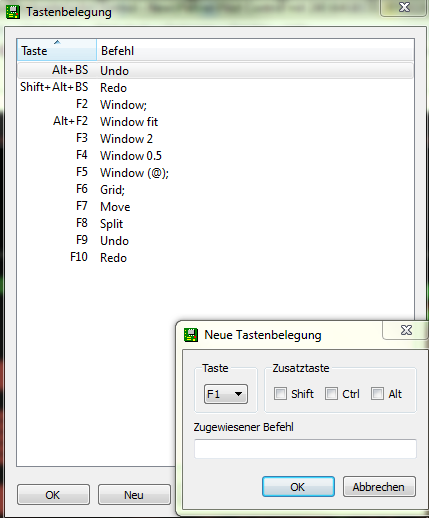
Strg+1 und Strg+2 geht bei mir leider nicht. Wahrscheinlich muß/kann man
die Tasten programmieren. Unter Optionen Tastenbelegung.
Ich weiß nur nicht welche Befehle eingetragen werden müssen.
Angehängte Dateien:
-
 Capture.PNG
(34 KB)
Capture.PNG
(34 KB)
Wozu ein Script .. in Eagle wechselt man zwischen Top und Bottom mit der
mittleren Maustaste.
Gast
#3095416
Habe es nicht gefunden, wo es eingestellt ist. Zimlich blöde.

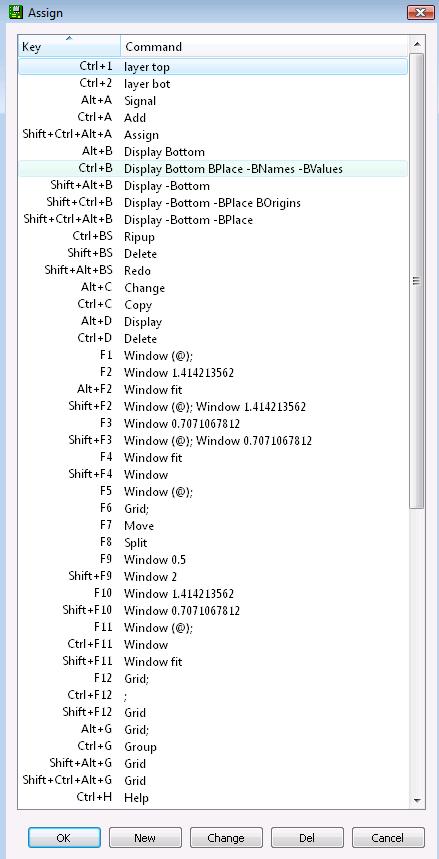
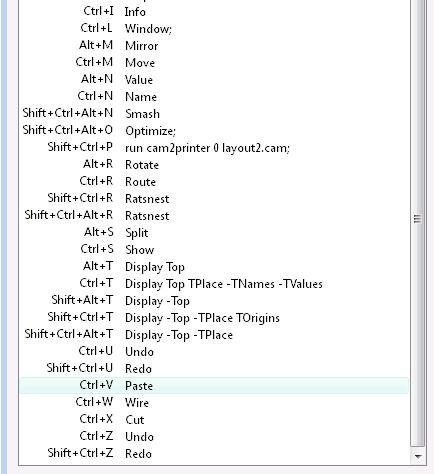
Im Anhang meine Standard-Assigns im Eagle 6.x was ich nur im Demomode
benutze wegen einigen Libs sowie Designs konvertieren, deshalb glaubte
ich auch, daß sie jetzte standard sind. Muss wohl irgendwo vom
Projektverzeichnis aus was automatisch laden, was genau habe ich nicht
gefunde, oder es wurde vom alten Eagle konvertiert und in die windows
ini
gespeichert.

Hier ein scr, was ich nicht benutze, es aber gefunden habe, vielleicht
ist es dir nützlich.

# Allowed modifiers are A+ S+ C+ for Alt, Shift, Control respectively
# Allowed keys are A-Z 0-9 F1-F12 and BackSpace
# Assignments to 0-9 A-Z require a Control or Alt modifier
#
# Note that key assignments which conflict with the menu bar (e.g. A+F
for the
# File Menu) overwrite the menu bar and you may lose keyboard access to
# the menu bar.

# Assignments for the EAGLE Library (device) Editor
LBR:
ASSIGN     C+A 'Add';
ASSIGN S+C+A+A 'Assign';  # Bring up dialog box to show the key
assignments
ASSIGN     C+C 'Copy';
ASSIGN     A+C 'Change';  # Change a property
ASSIGN     C+D 'Delete';
ASSIGN    S+BS 'Delete';
ASSIGN     A+D 'display'; # Display available layers
ASSIGN     C+G 'Group';
ASSIGN     A+G 'Grid;';   # Turns the grid On/Off
ASSIGN   S+A+G 'Grid';    # Invokes the Grid Dialog Box
ASSIGN S+C+A+G 'Grid';    # Invokes the Grid Dialog Box
ASSIGN     C+H 'Help';    # Invoke help on the current command
ASSIGN     C+I 'Info';    # Get info on a part
ASSIGN     C+L 'Window;'; # Redraw the window
ASSIGN     A+M 'Mirror';
ASSIGN     C+M 'Move';
ASSIGN     C+N 'Name';
ASSIGN     A+N 'Value';
ASSIGN     A+R 'Rotate';  # (C+R used for route)
ASSIGN     A+S 'Split';
ASSIGN     C+S 'Show';
ASSIGN S+C+A+S 'Write;';  # Save the current file using the default name
ASSIGN     C+W 'Wire';
ASSIGN     C+U 'Undo';
ASSIGN   S+C+U 'Redo';
# Cut/Paste don't work in LBR editor, but here it's better to let the
user try,
# and get the warning, than to have the expected keys absent. They ought
to
# work, maybe someday they will ;)
ASSIGN     C+V 'Paste' # Groups only
ASSIGN     C+X 'Cut';  # Groups only, really COPY to buffer
ASSIGN     C+Z 'Undo';
ASSIGN   S+C+Z 'Redo';
ASSIGN      F1 'Window (@);';         # Pan to mouse
ASSIGN      F2 'Window 1.414213562';  # Zoom in
ASSIGN    S+F2 'Window (@); Window 1.414213562' # Zoom in at mouse
ASSIGN      F3 'Window 0.7071067812'; # Zoom out
ASSIGN    S+F3 'Window (@); Window 0.7071067812' # Zoom out at mouse
ASSIGN      F4 'Window fit';          # Auto zoom
ASSIGN    S+F4 'Window';              # Select window to fit
ASSIGN      F9 'Window 0.5';          # Zoom out more
ASSIGN    S+F9 'Window 2';            # Zoom in more
ASSIGN     F10 'Window 1.414213562';  # Zoom in
ASSIGN   S+F10 'Window 0.7071067812'; # Zoom out
ASSIGN     F11 'Window (@);';         # Pan to mouse
ASSIGN   S+F11 'Window fit';          # Auto zoom
ASSIGN   C+F11 'Window';              # select window with mouse (or
keyboard)
ASSIGN     F12 'Grid;'; # Turns the grid On/Off
ASSIGN   S+F12 'Grid';  # Invokes the Grid Dialog Box
ASSIGN   C+F12 ';'; # Equivalent to hitting the "GO" button

# Assignments for the EAGLE library editor's package editor
PAC:
ASSIGN S+C+A+A 'Assign';  # Bring up dialog box to show the key
assignments
ASSIGN     C+C 'Copy';
ASSIGN     A+C 'Change';  # Change a property
ASSIGN     C+D 'Delete';
ASSIGN    S+BS 'Delete';
ASSIGN     A+D 'Display'; # Display available layers
ASSIGN     C+G 'Group';
ASSIGN     A+G 'Grid;';   # Turns the grid On/Off
ASSIGN   S+A+G 'Grid';    # Invokes the Grid Dialog Box
ASSIGN S+C+A+G 'Grid';    # Invokes the Grid Dialog Box
ASSIGN     C+H 'Help';    # Invoke help on the current command
ASSIGN     C+I 'Info';    # Get info on a part
ASSIGN     C+L 'Window;'; # Redraw the window
ASSIGN     C+M 'Move';
ASSIGN     A+M 'Mirror';
ASSIGN     C+N 'Name';
ASSIGN     A+R 'Rotate';  # (C+R used for route)
ASSIGN     A+S 'Split';
ASSIGN     C+S 'Show';
ASSIGN S+C+A+S 'Write;';  # Save the current file using the default name
ASSIGN     C+W 'Wire';
ASSIGN     C+U 'Undo';
ASSIGN   S+C+U 'Redo';
ASSIGN     C+V 'Paste' # Groups only
ASSIGN     C+X 'Cut';  # Groups only, really COPY to buffer
ASSIGN     C+Z 'Undo';
ASSIGN   S+C+Z 'Redo';
ASSIGN      F1 'Window (@);';         # Pan to mouse
ASSIGN      F2 'Window 1.414213562';  # Zoom in
ASSIGN    S+F2 'Window (@); Window 1.414213562' # Zoom in at mouse
ASSIGN      F3 'Window 0.7071067812'; # Zoom out
ASSIGN    S+F3 'Window (@); Window 0.7071067812' # Zoom out at mouse
ASSIGN      F4 'Window fit';          # Auto zoom
ASSIGN    S+F4 'Window';              # Select window to fit
ASSIGN      F9 'Window 0.5';          # Zoom out more
ASSIGN    S+F9 'Window 2';            # Zoom in more
ASSIGN     F10 'Window 1.414213562';  # Zoom in
ASSIGN   S+F10 'Window 0.7071067812'; # Zoom out
ASSIGN     F11 'Window (@);';         # Pan to mouse
ASSIGN   S+F11 'Window fit';          # Auto zoom
ASSIGN   C+F11 'Window';              # select window with mouse (or
keyboard)
ASSIGN     F12 'Grid;';               # Turns the grid On/Off
ASSIGN   S+F12 'Grid'; # Invokes the Grid Dialog Box
ASSIGN   C+F12 ';'; # Equivalent to hitting the "GO" button

# Assignments for the EAGLE library editor's schematic symbol editor
SYM:
ASSIGN S+C+A+A 'Assign';  # Bring up dialog box to show the key
assignments
ASSIGN     C+C 'Copy';
ASSIGN     A+C 'Change';  # Change a property
ASSIGN     C+D 'Delete';
ASSIGN    S+BS 'Delete';
ASSIGN     A+D 'Display'; # Display available layers
ASSIGN     C+G 'Group';
ASSIGN     A+G 'Grid;';   # Turns the grid On/Off
ASSIGN   S+A+G 'Grid';    # Invokes the Grid Dialog Box
ASSIGN S+C+A+G 'Grid';    # Invokes the Grid Dialog Box
ASSIGN     C+H 'Help';    # Invoke help on the current command
ASSIGN     C+I 'Info';    # Get info on a part
ASSIGN     C+L 'Window;'; # Redraw the window
ASSIGN     A+M 'Mirror';
ASSIGN     C+M 'Move';
ASSIGN     C+N 'Name';
ASSIGN     A+R 'Rotate'; # (C+R used for route)
ASSIGN     A+S 'Split';
ASSIGN     C+S 'Show';
ASSIGN S+C+A+S 'Write;';  # Save the current file using the default name
ASSIGN     C+W 'Wire';
ASSIGN     C+U 'Undo';
ASSIGN   S+C+U 'Redo';
ASSIGN     C+V 'Paste' # Groups only
ASSIGN     C+X 'Cut';  # Groups only, really COPY to buffer
ASSIGN     C+Z 'Undo';
ASSIGN   S+C+Z 'Redo';
ASSIGN      F1 'Window (@);';         # Pan to mouse
ASSIGN      F2 'Window 1.414213562';  # Zoom in
ASSIGN    S+F2 'Window (@); Window 1.414213562' # Zoom in at mouse
ASSIGN      F3 'Window 0.7071067812'; # Zoom out
ASSIGN    S+F3 'Window (@); Window 0.7071067812' # Zoom out at mouse
ASSIGN      F4 'Window fit';          # Auto zoom
ASSIGN    S+F4 'Window';              # Select window to fit
ASSIGN      F9 'Window 0.5';          # Zoom out more
ASSIGN    S+F9 'Window 2';            # Zoom in more
ASSIGN     F10 'Window 1.414213562';  # Zoom in
ASSIGN   S+F10 'Window 0.7071067812'; # Zoom out
ASSIGN     F11 'Window (@);';         # Pan to mouse
ASSIGN   S+F11 'Window fit';          # Auto zoom
ASSIGN   C+F11 'Window';              # select window with mouse (or
keyboard)
ASSIGN     F12 'Grid;';               # Turns the grid On/Off
ASSIGN   S+F12 'Grid'; # Invokes the Grid Dialog Box
ASSIGN   C+F12 ';'; # Equivalent to hitting the "GO" button

# Assignments for the EAGLE schematic editor
SCH:
ASSIGN     C+A 'Add';
ASSIGN S+C+A+A 'Assign';  # Bring up dialog box to show the key
assignments
ASSIGN     C+C 'Copy';
ASSIGN     A+C 'Change';  # Change a property
ASSIGN     C+D 'Delete';
ASSIGN    S+BS 'Delete';
ASSIGN     A+D 'Display'; # Display available layers
ASSIGN     C+G 'Group';
ASSIGN     A+G 'Grid;';   # Turns the grid On/Off
ASSIGN   S+A+G 'Grid';    # Invokes the Grid Dialog Box
ASSIGN S+C+A+G 'Grid';    # Invokes the Grid Dialog Box
ASSIGN     C+H 'Help';    # Invoke help on the current command
ASSIGN     C+I 'Info';    # Get info on a part
ASSIGN     C+L 'Window;'; # Redraw the window
ASSIGN     C+M 'Move';
ASSIGN     A+M 'Mirror';
ASSIGN     C+N 'Name';
ASSIGN     A+N 'Value';
ASSIGN S+C+A+N 'Smash';
ASSIGN     A+R 'Rotate'; # (C+R used for route)
ASSIGN     A+S 'Split';
ASSIGN     C+S 'Show';
ASSIGN S+C+A+S 'Write;'; # Save the current file using the default name
ASSIGN     C+W 'Wire';
ASSIGN     A+W 'Net';  # Draw nets; Use THIS command to draw wires on
sch.
ASSIGN     C+U 'Undo';
ASSIGN   S+C+U 'Redo';
ASSIGN     C+V 'Paste' # Groups only
ASSIGN     C+X 'Cut';  # Groups only, really COPY to buffer
ASSIGN     C+Z 'Undo';
ASSIGN   S+C+Z 'Redo';
ASSIGN      F1 'Window (@);';         # Pan to mouse
ASSIGN      F2 'Window 1.414213562';  # Zoom in
ASSIGN    S+F2 'Window (@); Window 1.414213562'  # Zoom in at mouse
ASSIGN      F3 'Window 0.7071067812'; # Zoom out
ASSIGN    S+F3 'Window (@); Window 0.7071067812' # Zoom out at mouse
ASSIGN      F4 'Window fit';          # Auto zoom
ASSIGN    S+F4 'Window';              # Select window to fit
ASSIGN      F9 'Window 0.5';          # Zoom out more
ASSIGN    S+F9 'Window 2';            # Zoom in more
ASSIGN     F10 'Window 1.414213562';  # Zoom in
ASSIGN   S+F10 'Window 0.7071067812'; # Zoom out
ASSIGN     F11 'Window (@);';         # Pan to mouse
ASSIGN   S+F11 'Window fit';          # Auto zoom
ASSIGN   C+F11 'Window';              # select window with mouse (or
keyboard)
ASSIGN     F12 'Grid;';               # Turns the grid On/Off
ASSIGN   S+F12 'Grid'; # Invokes the Grid Dialog Box
ASSIGN   C+F12 ';'; # Equivalent to hitting the "GO" button

# Assignments for the EAGLE board editor
BRD:
ASSIGN     C+A 'Add';
ASSIGN S+C+A+A 'Assign';  # Bring up dialog box to show the key
assignments
ASSIGN     C+C 'Copy';
ASSIGN     A+C 'Change';  # Change a property
ASSIGN     C+D 'Delete';
ASSIGN    S+BS 'Delete';
ASSIGN     A+D 'Display'; # Display available layers
ASSIGN     C+G 'Group';
ASSIGN     A+G 'Grid;';   # Turns the grid On/Off
ASSIGN   S+A+G 'Grid';    # Invokes the Grid Dialog Box
ASSIGN S+C+A+G 'Grid';    # Invokes the Grid Dialog Box
ASSIGN     C+H 'Help';    # Invoke help on the current command
ASSIGN     C+I 'Info';    # Get info on a part
ASSIGN     C+L 'Window;'; # Redraw the window
ASSIGN     C+M 'Move';
ASSIGN     A+M 'Mirror';
ASSIGN     C+N 'Name';
ASSIGN     A+N 'Value';
ASSIGN S+C+A+N 'Smash';
ASSIGN     C+R 'Route';
ASSIGN     A+R 'Rotate';  # Rotate a part without moving the origin
ASSIGN     A+S 'Split';
ASSIGN     C+S 'Show';
ASSIGN S+C+A+S 'Write;';  # Save the current file using the default name
ASSIGN     C+W 'Wire';
ASSIGN     C+U 'Undo';
ASSIGN   S+C+U 'Redo';
ASSIGN     C+V 'Paste' # Groups only
ASSIGN     C+X 'Cut';  # Groups only, really COPY to buffer
ASSIGN     C+Z 'Undo';
ASSIGN   S+C+Z 'Redo';
ASSIGN      F1 'Window (@);';         # Pan to mouse
ASSIGN      F2 'Window 1.414213562';  # Zoom in
ASSIGN    S+F2 'Window (@); Window 1.414213562' # Zoom in at mouse
ASSIGN      F3 'Window 0.7071067812'; # Zoom out
ASSIGN    S+F3 'Window (@); Window 0.7071067812' # Zoom out at mouse
ASSIGN      F4 'Window fit';          # Auto zoom
ASSIGN    S+F4 'Window';              # Select window to fit
ASSIGN      F9 'Window 0.5';          # Zoom out more
ASSIGN    S+F9 'Window 2';            # Zoom in more
ASSIGN     F10 'Window 1.414213562';  # Zoom in
ASSIGN   S+F10 'Window 0.7071067812'; # Zoom out
ASSIGN     F11 'Window (@);';         # Pan to mouse
ASSIGN   S+F11 'Window fit';          # Auto zoom
ASSIGN   C+F11 'Window';              # select window with mouse (or
keyboard)
ASSIGN     F12 'Grid;';               # Turns the grid On/Off
ASSIGN   S+F12 'Grid'; # Invokes the Grid Dialog Box
ASSIGN   C+F12 ';'; # Equivalent to hitting the "GO" button

# special commands for boards
ASSIGN     A+A 'Signal';  # Adds airwire
ASSIGN     C+B 'Display Bottom BPlace -BNames -BValues'; # w/origins
ASSIGN   S+C+B 'Display -Bottom -BPlace BOrigins'; # keep origins
ASSIGN S+C+A+B 'Display -Bottom -BPlace'; # turn off origins too
ASSIGN     A+B 'Display Bottom';
ASSIGN   S+A+B 'Display -Bottom';
ASSIGN S+C+A+O 'Optimize;'; # combine straight segments
ASSIGN   S+C+R 'Ratsnest';
ASSIGN S+C+A+R 'Ratsnest';
ASSIGN     C+T 'Display Top TPlace -TNames -TValues'; # w/origins
ASSIGN   S+C+T 'Display -Top -TPlace TOrigins'; # keep origins
ASSIGN S+C+A+T 'Display -Top -TPlace'; # turn off origins too
ASSIGN     A+T 'Display Top';
ASSIGN   S+A+T 'Display -Top';
ASSIGN    C+BS 'Ripup';
Angehängte Dateien:
-
 assign1.jpg
(59 KB)
assign1.jpg
(59 KB)
-
 assign2.jpg
(32 KB)
assign2.jpg
(32 KB)
Michael D. schrieb:
> ...mittleren Maustaste.

...oder drücken des Rädchens.
Ist es eigentlich SO schwer, die paar Seiten im Handbuch zu lesen? Oder
einfach nur das vorgefertigt gelieferte Beispiel anzuschauen und eine
halbe Minute darüber nachzudenken?

Wie kann man sich nur so anstellen...
Michael D. schrieb:
> Wozu ein Script .. in Eagle wechselt man zwischen Top und Bottom mit der
> mittleren Maustaste.

Darum gehts hier nicht. Auch wenn der TO natürlich nicht in der Lage
war, das im ersten post verständlich zu formulieren.
Mittlere Maustaste habe ich nicht (wechselt nur den aktiven Layer).
Rädchen drücken geht auch nicht. Es wechselt zwischen Gespiegelt und
Normal.
Werde es mal mit Chris seinen Tastenbelegungen probieren.


Na klar kann man das Handbuch lesen oder ne Stunde im Internet suchen.
Aber, wenn man Leute fragt, die sich auskennen und auch bereit sind ihr
Wissen zu teilen, ist man einfach schneller.
Habe jetzt eine Taste mit dem folgendem Befehl belegt:

DISPLAY NONE 1 17 18 19 20 21 23 25 27 29 31 33 35 37 39 41 44 45 51

Das blendet alles ein (fast alles), was TOP ist.

Danke und Gruß
Gast
#3095516
Geht auch ohne Script

Erstmal einrichten
1.Alle Layer die man haben will für TOP aktivieren(Top, tPlace, ...)
2.Rechtsklick auf Display->Neu
3.Alias eingeben z.B. TOP
1-3. Für den Bot Layer machen

Dann kann man mit Optionen->Tastenbelegung einer bel. Taste "DISPLAY
Last"(ohne Anführungszeichen ;)) zuzweisen. Mit der Taste kann man da
immer zwischen Top und Bot wechseln. Mit zwei Tasten geht das natürlich
auch einfach zuweisen mit "DISPLAY TOP" und "DISPLAY BOT" (geht
natürlich nur wenn man den Alias mit TOP und BOT belegt hat).


Gruß Matthias
Gast
#3095637
Du musst dir die Befehle Alt + B bzw Ctrl + B sowie die mit Shift
ansehen,
wie auch die T für Top varianten. Ctrl + 1 bzw 2 wechselt nur den
Routing
Layer, aber die mit B/T sind die , welche dich interessieren.

Ansonsten, menu.scr kennst du schon, wenn nicht ändere es nach deinen
wünschen .
Ich hab einfach folgende Tastenbelegungen hinzugefügt:
Alle anzeigen: CTRL+A: display none vias top bottom pads unrouted
dimension tdocu bdocu torigins borigins tplace bplace reference holes

Top anzeigen: CTRL+Q: display none vias top pads unrouted dimension
tdocu torigins tplace reference holes

Bottom anzeigen: CTRL+B: display none vias bottom pads unrouted
dimension bdocu borigins bplace reference holes