Gast
#4858064
Hallo. Vorweg, ich beschäftige mich im Rahmen einer Studienarbeit
erstmals mit einem Microcontroller. Und bin was das angeht völlig
unerfahren...(sorry).

Dafür habe ich von einem Betreuer einen Infinion XMC 4500 100x1024
(Relax Lite kit / Relax Kit) bekommen. Zusätzlich benutze ich Dave 4 auf
Win 10 Pro N.

Ziel ist es damit über eine Matlab-Comport-Schnittstelle einen
Hochsetzsteller (PWM) zu steuern und mit ADC Werte desselbigen
auszulesen (Außerdem noch Wechselrichter etc.) PWM (erst einmal durch
LED visualisiert) mit Matlab zu steuern klappt soweit sehr gut.

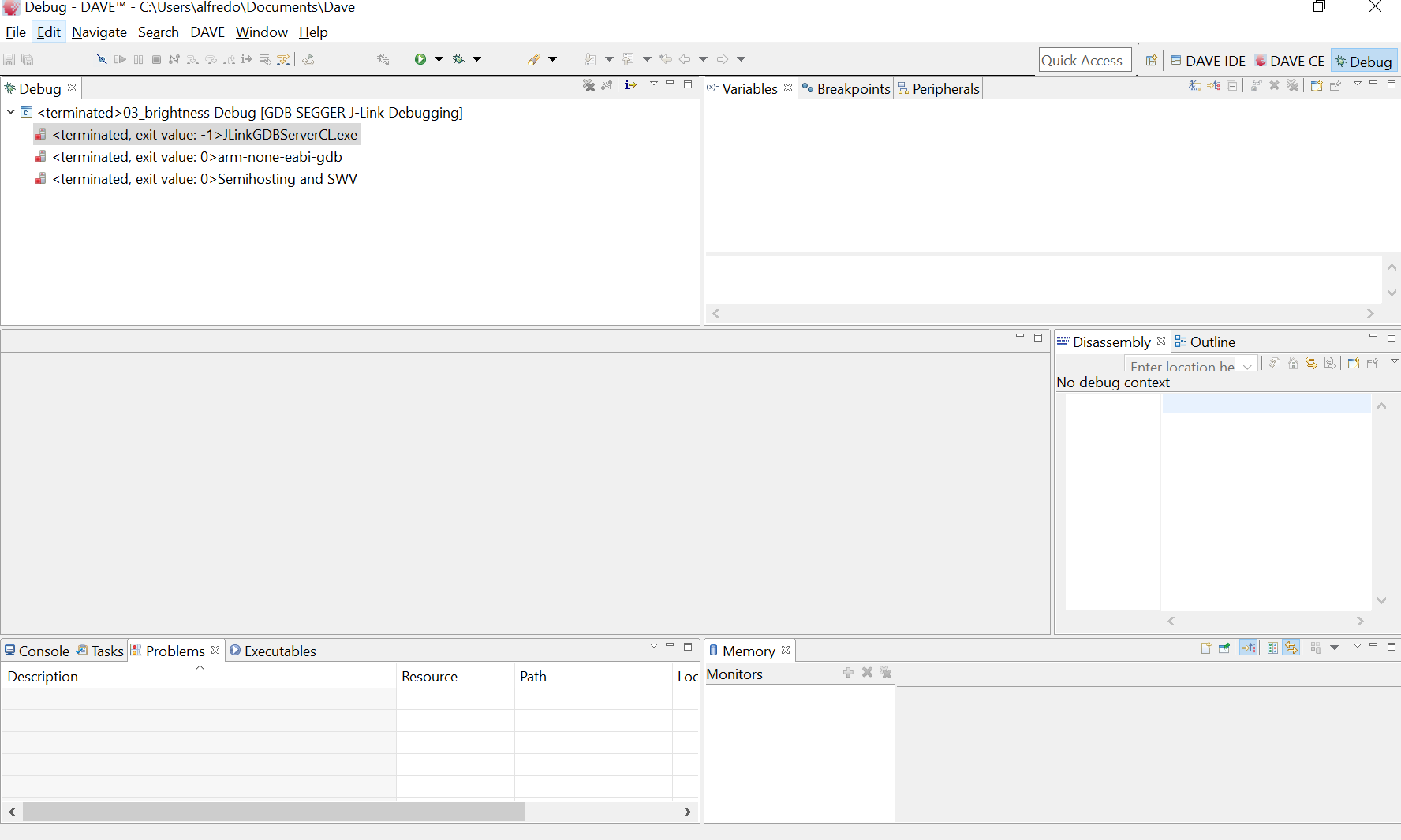
Was nicht funktioniert ist ADC. Mein Betreuer wollte dann mit dem Dave
Debugger das Problem aufspüren. Beim Debuggen passiert dann nichts
weiter (siehe PNG).

Ein anderer Kollege meinte dann, dass es offensichtlich ein J-Link
Treiber Problem unter Windows 10 ist. Ich hab hier mal die Konsolen
ausgabe der 3 "terminated" aus Dave aufgeführt

***
<terminated, exit value: -1>JLinkGDBServerCL.exe

SEGGER J-Link GDB Server V6.00d Command Line Version

JLinkARM.dll V6.00d (DLL compiled Jul 29 2016 19:07:54)

-----GDB Server start settings-----
GDBInit file:                  none
GDB Server Listening port:     2331
SWO raw output listening port: 2332
Terminal I/O port:             2333
Accept remote connection:      localhost only
Generate logfile:              off
Verify download:               on
Init regs on start:            on
Silent mode:                   off
Single run mode:               on
Target connection timeout:     0 ms
------J-Link related settings------
J-Link Host interface:         USB
J-Link script:                 none
J-Link settings file:          none
------Target related settings------
Target device:                 XMC4500-F100x1024
Target interface:              SWD
Target interface speed:        1000kHz
Target endian:                 little

Connecting to J-Link...
J-Link is connected.
Firmware: J-Link Lite-XMC4000 Rev.1 compiled Apr  2 2015 18:25:20
Hardware: V1.00
S/N: 551010176
Checking target voltage...
Target voltage: 3.30 V
Listening on TCP/IP port 2331
Connecting to target...Connected to target
Waiting for GDB connection...Connected to 127.0.0.1
Reading all registers
Read 4 bytes @ address 0x00000000 (Data = 0x2000FF3C)
Read 2 bytes @ address 0x00000000 (Data = 0xFF3C)
Target interface speed set to 1000 kHz
Resetting target
Halting target CPU...
...Target halted (PC = 0x08000200)
R0 = E000ED08, R1 = 00000263, R2 = 02000080, R3 = C8000201
R4 = 00000536, R5 = 00000000, R6 = 00000000, R7 = 00000000
R8 = 00000000, R9 = 0C000004, R10= 00000000, R11= 00000000
R12= 00000000, R13= 10000800, MSP= 10000800, PSP= 00000000
R14(LR) = 000000ED, R15(PC) = 08000200
XPSR 01000000, APSR 00000000, EPSR 01000000, IPSR 00000000
CFBP 00000000, CONTROL 00, FAULTMASK 00, BASEPRI 00, PRIMASK 00
Reading all registers
Read 4 bytes @ address 0x08000200 (Data = 0xD08CF8DF)
Read 2 bytes @ address 0x08000200 (Data = 0xF8DF)
Select auto target interface speed (1539 kHz)
Flash breakpoints enabled
Read 4 bytes @ address 0x08000200 (Data = 0xD08CF8DF)
Downloading 4096 bytes @ address 0x0C000000 - Verified OK
Downloading 4096 bytes @ address 0x0C001000 - Verified OK
Downloading 4096 bytes @ address 0x0C002000 - Verified OK
Downloading 4096 bytes @ address 0x0C003000 - Verified OK
Downloading 4096 bytes @ address 0x0C004000 - Verified OK
Downloading 4096 bytes @ address 0x0C005000 - Verified OK
Downloading 788 bytes @ address 0x0C006000 - Verified OK
Downloading 272 bytes @ address 0x0C006314 - Verified OK
Read 4 bytes @ address 0x08000200 (Data = 0xD08CF8DF)
Resetting target
Halting target CPU...
...Target halted (PC = 0x08000200)
Starting target CPU...
GDB closed TCP/IP connection
Restoring target state and closing J-Link connection...

***

<terminated, exit value: 0>arm-none-eabi-gdb

GNU gdb (GNU Tools for ARM Embedded Processors) 7.10.1.20160210-cvs
Copyright (C) 2015 Free Software Foundation, Inc.
License GPLv3+: GNU GPL version 3 or later
<http://gnu.org/licenses/gpl.html>;
This is free software: you are free to change and redistribute it.
There is NO WARRANTY, to the extent permitted by law.  Type "show
copying"
and "show warranty" for details.
This GDB was configured as "--host=i686-w64-mingw32
--target=arm-none-eabi".
Type "show configuration" for configuration details.
For bug reporting instructions, please see:
<http://www.gnu.org/software/gdb/bugs/>;.
Find the GDB manual and other documentation resources online at:
<http://www.gnu.org/software/gdb/documentation/>;.
For help, type "help".
Type "apropos word" to search for commands related to "word".
Warning: the current language does not match this frame.

***

<terminated, exit value: 0>Semihosting and SWV

SEGGER J-Link GDB Server V6.00d - Terminal output channel
Connection closed by the GDB server.

***

Also mir ist bewusst, dass ich relativ ahnungslos bin. Wie gesagt ich
ebschäftige mich das erste mal damit. Meine Betreuer sind jedoch der
Meinung, dass es an Win 10 liegen würde und ich einfach Win 7 auftreiben
soll und es dort funktionieren wird.
Kann ich machen, mir wäre es aber lieber wenn es auf meinem Rechner
klappt.
Vllt kann mir jmd Hinweise geben, wo hier das Problem liegt bzw.
wo/wonach ich anfangen kann selbst zu suchen....ich will ja auch nicht
zwingend nur die Lösung meines Problems, sondern evtll auch zumindest
grundlegend verstehen, was ich hier machen. Deswegen habe ich ja in
Absprache mit meinem Betreuer diese Studienarbeit gewählt.

Ich kann mir denken, dass ich hier noch einiges lernen/verstehen muss,
aber vllt kann/will mir ja trotzdem jemand helfen :)
Angehängte Dateien:
-
 debug_fehler.PNG
(60 KB)
debug_fehler.PNG
(60 KB)