-
Bild
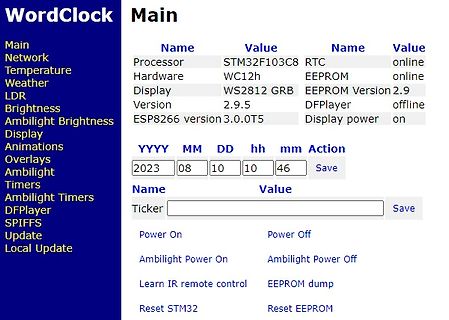
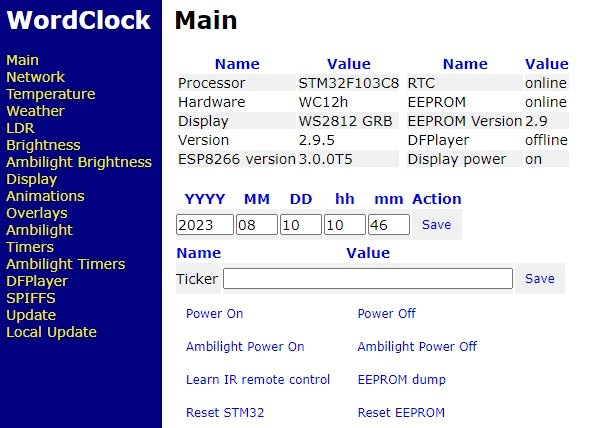
Webinterface einer WordClock mit Systemstatus und Einstellungen
Hardware WC12h EEPROM online Display WS2812 GRB EEPROM Version 2.9 Version 2.9.5 DFPlayer offline ESP8266 version 3.0.0T5 Display power on YYYY MM DD hh mm Action 2023 08 10 10 46 Save Name Value Ticker Save Power On Power Off Ambilight Power On Ambilight Power Off Learn IR remote control EEPROM dump
in „WordClock mit WS2812“ · Projekte & Code · · Screenshots
-
Bild
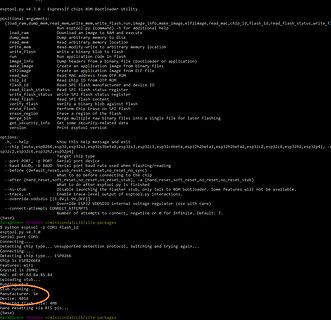
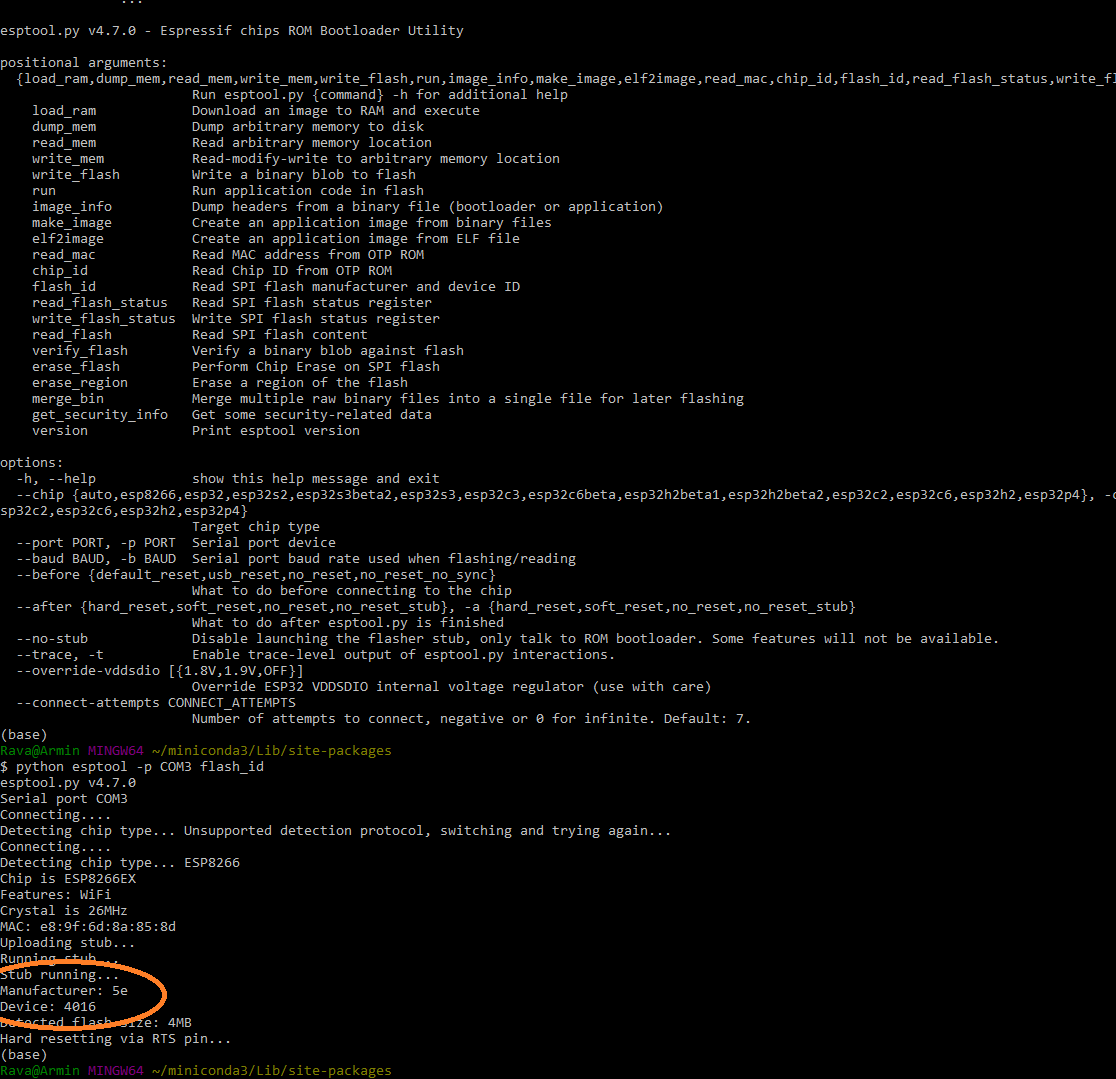
Terminal-Ausgabe eines ESP32-Flashing-Tools
Detecting chip type... Unsupported detection protocol, switching and trying again... Connecting... Chip is ESP8266 Features: WiFi Crystal is 26MHz MAC: e8:9f:6d:8a:85:8d Absorbing stub... Running stub... Stub manufacturer: Espressif Device ID: 0x16 Detected flash size: 4MB Hard resetting via RTS pin...
in „Was ist die Block-Größe meines SPI-ROMs auf dem ESP8266?“ · Mikrocontroller und Digitale Elektronik · · Screenshots
-
Bild
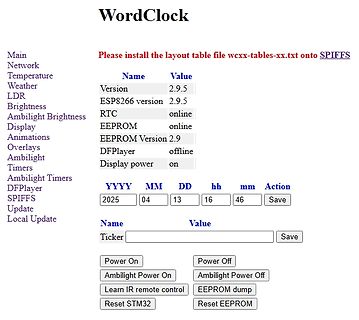
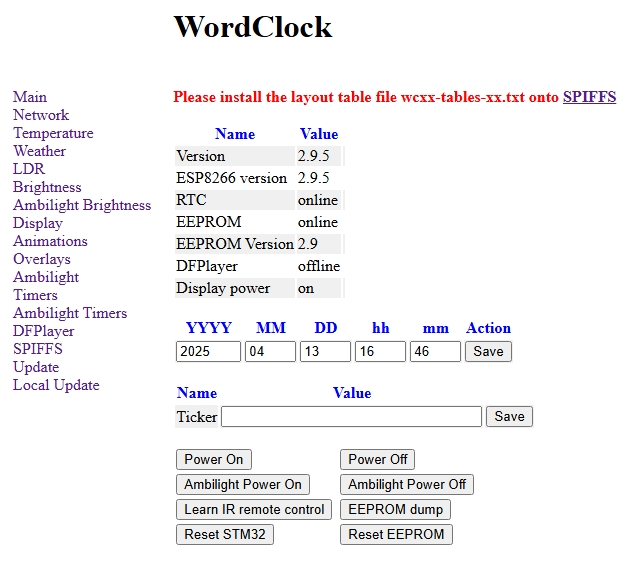
Webinterface einer WordClock Steuerung
Overlays Ambilight Timers Ambilight Timers DFPlayer SPIFFS Update Local Update Name Value Version 2.9.5 ESP8266 version 2.9.5 RTC online EEPROM online EEPROM Version 2.9 DFPlayer offline Display power on YYYY MM DD hh mm Action 2025 04 13 16 46 Save Name Value Ticker Save Power On Power Off Ambilight Power
in „WordClock mit WS2812“ · Projekte & Code · · Screenshots
-
Bild
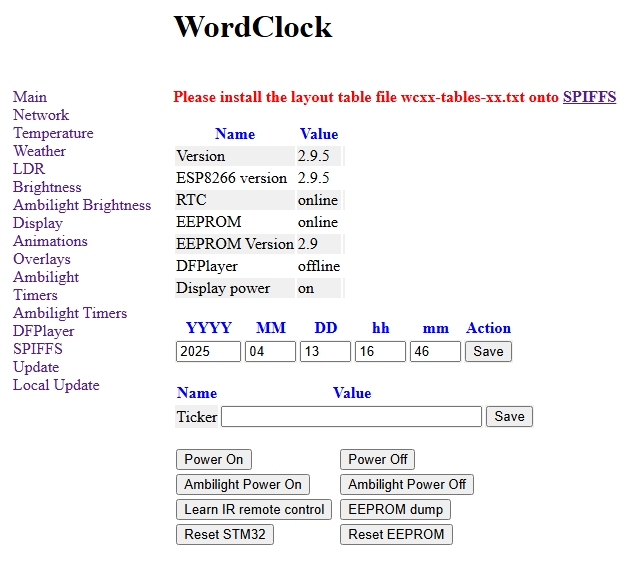
Webinterface einer WordClock Steuerung
Overlays Ambilight Timers Ambilight Timers DFPlayer SPIFFS Update Local Update Name Value Version 2.9.5 ESP8266 version 2.9.5 RTC online EEPROM online EEPROM Version 2.9 DFPlayer offline Display power on YYYY MM DD hh mm Action 2025 04 13 16 46 Save Name Value Ticker Save Power On Power Off Ambilight Power
in „WordClock mit WS2812“ · Projekte & Code · · Screenshots
-
Bild
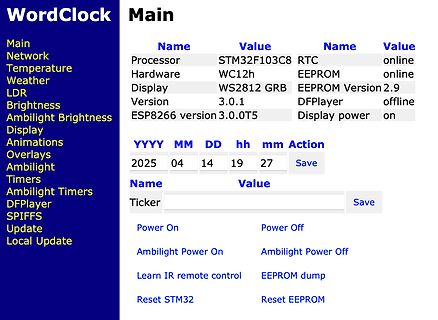
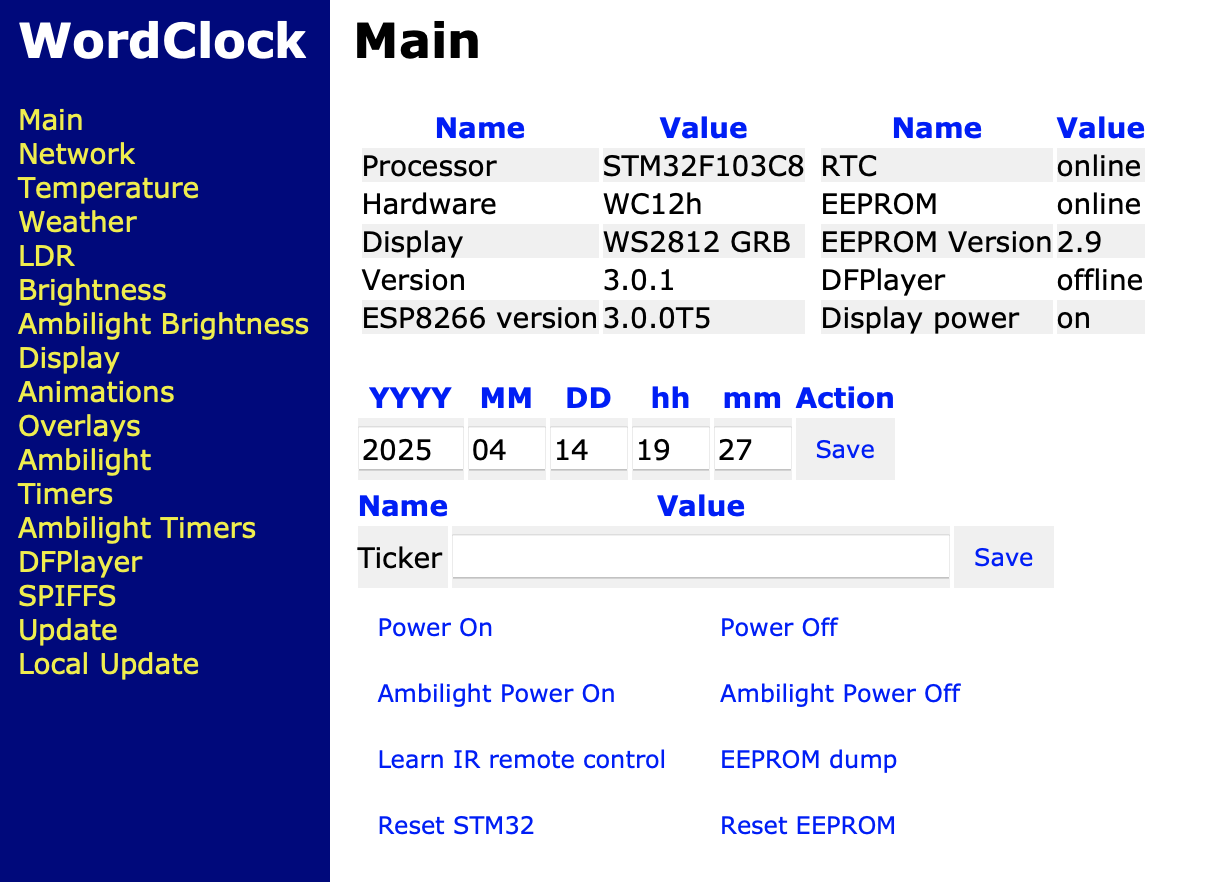
Webinterface einer WordClock Steuerung
DFPlayer SPIFFS Update Local Update Processor STM32F103C8 Hardware WC12h Display WS2812 GRB Version 3.0.1 ESP8266 version 3.0.0T5 RTC online EEPROM online EEPROM Version 2.9 DFPlayer offline Display power on YYYY MM DD hh mm Action 2025 04 14 19 27 Save Name Value Ticker Save Power On Power Off Ambilight Power
in „WordClock mit WS2812“ · Projekte & Code · · Screenshots
-
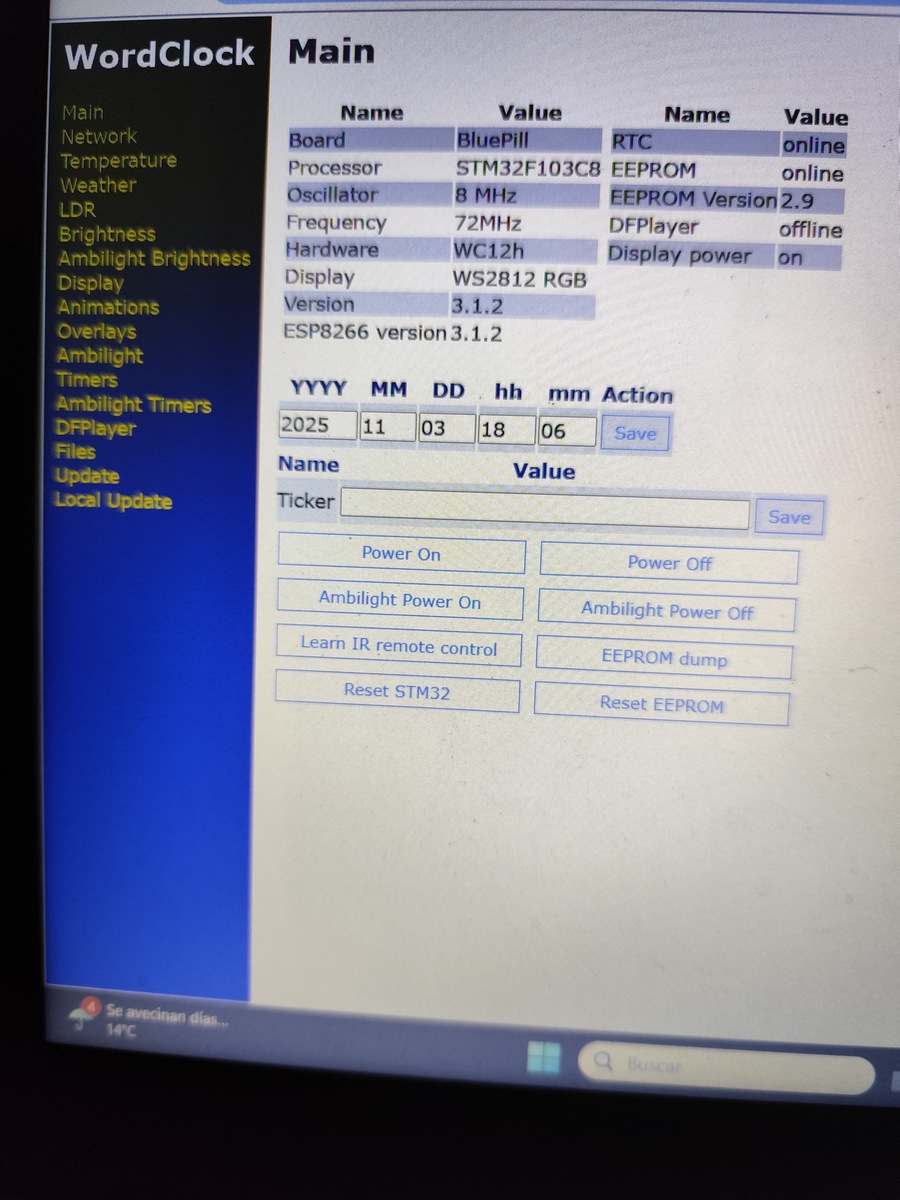
Bild
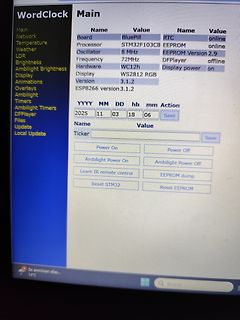
Abfotografierter Bildschirm einer Web-Oberfläche für ein STM32-Projekt
Frequency 72MHz DFPlayer offline Hardware WC12h Display power on Display WS2812 RGB Version 3.1.2 ESP8266 version 3.1.2 YYYY MM DD hh mm Action 2025 11 03 18 06 Save Name Value Ticker Save Power On Power Off Ambilight Power On Ambilight Power Off Learn IR remote control EEPROM dump Reset STM32 Reset
in „WordClock mit WS2812“ · Projekte & Code · · Fotos
-
Datei
log.txt
detected eeprom is online current eeprom version: 0x00020900 reading ir codes from eeprom DFPLAYER LOGGER ESP8266 LOGGER read rtc: Su 2000-01-01 00:00:03 read rtc: Su 2000-01-01 00:00:03 read rtc: Su 2000-01-01 00:00:44 RTC temperature: 24
-
Datei
Wecker.ino
//ESP ADVENTSKALEDER //Biblothecken #include <NTPClient.h> #include <ESP8266WiFi.h> #include <WiFiUdp.h> #include <Kalender.h> //Variablen int buttonPin1 = 1; int buttonPin2 = 2; int buttonPin3 = 3; int buttonPin4
in „Node Mcu WDT Reset“ · Mikrocontroller und Digitale Elektronik ·
-
Bild
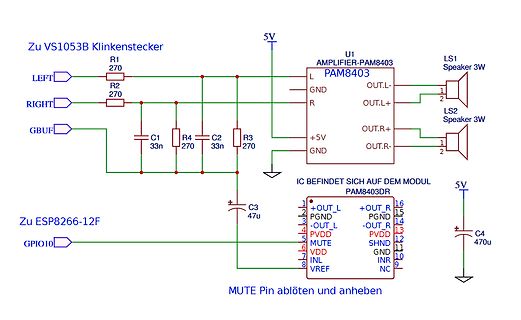
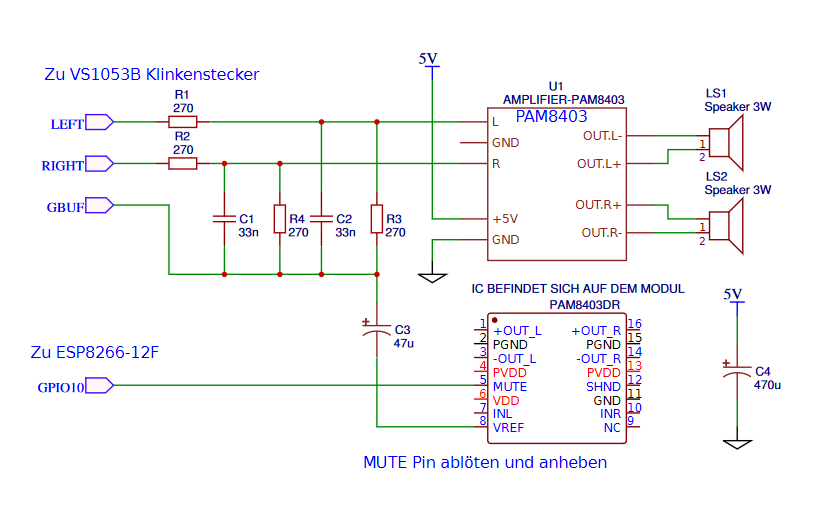
Schaltplan eines PAM8403 Audio-Verstärkers
OUT.L- 2 OUT.L+ 1 LS2 Speaker 3W OUT.R+ OUT.R- IC BEFINDET SICH AUF DEM MODUL PAM8403DR C3 47u 5V Zu ESP8266-12F GPIO10 1 +OUT_L 16 +OUT_R 2 PGND 15 PGND 3 -OUT_L 14 -OUT_R 4 PVDD 13 PVDD 5 MUTE 12 SHND 6 VDD 11 GND 7 INL 10 INR 8 VREF 9 NC C4 47u MUTE Pin ablöten und anheben
in „PAM8403 im gleichen Stromkreis wie ESP und VS1053, Rauschen“ · Mikrocontroller und Digitale Elektronik · · Schaltpläne
-
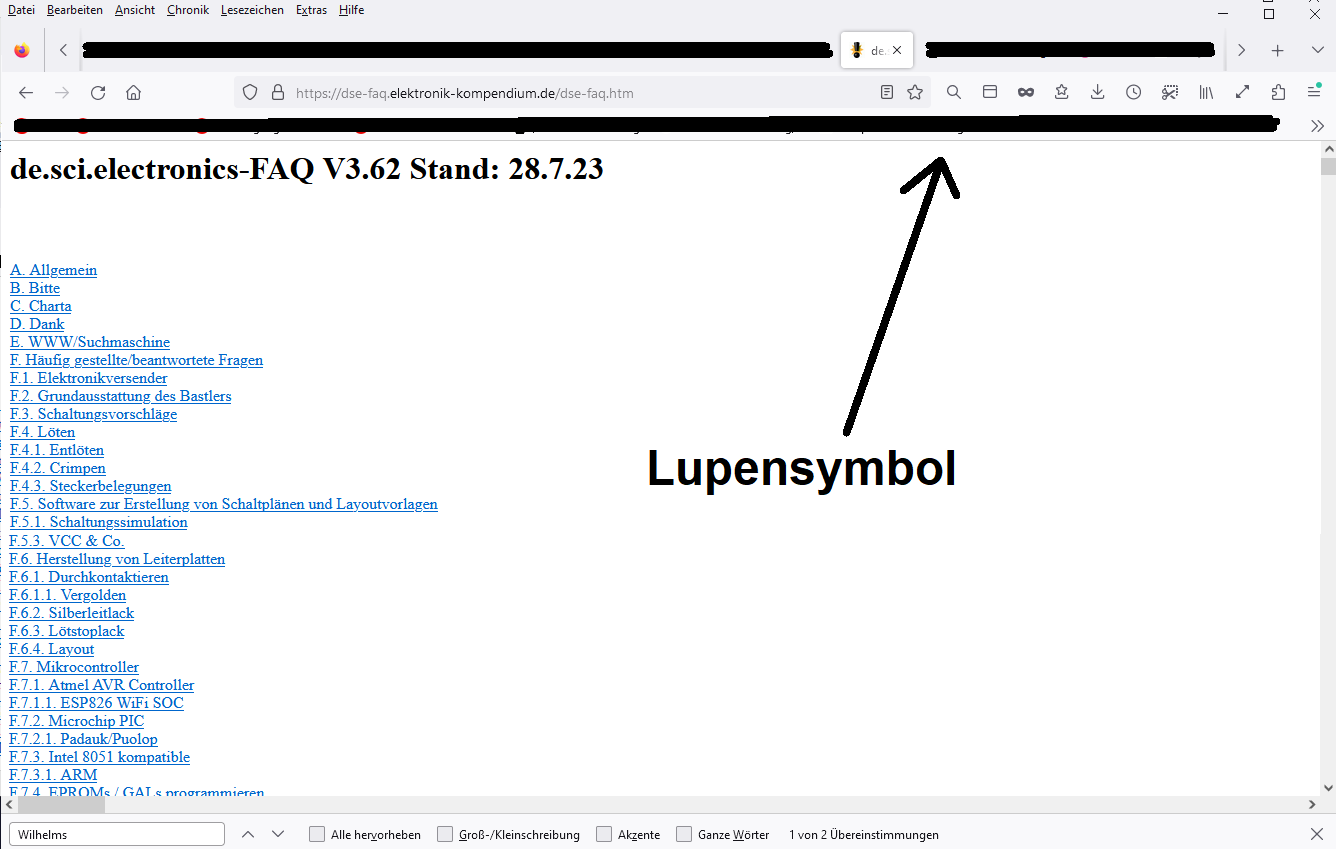
Bild
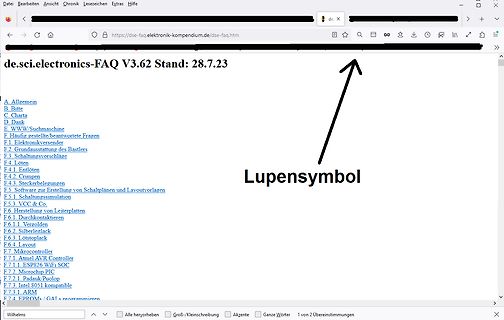
Inhaltsverzeichnis einer Elektronik-FAQ Webseite
Silberleitlack F.6.3. Löstoplack F.6.4. Layout F.7. Mikrocontroller F.7.1. Atmel AVR Controller F.7.1.1. ESP8266 WiFi SoC F.7.2. Microchip PIC F.7.3. Intel 8051 kompatibel F.7.4. ARM F.7.4. EPROMs / GALs programmieren
in „230V auf 220V drosseln“ · Analoge Elektronik und Schaltungstechnik · · Screenshots
-
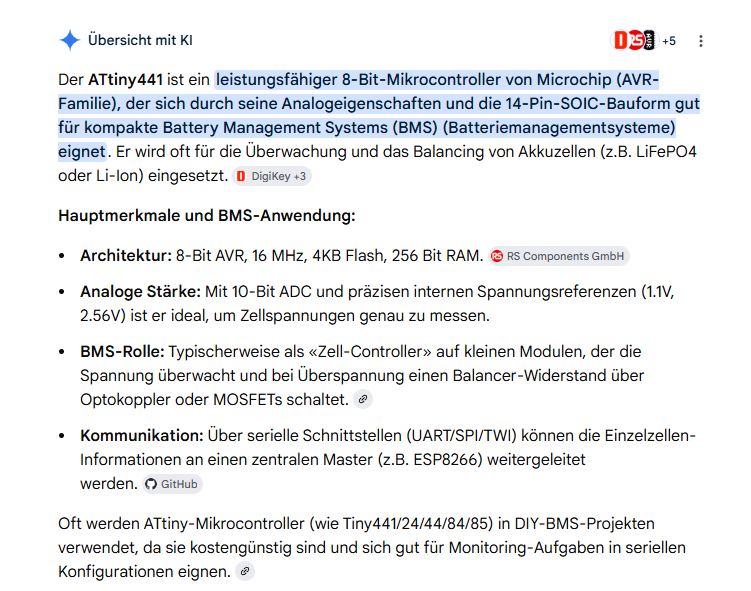
Bild
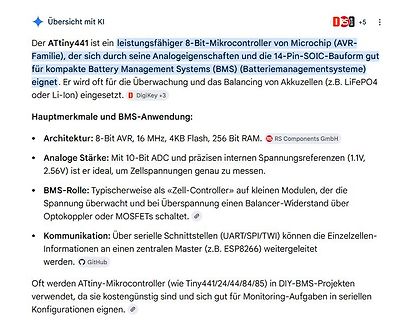
Text über ATtiny441 Mikrocontroller und BMS-Anwendung
Schnittstellen (UART/SPI/TWI) können die Einzelzellen-Informationen an einen zentralen Master (z.B. ESP8266) weitergeleitet werden. Oft werden ATtiny-Mikrocontroller (wie Tiny441/24/44/84/85) in DIY-BMS-Projekten verwendet, da sie kostengünstig sind und sich gut für Monitoring-Aufgaben in seriellen Konfigurationen
in „alternativ Akku zum verbauten??“ · Analoge Elektronik und Schaltungstechnik · · Screenshots
-
Datei
Logfile.txt
detected eeprom is online current eeprom version: 0x00020900 reading ir codes from eeprom DFPLAYER LOGGER ESP8266 LOGGER read rtc: Su 2000-01-01 18:41:19 read rtc: Su 2000-01-01 18:41:19 net_time_countdown = 3786, don't check overlays read rtc: Su 2000-01-01 18:41:44 RTC temperature: 23 Welcome to WordClock
-
Datei
ESPNow2Serial_micropython.py
send()/recv() sta = network.WLAN(network.WLAN.IF_STA) sta.active(True) sta.disconnect() # Because ESP8266 auto-connects to last Access Point print('MAC:', ':'.join(['%02x' % b for b in sta.config('mac')])) e = espnow.ESPNow() e.active(True) print("timestamp, temperature, pressure, humidity, vbat, counter
-
Datei
tcptest.ino
#include <ESP8266WiFi.h> #include <WiFiClient.h> const char* ssid = "WLAN"; const char* password = "PASSWORT"; const int serverport = 4210; WiFiServer server(serverport); void setup() { Serial.begin(115200); Serial.println
in „ESP8266 TCP Server: Erster Verbindungsaufbau nach Reset dauert lange“ · Mikrocontroller und Digitale Elektronik ·
-
Bild
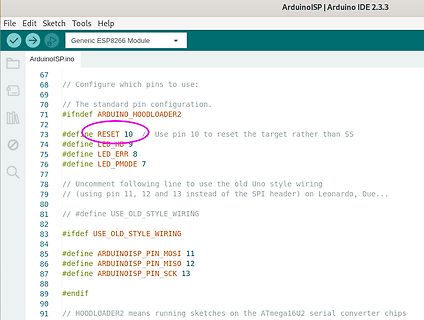
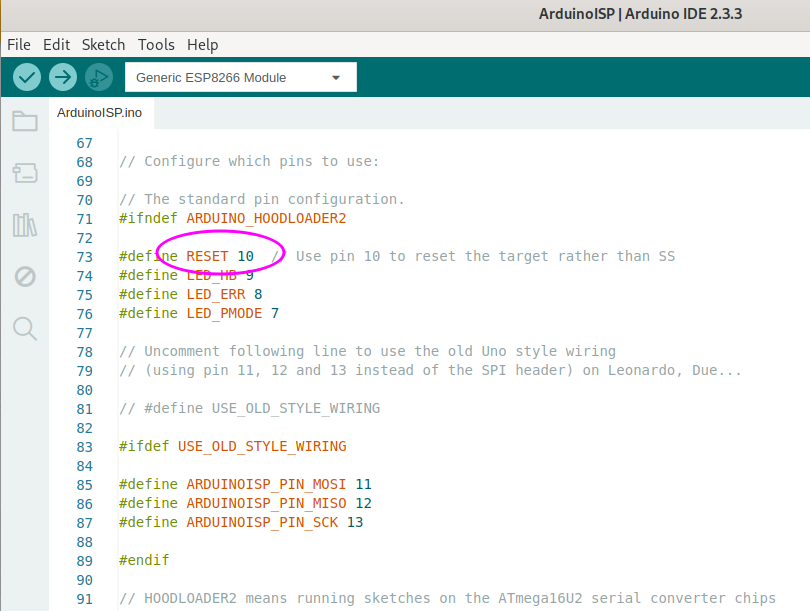
Arduino IDE Code-Ausschnitt ArduinoISP
ArduinoISP | Arduino IDE 2.3.3 File Edit Sketch Tools Help Generic ESP8266 Module ArduinoISP.ino 67 68 // Configure which pins to use: 69 70 // The standard pin configuration. 71 #ifndef ARDUINO_HOODLOADER2 72 73 #define RESET 10 // Use pin 10 to reset the target rather
in „Fusebits lassen sich nicht setzen (neuer ATMEGA328P)“ · Mikrocontroller und Digitale Elektronik · · Screenshots
-
Datei
HTTP.txt
nil)then for k, v in string.gmatch(vars, "(%w+)=(%w+)&*") do _GET[k] = v end end buf = buf.."<h1> ESP8266 Web Server</h1>"; buf = buf.."<p>GPIO0 <a href=\"?pin=ON1\"><button>ON</button></a> <a href=\"?pin=OFF1\"><button>OFF</button></a></p>"; buf = buf.."<p>GPIO2 <a href=\"?pin=ON2\"><button>ON
in „ESP8266, LUA: HTTP-Server Problem“ · Mikrocontroller und Digitale Elektronik ·
-
Datei
SlowSwitch.ino
GPIO13 #define FastPin 12 //D6 GPIO15 #define SwitchTime 0.5 Ticker SwitchTicker; //https://github.com/esp8266/Arduino/blob/master/libraries/Ticker/src/Ticker.h enum SwitchState {isoff,isslow,ison}; SwitchState swst = isoff; SwitchState gost = isoff; void changeState() { if (swst != gost) { if (gost == ison
in „Relais Ein/Aus schalten eines $40 WR. Was zuerst, wie?“ · Haus & Smart Home ·
-
PDF
CanCheckV1_PCB.pdf
1 2 3 2 1 2 1 1 15 14 13 3 2 1 1 I D T V V 0 2 4 3 V N R R R A T G 10 S 8 9 2 1 R 11 Wi Fi 2 ESP8266MOD ISM 2,4GHz PA +25dBm 882.11b/g/n 1 2 i h X X S s s K A L s T R C M M S D C F V D 0 S S . N 1 9 8 7 6 5 N 3 4 3 2 1 0 3 G D D D D D D G 3 D D D D D 30 29 28 27 26 25 24 23 22 21 20 19 18 17 16
-
Datei
main.c
2; const char KEY_SETRGB[] = "setRGB"; const char KEY_FADE[] = "fade"; const char INITIAL_ACK[] = "ESP8266 UP AND RUNNING"; const char MSG_FINISHED[] = "ESP_FINISHED\r\n"; int isinitcomplete = 0; //global variables for color fader int hue = 0; int saturation = 0; int intensity = 0; /** * Pins auf Output
in „ATMEGA328 Led-Fader Projekt instabil“ · Mikrocontroller und Digitale Elektronik ·
-
Datei
putty.txt
detected eeprom is online current eeprom version: 0x00020900 reading ir codes from eeprom DFPLAYER LOGGER ESP8266 LOGGER read rtc: Tu 2019-03-19 21:59:27 read rtc: Tu 2019-03-19 21:59:27 net_time_countdown = 3794, don't check overlays read rtc: Tu 2019-03-19 21:59:45 RTC temperature: 20 read rtc: Tu 2019-03
-
Datei
esp_server.ino
#include <ESP8266WiFi.h> const char *ssid = "testserver"; const char *pass = "test4711"; const int httpPort = 80; int token= 3; //number of measuring device to ask WiFiServer server(httpPort); String req=""; void
in „ESP8266 Server-Client“ · Mikrocontroller und Digitale Elektronik ·
-
Datei
code_PIR.txt
Serial.println(F("2.Please insert the SD card!")); while(true){ delay(0); // Code to compatible with ESP8266 watch dog. } } Serial.println(F("DFPlayer Mini online.")); myDFPlayer.volume(16); //setze lautstaerke von 0 bis 30 } void loop() { delay(5000); daistwer = digitalRead(ausloeser); Serial.println(
in „arduino und dfplayer spielt einfach nichts ab“ · Mikrocontroller und Digitale Elektronik ·
-
Datei
testESP.ino
#include "Arduino.h" extern "C" { #include "fs/ff.h" } #include <ESP8266WiFi.h> const char* ssid = "SSID_OF_YOUR_NETWORK_HERE"; const char* password = "WIFI_PASSWORD_GOES_HERE"; // Create an instance of the server on Port 80 WiFiServer server(80); unsigned long ulReqcount
in „Arduino Sloeber - C Code einbinden“ · Mikrocontroller und Digitale Elektronik ·
-
Datei
ESP_NTP.ino
#include <ESP8266WiFi.h> #include <time.h> #define WIFI_SSID "xxxxxxxxxx" #define WIFI_PASSWORD "xxxxxxxxxx" int timezone = 2; // MESZ //###################################################################### void
in „Nixie Uhr Probleme :-(“ · Analoge Elektronik und Schaltungstechnik ·
-
PDF
Hoymiles.sch.pdf
K3 MISO 5 D6 IRQ 5 D3 SCL 3 I2C MOSI 6 CE 6 4 CS 7 D7 7 D4 Power 8 D8 8 GND 3V3 5V K4 K5 +3V3 +5V C ESP8266 D1 MINI C D D Joe G. Hoymiles Hoymiles Ahoy! 13.10.2022 09:13 Sheet: 1/1 V 1.0 1 2 3 4 5 6
in „Wechselrichter Hoymiles HM-xxxx 2,4 GhZ Nordic Protokoll?“ · Mikrocontroller und Digitale Elektronik ·
-
PDF
Hoymiles.sch.pdf
K3 MISO 5 D6 IRQ 5 D3 SCL 3 I2C MOSI 6 CE 6 4 CS 7 D7 7 D4 Power 8 D8 8 GND 3V3 5V K4 K5 +3V3 +5V C ESP8266 D1 MINI C D D Joe G. Hoymiles Hoymiles Ahoy! 13.10.2022 09:13 Sheet: 1/1 V 1.0 1 2 3 4 5 6
in „Wechselrichter Hoymiles HM-xxxx 2,4 GhZ Nordic Protokoll?“ · Mikrocontroller und Digitale Elektronik ·
-
Bild
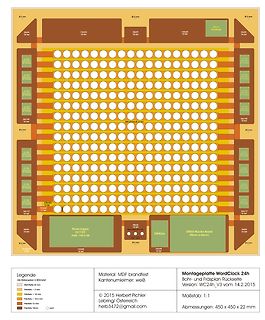
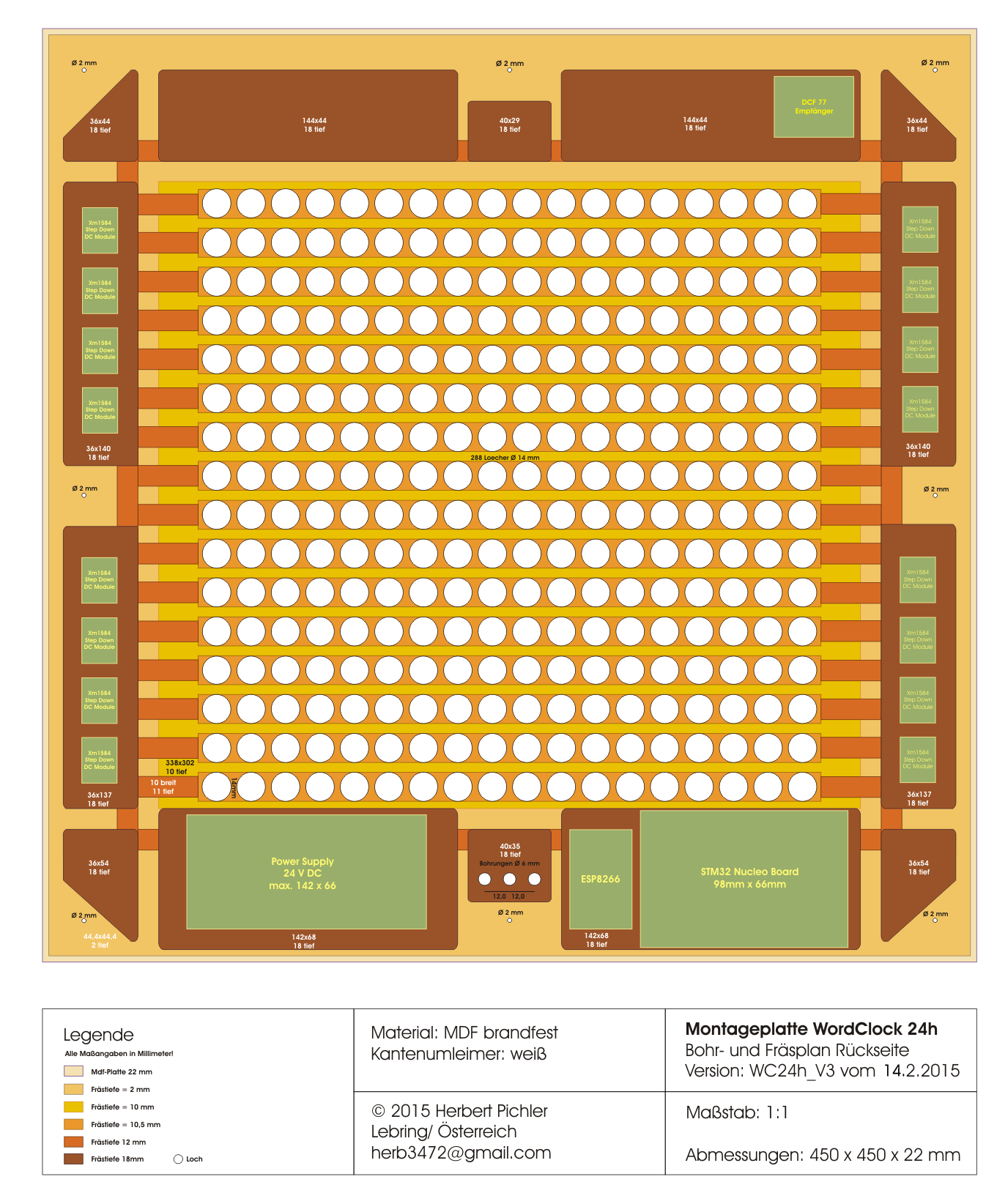
Layout einer Montageplatte für Elektronikkomponenten
40x29 18 loch, 144x44 18 loch, 36x44 18 loch, 288 Locher @ 12 mm, Power Supply 24 V DC max. 12 x 66, ESP8266, STM32 Nucleo Board 98mm x 66mm, 36x64 18 loch, 36x64 18 loch, 36x137 18 loch, 36x137 18 loch, 36x137 18 loch, 36x137 18 loch, 36x137 18 loch, 36x137 18 loch, 36x137 18 loch, 36x137 18 loch, 36x137
in „Minutengenaue 24 Stunden-Wortuhr - wer will mitbauen?“ · Projekte & Code · · Screenshots
-
Bild
Screenshot eines Mikrocontroller-Forums
06 Senkeroiden gerd 17 22.01.2019 14:00 Phasenkomparator PLL Didididum 7 22.01.2019 13:50 Arduino (ESP8266): Funktionspointer für Klassendefinition Andreas K. 1 22.01.2019 13:42 Arduino wird vom System nicht erkannt MultiVit 6 22.01.2019 13:41 Alternative zu NAS Walter T. 59 22.01.2019 13:40 Drehencoder
in „Amper hochskillen“ · Offtopic · · Screenshots
-
PDF
Confidentiality_Letter.pdf
Request for Confidentiality Date: __2014/10/27______ Subject: Confidentiality Request for: _____2AC7Z-ESP8266EX Pursuant to FCC 47 CRF 0.457(d) and 0.459 and IC RSP-100, Section 10, the applicant requests that a part of the subject FCC application be held confidential. Type of Confidentiality Requested
in „Wlan2Serial Modul für 5 euro“ · Mikrocontroller und Digitale Elektronik ·
-
Datei
Empfaenger.ino
Streifen // Als UDP-Slave, der vom NodeMCU V3.3 seine Befehle bekommt // für UDP-Server #include <ESP8266WiFi.h> #include <WiFiUdp.h> #include <Adafruit_NeoPixel.h> // Einfügen der Adafruit_NeoPixel Bibiliothek int led = 10; #define LED1 D7 char *ssid = "NETZWERKNAME"; char *password = "NETZWERKPASSWORT
in „Daten zwischen zwei ESPs in Echtzeit übertragen“ · Mikrocontroller und Digitale Elektronik ·
-
Datei
Empfaenger.ino
Streifen // Als UDP-Slave, der vom NodeMCU V3.3 seine Befehle bekommt // für UDP-Server #include <ESP8266WiFi.h> #include <WiFiUdp.h> #include <Adafruit_NeoPixel.h> // Einfügen der Adafruit_NeoPixel Bibiliothek int led = 10; #define LED1 D4 char *ssid = "NETZWERKNAME"; char *password = "NETZWERKPASSWORT
in „Daten zwischen zwei ESPs in Echtzeit übertragen“ · Mikrocontroller und Digitale Elektronik ·
-
Datei
ERR07.txt
ImageConvert/pushData.php?nodeID=1&values=12.5;14.7;36.5 HTTP/1.1 Host: srv12.blselectronics.ch User-Agent: ESP8266HTTPClient Connection: close Accept-Encoding: identity;q=1,chunked;q=0.1,*;q=0 ----- [HTTP-Client][returnError] error(-11): read Timeout [HTTP-Client][returnError] tcp stop -11 [HTTP-Client][end]
in „ESP8266 - Arduino - HTTP Get, ESP stürzt ab.“ · Mikrocontroller und Digitale Elektronik ·
-
Datei
18-002A.ino
#include <RF24Network.h> #include <RF24.h> #include <RF24Mesh.h> #include <ESP8266WiFi.h> #define _VERSION 1005 uint32_t displayTimer = 0; // NRF24L01+ CE auf GPIO15 / Pin12 RF24 radio(15, 2); // CE, CS RF24Network network(radio); RF24Mesh mesh(radio,network); void setup(void)
in „ESP8266 - Arduino - HTTP Get, ESP stürzt ab.“ · Mikrocontroller und Digitale Elektronik ·
-
Datei
z2dbase.php
<?php // this is the communication-file for the conversation between ESP8266 (metering) and database for user19 data require 'dbconnectOPEN.php'; /*--------------- save actual dtz-data by request method POST ------------------------------*/ if(strcasecmp($_SERVER['REQUEST_METHOD
in „Digitale Stromzähler auslesen und in DB speichern“ · Mikrocontroller und Digitale Elektronik ·
-
Datei
sample.ino
Serial.println(F("2.Please insert the SD card!")); while(true){ delay(0); // Code to compatible with ESP8266 watch dog. } } Serial.println(F("DFPlayer Mini online.")); myDFPlayer.volume(10); //Set volume value. From 0 to 30 myDFPlayer.play(1); //Play the first mp3 } void loop() { static unsigned long timer
in „arduino und dfplayer spielt einfach nichts ab“ · Mikrocontroller und Digitale Elektronik ·
-
PDF
SCH_Schematic1_2025-04-21.pdf
▯1 ▯2 ▯3 ▯4 ▯5 ▯6 Voltage Regulator ESP8266 ▯A DC1 +12V U2 +3.3V H3 ▯A 1 3 2 GND 3 SW1 4 GND 1 1 PWM2 H2 2 VIN VOUT 4 U1 2.4GHz 2 2 1 3 EP 1 1 2 1 22 GND 2 1 ADJ/GND 2 RST TXD 21 3 2 13 ADC RXD 20 4 3 GND GND +3.3V M4 EN IO5 19 RPM4 +3.3V
in „PWM Lüfter Steuerung mit ESP8266 Tacho Problem“ · Mikrocontroller und Digitale Elektronik ·
-
Datei
ERR08.txt
ImageConvert/pushData.php?nodeID=1&values=12.5;14.7;36.5 HTTP/1.1 Host: srv12.blselectronics.ch User-Agent: ESP8266HTTPClient Connection: close Accept-Encoding: identity;q=1,chunked;q=0.1,*;q=0 ----- [HTTP-Client][handleHeaderResponse] RX: 'HTTP/1.1 200 OK' [HTTP-Client][handleHeaderResponse] RX: 'Date: Wed,
in „ESP8266 - Arduino - HTTP Get, ESP stürzt ab.“ · Mikrocontroller und Digitale Elektronik ·
-
Datei
user_main.c
BIT_RATE_115200, BIT_RATE_115200); // print welcome msg and FW/SDK versions on UART0 uart0_sendStr("\rESP8266EX ready! \r\n"); os_sprintf(temp,"FW:%04X SDK:%04X\r\n\n", FW_VERSION,SDK_VERSION); // init LED on GPIO4 // disable pullup and pulldown PIN_PULLUP_DIS(PERIPHS_IO_MUX_GPIO4_U); PIN_PULLDWN_DIS(PERIPHS_IO_MUX_GPIO4
in „Wlan2Serial Modul für 5 euro“ · Mikrocontroller und Digitale Elektronik ·
-
PDF
SCH_Schematic1_2025-04-25-1.pdf
▯1 ▯2 ▯3 ▯4 ▯5 ▯6 Voltage Regulator ESP8266 ▯A DC1 +12V U2 +3.3V H3 ▯A 1 3 2 GND 3 SW1 4 GND 1 1 PWM2 H2 2 VIN VOUT 4 U1 2.4GHz 2 2 1 3 EP 1 1 2 1 22 GND 2 1 ADJ/GND 2 RST TXD 21 3 2 3 ADC RXD 20 4 3 GND GND +3.3V 4 EN IO5 19 RPM4 +3.3V 4
in „PWM Lüfter Steuerung mit ESP8266 Tacho Problem“ · Mikrocontroller und Digitale Elektronik ·
-
Datei
WIFI-Kit-8-Test3.ino
#include <ESP8266WiFi.h> #include "oled.h" #define SSID "Muschikatze" #define PASSWORD "Geheim" #define SERVER "ptb.de" // There are 2 different versions of the board // OLED display=OLED(2,14,4); OLED display=OLED
in „Display was auf Knopfdruck Datum anzeigt“ · Mikrocontroller und Digitale Elektronik ·
-
Datei
WIFI-Kit-8-DateTime.ino
#include <ESP8266WiFi.h> #include "oled.h" #define SSID "Muschikatze" #define PASSWORD "Geheim" #define SERVER "ptb.de" // There are 2 different versions of the board // static OLED display=OLED(2,14,4); static OLED
in „Zeitschaltuhr + PWM“ · Mikrocontroller und Digitale Elektronik ·
-
Datei
WLAN_RELAY.ino
#include <ESP8266WiFi.h> #ifndef STASSID #define STASSID "xxxxxxxx" #define STAPSK "xxxxxxxx" #endif #undef DEBUG #ifdef DEBUG unsigned long PacketCount=0; #endif const char* ssid = STASSID; const char* password
in „ESP8266 als TCP Server verschluckt Client Pakets“ · Mikrocontroller und Digitale Elektronik ·
-
PDF
haupt_pcb_deepsleep.ecken_SCH.PDF
1 2 1 2 0 2 1 1 K15 GND GND X2p TVS505 TVS505 Vin ( 5V ) 3.3V 4 14 + Vdd rt data gb GND sz NodeMCU ESP8266 ( Amica ) VDD s IC3 s GND sz 3 R15 Vss V LM324N DATA gb R2 7 11 2 1 2 VDD rt 1 1 2 5,1K 1K CD4011BE DHT22
in „Warum hat mein invertierender Schmitt-Trigger nur 1.9V am Ausgang?“ · Mikrocontroller und Digitale Elektronik ·
-
PDF
include.pdf
#include <ESP8266WiFi.h> const char* ssid = ""; const char* password = ""; short rc_pin=3; int ledPin=2; WiFiServer server(80); void setup() { Serial.begin(115200); delay(10); pinMode(rc_pin, OUTPUT); //definiere
in „Projekt läuft nicht stabil. Hilfe!!“ · Mikrocontroller und Digitale Elektronik ·
-
PDF
PARTS_CLEARING_-_Sheet1.pdf
https://www.sparkfun.c http://i.ebayimg.c 10€ ebay available sparkfun just for reference, mine is ebay esp8266 module (ESP-01), wireless lan module with AT-commands used, working, E07 never soldered €3.00 2 http://4tronix.co.u 4€ ebay intl payment pending ROBOTICS / RC Hobby Equipment Trollfactory TFC Silicone
in „[V] Rigol DS1052E, Labornetzteil, Robotikteile, Modellbau“ · Markt ·
-
Datei
sipdial.ino
SUCH DAMAGE. * * ====================================================================*/ #include <ESP8266WiFi.h> #include <WifiUdp.h> //------------------------------------------------ // configuration with fix ip //------------------------------------------------ // wlan param const char* ssid = "ssid
-
Datei
Geigerzaehler_GC20.ino
github.com/pra22/GC-20 SBM-20 based Geiger Counter Author: Prabhat Email: pra22@pitt.edu Sketch for ESP8266 that counts clicks from the Geiger tube, calculates the counts per minute, and displays information on a TFT touchscreen. Attribution-ShareAlike 4.0 International (CC BY-SA 4.0) */ #include <Arduino.h> #include <ESP8266WiFi.h> #include <EthernetClient.h> #include <DNSServer.h> #include <ESP8266WebServer.h> #include <WiFiManager.h> #include <EEPROM.h> #include "SPI.h" #include "Adafruit_GFX.h" #include <Fonts/FreeSans9pt7b.h
in „Hilfe 2.8" LCD Problem“ · Mikrocontroller und Digitale Elektronik ·
-
Datei
bmp.htm
EN"> <html> <head> <meta http-equiv="content-type" content="text/html; charset=ISO-8859-1"> <title>ESP8266</title> </head> <body> <script type="text/javascript"> param = [0x1D, 0x93, 0xFC, 0x9C, 0xC8, 0xED, 0x82, 0x0F, 0x69, 0xBC, 0x57, 0x1C, 0x15, 0x7A, 0x00, 0x29, 0x80, 0x00, 0xD4, 0xBD, 0x09, 0x80
in „HTML, AJAX, JavaScript, Merkwürdigkeit im Script“ · Softwareentwicklung ·
-
Datei
bmp.html
EN"> <html> <head> <meta http-equiv="content-type" content="text/html; charset=ISO-8859-1"> <title>ESP8266</title> </head> <body> <script type="text/javascript"> param = [0x1D, 0x93, 0xFC, 0x9C, 0xC8, 0xED, 0x82, 0x0F, 0x69, 0xBC, 0x57, 0x1C, 0x15, 0x7A, 0x00, 0x29, 0x80, 0x00, 0xD4, 0xBD, 0x09, 0x80
in „HTML, AJAX, JavaScript, Merkwürdigkeit im Script“ · Softwareentwicklung ·
-
Datei
WS2812x300-Christmas.ino
the NeoPixels? const uint8_t PIN = 6; // make sure to set this to the correct PixelPin, ignored for Esp8266 // How many NeoPixels are attached to the Arduino? const uint16_t NUMPIXELS = 300; // When we setup the NeoPixel library, we tell it how many pixels, and which pin to use to send signals. // Note
in „Zeigt her eure elektronischen Weihnachtsbasteleien!“ · Projekte & Code ·