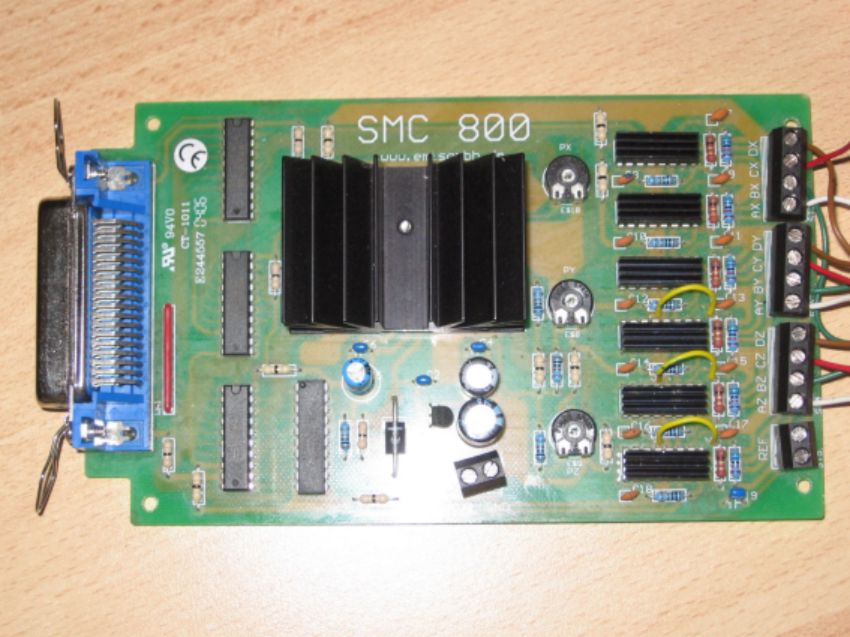
Schrittmotorenkarte SMC 800 defekt

OP #1315858
Hallo Allerseits,

meine SMC 800 hat mir zwei Jahre lang gut gedient, nun ist offenbar die 
Steuerung der Y-Achse defekt. Der Schrittmotor der Y-Achse dreht nicht 
mehr, er „zittert“ nur noch. Kennt jemand das Problem bzw. weiß jemand 
wie man das defekte Bauteil (Widerstand, Kondensator, Steuerchip,....) 
identifizieren kann?

Vielen Dank und Gruß,

Markus
Angehängte Dateien:
Gast #1315977
er „zittert“ nur noch....

Inside a bi-polar stepper motor there are two coils.
The SMC800 has an IC for each coil. It is likely that
one of the ICs of the Y axis is defective so this is
way the stepper motor is only vibrating. Try to disconnect
the wire AY. If the Y motor is still vibrating then
IC8 is defective. If the motor is not vibrating anymore
(completely silent) then IC7 is defective. Before you
try that, make sure that the two coils of the motor are OK.
(If one coil of the motor is defective you will see the
same problem).
Gast #1317154
If you have disconnected AY and the motor is still turning,
then IC8 is defective. IC7 and IC8 are driven by IC3 which
is a 74HC574 IC. (See page 2 of the PDF of my previous link).


Replace IC8 and IC7. Not sure which type of IC you will find
(PBL3717A or TEA3717) so if you replace both ICs you will
be sure that the two coils of the motor Y are driven by the
same type of IC. If you still have problems after replacing
IC7 and IC8, then replace also IC3. The heatsinks are glued
on IC7 and IC8 with a 2-component thermal glue. Heatsinks
are mandatory!

Good luck!

Antwort schreiben

Eine eigene Frage? Dieser Thread ist über 17 Jahre alt. Stell sie in einem eigenen Thread – dort lesen mehr Leute mit, und sie wird öfter und schneller beantwortet.

Neuen Thread starten

Eine Lösung, Ergänzung oder Rückmeldung zu diesem Thread? Dann antworte hier.

Formatierung
  • [c]C-Code[/c]
  • [code]Code in anderen Sprachen, ASCII-Zeichnungen[/code]
  • [math]Formel in LaTeX-Syntax[/math]
  • [[Titel]] – Link zu einem Artikel
  • Verweis auf einen anderen Beitrag: Rechtsklick auf dessen Beitrags-ID (#8078628), „Adresse kopieren“, in den Text einfügen

Mehr zur Formatierung

Längeren Sourcecode als Anhang, nicht in den Text. JPG nur für Fotos und Scans; Zeichnungen und Screenshots als PNG oder GIF. Siehe Bildformate.

Schon registriert? Anmelden

Wird nicht angezeigt. Wir schicken dir einen Link; sobald du damit bestätigst, erscheint dein Beitrag.

Mit dem Abschicken legst du einen kostenlosen Account an und erkennst die Nutzungsbedingungen und die Datenschutzerklärung an.