rs232

Gast #38529
i have a haematology cell-counter device. in the manual book it's said
that it can be connect to pc via rs232 cable connection. the
configuration rs232 on that device i enclose in the rs232.doc

i have try to laplink and non cross rs232 cable, but it's not working
at all ( i can't receive and transfer data).

my question : how rs232 configuration on the pc side ? (on the device
side you can take alook at file rs232.doc).

thank you, and please respon asap ....
Gast
Hi,

there is no file attached (your rs232.doc).

try once more, that people here can read more about the problem.

greetings, Markus.
Gast
hi markus, it's me again

i have A haematology cell counter DEVICES.  into the manual book it's
said that it CAN connect to PC via rs232 cable connection. the
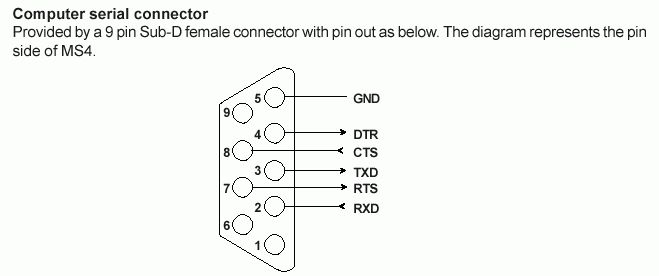
configuration rs232 on that DEVICE i enclose (rs232.gif), i'v try with
laplink and non CROSS rs232 cable, but it's not working at all(i
can't receive and transfer DATA).  my question:  how rs232
configuration on the PC side?  (on the DEVICES side you CAN take alook
at file rs232.gif).  thank you, and please respon asap....
Angehängte Dateien:
Gast
Hi

Maybe you have to change configuration in your COM-Port.
Your Devide uses things like bits per second, databits, parity and
stopbit. That configuration of the PC has to be the same as it is in
your Device.

Antwort schreiben

Eine eigene Frage? Dieser Thread ist über 23 Jahre alt. Stell sie in einem eigenen Thread – dort lesen mehr Leute mit, und sie wird öfter und schneller beantwortet.

Neuen Thread starten

Eine Lösung, Ergänzung oder Rückmeldung zu diesem Thread? Dann antworte hier.

Formatierung
  • [c]C-Code[/c]
  • [code]Code in anderen Sprachen, ASCII-Zeichnungen[/code]
  • [math]Formel in LaTeX-Syntax[/math]
  • [[Titel]] – Link zu einem Artikel
  • Verweis auf einen anderen Beitrag: Rechtsklick auf dessen Beitrags-ID (#8078628), „Adresse kopieren“, in den Text einfügen

Mehr zur Formatierung

Längeren Sourcecode als Anhang, nicht in den Text. JPG nur für Fotos und Scans; Zeichnungen und Screenshots als PNG oder GIF. Siehe Bildformate.

Schon registriert? Anmelden

Wird nicht angezeigt. Wir schicken dir einen Link; sobald du damit bestätigst, erscheint dein Beitrag.

Mit dem Abschicken legst du einen kostenlosen Account an und erkennst die Nutzungsbedingungen und die Datenschutzerklärung an.