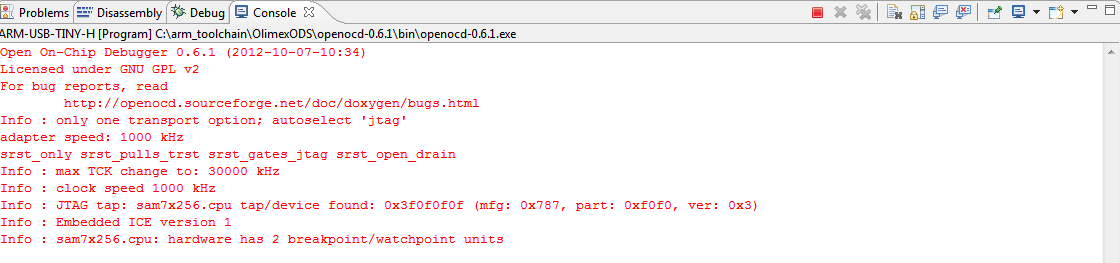
Hallo, ich versuche gerade 3 Leds (rot, grün und gelb) mit olimex sam7-ex256 blinken lassen. Die Erstellung (Build Project) des Projekts ist fehlerfrei aber wenn ich mein JTAG-Kabel zum PC anschließen, blinkt nur die grüne LED, obwohl ihc mein external tool (arm-usb-tiny-h) nicht ausgewählt habe. Wenn ich jetzt das Debugging durchführe kriege den beigefügten Inhalt in der Konsole. Frage: 1- Warum blink die grüne led, obwohl ich das Programm noch nicht auf dem Board gebracht bzw laufen lassen mit "Make Target" habe? 2- Wenn ich jetzt mein external tool arm-usb-tiny-h auswähle und mit dem Debug anfange, warum blinken die anderen leds nicht? Anhänge: - C Code - Inhalte der Konsole bei Debugging - Inhalte der Konsole, wenn arm-usb-tiny-h ausgewählt wurde Ich freue mich auf eure Meldungen.
Kann es sein , dass du die LED anmachst ausmachst und dann wartest? du müsstest so gemacht werden. PIO_CODR = 0x00000020; //with clear output data register the green led is turned off Delay(); PIO_SODR = 0x00000020; //with set output data register the green led is turned on Das die grüne LED Blinkt kann ich mir nur vorstellen, dass bereits ein Beispiel Programm auf dem Board läuft. grüße
Sebastian B. schrieb: > Kann es sein , dass du die LED anmachst ausmachst und dann wartest? > du müsstest so gemacht werden. > PIO_CODR = 0x00000020; //with clear output data register the green led > is turned off > Delay(); > PIO_SODR = 0x00000020; //with set output data register the green led is > turned on Dke Sebastian für deine schnelle Meldung. Du hast recht, es war ein Fehler von mir. Ich habe es gerade korrigiert aber nur die grüne LED blinkt immer. > Das die grüne LED Blinkt kann ich mir nur vorstellen, dass bereits ein > Beispiel Programm auf dem Board läuft. Das stelle ich mir auch vor aber wie gesagt habe ich bis jetzt nur debug gemacht und kein Program auf das Board gebracht. Wird bei der Auswahl des externen Tools (arm-usb-tiny-h) das Prog auf dem Board gebrannt? Wie kann ich jetzt das neue Programm auf dem Board brennen?
Der Debug Vorgang ist eing. ein Programmier-Vorgang mit anschließender Debug Funktion. wenn du dein Programm auf den Prozessor spielen möchtest musst du bz. bei atmel studio unter Tools->device preomming-> memories-> datein auswählen -> Programming dann wird deine Anwendung auf den Chip gespielt grüße
Bei Debugging kriege ich das: source .gdbinit target remote localhost:3333 localhost:3333: A connection attempt failed because the connected party did not properly respond after a period of time, or established connection failed because connected host has failed to respond. monitor reset init "monitor" command not supported by this target. monitor arm7_9 force_hw_breakpoints enable "monitor" command not supported by this target. monitor arm7_9 fast_memory_access disable "monitor" command not supported by this target. symbol-file main.out monitor flash write_image erase unlock main.bin 0x00100000 "monitor" command not supported by this target. monitor sleep 100 "monitor" command not supported by this target. monitor arm7_9 fast_memory_access enable "monitor" command not supported by this target. monitor reset halt "monitor" command not supported by this target. thbreak main No hardware breakpoint support in the target. continue The program is not being run. Die Verbindung mit localhost ist leider fehlgeschlagen. Hast du vielleicht eine Ahnung, woran das liegen könnte? Ansonstens so sieht meine Debug Configuration aus: 'Initialize' commands target remote localhost:3333 monitor reset init monitor arm7_9 force_hw_breakpoints enable monitor arm7_9 fast_memory_access disable symbol-file main.out monitor flash write_image erase unlock main.bin 0x00100000 monitor sleep 100 monitor arm7_9 fast_memory_access enable 'Run' commands monitor reset halt thbreak main continue Dke im voraus- Yann
Bitte melde dich an um einen Beitrag zu schreiben. Anmeldung ist kostenlos und dauert nur eine Minute.
Bestehender Account
Schon ein Account bei Google/GoogleMail? Keine Anmeldung erforderlich!
Mit Google-Account einloggen
Noch kein Account? Hier anmelden.