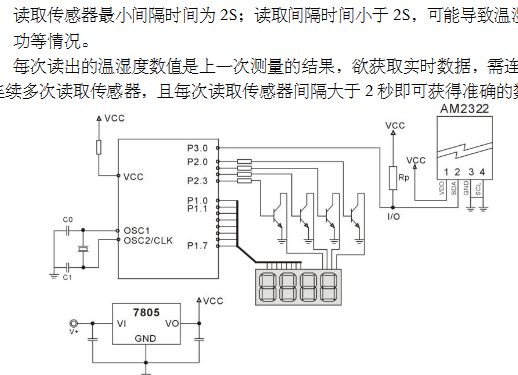
Hi, hat jemand Erfahrung mit diesem Baustein? Ich kann leider keine Projekte finden, die funktionieren.
ich habe folgenden i2c scanner ausgeführt:
1 | // -------------------------------------- |
2 | // i2c_scanner |
3 | // |
4 | // Version 1 |
5 | // This program (or code that looks like it) |
6 | // can be found in many places. |
7 | // For example on the Arduino.cc forum. |
8 | // The original author is not know. |
9 | // Version 2, Juni 2012, Using Arduino 1.0.1 |
10 | // Adapted to be as simple as possible by Arduino.cc user Krodal |
11 | // Version 3, Feb 26 2013 |
12 | // V3 by louarnold |
13 | // Version 4, March 3, 2013, Using Arduino 1.0.3 |
14 | // by Arduino.cc user Krodal. |
15 | // Changes by louarnold removed. |
16 | // Scanning addresses changed from 0...127 to 1...119, |
17 | // according to the i2c scanner by Nick Gammon |
18 | // http://www.gammon.com.au/forum/?id=10896 |
19 | // Version 5, March 28, 2013 |
20 | // As version 4, but address scans now to 127. |
21 | // A sensor seems to use address 120. |
22 | // Version 6, November 27, 2015. |
23 | // Added waiting for the Leonardo serial communication. |
24 | // |
25 | // |
26 | // This sketch tests the standard 7-bit addresses |
27 | // Devices with higher bit address might not be seen properly. |
28 | // |
29 | |
30 | #include <Wire.h> |
31 | |
32 | |
33 | void setup() |
34 | {
|
35 | Wire.begin(); |
36 | |
37 | Serial.begin(9600); |
38 | while (!Serial); // Leonardo: wait for serial monitor |
39 | Serial.println("\nI2C Scanner");
|
40 | } |
41 | |
42 | |
43 | void loop() |
44 | {
|
45 | byte error, address; |
46 | int nDevices; |
47 | |
48 | Serial.println("Scanning...");
|
49 | |
50 | nDevices = 0; |
51 | for(address = 1; address < 127; address++ ) |
52 | {
|
53 | // The i2c_scanner uses the return value of |
54 | // the Write.endTransmisstion to see if |
55 | // a device did acknowledge to the address. |
56 | Wire.beginTransmission(address); |
57 | delay(1); |
58 | error = Wire.endTransmission(); |
59 | |
60 | if (error == 0) |
61 | {
|
62 | Serial.print("I2C device found at address 0x");
|
63 | if (address<16) |
64 | Serial.print("0");
|
65 | Serial.println(address,HEX); |
66 | Serial.println(address); |
67 | Serial.println(" !");
|
68 | |
69 | nDevices++; |
70 | } |
71 | else if (error==4) |
72 | {
|
73 | Serial.print("Unknown error at address 0x");
|
74 | if (address<16) |
75 | Serial.print("0");
|
76 | Serial.println(address,HEX); |
77 | } |
78 | |
79 | delay(2); |
80 | } |
81 | if (nDevices == 0) |
82 | Serial.println("No I2C devices found\n");
|
83 | else |
84 | Serial.println("done\n");
|
85 | |
86 | delay(5000); // wait 5 seconds for next scan |
87 | } |
leider Antwortet der Chip nicht und ich bekomme für alle 127 Adressen einen NACK zurück...
Hallo,
Erfahrungen damit hab ich noch keine, aber hier steht etwas zur
Kompatibilität dieses Sensors.
>https://github.com/micropython/micropython/issues/2290
Es gibt bestimmt funktionierende Bibliotheken (i2c/single-wire) zu einen
kompatiblen Sensor, die mit dem AM2322 funktionieren.
Grüße Oliver
neuling schrieb: > leider Antwortet der Chip nicht und ich bekomme für alle 127 Adressen > einen NACK zurück... Wie ist der Sensor angeschlossen? Sind Pullup-Widerstände am Bus?
Hallo, welche Busgeschwindigkeit verwendet das Arduino Gedöns ohne das man irgendwo was angibt? Der Sensor macht mur 100kHz. Sascha
So wie im bild als Onewire verdrahtet könnte der DHT-22 kompatibel sein, davon gibt es eine Riesen Asuwahl an Beispeielen.
Bitte melde dich an um einen Beitrag zu schreiben. Anmeldung ist kostenlos und dauert nur eine Minute.
Bestehender Account
Schon ein Account bei Google/GoogleMail? Keine Anmeldung erforderlich!
Mit Google-Account einloggen
Noch kein Account? Hier anmelden.