
Hallo zusammen!

ich versuche gerade einen Code von einer Fernbedienung und einem
Empfänger von RFM69 auf NRF24L01 umzustellen um das Modul
auszuprobieren.

Leider schaffe ich es ums verrecken nicht, den NRF24 an einem SAMD21 zum
laufen zu bringen...

Ich benutze folgende lib:
http://tmrh20.github.io/RF24/

Heruntergeladen und importiert.

Binbelegung ist wie folgt bei mir:

Hardware und und Konfiguriert
CE : 5
CS : 6

HARDWARE
MOSI : MOSI
MISO : MISO
SCK : SCK

Ich kann das Modul nicht initialisieren... Ich bekomme von   if
(!radio.isChipConnected()) {Serial.println("not connected");}  immer not
connected zurück.

Ich benutze folgenden Code zum testen:


/*
* Getting Started example sketch for nRF24L01+ radios
* This is a very basic example of how to send data from one node to
another
* Updated: Dec 2014 by TMRh20
*/

#include <SPI.h>
#include "RF24.h"

/****************** User Config ***************************/
/***      Set this radio as radio number 0 or 1         ***/
bool radioNumber = 0;

/* Hardware configuration: Set up nRF24L01 radio on SPI bus plus pins 7
& 8 */
RF24 radio(5,6);
/**********************************************************/

byte addresses[][6] = {"1Node","2Node"};

// Used to control whether this node is sending or receiving
bool role = 0;

void setup() {
  Serial.begin(115200);
  while (!Serial) {delay(1);}
  Serial.println(F("RF24/examples/GettingStarted"));
  Serial.println(F("*** PRESS 'T' to begin transmitting to the other
node"));

  radio.begin();
  if (!radio.isChipConnected()) {Serial.println("not connected");}

  // Set the PA Level low to prevent power supply related issues since
this is a
 // getting_started sketch, and the likelihood of close proximity of the
devices. RF24_PA_MAX is default.
  radio.setPALevel(RF24_PA_LOW);

  // Open a writing and reading pipe on each radio, with opposite
addresses
  if(radioNumber){
    radio.openWritingPipe(addresses[1]);
    radio.openReadingPipe(1,addresses[0]);
  }else{
    radio.openWritingPipe(addresses[0]);
    radio.openReadingPipe(1,addresses[1]);
  }

  // Start the radio listening for data
  radio.startListening();
}

void loop() {


/****************** Ping Out Role ***************************/
if (role == 1)  {

    radio.stopListening();                                    // First,
stop listening so we can talk.


    Serial.println(F("Now sending"));

    unsigned long start_time = micros();                             //
Take the time, and send it.  This will block until complete
     if (!radio.write( &start_time, sizeof(unsigned long) )){
       Serial.println(F("failed"));
     }

    radio.startListening();                                    // Now,
continue listening

    unsigned long started_waiting_at = micros();               // Set up
a timeout period, get the current microseconds
    boolean timeout = false;                                   // Set up
a variable to indicate if a response was received or not

    while ( ! radio.available() ){                             // While
nothing is received
      if (micros() - started_waiting_at > 200000 ){            // If
waited longer than 200ms, indicate timeout and exit while loop
          timeout = true;
          break;
      }
    }

    if ( timeout ){                                             //
Describe the results
        Serial.println(F("Failed, response timed out."));
    }else{
        unsigned long got_time;                                 // Grab
the response, compare, and send to debugging spew
        radio.read( &got_time, sizeof(unsigned long) );
        unsigned long end_time = micros();

        // Spew it
        Serial.print(F("Sent "));
        Serial.print(start_time);
        Serial.print(F(", Got response "));
        Serial.print(got_time);
        Serial.print(F(", Round-trip delay "));
        Serial.print(end_time-start_time);
        Serial.println(F(" microseconds"));
    }

    // Try again 1s later
    delay(1000);
  }


/****************** Pong Back Role ***************************/

  if ( role == 0 )
  {
    unsigned long got_time;

    if( radio.available()){
                                                                    //
Variable for the received timestamp
      while (radio.available()) {                                   //
While there is data ready
        radio.read( &got_time, sizeof(unsigned long) );             //
Get the payload
      }

      radio.stopListening();                                        //
First, stop listening so we can talk
      radio.write( &got_time, sizeof(unsigned long) );              //
Send the final one back.
      radio.startListening();                                       //
Now, resume listening so we catch the next packets.
      Serial.print(F("Sent response "));
      Serial.println(got_time);
   }
 }


/****************** Change Roles via Serial Commands
***************************/

  if ( Serial.available() )
  {
    char c = toupper(Serial.read());
    if ( c == 'T' && role == 0 ){
      Serial.println(F("*** CHANGING TO TRANSMIT ROLE -- PRESS 'R' TO
SWITCH BACK"));
      role = 1;                  // Become the primary transmitter (ping
out)

   }else
    if ( c == 'R' && role == 1 ){
      Serial.println(F("*** CHANGING TO RECEIVE ROLE -- PRESS 'T' TO
SWITCH BACK"));
       role = 0;                // Become the primary receiver (pong
back)
       radio.startListening();

    }
  }


} // Loop
Gast
#5799310
Stefan M. schrieb:
> Binbelegung ist wie folgt bei mir:
>
> Hardware und und Konfiguriert
> CE : 5
> CS : 6
>
> HARDWARE
> MOSI : MOSI
> MISO : MISO
> SCK : SCK

Interrupt-Leitung musst du nicht anschliessen?

Regeln musst du nicht beachten?
Angehängte Dateien:
-
 Posten_Regeln.png
(11 KB)
Posten_Regeln.png
(11 KB)
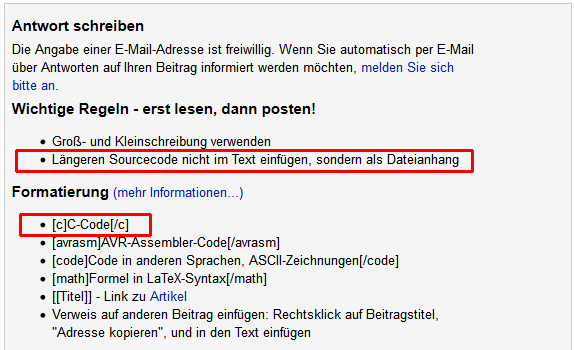
Entschuldigung... Ich werde es beim nächsten mal beachten. Leider kann
ich jetzt nichts mehr im Beitrag ändern.

In allen Tutorials die ich gefunden habe, wird der IRQ nicht
anschlossen...

https://howtomechatronics.com/tutorials/arduino/arduino-wireless-communication-nrf24l01-tutorial/
Gast
#5799421
Kann man nutzen, muss man aber nicht.
Gast
#5799465
> HARDWARE
> MOSI : MOSI
> MISO : MISO

Sicher?
Gast
#5799472
Lutz schrieb:
> Sicher?

Ja das macht man bei SPI so.
Gast
#5799483
Im vorbeigehen unglücklich formuliert, stimmt leider. Ich meine
eigentlich: Vermutlich wird die SPI-Kommunikation gar nicht laufen.
Sprich: Ohne den SAM-code wird es hier wohl nicht weitergehen.
Antwort schreiben
Bitte melde dich an, um einen Beitrag zu schreiben.