Hallo zusammen,
Ich versuche einen ESP und ATtiny85 miteinander kommunizieren zu lassen. #
Der Attiny soll PWM-Werte Empfangen und eine LED schalten.
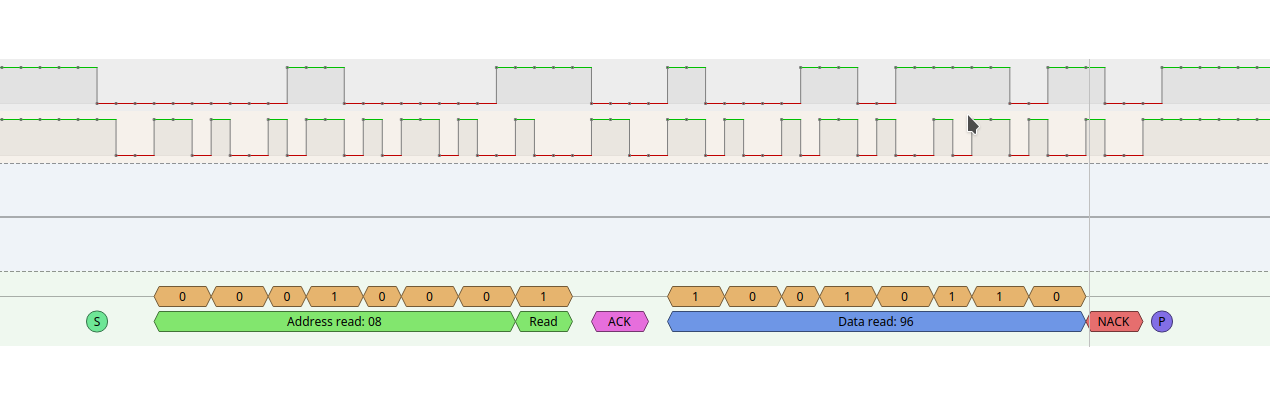
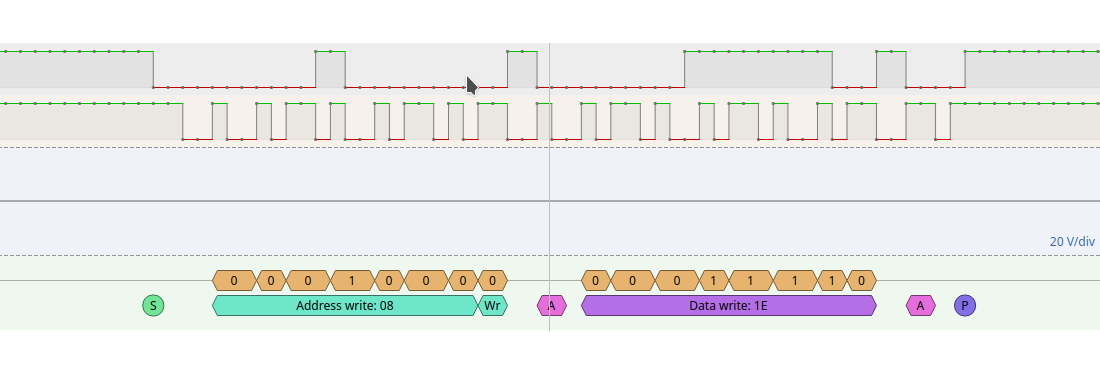
Der ESP sendet die Daten korrekt, soweit ich das beurteilen kann, aber der Attiny will die Daten einfach nicht verarbeiten.
Habe mal 2 Screenshots hochgeladen.
Habe als Test, ob die Routine überhaupt aufgerufen wird eine LED schalten lassen beim receiveEvent(). Dies funktioniert, aber die Variable pwm, wird einfach nicht geändert. Sie ist am Anfang auf 150 gesetzt und bleibt auch fröhlich dort.
Sitze da jetzt seit 2 Tagen dran und hab echt ein Brett vorm Kopf anscheinend.
Der ATtinycode :
1 |
#define I2C_SLAVE_ADDRESS 0x8 // the 7-bit address (remember to change this when adapting this example)
|
2 |
// Get this from https://github.com/rambo/TinyWire
|
3 |
#include <TinyWireS.h>
|
4 |
#include <Arduino.h>
|
5 |
// The default buffer size, Can't recall the scope of defines right now
|
6 |
#ifndef TWI_RX_BUFFER_SIZE
|
7 |
#define TWI_RX_BUFFER_SIZE ( 16 )
|
8 |
#endif
|
9 |
|
10 |
volatile int pwm = 150;
|
11 |
|
12 |
/**
|
13 |
* This is called for each read request we receive, never put more than one byte of data (with TinyWireS.send) to the
|
14 |
* send-buffer when using this callback
|
15 |
*/
|
16 |
void requestEvent()
|
17 |
{
|
18 |
TinyWireS.send(pwm);
|
19 |
}
|
20 |
|
21 |
|
22 |
/**
|
23 |
* The I2C data received -handler
|
24 |
*
|
25 |
* This needs to complete before the next incoming transaction (start, data, restart/stop) on the bus does
|
26 |
* so be quick, set flags for long running tasks to be called from the mainloop instead of running them directly,
|
27 |
*/
|
28 |
void receiveEvent(uint8_t howMany)
|
29 |
{
|
30 |
digitalWrite(3,HIGH);
|
31 |
if (howMany < 1)
|
32 |
{
|
33 |
// Sanity-check
|
34 |
return;
|
35 |
}
|
36 |
if (howMany > TWI_RX_BUFFER_SIZE)
|
37 |
{
|
38 |
// Also insane number
|
39 |
return;
|
40 |
}
|
41 |
|
42 |
// ignore write address
|
43 |
TinyWireS.receive();
|
44 |
howMany--;
|
45 |
|
46 |
if (!howMany)
|
47 |
{
|
48 |
// This write was only to set the buffer for next read
|
49 |
return;
|
50 |
}
|
51 |
|
52 |
while(howMany--)
|
53 |
{
|
54 |
byte recv = TinyWireS.receive();
|
55 |
pwm = recv;
|
56 |
}
|
57 |
}
|
58 |
|
59 |
|
60 |
void setup()
|
61 |
{
|
62 |
|
63 |
pinMode(1, OUTPUT); // OC1A, also The only HW-PWM -pin supported by the tiny core analogWrite
|
64 |
pinMode(3, OUTPUT);
|
65 |
/**
|
66 |
* Reminder: taking care of pull-ups is the masters job
|
67 |
*/
|
68 |
|
69 |
TinyWireS.begin(I2C_SLAVE_ADDRESS);
|
70 |
TinyWireS.onReceive(receiveEvent);
|
71 |
TinyWireS.onRequest(requestEvent);
|
72 |
}
|
73 |
|
74 |
void loop()
|
75 |
{
|
76 |
/**
|
77 |
* This is the only way we can detect stop condition (http://www.avrfreaks.net/index.php?name=PNphpBB2&file=viewtopic&p=984716&sid=82e9dc7299a8243b86cf7969dd41b5b5#984716)
|
78 |
* it needs to be called in a very tight loop in order not to miss any (REMINDER: Do *not* use delay() anywhere, use tws_delay() instead).
|
79 |
* It will call the function registered via TinyWireS.onReceive(); if there is data in the buffer on stop.
|
80 |
*/
|
81 |
TinyWireS_stop_check();
|
82 |
analogWrite(1, pwm);
|
83 |
}
|
ESP :
1 |
int pwm = 0;
|
2 |
|
3 |
void setup() {
|
4 |
Serial.begin(115200); /* begin serial for debug */
|
5 |
Wire.begin(); /* join i2c bus with SDA=D1 and SCL=D2 of NodeMCU */
|
6 |
}
|
7 |
|
8 |
void loop() {
|
9 |
|
10 |
if(pwm < 255){
|
11 |
pwm +=5;
|
12 |
Serial.printf("Dimming up... Next pwm value : %i", pwm);
|
13 |
Serial.println();
|
14 |
}
|
15 |
|
16 |
else if (pwm >= 255){
|
17 |
pwm =0;
|
18 |
Serial.println("Reset PWM");
|
19 |
}
|
20 |
|
21 |
Wire.beginTransmission(8); /* begin with device address 8 */
|
22 |
Wire.write(pwm); /* sends hello string */
|
23 |
Wire.endTransmission(); /* stop transmitting */
|
24 |
delay(500);
|
25 |
|
26 |
Serial.printf("Sent pwm value : %i", pwm);;
|
27 |
Serial.println();
|
28 |
|
29 |
Wire.requestFrom(8, 1); // request 6 bytes from slave device #8
|
30 |
|
31 |
while (Wire.available()) { // slave may send less than requested
|
32 |
byte c = Wire.read(); // receive a byte as character
|
33 |
Serial.println("Requested value from Slave:");
|
34 |
Serial.print(c); // print the character
|
35 |
Serial.println();
|
36 |
}
|
37 |
|
38 |
delay(500);
|
39 |
|
40 |
}
|
Ich kann hier einfach keinen Fehler entdecken.
Hat jemand von Euch eine Idee ?
Grüße

 AttinyRead.png
(23 KB)
AttinyRead.png
(23 KB)
 AttinyWrite.png
(23 KB)
AttinyWrite.png
(23 KB)