MEGA1284P XPLAINED über USB mit avrdudue programmieren

OP #7555983
Lesenswert?

Hallo,

ich versuche den MEGA-1284P Xplained über USB mit avrdudue anzusprechen. Nach Infos in https://ww1.microchip.com/downloads/en/Appnotes/doc8374.pdf und im Internet sollte das mit der Option -c avr911 -b 57600 gehen. "The communication port settings (baud rate, parity control etc.) must be set manually before using AVROSP. The needed settings are 57600bps, no parity control and eight data bits." Das klappt aber nicht. Auch nicht wenn ich Reset und SW0 drücke und SW0 später loslasse um den Bootloader zu aktivieren.

1
~$ lsusb
2
Bus 001 Device 005: ID 03eb:2122 Atmel Corp. XMEGA-A1 Explained evaluation kit
3

4
~$ ls -lah /dev/ttyACM0 
5
crw-rw----+ 1 root dialout 166, 0 Dec 10 16:22 /dev/ttyACM0
6

7
~$ avrdude -p m1284p -P /dev/ttyACM0 -b 57600 -c avr911 -n -v
8

9
         Programmer Type : butterfly
10
         Description     : Atmel AppNote AVR911 AVROSP
11

12
Connecting to programmer: .avrdude: butterfly_recv(): programmer is not responding
13

14
avrdude: butterfly_recv(): programmer is not responding
15
avrdude: butterfly_recv(): programmer is not responding
16
avrdude: butterfly_recv(): programmer is not responding
17
avrdude: butterfly_recv(): programmer is not responding
18
avrdude: butterfly_recv(): programmer is not responding
19
Found programmer: Id = ""; type = 
20
    Software Version = .; Hardware Version = .
21
avrdude: butterfly_recv(): programmer is not responding
22
avrdude: butterfly_recv(): programmer is not responding
23
avrdude: error: buffered memory access not supported. Maybe it isn't
24
a butterfly/AVR109 but a AVR910 device?
25
avrdude: initialization failed, rc=-1
26
         Double check connections and try again, or use -F to override
27
         this check.
28

29
avrdude: butterfly_recv(): programmer is not responding
30
avrdude: error: programmer did not respond to command: leave prog mode
31
avrdude: butterfly_recv(): programmer is not responding
32
avrdude: error: programmer did not respond to command: exit bootloader
33

34
avrdude done.  Thank you.

Das Board habe ich gebraucht gekauft. Ich weiß nicht, ob der Bootloader noch darauf ist.

OP #7556018
Lesenswert?

Welches zip ist denn mit "5.2 Restoring the bootloader When the bootloader has been erased it can be restored with any of the previously mentioned programming tools. The hex file for the bootloader is a part of the application note zip (in the folder named hex) file and is called mega_1284p_xplained_bootloader_and_example.hex" gemeint.

Die Application Note AVR370: MEGA-1284P Xplained Getting Started Guide oder AVR911: AVR Open Source Programmer http://www.atmel.com/dyn/resources/prod_documents/doc2568.pdf http://www.atmel.com/dyn/resources/prod_documents/AVR911.zip ? Unter https://www.microchip.com konnte ich da bisher nichts finden.

Habe es gefunden https://www.microchip.com/en-us/application-notes/an8374 https://ww1.microchip.com/downloads/en/Appnotes/AVR370_MEGA_1284P_Xplained_Example_Application.zip

OP #7556052
Lesenswert?

Hallo,

ich habe den bootloader in den flash geschrieben:

1
$ avrdude -p m1284p -c atmelice -U flash:w:mega_1284p_xplained_bootloader_and_example.hex:i
2

3
avrdude: AVR device initialized and ready to accept instructions
4

5
Reading | ################################################## | 100% 0.07s
6

7
avrdude: Device signature = 0x1e9705 (probably m1284p)
8
avrdude: NOTE: "flash" memory has been specified, an erase cycle will be performed
9
         To disable this feature, specify the -D option.
10
avrdude: erasing chip
11
avrdude: reading input file "mega_1284p_xplained_bootloader_and_example.hex"
12
avrdude: writing flash (128192 bytes):
13

14
Writing | ################################################## | 100% 3.21s
15

16
avrdude: 128192 bytes of flash written
17
avrdude: verifying flash memory against mega_1284p_xplained_bootloader_and_example.hex:
18
avrdude: load data flash data from input file mega_1284p_xplained_bootloader_and_example.hex:
19
avrdude: input file mega_1284p_xplained_bootloader_and_example.hex contains 128192 bytes
20
avrdude: reading on-chip flash data:
21

22
Reading | ################################################## | 100% 2.55s
23

24
avrdude: verifying ...
25
avrdude: 128192 bytes of flash verified
26

27
avrdude: safemode: Fuses OK (E:FF, H:9A, L:F7)
28

29
avrdude done.  Thank you.

Wenn ich das MEGA1284P XPLAINED jetzt über USB per avrdude anspreche sieht es (etwas) besser aus, aber es kommt noch mind. ein Fehler:

1
$ avrdude -p m1284p -P /dev/ttyACM0 -b 57600 -c avr911 -n -v
2

3
avrdude: Version 6.3-20171130
4
         Copyright (c) 2000-2005 Brian Dean, http://www.bdmicro.com/
5
         Copyright (c) 2007-2014 Joerg Wunsch
6

7
         System wide configuration file is "/etc/avrdude.conf"
8
         User configuration file is "/home/a.../.avrduderc"
9
         User configuration file does not exist or is not a regular file, skipping
10

11
         Using Port                    : /dev/ttyACM0
12
         Using Programmer              : avr911
13
         Overriding Baud Rate          : 57600
14
         AVR Part                      : ATmega1284P
15
         Chip Erase delay              : 55000 us
16
         PAGEL                         : PD7
17
         BS2                           : PA0
18
         RESET disposition             : dedicated
19
         RETRY pulse                   : SCK
20
         serial program mode           : yes
21
         parallel program mode         : yes
22
         Timeout                       : 200
23
         StabDelay                     : 100
24
         CmdexeDelay                   : 25
25
         SyncLoops                     : 32
26
         ByteDelay                     : 0
27
         PollIndex                     : 3
28
         PollValue                     : 0x53
29
         Memory Detail                 :
30

31
                                  Block Poll               Page                       Polled
32
           Memory Type Mode Delay Size  Indx Paged  Size   Size #Pages MinW  MaxW   ReadBack
33
           ----------- ---- ----- ----- ---- ------ ------ ---- ------ ----- ----- ---------
34
           eeprom        65    10   128    0 no       4096    8      0  9000  9000 0xff 0xff
35
           flash         65    10   256    0 yes    131072  256    512  4500  4500 0xff 0xff
36
           lock           0     0     0    0 no          1    0      0  9000  9000 0x00 0x00
37
           lfuse          0     0     0    0 no          1    0      0  9000  9000 0x00 0x00
38
           hfuse          0     0     0    0 no          1    0      0  9000  9000 0x00 0x00
39
           efuse          0     0     0    0 no          1    0      0  9000  9000 0x00 0x00
40
           signature      0     0     0    0 no          3    0      0     0     0 0x00 0x00
41
           calibration    0     0     0    0 no          1    0      0     0     0 0x00 0x00
42

43
         Programmer Type : butterfly
44
         Description     : Atmel AppNote AVR911 AVROSP
45

46
Connecting to programmer: .
47
Found programmer: Id = "AVRBOOT"; type = S
48
    Software Version = 1.5; No Hardware Version given.
49
Programmer supports auto addr increment.
50
Programmer supports buffered memory access with buffersize=256 bytes.
51

52
Programmer supports the following devices:
53

54
avrdude: error: programmer did not respond to command: select device
55
avrdude: initialization failed, rc=-1
56
         Double check connections and try again, or use -F to override
57
         this check.
58

59

60
avrdude done.  Thank you.
OP #7556127
Lesenswert?

Hallo,

mit einem Terminalprogramm (minicom) kann ich über USB mit dem MEGA1284P XPLAINED und dem Beispielprogramm kommunizieren:

1
$ minicom -D /dev/ttyACM0 -b 57600
2

3
Welcome to minicom 2.8
4

5
OPTIONS: I18n 
6
Port /dev/ttyACM0, 18:03:29
7

8
------------------------------------------------------------------------------
9
#  COMMAND:             DESCRIPTION:
10
------------------------------------------------------------------------------
11
1  help                 Print this help
12
2  flash leds           Toggles leds connected to PORTB0:3
13
3  read ntc             Returns NTC ADC code (ADC7)
14
4  read light sensor    Returns Light Sensor ADC code (ADC6)
15
5  light sensor demo    LED3:0 are dimmed according to the light sensor value
16
6  start 32khz crystal  Starts the 32.768kHz crystal
17
7  stop 32khz crystal   Stops the 32.768kHz crystal
18
8  idle                 MCU in idle mode. Wake up by pressing SW0
19
9  power-save           MCU in Power-Save mode. Wake up by pressing SW0
20
10 power-down           MCU in Power-Down mode. Wake up by pressing SW0
21
11 standby              MCU in Standby mode. Wake up by pressing SW0
22
12 extended standby     MCU in Extended Standby mode. Wake up by pressing SW0
23
------------------------------------------------------------------------------
24
To perform a command, enter command number or command string
25

26
MEGA-1284P Xplained>2
27

28
MEGA-1284P Xplained>3
29
NTC ADC value:  450

Kann ich auch mit minicom und dem bootloader ein hex in den flash schreiben oder braucht es dazu ein Programm wie avrdude? Bisher habe ich ATmegas nur ohne bootloader mit avrdude per ISP programmiert.

Moderator Persönliche Seite #7556207
Lesenswert?

Alexander S. schrieb:

Programmer supports the following devices:

Das ist irgendwie seltsam.

Vielleicht solltest du deinen eigenen Bootloader lieber benutzen. Dieses uralte AVR109/AVR911 Protokoll ist nicht sonderlich toll und offenbar oft noch schlechter implementiert.

1
  /* Tell the programmer which part we selected.
2
     According to the AVR109 code, this is ignored by the bootloader.  As
3
     some early versions might not properly ignore it, rather pick up the
4
     first device type as reported above than anything out of avrdude.conf,
5
     so to avoid a potential conflict.  There appears to be no general
6
     agreement on AVR910 device IDs beyond the ones from the original
7
     appnote 910. */
8

9
  buf[0] = 'T';
10
  buf[1] = devtype_1st;
11

12
  butterfly_send(pgm, buf, 2);
13
  if (butterfly_vfy_cmd_sent(pgm, "select device") < 0)
14
      return -1;

Problem in deinem Falle ist aber, dass der Bootloader ja behauptet, kein einziges device zu unterstützen.

Das ganze Konzept von "device codes" (als einzelne Bytes) in diesem Protokoll ist grottig.

Wenn du irgendwie kannst, such dir irgendeinen Bootloader, der STK500v2-Protokoll spricht, und benutze diesen. Alternativ kannst du dir natürlich auch die Quellen von dem alten Butterfly/AVR911-Bootloader schnappen und schauen, dass er zumindest einen brauchbaren device code produziert. Oder aber du hackst AVRDUDE, dass es gar keinen device code erst aussuchen will – ist ja bei einem Bootloader ohnehin egal, der hat nur genau ein device. (Das Protokoll AVR109 war ursprünglich für einen standalone programmer konzipiert worden.)

OP #7556278
Lesenswert?

Hallo Jörg,

ich habe noch diesen Bugreport https://lists.nongnu.org/archive/html/avrdude-dev/2007-01/msg00021.html von 2007 gefunden und avrdude nochmal mit -vvvv aufgerufen:

1
...
2
Programmer supports buffered memory access with buffersize=256 bytes.
3
avrdude: Send: t [74] 
4

5
Programmer supports the following devices:
6
avrdude: Recv: . [00] 
7

8
avrdude: Send: T [54] . [00] 
9
avrdude: Recv: . [00] 
10
avrdude: error: programmer did not respond to command: select device
11
avrdude: initialization failed, rc=-1
12
         Double check connections and try again, or use -F to override
13
         this check.
14

15
avrdude: Send: L [4c] 
16
avrdude: Recv: . [0d] 
17
avrdude: Send: E [45] 
18
avrdude: Recv: . [0d] 
19

20
avrdude done.  Thank you.

Das ist wahrscheinlich keine neue Info für Dich. Ich schreibe das nur der Vollständigkeit halber.

P.S. Mich wundert schon etwas, dass ich so wenig im Internet zu dem Problem finde. Das MEGA1284P XPLAINED gibt es ja schon lange und ich kann doch nicht der erste sein, der das mit avrdude und bootloader nutzen möchte.

Moderator Persönliche Seite #7556281
Lesenswert?

Naja, das, was ich damals dazu geschrieben habe, haben wir ja dann implementiert. Hilft nur in deinem Falle nicht, weil dein Bootloader ja gleich mal keinen einzigen Code als "supported" zurück gibt.

Ja, das Board gibt es schon lange, aber vermutlich benutzen nur wenige den Bootloader überhaupt. Die Nachfolger des alten XPLAINED hatten dann später auch einen Onboard-Programmer drauf (EDBG oder mEDBG), das mit dem 1284 war eins der ersten, da gab es sowas noch nicht.

#7557039
Lesenswert?

Hallo,

wie das immer so zusammenpasst. ;-)

Ich habe das nochmal nachgestellt. Folgende Zeile müsstest du ggf. Linux spezifisch anpassen. Das sollte funktionieren. Also erst Bootloader von MCUdude flashen und dann per USB mit Baudrate vom geflashten Bootloader und avrdude usw.

1
avrdude -v -p atmega1284p -c urclock -P COM4 -b115200 -D

Mir fällt da nochwas ein. Hast du die Resetleitung angepasst? Weil das Resetsignal kommt vom DTR. Sonst kann avrdude den Controller nicht in den Bootloader-Mode versetzen. Siehe ganz unten https://github.com/MCUdude/MightyCore

OP #7557088
Lesenswert?

Veit D. schrieb:

Also erst Bootloader von MCUdude flashen und dann per USB mit Baudrate vom geflashten Bootloader und avrdude usw.

Hallo Veit,

Moment, nicht ganz so schnell. Wie geschrieben, programmiere ich normalerweise per ISP. Da es für das MEGA1284P XPLAINED einen Bootloader und ein Beispielprogramm von Atmel gibt, wollte ich das einfach mal ausprobieren. Der Empfehlung einen anderen Bootloader auszuprobieren folge ich gerne. Wenn ich aber auf https://github.com/MCUdude/MightyCore lese "An Arduino core for ATmega8535, ATmega16, ATmega32, ATmega164, ATmega324, ATmega644 and ATmega1284, all running the Urboot bootloader. ..." dann frage ich mich, ob ich nicht nur den Urboot bootloader brauche. Warum soll ich mir das ganze MightyCore Framework installieren?

"... Boards Manager Installation This installation method requires Arduino IDE version 1.8.0 or greater."

Brauche ich die wirklich nur um einen bootloader zu installieren?

Veit D. schrieb:

Mir fällt da nochwas ein. Hast du die Resetleitung angepasst? Weil das Resetsignal kommt vom DTR. Sonst kann avrdude den Controller nicht in den Bootloader-Mode versetzen. Siehe ganz unten https://github.com/MCUdude/MightyCore

Angepasst habe ich an der HW nichts. Bisher habe ich ja nur nur den bootlaoder aus https://ww1.microchip.com/downloads/en/Appnotes/AVR370_MEGA_1284P_Xplained_Example_Application.zip ausprobiert.

Ich werde erst einnmal schauen welche optionalen Bootloader es für das MEGA1284P XPLAINED gibt. Ein einzelnes .hex oder der source code dafür und ein bootloader der ohne HW-Modifikationen funktioniert wäre mir lieber.

P.S. Ich werde wahrscheinlich erst am Wochenende dazukommen.

OP #7557248
Lesenswert?

Hallo,

ich habe https://github.com/cbalint13/avr-aosp entdeckt. Leider scheitert das Pyhon3 Programm beim Lesen der Fuses:

1
$ python3 avr-aosp.py 
2
Usage: avr-aosp.py -op read|write|erase -start <0x0000> -stop <0x1FFFF> -file intel.hex <-serial /dev/ttyUSB0> <-baud 19200>
3

4
$ python3 avr-aosp.py -op read -start 0x0000 -stop 0x1FFFF -file read_mega1284pxpl.hex -serial /dev/ttyACM0 -baud 57600
5

6
INFO
7

8
  S = AVRBOOT   #programmer id
9
  V = 15   #software version
10
  v = ?   #hardware version
11
  p = S   #programmer type
12
  a = Y   #autoincrement support
13
  b = Y   #block mode support
14
  t = [0100]   #supported device code
15
  s = 000005   #signature
16
Traceback (most recent call last):
17
  File "/home/alesi/AVR/avr-aosp/avr-aosp.py", line 329, in <module>
18
    main()
19
  File "/home/a.../AVR/avr-aosp/avr-aosp.py", line 307, in main
20
    GetParams( fd )
21
  File "/home/a.../AVR/avr-aosp/avr-aosp.py", line 98, in GetParams
22
    print ("  N =", fd.read(1).decode(), "\t#high fuse bits")
23
UnicodeDecodeError: 'utf-8' codec can't decode byte 0x97 in position 0: invalid start byte

Bei den <> im usage string für start und stop bin ich mir nicht sicher, ob die eingegeben werden sollen. Mit <> kommt aber der gleiche Fehler. Benutzt jemand hier avr-aosp.py ?

Dann könnte ich noch den AVR Open Source Programmer (AVROSP) unter wine ausprobieren. Ich kann das http://www.atmel.com/dyn/resources/prod_documents/AVR911.zip aber auf der microchip Seite nicht finden.

#7557251
Lesenswert?

Hallo,

ähm nein, du sollst nichts installieren oder Dergleichen. Du sollst nur einen Bootloader von MCUdude für deinen ATmega1284p verwenden. Hier ist der korrekte Link dorthin. Beitrag "Re: MEGA1284P XPLAINED über USB mit avrdudue programmieren"

Ich kenne das XPLAINED Board nicht. Müßte man den Schaltplan anschauen. Die Frage lautet wie Atmel sich damals gedacht hat den Controller zu reseten damit der Bootloader Mode aktiv wird um überhaupt die Chance zu haben Serial sein Programm zu flashen.

Wenn der Bootloader drauf ist und man möchte per USB ein Programm aufspielen, was am Ende immer auf Serial hinausläuft, dann muss ja irgendwas den Controller reseten können. Der Bootloader ist nach Reset immer nur kurz aktiv, danach startet er sein Programm was drauf ist. Vielleicht verstehst du jetzt den Ablauf besser. Also nur Rx/Tx Leitung am Controller kann dafür nicht ausreichend sein.

Moderator Persönliche Seite #7557282
Lesenswert?

Alexander S. schrieb:

Kannst Du einen … empfehlen?

Erstmal: ein Bootloader wird wohl sicher kein Arduino Framework nehmen.

Zweitens, Stefan Ruegers urboot wurde dir schon nahe gelegt.

https://github.com/stefanrueger/urboot

Bonus: auch wenn Stefan in Großbritannien lebt, er spricht deutsch, falls du Fragen an ihn hast. ;-) Stefan hat von mir die Federführung für AVRDUDE übernommen. Es lohnt sich also durchaus, auch mal eine aktuelle Version davon zu benutzen.

OP #7557299
Lesenswert?

Veit D. schrieb:

Ich kenne das XPLAINED Board nicht. Müßte man den Schaltplan anschauen. Die Frage lautet wie Atmel sich damals gedacht hat den Controller zu reseten damit der Bootloader Mode aktiv wird um überhaupt die Chance zu haben Serial sein Programm zu flashen.

Es sind drei Taster auf dem Board. Mit SW0 nach Reset loslassen kommt man in den bootloader Modus.

Veit D. schrieb:

Du sollst nur einen Bootloader von MCUdude für deinen ATmega1284p verwenden. Hier ist der korrekte Link dorthin. Beitrag "Re: MEGA1284P XPLAINED über USB mit avrdudue programmieren"

Das war mir nicht wirklich klar. Ich hatte noch nicht genug unter https://github.com/MCUdude/MightyCore gelesen.

Weder im AVR370: MEGA-1284P Xplained Getting Started Guide noch im AVR364: MEGA-1284P Xplained Hardware User's Guide finde ich Infos zur Clock des MEGA1284P XPLAINED. avrdude sagt

1
avrdude: safemode: lfuse reads as F7
2
avrdude: safemode: hfuse reads as 9A
3
avrdude: safemode: efuse reads as FF
4
avrdude: safemode: Fuses OK (E:FF, H:9A, L:F7)

und https://www.engbedded.com/fusecalc/ sagt damit "CKDIV8 nicht programmiert". Das Datenblatt sagt "9.2.1 Default Clock Source The device is shipped with internal RC oscillator at 8.0MHz". Demnach sollte er mit 8 MHz laufen, wenn er keinen externen Quarz hat. Mit 3.3 V kann er bis zu 10MHz.

#7557891
Lesenswert?

Hallo,

habe den Board Schaltplan gefunden. Als USB-Serial Wandler sitzt hier eine AT32UC3B1256 drauf. Von dem geht eine Leitung zum ATmega1284P Reset Pin. Der sollte das Arduino like automatisch machen. An dem AT32UC3B1256 fummelst du ja nicht rum und solltest auch nicht daran rum fummeln. Ich sehe das immer noch so das der ATmega1284P den Bootloader benötigt und dann sollte das funktionieren.

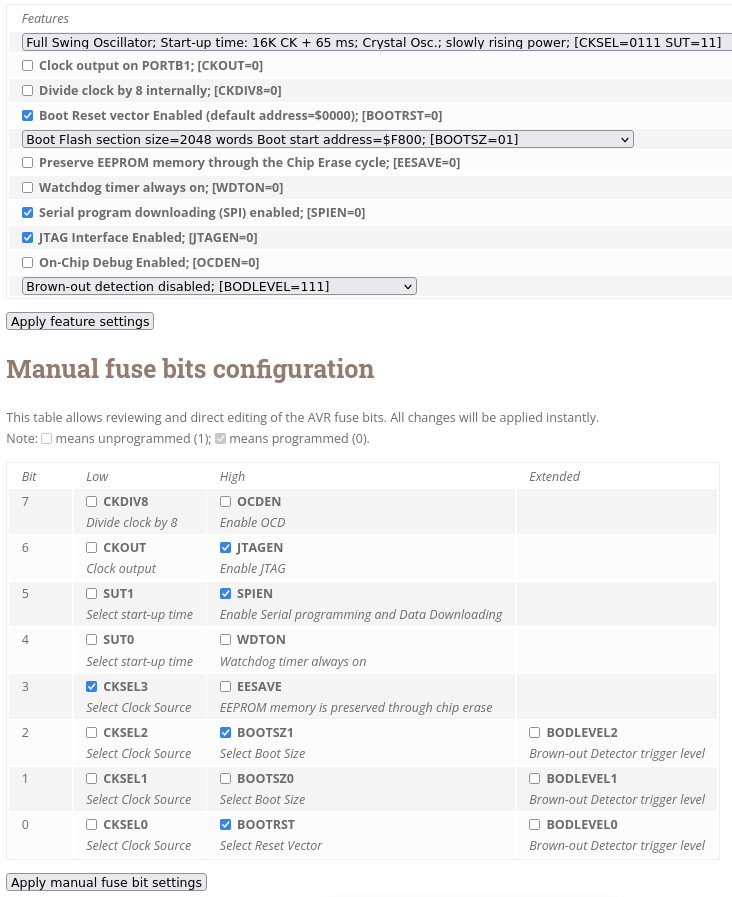
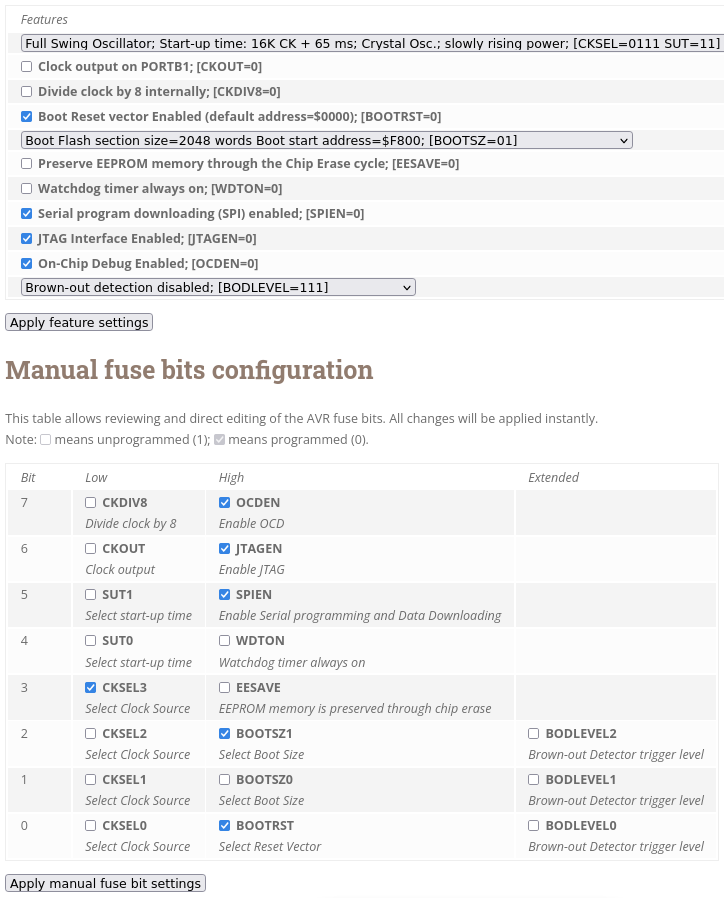
Was noch sein kann ist das die Fuse vom ATmega1284P vorher eingestellt werden müssen. Sonst ist der Bootloader wieder weg nach eigentlichen Programm flashen, weil der Speicherbereich nicht reserviert/geschützt wurde. Im Zweifelsfall konfigurierst du die größte Bootloadergröße. Damit verschenkst du nur paar Bytes Flashspeicher, mehr Nachteil hat man dadurch nicht.

Angehängte Dateien:
Moderator Persönliche Seite #7558005
Lesenswert?

Veit D. schrieb:

Als USB-Serial Wandler sitzt hier eine AT32UC3B1256 drauf.

Dann sollte der doch aber auch direkt den ATmega1284 programmieren können, ohne irgendwelche Bootloader da drauf. Diese UC3 wurden später als EDBG (Embedded Debugger) auf die diversen Xplained* gebaut – ich dachte nur zuerst, dieser Ur-Prototyp eines Xplained hätte den noch nicht gehabt.

Als was für ein Gerät meldet der sich denn am USB?

OP #7558015
Lesenswert?

Hallo,

das Flashen von optiboot scheint funktioniert zu haben:

1
$ avrdude -p m1284p -c atmelice -U flash:w:optiboot_flash_atmega1284p_UART0_57600_11059200L_B0_BIGBOOT.hex:i
2

3
avrdude: AVR device initialized and ready to accept instructions
4

5
Reading | ################################################## | 100% 0.07s
6

7
avrdude: Device signature = 0x1e9705 (probably m1284p)
8
avrdude: NOTE: "flash" memory has been specified, an erase cycle will be performed
9
         To disable this feature, specify the -D option.
10
avrdude: erasing chip
11
avrdude: reading input file "optiboot_flash_atmega1284p_UART0_57600_11059200L_B0_BIGBOOT.hex"
12
avrdude: writing flash (131072 bytes):
13

14
Writing | ################################################## | 100% 0.00s
15

16
avrdude: 131072 bytes of flash written
17
avrdude: verifying flash memory against optiboot_flash_atmega1284p_UART0_57600_11059200L_B0_BIGBOOT.hex:
18
avrdude: load data flash data from input file optiboot_flash_atmega1284p_UART0_57600_11059200L_B0_BIGBOOT.hex:
19
avrdude: input file optiboot_flash_atmega1284p_UART0_57600_11059200L_B0_BIGBOOT.hex contains 131072 bytes
20
avrdude: reading on-chip flash data:
21

22
Reading | ################################################## | 100% 0.00s
23

24
avrdude: verifying ...
25
avrdude: 131072 bytes of flash verified
26

27
avrdude: safemode: Fuses OK (E:FF, H:9A, L:F7)
28

29
avrdude done.  Thank you.

fusecalc sagt u.a. (nach wie vor):

1
Boot Reset vector Enabled (default address=$0000); [BOOTRST=0]
2
BOOTSZ1   BOOTRST

Die LED an SW0 bzw. an PB0 vom ATmega1284P leuchtet und flackert zwischendurch.

Den bootloader ohne etwas zu programmieren über USB mit avrdude anzusprechen, funktioniert noch nicht. Weder kurz nach Reset noch kurz nach SW0 nach Reset loslassen:

1
$ avrdude -p m1284p -P /dev/ttyACM0 -b 57600 -c wiring -n -vv
2

3
avrdude: Version 6.3-20171130
4
         Copyright (c) 2000-2005 Brian Dean, http://www.bdmicro.com/
5
         Copyright (c) 2007-2014 Joerg Wunsch
6

7
         System wide configuration file is "/etc/avrdude.conf"
8
         User configuration file is "/home/a.../.avrduderc"
9
         User configuration file does not exist or is not a regular file, skipping
10

11
         Using Port                    : /dev/ttyACM0
12
         Using Programmer              : wiring
13
         Overriding Baud Rate          : 57600
14
avrdude: wiring_open(): releasing DTR/RTS
15
ioctl("TIOCMSET"): Connection timed out
16
avrdude: wiring_open(): asserting DTR/RTS
17
ioctl("TIOCMSET"): Connection timed out
18
avrdude: ser_recv(): programmer is not responding
19
avrdude: stk500v2_ReceiveMessage(): timeout
20
avrdude: ser_recv(): programmer is not responding
21
avrdude: stk500v2_ReceiveMessage(): timeout
22
avrdude: ser_recv(): programmer is not responding
23
avrdude: stk500v2_ReceiveMessage(): timeout
24
avrdude: ser_recv(): programmer is not responding
25
avrdude: stk500v2_ReceiveMessage(): timeout
26
avrdude: ser_recv(): programmer is not responding
27
avrdude: stk500v2_ReceiveMessage(): timeout
28
avrdude: ser_recv(): programmer is not responding
29
avrdude: stk500v2_ReceiveMessage(): timeout
30
avrdude: stk500v2_getsync(): timeout communicating with programmer
31

32
avrdude done.  Thank you.

Die oben von Veit genannten programmer (Option -c) urclock oder carduino kennt mein avrdude: Version 6.3-20171130 (Debian oldstable) nicht.

Ich muss mich noch schlau lesen, wie ich den optiboot nutze. Ich habe momentan wenig Zeit. Am Wochenende evtl. mehr. Trotzdem schon mal vielen Dank.

#7558032
Lesenswert?

Hallo,

ich kenne jetzt nicht den Grundgedanken des AT32UC3B1256 auf dem Xplained Board, wenn das üblicherweise mittels ISP programmiert wird. Aber allein die Verschaltung sieht aus so wie ich das von Arduino kenne. USB-Serial Wandler per Tx/Rx und Reset am eigentlichen Controller gekoppelt. Deswegen benötigt der zu programmierende Controller einen Bootloader, sonst weiß der nicht das die Daten über Serial reinkommen zum flashen. Oder anders gesagt, der AT32UC3B1256 ist nur der Ersatz für einen FTDI oder CH340. Genauso wie ein ATmega16U2 auf den original Arduinos der Ersatz dafür ist. Wenn das nicht so wäre würde alles keinen Sinn ergeben. Sehe ich jedenfalls aktuell so.

Im Vergleich zur Arduino Schaltung fehlt der R und C in/an der Resetleitung, aber das muss nichts bedeuten. Das kann und wird Atmel im AT32UC3B1256 ganz sicher nur anders in Software gelöst haben um ein kurzes Resetsignal auszugeben.

Per USB am Rechner muss sich der AT32UC3B1256 melden, wenn der passende Treiber installiert ist. Oder gibt einen Standardtreiber dafür? Die genaue Auskunft muss Alexander geben. Ich habe das Board nicht.

Nicht das wir uns falsch verstehen. Ich transferiere mein Wissen wie Arduino-Boards und eigens gebaute Boards funktionieren. Laut meiner Logik bleiben da auch (fast) keine anderen Möglichkeiten. Irgendwas muss den ATmega1284P reseten und damit in den Bootloadermode versetzen. Das kann nur der AT32UC3B1256 machen, zudem die Verbindung vorhanden ist.

EDBG kenne ich vom Arduino Nano Every, da sitzt ein SAMD11 drauf der als EDBG bezeichnet wird. Oder auf den Microchip Curiosity Boards (Atmega4809, AVR128DB48) sitzt ein SAMDxx drauf. Die Grundfunktion (und mehr) ist ein USB-Serial Wandler zu sein. Das sind alles Boards mit Controller die eigentlich per UPDI programmiert werden. Hier haben die eigentlichen Controller keinen Bootloader drauf.

Nun ist die Frage ist der AT32UC3B1256 auf dem Xplained ein "EDBG" oder stellt er nur einen USB-Serial Wandler dar. Bin der Meinung Letzteres. War EDBG zu ATmega1284P Zeiten schon üblich? Im Schaltplan fehlt mir die Bezeichnung EDBG.

Ich lasse mich jedoch gern eines Besseren Belehren. :-)

Edit: Hat sich jetzt teilweise überschnitten.

#7558046
Lesenswert?

Hallo,

bin mir fast sicher das Problem gefunden zu haben. Korrigiert mich wenn ich falsch liege.

Im Schaltplan geht Tx/Rx vom AT32UC3B1256 an UART1 am ATmega1284P. Alex hat den Bootloader verwendet mit folgenden Namen: optiboot_flash_atmega1284p_UART0_57600_11059200L_B0_BIGBOOT.hex Also für UART0. Wenn Alex den für UART1 flasht könnte es klappen.

OP #7558048
Lesenswert?

Hallo,

nachdem ich auf https://github.com/stefanrueger/urboot "Avrdude (from v7.1 onwards) supports urboot bootloaders with -c urclock" gelesen habe, habe ich auf einen anderen Rechner mit Debian stable gewechselt. Debian stable hat avrdude: Version 7.1. Leider funktioniert es mit avrdude: Version 7.1 und -c urclock immer noch nicht:

1
~$ avrdude -p m1284p -P /dev/ttyACM0 -b 57600 -c urclock -n -vv
2

3
avrdude: Version 7.1
4
         Copyright the AVRDUDE authors;
5
         see https://github.com/avrdudes/avrdude/blob/main/AUTHORS
6

7
         System wide configuration file is /etc/avrdude.conf
8
         User configuration file is /home/a.../.avrduderc
9
         User configuration file does not exist or is not a regular file, skipping
10

11
avrdude: libreadline is used; avrdude -t -c urclock should work interactively
12
         Using Port                    : /dev/ttyACM0
13
         Using Programmer              : urclock
14
         Overriding Baud Rate          : 57600
15
avrdude: ser_recv(): programmer is not responding
16
avrdude: ser_recv(): programmer is not responding
17
avrdude: ser_recv(): programmer is not responding
18
avrdude: ser_recv(): programmer is not responding
19
avrdude: ser_recv(): programmer is not responding
20
avrdude: ser_recv(): programmer is not responding
21
avrdude: ser_recv(): programmer is not responding
22
avrdude urclock_getsync() warning: attempt 1 of 10: not in sync
23
avrdude: ser_recv(): programmer is not responding

Kurz nach Reset ausgeführt.

OP #7558061
Lesenswert?

Veit D. schrieb:

Wenn Alex den für UART1 flasht könnte es klappen.

1
$ avrdude -p m1284p -c atmelice -U flash:w:optiboot_flash_atmega1284p_UART1_57600_11059200L_B0_BIGBOOT.hex:i
2

3
         Vtarget         : 3.35 V
4
         JTAG clk prog.  : 200 kHz
5
         JTAG clk debug  : 1000 kHz
6

7
avrdude: AVR device initialized and ready to accept instructions
8
avrdude: device signature = 0x1e9705 (probably m1284p)
9
avrdude: Note: flash memory has been specified, an erase cycle will be performed.
10
         To disable this feature, specify the -D option.
11
avrdude: erasing chip
12
avrdude: reading input file optiboot_flash_atmega1284p_UART1_57600_11059200L_B0_BIGBOOT.hex for flash
13
         with 922 bytes in 2 sections within [0x1fc00, 0x1ffff]
14
         using 4 pages and 102 pad bytes
15
avrdude: writing 922 bytes flash ...
16

17
Writing | ################################################## | 100% 0.08 s 
18

19
avrdude: 922 bytes of flash written
20
avrdude: verifying flash memory against optiboot_flash_atmega1284p_UART1_57600_11059200L_B0_BIGBOOT.hex
21

22
Reading | ################################################## | 100% 0.00 s 
23

24
avrdude: 922 bytes of flash verified
25

26
avrdude done.  Thank you.
1
$ avrdude -p m1284p -P /dev/ttyACM0 -b 57600 -c urclock -n -vv
2

3
avrdude: Version 7.1
4
         Copyright the AVRDUDE authors;
5
         see https://github.com/avrdudes/avrdude/blob/main/AUTHORS
6

7
         System wide configuration file is /etc/avrdude.conf
8
         User configuration file is /home/a.../.avrduderc
9
         User configuration file does not exist or is not a regular file, skipping
10

11
avrdude: libreadline is used; avrdude -t -c urclock should work interactively
12
         Using Port                    : /dev/ttyACM0
13
         Using Programmer              : urclock
14
         Overriding Baud Rate          : 57600
15
avrdude: ser_recv(): programmer is not responding
16
avrdude: ser_recv(): programmer is not responding
17
avrdude: ser_recv(): programmer is not responding
18
         AVR Part                      : ATmega1284P
19
         Chip Erase delay              : 55000 us
20
         PAGEL                         : PD7
21
         BS2                           : PA0
22
         RESET disposition             : possible i/o
23
         RETRY pulse                   : SCK
24
         Serial program mode           : yes
25
         Parallel program mode         : yes
26
         Timeout                       : 200
27
         StabDelay                     : 100
28
         CmdexeDelay                   : 25
29
         SyncLoops                     : 32
30
         PollIndex                     : 3
31
         PollValue                     : 0x53
32
         Memory Detail                 :
33

34
                                           Block Poll               Page                       Polled
35
           Memory Type Alias    Mode Delay Size  Indx Paged  Size   Size #Pages MinW  MaxW   ReadBack
36
           ----------- -------- ---- ----- ----- ---- ------ ------ ---- ------ ----- ----- ---------
37
           eeprom                 65    10   128    0 no       4096    8      0  9000  9000 0xff 0xff
38
           flash                  65    10   256    0 yes    131072  256    512  4500  4500 0xff 0xff
39
           lfuse                   0     0     0    0 no          1    1      0  9000  9000 0x00 0x00
40
           hfuse                   0     0     0    0 no          1    1      0  9000  9000 0x00 0x00
41
           efuse                   0     0     0    0 no          1    1      0  9000  9000 0x00 0x00
42
           lock                    0     0     0    0 no          1    1      0  9000  9000 0x00 0x00
43
           signature               0     0     0    0 no          3    1      0     0     0 0x00 0x00
44
           calibration             0     0     0    0 no          1    1      0     0     0 0x00 0x00
45

46
         Programmer Type : Urclock
47
         Description     : Urclock programmer for urboot bootloaders using urprotocol
48
         Bootloader using STK500v1 communication protocol
49

50
avrdude: AVR device initialized and ready to accept instructions
51

52
Reading | -------------------------------------------------- | 0% 6.69 s 
53

54
avrdude ur_initstruct() error: bootloader might be optiboot 8.0? Please use -xbootsize=<num>
55

56
avrdude avr_signature() error: unable to read signature data for part ATmega1284P, rc=-1
57
avrdude main() error: unable to read signature data, rc=-1
58

59
avrdude done.  Thank you.

Ich habe auf die schnelle nichts für -xbootsize=<num> gefunden. Ist das die Größe vom bootloader? "922 bytes of flash verified"

1
$ avrdude -p m1284p -P /dev/ttyACM0 -b 57600 -c urclock -n -xbootsize=922 -vv
2

3
avrdude: Version 7.1
4
         Copyright the AVRDUDE authors;
5
         see https://github.com/avrdudes/avrdude/blob/main/AUTHORS
6

7
         System wide configuration file is /etc/avrdude.conf
8
         User configuration file is /home/a.../.avrduderc
9
         User configuration file does not exist or is not a regular file, skipping
10

11
avrdude: libreadline is used; avrdude -t -c urclock should work interactively
12
avrdude: bootsize=922 set
13
         Using Port                    : /dev/ttyACM0
14
         Using Programmer              : urclock
15
         Overriding Baud Rate          : 57600
16
avrdude: ser_recv(): programmer is not responding
17
avrdude: ser_recv(): programmer is not responding
18
avrdude: ser_recv(): programmer is not responding
19
         AVR Part                      : ATmega1284P
20
         Chip Erase delay              : 55000 us
21
         PAGEL                         : PD7
22
         BS2                           : PA0
23
         RESET disposition             : possible i/o
24
         RETRY pulse                   : SCK
25
         Serial program mode           : yes
26
         Parallel program mode         : yes
27
         Timeout                       : 200
28
         StabDelay                     : 100
29
         CmdexeDelay                   : 25
30
         SyncLoops                     : 32
31
         PollIndex                     : 3
32
         PollValue                     : 0x53
33
         Memory Detail                 :
34

35
                                           Block Poll               Page                       Polled
36
           Memory Type Alias    Mode Delay Size  Indx Paged  Size   Size #Pages MinW  MaxW   ReadBack
37
           ----------- -------- ---- ----- ----- ---- ------ ------ ---- ------ ----- ----- ---------
38
           eeprom                 65    10   128    0 no       4096    8      0  9000  9000 0xff 0xff
39
           flash                  65    10   256    0 yes    131072  256    512  4500  4500 0xff 0xff
40
           lfuse                   0     0     0    0 no          1    1      0  9000  9000 0x00 0x00
41
           hfuse                   0     0     0    0 no          1    1      0  9000  9000 0x00 0x00
42
           efuse                   0     0     0    0 no          1    1      0  9000  9000 0x00 0x00
43
           lock                    0     0     0    0 no          1    1      0  9000  9000 0x00 0x00
44
           signature               0     0     0    0 no          3    1      0     0     0 0x00 0x00
45
           calibration             0     0     0    0 no          1    1      0     0     0 0x00 0x00
46

47
         Programmer Type : Urclock
48
         Description     : Urclock programmer for urboot bootloaders using urprotocol
49
         Bootloader using STK500v1 communication protocol
50

51
avrdude: ser_recv(): programmer is not responding
52
avrdude urclock_recv() warning: programmer is not responding
53
avrdude main() error: initialization failed, rc=-1
54
        - double check the connections and try again
55
        - use -B to set lower ISP clock frequency, e.g. -B 125kHz
56
        - use -F to override this check
57

58

59
avrdude done.  Thank you.
1
$ avrdude -p m1284p -P /dev/ttyACM0 -b 57600 -c urclock -n -xbootsize=922 -B 125kHz -vv
2

3
avrdude: Version 7.1
4
         Copyright the AVRDUDE authors;
5
         see https://github.com/avrdudes/avrdude/blob/main/AUTHORS
6

7
         System wide configuration file is /etc/avrdude.conf
8
         User configuration file is /home/a.../.avrduderc
9
         User configuration file does not exist or is not a regular file, skipping
10

11
avrdude: libreadline is used; avrdude -t -c urclock should work interactively
12
avrdude: bootsize=922 set
13
         Using Port                    : /dev/ttyACM0
14
         Using Programmer              : urclock
15
         Overriding Baud Rate          : 57600
16
         Setting bit clk period        : 8.0
17
avrdude: ser_recv(): programmer is not responding
18
avrdude: ser_recv(): programmer is not responding
19
avrdude: ser_recv(): programmer is not responding
20
         AVR Part                      : ATmega1284P
21
         Chip Erase delay              : 55000 us
22
         PAGEL                         : PD7
23
         BS2                           : PA0
24
         RESET disposition             : possible i/o
25
         RETRY pulse                   : SCK
26
         Serial program mode           : yes
27
         Parallel program mode         : yes
28
         Timeout                       : 200
29
         StabDelay                     : 100
30
         CmdexeDelay                   : 25
31
         SyncLoops                     : 32
32
         PollIndex                     : 3
33
         PollValue                     : 0x53
34
         Memory Detail                 :
35

36
                                           Block Poll               Page                       Polled
37
           Memory Type Alias    Mode Delay Size  Indx Paged  Size   Size #Pages MinW  MaxW   ReadBack
38
           ----------- -------- ---- ----- ----- ---- ------ ------ ---- ------ ----- ----- ---------
39
           eeprom                 65    10   128    0 no       4096    8      0  9000  9000 0xff 0xff
40
           flash                  65    10   256    0 yes    131072  256    512  4500  4500 0xff 0xff
41
           lfuse                   0     0     0    0 no          1    1      0  9000  9000 0x00 0x00
42
           hfuse                   0     0     0    0 no          1    1      0  9000  9000 0x00 0x00
43
           efuse                   0     0     0    0 no          1    1      0  9000  9000 0x00 0x00
44
           lock                    0     0     0    0 no          1    1      0  9000  9000 0x00 0x00
45
           signature               0     0     0    0 no          3    1      0     0     0 0x00 0x00
46
           calibration             0     0     0    0 no          1    1      0     0     0 0x00 0x00
47

48
         Programmer Type : Urclock
49
         Description     : Urclock programmer for urboot bootloaders using urprotocol
50
         Bootloader using STK500v1 communication protocol
51

52
avrdude: AVR device initialized and ready to accept instructions
53

54
Reading | -------------------------------------------------- | 0% 0.09 s 
55

56
avrdude ur_initstruct() error: -xbootsize=922 size not a multiple of flash page size 256
57
avrdude avr_signature() error: unable to read signature data for part ATmega1284P, rc=-1
58
avrdude main() error: unable to read signature data, rc=-1
59

60
avrdude done.  Thank you.

Ich bin scheinbar kurz vor dem Ziel, aber leider noch nicht da.

OP #7558063
Lesenswert?

Huuuraaaaaaah!

[code] $ avrdude -p m1284p -P /dev/ttyACM0 -b 57600 -c urclock -n -xbootsize=1024 -B 125kHz -vv

avrdude: Version 7.1 Copyright the AVRDUDE authors; see https://github.com/avrdudes/avrdude/blob/main/AUTHORS

1
     System wide configuration file is /etc/avrdude.conf
2
     User configuration file is /home/a.../.avrduderc
3
     User configuration file does not exist or is not a regular file, skipping

avrdude: libreadline is used; avrdude -t -c urclock should work interactively avrdude: bootsize=1024 set Using Port : /dev/ttyACM0 Using Programmer : urclock Overriding Baud Rate : 57600 Setting bit clk period : 8.0 avrdude: ser_recv(): programmer is not responding avrdude: ser_recv(): programmer is not responding avrdude: ser_recv(): programmer is not responding AVR Part : ATmega1284P Chip Erase delay : 55000 us PAGEL : PD7 BS2 : PA0 RESET disposition : possible i/o RETRY pulse : SCK Serial program mode : yes Parallel program mode : yes Timeout : 200 StabDelay : 100 CmdexeDelay : 25 SyncLoops : 32 PollIndex : 3 PollValue : 0x53 Memory Detail :

1
                                       Block Poll               Page                       Polled
2
       Memory Type Alias    Mode Delay Size  Indx Paged  Size   Size #Pages MinW  MaxW   ReadBack
3
       ----------- -------- ---- ----- ----- ---- ------ ------ ---- ------ ----- ----- ---------
4
       eeprom                 65    10   128    0 no       4096    8      0  9000  9000 0xff 0xff
5
       flash                  65    10   256    0 yes    131072  256    512  4500  4500 0xff 0xff
6
       lfuse                   0     0     0    0 no          1    1      0  9000  9000 0x00 0x00
7
       hfuse                   0     0     0    0 no          1    1      0  9000  9000 0x00 0x00
8
       efuse                   0     0     0    0 no          1    1      0  9000  9000 0x00 0x00
9
       lock                    0     0     0    0 no          1    1      0  9000  9000 0x00 0x00
10
       signature               0     0     0    0 no          3    1      0     0     0 0x00 0x00
11
       calibration             0     0     0    0 no          1    1      0     0     0 0x00 0x00
12

13
     Programmer Type : Urclock
14
     Description     : Urclock programmer for urboot bootloaders using urprotocol
15
     Bootloader using STK500v1 communication protocol

avrdude: AVR device initialized and ready to accept instructions

Reading | ################################################## | 100% 0.29 s

avrdude: device signature = 0x1e9705 (probably m1284p)

avrdude done. Thank you. [/close]

Vielen Dank an alle.

Moderator Persönliche Seite #7558079
Lesenswert?

Veit D. schrieb:

Aber allein die Verschaltung sieht aus so wie ich das von Arduino kenne.

Nein, deutlich anders/mehr. Neben UART Rx/Tx (und I²C) ist eben auch SPI komplett gekoppelt. Damit könnte der UC3 den gesamten ISP-Kram selbst machen.

Ist halt nur eine Frage, ob er dafür irgendwas drauf hat. Ich kann mir eigentlich nicht vorstellen, dass man den nur als UART-Bridge vorgesehen hat.

OP #7558084
Lesenswert?

Jörg W. schrieb:

Ist halt nur eine Frage, ob er dafür irgendwas drauf hat. Ich kann mir eigentlich nicht vorstellen, dass man den nur als UART-Bridge vorgesehen hat.

AVR364: MEGA-1284P Xplained HardwareUser's Guide https://ww1.microchip.com/downloads/en/Appnotes/doc8377.pdf

...

6.5 Board controller The Atmel AT32UC3B1256 board controller and the Atmel ATmega1284P are connected through TWI, SPI, and USART interfaces. All interfaces can be used to communicate between the devices, but only the USART is implemented by default on the board controller. ...

Moderator Persönliche Seite #7558094
Lesenswert?

Veit D. schrieb:

du meinst der AT32UC3B1256 könnte der komplette Programmer Ersatz sein. Ich habe keine Ahnung ob das klappt.

Die späteren Xplained* Boards hatten auch einen UC3, der war aber mit einer EDBG-Firmware. Ich vermute, dass man die leider nicht separat bekommen können wird (um den UC3 selbst damit zu flashen). Diese EDBGs wurden dann auch separat von Atmel/Microchip vermarktet und waren eigentlich die letzte Domäne der UC3 (und damit der AVR32). Mittlerweile sind sie aber auch von SAMD21 abgelöst worden, die auf den neueren Boards als EDBG fungieren.

Die Funktion dieser Chips ist zu großen Teilen von den AtmelICE übernommen worden.

Naja, dieses 1284-Board war wohl vor 15+ Jahren wirklich der erste Versuch in Richtung dieser neueren Devboards.

OP #7558111
Lesenswert?

Jörg W. schrieb:

Die späteren Xplained* Boards hatten auch einen UC3, der war aber mit einer EDBG-Firmware. Ich vermute, dass man die leider nicht separat bekommen können wird (um den UC3 selbst damit zu flashen).

AVR370: MEGA-1284P Xplained Getting Started Guide https://ww1.microchip.com/downloads/en/Appnotes/doc8374.pdf

... 6.1 Preprogrammed firmware ... The Atmel AT32UC3B1256 board controller is also pre-programmed with a bootloader and an USART-to-USB gateway application which can be used to communicate with the target controller ATmega1284P.

Zu mindestens an die Firmware des AT32UC3B1256 auf dem MEGA1284P XPLAINED müsste man rankommen, oder?

Moderator Persönliche Seite #7558121
Lesenswert?

Alexander S. schrieb:

Zu mindestens an die Firmware des AT32UC3B1256 auf dem MEGA1284P XPLAINED müsste man rankommen, oder?

Naja, über dessen Bootloader kannst du sie aktualisieren. Aber ob es eine neuere dafür gibt, die auch ISP beinhaltet, wage ich zu bezweifeln. Man wird das Teil dann nie wieder angefasst haben.

So toll eingeschlagen, wie man sich das erhofft hatte, ist der ATmega1284P wohl sowieso nicht seinerzeit, und irgendwann ist er dann von den Xmegas überholt worden.

#7561143
Lesenswert?

Hallo,

noch ein Nachtrag zu EDBG µC. Falls sich wer sowas selbst bauen möchte. Einfacher wäre sich ein kleines Microchip Curiosity Board zu nehmen und den Programmer-Teil "abzubrechen". Also, zumindestens für einen SAMD11 passend liegt hier das Programm dafür. Für UPDI Programmierung und USB-Serial Wandler in einem. Ist vom Nano Every Board. https://github.com/arduino/ArduinoCore-megaavr/tree/master/firmwares/MuxTO

OP #7562052
Lesenswert?

Hallo,

ich habe jetzt zwar den optiboot bootloader erfolgreich auf dem MEGA1284P XPLAINED installiert und kann dann über USB scheinbar erfolgreich das Demoprogramm zum MEGA1284P XPLAINED aufspielen:

1
$ avrdude -p m1284p -P /dev/ttyACM0 -b 57600 -c urclock -U flash:w:mega_1284p_xplained_example.hex:i -xbootsize=1024 -B 250kHz -v
2

3
...
4
avrdude: erasing chip
5
         delaying chip erase until first -U upload to flash
6
avrdude: reading input file mega_1284p_xplained_example.hex for flash
7
         with 9022 bytes in 1 section within [0, 0x233d]
8
         using 36 pages and 194 pad bytes
9
avrdude: preparing flash input for device bootloader
10
avrdude: writing 9022 bytes flash ...
11

12
Writing | ################################################## | 100% 101.60 s 
13

14
avrdude: 9022 bytes of flash written
15
avrdude: verifying flash memory against mega_1284p_xplained_example.hex
16

17
Reading | ################################################## | 100% 101.60 s 
18

19
avrdude: 9022 bytes of flash verified
20

21
avrdude done.  Thank you.

Aber das Programm, d.h. der "Terminal Mode" mit minicom, funktioniert nicht. Es funktioniert scheinbar nur wenn ich es mit Atmel ICE per ISP programmiere.

1
$ avrdude -p m1284p -c atmelice -U flash:w:mega_1284p_xplained_example.hex:i
2
...
3
avrdude: erasing chip
4
avrdude: reading input file mega_1284p_xplained_example.hex for flash
5
         with 9022 bytes in 1 section within [0, 0x233d]
6
         using 36 pages and 194 pad bytes
7
avrdude: writing 9022 bytes flash ...
8

9
Writing | ################################################## | 100% 3.48 s 
10

11
avrdude: 9022 bytes of flash written
12
avrdude: verifying flash memory against mega_1284p_xplained_example.hex
13

14
Reading | ################################################## | 100% 2.70 s 
15

16
avrdude: 9022 bytes of flash verified
17

18
avrdude done.  Thank you.

Nur dann flackern alle LEDs auf dem Board, wenn ich SW1 nach dem Reset loslasse und nur dann kann ich das Demoprogramm über minicom wie in Beitrag Beitrag "Re: MEGA1284P XPLAINED über USB mit avrdudue programmieren" beschrieben nutzen.

Das Demoprogramm ist in diesem zip enthalten: https://ww1.microchip.com/downloads/en/Appnotes/AVR370_MEGA_1284P_Xplained_Example_Application.zip und auch hier beschrieben: https://asf.microchip.com/docs/latest/mega.applications.mega_1284p_xplained.example/html/index.html

Ich habe jeweils das Board nach dem programmieren neu in die USB-Buchse eingesteckt, minicom mit "$ minicom -D /dev/ttyACM0 -b 57600" aufgerufen und SW1 nach Reset losgelassen um in den "Terminal Mode" zu gehen.

OP #7562550
Lesenswert?

Jörg W. schrieb:

Du kannst den Debugger auch ohne -g benutzen,

Da im zip nur ein .hex ist, muss ich für den Debugger ja sowieso ein .elf erzeugen. Dann kann ich auch gleich mit -g compilieren. Habe ich zu mindestens gedacht. Aber leider sind im zip nicht alle Quelltexte enthalten um mega_1284p_xplained_example.c zu kompilieren. Die Atmel QTouch Lib fehlt.

1
$ avr-gcc -g -mmcu=atmega1284p -o m1284p_xpld_ex.elf init.o usart.o mega_1284p_xplained_example.o
2
init.o: In function `qt_set_parameters':
3
AVR/m1284p-xpld-src/init.c:266: undefined reference to `qt_config_data'
4
AVR/m1284p-xpld-src/init.c:266: undefined reference to `qt_config_data'
5
init.o: In function `touch_init':
6
AVR/m1284p-xpld-src/init.c:284: undefined reference to `SNS_array'
7
AVR/m1284p-xpld-src/init.c:284: undefined reference to `SNS_array'
8
AVR/m1284p-xpld-src/init.c:284: undefined reference to `SNSK_array'
9
AVR/m1284p-xpld-src/init.c:284: undefined reference to `SNSK_array'
10
AVR/m1284p-xpld-src/init.c:284: undefined reference to `qt_enable_key'
11
AVR/m1284p-xpld-src/init.c:284: undefined reference to `calc_masks'
12
AVR/m1284p-xpld-src/init.c:284: undefined reference to `calc_masks'
13
AVR/m1284p-xpld-src/init.c:284: undefined reference to `burst_1_2_00_0'
14
AVR/m1284p-xpld-src/init.c:284: undefined reference to `burst_1_2_00_0'
15
AVR/m1284p-xpld-src/init.c:284: undefined reference to `qt_init_sensing_with_burst'
16
AVR/m1284p-xpld-src/init.c:284: undefined reference to `qt_filter_callback'
17
AVR/m1284p-xpld-src/init.c:284: undefined reference to `qt_filter_callback'
18
mega_1284p_xplained_example.o: In function `standby_cmd':
19
AVR/m1284p-xpld-src/mega_1284p_xplained_example.c:546: undefined reference to `qt_measure_sensors'
20
mega_1284p_xplained_example.o: In function `power_down_cmd':
21
AVR/m1284p-xpld-src/mega_1284p_xplained_example.c:535: undefined reference to `qt_measure_data'
22
collect2: error: ld returned 1 exit status

Die Lib finde ich nur als .vsix und die will ich eigentlich auch nicht installieren. Alle Aufrufe der QTouch Lib auszukommentieren ist mir ehrlich gesagt momentan auch zu aufwändig.

P.S. Ohne das Atmel Studio komme ich selbst mit dem .vsix ja nicht an die C-Quelltexte, oder?

OP #7562622
Lesenswert?

Alexander S. schrieb:

Alle Aufrufe der QTouch Lib auszukommentieren ist mir ehrlich gesagt momentan auch zu aufwändig.

Ich habe jetzt doch damit begonnen. Scheinbar habe ich eine Timer-Routine zu viel auskommentiert. Im Menuepunkt 5 verhält sich das Terminalprogramm abweichend. Der Rest, bis auf QTouch, scheint aber, nach Programmieren mit dem Atmel ICE, zu funktionieren.

1
$ avrdude -p m1284p -c atmelice -U flash:w:m1284p_xpld_ex.hex:i
2
...
3
avrdude: 5532 bytes of flash written
4
avrdude: verifying flash memory against m1284p_xpld_ex.hex
5
...
6
avrdude: 5532 bytes of flash verified
7

8
$ avr-gcc -g -Os -mmcu=atmega1284p -c init.c
9
$ avr-gcc -g -Os -mmcu=atmega1284p -c usart.c
10
$ avr-gcc -g -Os -mmcu=atmega1284p -c mega_1284p_xplained_example.c
11
$ avr-gcc -g -mmcu=atmega1284p -o m1284p_xpld_ex.elf init.o usart.o mega_1284p_xplained_example.o
12
$ avr-objdump -h -S m1284p_xpld_ex.elf > m1284p_xpld_ex.lst
13
$ avarice --edbg --debug --jtag usb:7679 --part atmega1284p :4242
14

15
$ avr-gdb m1284p_xpld_ex.elf
16
(gdb) target remote localhost:4242
17
Remote debugging using localhost:4242
18
0x0001f000 in ?? ()
19
(gdb) list
20
796   * This example code shows some of the basic features of the
21
797   * MEGA-1284P Xplained kit. This includes sleep modes, reading the light sensor
22
798   * and the ntc sensor.
23
799   *
24
800   * Please refer to the \ref application_description "detailed description"
25
801   * for more informaiton.
26
802   */
27
803  
28
804  int main(void)
29
805  {
30
(gdb) next
31
Cannot find bounds of current function
32
(gdb) step
33
Cannot find bounds of current function
34
(gdb)
OP #7562635
Lesenswert?

So jetzt wieder den optiboot darauf:

1
$ avrdude -p m1284p -c atmelice -U flash:w:optiboot_flash_atmega1284p_UART1_57600_11059200L_B0_BIGBOOT.hex:i
2
...
3
avrdude: reading input file optiboot_flash_atmega1284p_UART1_57600_11059200L_B0_BIGBOOT.hex for flash
4
         with 922 bytes in 2 sections within [0x1fc00, 0x1ffff]
5
         using 4 pages and 102 pad bytes
6
avrdude: writing 922 bytes flash ...
7

8
Writing | ################################################## | 100% 0.08 s 
9

10
avrdude: 922 bytes of flash written
11
avrdude: verifying flash memory against optiboot_flash_atmega1284p_UART1_57600_11059200L_B0_BIGBOOT.hex
12

13
Reading | ################################################## | 100% 0.00 s 
14

15
avrdude: 922 bytes of flash verified

Aber scheinbar geht das Programmieren über USB mit optiboot nicht mehr - seltsam. Das hat ja vorher funktioniert.

1
$ avrdude -p m1284p -P /dev/ttyACM0 -b 57600 -c urclock -U flash:w:m1284p_xpld_ex.hex:i -xbootsize=1024 -B 250kHz -v
2
...
3
         Programmer Type : Urclock
4
         Description     : Urclock programmer for urboot bootloaders using urprotocol
5
         Bootloader using STK500v1 communication protocol
6

7
avrdude: AVR device initialized and ready to accept instructions
8
avrdude urclock_recv() warning: programmer is not responding
9
avrdude avr_signature() error: unable to read signature data for part ATmega1284P, rc=-1
10
avrdude main() error: unable to read signature data, rc=-1
11

12
avrdude done.  Thank you.
13

14
2. Versuch
15
...
16

17
avrdude: AVR device initialized and ready to accept instructions
18
avrdude urclock_res_check() error: protocol expects OK byte 0x10 but got 0x14 in urclock_read_sig_bytes()
19
avrdude avr_signature() error: unable to read signature data for part ATmega1284P, rc=-1
20
avrdude main() error: unable to read signature data, rc=-1
21
avrdude urclock_disable() error: protocol expects sync byte 0x14 but got 0x1e
22

23
avrdude done.  Thank you.

Sehr seltsam. Den ICE habe ich abgezogen und auch das Mega-1284p-xpld kurz und dann auch Reset gedrückt.

Moderator Persönliche Seite #7562658
Lesenswert?

Alexander S. schrieb:

Da im zip nur ein .hex ist, muss ich für den Debugger ja sowieso ein .elf erzeugen.

Musst du nicht. Prinzipiell sollte man einen Debugger auch ganz ohne Objektdatei starten können, er hat ja schließlich den Flash des Targets, den er auslesen kann. Klar, du hast dann keinerlei Symbole, nur Adressen und einen Disassembler.

QTouch gibt es nicht als Sourcecode, solltest du aber trotzdem auch dazu linken können. Dann hast du eben für den Touch-Teil keine Debug-Informationen.

Moderator Persönliche Seite #7562659
Lesenswert?

Alexander S. schrieb:

(gdb) target remote localhost:4242 Remote debugging using localhost:4242 0x0001f000 in ?? ()

Das ist der Einsprungpunkt für den Bootloader.

(gdb) list 796 * This example code shows some of the basic features of the 797 * MEGA-1284P Xplained kit. This includes sleep modes, reading the

Das zeigt dir natürlich nur erst einmal das main() deiner geladenen Applikation.

(gdb) next Cannot find bounds of current function (gdb) step Cannot find bounds of current function

Klar, irgendwas in der Richtung geht nicht, denn das will auf Sourcecode-Ebene arbeiten. stepi (kurz: si) geht aber. Dann noch ein

1
disp/i $pc

und du kannst mit deinen si-Kommandos zumindest verfolgen, wo er lang wandert.

Irgendwann ein "c" (continue), dann kannst du später mit ^C anhalten und schauen, wo er jetzt ist.

OP #7562665
Lesenswert?

Veit D. schrieb:

Optiboot lauscht auf der USART1. An den Pins hast du keine weitere Hardware angeklemmt?

Nein, angeschlossen ist nichts. Gleicher HW-Zustand wie in Beitrag "Re: MEGA1284P XPLAINED über USB mit avrdudue programmieren"

Von fünf Versuchen mit optibbot hat der letzte keinen Fehler geliefert. Ich starte avrdude sofort nach Reset.

1
$ avrdude -p m1284p -P /dev/ttyACM0 -b 57600 -c urclock -n -xbootsize=1024 -B 125kHz -vv
2

3
avrdude: Version 7.1
4
         Copyright the AVRDUDE authors;
5
         see https://github.com/avrdudes/avrdude/blob/main/AUTHORS
6

7
         System wide configuration file is /etc/avrdude.conf
8
         User configuration file is /home/a.../.avrduderc
9
         User configuration file does not exist or is not a regular file, skipping
10

11
avrdude: libreadline is used; avrdude -t -c urclock should work interactively
12
avrdude: bootsize=1024 set
13
         Using Port                    : /dev/ttyACM0
14
         Using Programmer              : urclock
15
         Overriding Baud Rate          : 57600
16
         Setting bit clk period        : 8.0
17
avrdude: ser_recv(): programmer is not responding
18
avrdude: ser_recv(): programmer is not responding
19
avrdude: ser_recv(): programmer is not responding
20
         AVR Part                      : ATmega1284P
21
         Chip Erase delay              : 55000 us
22
         PAGEL                         : PD7
23
         BS2                           : PA0
24
         RESET disposition             : possible i/o
25
         RETRY pulse                   : SCK
26
         Serial program mode           : yes
27
         Parallel program mode         : yes
28
         Timeout                       : 200
29
         StabDelay                     : 100
30
         CmdexeDelay                   : 25
31
         SyncLoops                     : 32
32
         PollIndex                     : 3
33
         PollValue                     : 0x53
34
         Memory Detail                 :
35

36
                                           Block Poll               Page                       Polled
37
           Memory Type Alias    Mode Delay Size  Indx Paged  Size   Size #Pages MinW  MaxW   ReadBack
38
           ----------- -------- ---- ----- ----- ---- ------ ------ ---- ------ ----- ----- ---------
39
           eeprom                 65    10   128    0 no       4096    8      0  9000  9000 0xff 0xff
40
           flash                  65    10   256    0 yes    131072  256    512  4500  4500 0xff 0xff
41
           lfuse                   0     0     0    0 no          1    1      0  9000  9000 0x00 0x00
42
           hfuse                   0     0     0    0 no          1    1      0  9000  9000 0x00 0x00
43
           efuse                   0     0     0    0 no          1    1      0  9000  9000 0x00 0x00
44
           lock                    0     0     0    0 no          1    1      0  9000  9000 0x00 0x00
45
           signature               0     0     0    0 no          3    1      0     0     0 0x00 0x00
46
           calibration             0     0     0    0 no          1    1      0     0     0 0x00 0x00
47

48
         Programmer Type : Urclock
49
         Description     : Urclock programmer for urboot bootloaders using urprotocol
50
         Bootloader using STK500v1 communication protocol
51

52
avrdude: AVR device initialized and ready to accept instructions
53

54
Reading | ################################################## | 100% 0.29 s 
55

56
avrdude: device signature = 0x1e9705 (probably m1284p)
57

58
avrdude done.  Thank you.

Die Meldungen "avrdude: ser_recv(): programmer is not responding" könnten vom Reset kurz davor kommen.

OP #7562672
Lesenswert?

So, jetzt nochmal Return am PC blitzschnell nach Reset am Mega-1284p-xpld gedrückt und das Demoprogramm ist darauf:

1
$ avrdude -p m1284p -P /dev/ttyACM0 -b 57600 -c urclock -U flash:w:m1284p_xpld_ex.hex:i -xbootsize=1024 -B 250kHz -v
2

3
avrdude: Version 7.1
4
         Copyright the AVRDUDE authors;
5
         see https://github.com/avrdudes/avrdude/blob/main/AUTHORS
6

7
         System wide configuration file is /etc/avrdude.conf
8
         User configuration file is /home/a.../.avrduderc
9
         User configuration file does not exist or is not a regular file, skipping
10

11
         Using Port                    : /dev/ttyACM0
12
         Using Programmer              : urclock
13
         Overriding Baud Rate          : 57600
14
         Setting bit clk period        : 4.0
15
         AVR Part                      : ATmega1284P
16
         Chip Erase delay              : 55000 us
17
         PAGEL                         : PD7
18
         BS2                           : PA0
19
         RESET disposition             : possible i/o
20
         RETRY pulse                   : SCK
21
         Serial program mode           : yes
22
         Parallel program mode         : yes
23
         Timeout                       : 200
24
         StabDelay                     : 100
25
         CmdexeDelay                   : 25
26
         SyncLoops                     : 32
27
         PollIndex                     : 3
28
         PollValue                     : 0x53
29
         Memory Detail                 :
30

31
                                           Block Poll               Page                       Polled
32
           Memory Type Alias    Mode Delay Size  Indx Paged  Size   Size #Pages MinW  MaxW   ReadBack
33
           ----------- -------- ---- ----- ----- ---- ------ ------ ---- ------ ----- ----- ---------
34
           eeprom                 65    10   128    0 no       4096    8      0  9000  9000 0xff 0xff
35
           flash                  65    10   256    0 yes    131072  256    512  4500  4500 0xff 0xff
36
           lfuse                   0     0     0    0 no          1    1      0  9000  9000 0x00 0x00
37
           hfuse                   0     0     0    0 no          1    1      0  9000  9000 0x00 0x00
38
           efuse                   0     0     0    0 no          1    1      0  9000  9000 0x00 0x00
39
           lock                    0     0     0    0 no          1    1      0  9000  9000 0x00 0x00
40
           signature               0     0     0    0 no          3    1      0     0     0 0x00 0x00
41
           calibration             0     0     0    0 no          1    1      0     0     0 0x00 0x00
42

43
         Programmer Type : Urclock
44
         Description     : Urclock programmer for urboot bootloaders using urprotocol
45
         Bootloader using STK500v1 communication protocol
46

47
avrdude: AVR device initialized and ready to accept instructions
48
avrdude: device signature = 0x1e9705 (probably m1284p)
49
avrdude: Note: flash memory has been specified, an erase cycle will be performed.
50
         To disable this feature, specify the -D option.
51
avrdude: erasing chip
52
         delaying chip erase until first -U upload to flash
53
avrdude: reading input file m1284p_xpld_ex.hex for flash
54
         with 5532 bytes in 1 section within [0, 0x159b]
55
         using 22 pages and 100 pad bytes
56
avrdude: preparing flash input for device bootloader
57
avrdude: writing 5532 bytes flash ...
58

59
Writing | ################################################## | 100% 101.60 s 
60

61
avrdude: 5532 bytes of flash written
62
avrdude: verifying flash memory against m1284p_xpld_ex.hex
63

64
Reading | ################################################## | 100% 101.60 s 
65

66
avrdude: 5532 bytes of flash verified
67

68
avrdude done.  Thank you.

Kann es sein, dass man nur bis ca. 0.1 s nach Reset Zeit hat?

OP #7562676
Lesenswert?

Direkt nach dem Programmieren über USB mit optiboot haben die LEDs auf dem Mega-1284p-xpld nach Loslassen von Taster SW1 nach Reset geblinkt. D.h. sich so verhalten, wie nach dem Programmieren mit dem Atmel ICE. Nach Reset blinken sie nicht mehr. Ist das Programm nach Reset jetzt schon wieder weg?

OP #7562681
Lesenswert?

1
$ avrdude -p m1284p -P /dev/ttyACM0 -b 57600 -c urclock -U flash:w:m1284p_xpld_ex.hex:i -xbootsize=1024 -B 250kHz -v
2

3
avrdude: Version 7.1
4
         Copyright the AVRDUDE authors;
5
         see https://github.com/avrdudes/avrdude/blob/main/AUTHORS
6

7
         System wide configuration file is /etc/avrdude.conf
8
         User configuration file is /home/a.../.avrduderc
9
         User configuration file does not exist or is not a regular file, skipping
10

11
         Using Port                    : /dev/ttyACM0
12
         Using Programmer              : urclock
13
         Overriding Baud Rate          : 57600
14
         Setting bit clk period        : 4.0
15
avrdude urclock_getsync() warning: attempt 1 of 10: not in sync
16
avrdude urclock_getsync() warning: attempt 2 of 10: not in sync
17
avrdude urclock_getsync() warning: attempt 3 of 10: not in sync
18
avrdude urclock_getsync() warning: attempt 4 of 10: not in sync
19
avrdude urclock_getsync() warning: attempt 5 of 10: not in sync
20
avrdude urclock_getsync() warning: attempt 6 of 10: not in sync
21
avrdude urclock_getsync() warning: attempt 7 of 10: not in sync
22
avrdude urclock_getsync() warning: attempt 8 of 10: not in sync
23
avrdude urclock_getsync() warning: attempt 9 of 10: not in sync
24
avrdude urclock_getsync() warning: attempt 10 of 10: not in sync
25
avrdude urclock_recv() warning: programmer is not responding; try -xstrict and/or vary -xdelay=100
26
avrdude main() error: unable to open programmer urclock on port /dev/ttyACM0
27

28
avrdude done.  Thank you.

Reproduzierbar ist anders...

OP #7562696
Lesenswert?

Jörg W. schrieb:

Klar, irgendwas in der Richtung geht nicht, denn das will auf Sourcecode-Ebene arbeiten. stepi (kurz: si) geht aber. Dann noch ein disp/i $pc

und du kannst mit deinen si-Kommandos zumindest verfolgen, wo er lang wandert.

Irgendwann ein "c" (continue), dann kannst du später mit ^C anhalten und schauen, wo er jetzt ist.

Ich habe den optiboot bootloader jetzt wieder mit dem Atmel ICE mit dem Demoprogramm überschrieben und avarice und gdb-avr gestartet. D.h. alles ohne optiboot.

1
$ avrdude -p m1284p -c atmelice -U flash:w:m1284p_xpld_ex.hex:i
2

3
$ avarice --edbg --debug --jtag usb:7679 --part atmega1284p :4242
4
AVaRICE version 2.14svn20200906, Mar 28 2022 12:30:47
5

6
Defaulting JTAG bitrate to 250 kHz.
7

8
$ avr-gdb m1284p_xpld_ex.elf 
9
(gdb) target remote localhost:4242
10
Remote debugging using localhost:4242
11
0x0001f000 in ?? ()
12
(gdb) stepi
13
0x0001f002 in ?? ()
14
(gdb) disp/i $pc
15
1: x/i $pc
16
=> 0x1f002:  .word  0xffff  ; ????
17
(gdb) stepi
18
0x0001f002 in ?? ()
19
1: x/i $pc
20
=> 0x1f002:  .word  0xffff  ; ????
21
(gdb) disp/i $pc
22
2: x/i $pc
23
=> 0x1f002:  .word  0xffff  ; ????
24
(gdb) c
25
Continuing.
26

27
Program received signal SIGTRAP, Trace/breakpoint trap.
28
0x0001f004 in ?? ()
29
1: x/i $pc
30
=> 0x1f004:  .word  0xffff  ; ????
31
2: x/i $pc
32
=> 0x1f004:  .word  0xffff  ; ????
33
(gdb)

Aber die Frage war ja warum oder wo das Programm mit optiboot hängt.

Moderator Persönliche Seite #7562706
Lesenswert?

Naja, du hast die Fuses jetzt noch so stehen, dass der Bootloader aktiv ist, nur keinen Bootloader mehr dort.

Alexander S. schrieb:

Aber die Frage war ja warum oder wo das Programm mit optiboot hängt.

Deshalb müsstest du sowohl optiboot als auch das eigentliche Program drin haben und dann alles im Debugger starten.

Wenn du für optiboot und das Demo nur getrennte Lade-Dateien hast zum Flashen, dann musst du sicherstellen, dass du beim zweiten Flashen nicht alles vorher löschst.

OP #7562723
Lesenswert?

Jörg W. schrieb:

Wenn du für optiboot und das Demo nur getrennte Lade-Dateien hast zum Flashen, dann musst du sicherstellen, dass du beim zweiten Flashen nicht alles vorher löschst.

Ich habe jetzt wieder den optiboot bootloader mit dem Atmel ICE in das Mega1284p-xpld geschrieben. Beim Programmieren des Demoprogramms über USB und per optiboot habe ich zusätzlich die avrdude Option -D (Disable auto erase for flash memory) angegeben. Da hatte ich mich vorher schon gefragt, ob die erforderlich ist.:

1
$ avrdude -p m1284p -P /dev/ttyACM0 -b 57600 -D -c urclock -U flash:w:m1284p_xpld_ex.hex:i -xbootsize=1024 -B 250kHz -v
2
...
3
avrdude: AVR device initialized and ready to accept instructions
4
avrdude: device signature = 0x1e9705 (probably m1284p)
5
avrdude: reading input file m1284p_xpld_ex.hex for flash
6
         with 5532 bytes in 1 section within [0, 0x159b]
7
         using 22 pages and 100 pad bytes
8
avrdude: preparing flash input for device bootloader
9
avrdude: writing 5532 bytes flash ...
10

11
Writing | ################################################## | 100% 4.40 s 
12

13
avrdude: 5532 bytes of flash written
14
avrdude: verifying flash memory against m1284p_xpld_ex.hex
15

16
Reading | ################################################## | 100% 4.40 s 
17

18
avrdude: 5532 bytes of flash verified
19

20
avrdude done.  Thank you.

jetzt blinken die LEDs auf dem Mega1284p-xpld nach Loslassen des Tasters SW1 nach Reset. Wie es sein soll.

1
$ avarice --edbg --debug --jtag usb:7679 --part atmega1284p :4242
2
AVaRICE version 2.14svn20200906, Mar 28 2022 12:30:47
3

4
Defaulting JTAG bitrate to 250 kHz.
5

6
Found HID PID:VID 0x03eb:0x2141, serno ...7679
7
...matched
8
Probing for HID max. packet size
9
Setting max. packet size to 512 from DAP_Info
10
JTAG config starting.
11

12
$ avr-gdb m1284p_xpld_ex.elf 
13
GNU gdb (GDB) 13.1
14
(gdb) target remote localhost:4242
15
Remote debugging using localhost:4242
16
0x0001f000 in ?? ()
17
(gdb) stepi
18
0x0001f002 in ?? ()
19
(gdb) disp/i $pc
20
1: x/i $pc
21
=> 0x1f002:  .word  0xffff  ; ????
22
(gdb) stepi
23
0x0001f002 in ?? ()
24
1: x/i $pc
25
=> 0x1f002:  .word  0xffff  ; ????
26
(gdb) disp/i $pc
27
2: x/i $pc
28
=> 0x1f002:  .word  0xffff  ; ????
29
(gdb) c
30
Continuing.
31

32
Program received signal SIGTRAP, Trace/breakpoint trap.
33
0x0001f004 in ?? ()
34
1: x/i $pc
35
=> 0x1f004:  .word  0xffff  ; ????
36
2: x/i $pc
37
=> 0x1f004:  .word  0xffff  ; ????
OP #7562728
Lesenswert?

Nur die Ausführung des mit optiboot programmierten Demoprogramms im Terminal Modus (SW 1 nach Reset loslassen) und Auswahl der Menuefunktionen über minicom funktioniert immer noch nicht. Wenn ich das Mega1284p-xpld aus- und wieder einstecke, blinken auch die LEDs nicht mehr nach Loslassen von SW1. Aber das Programm ist doch auch mit bootloader im Flash und sollte ohne Strom erhalten bleiben.

#7562752
Lesenswert?

Hallo,

hast du jemals die Fuses richtig konfiguriert? Die bootsize Option ist dafür kein Ersatz, falls du das annehmen solltest. Lies einmal die Fuse aus und schau nach ob die BOOT Bits im High Byte korrekt gesetzt sind. Oder prüf gleich alle nochmal. Weil ein Flash Erase vor Neuprogrammierung ist eigentlich normal um keine Bit Leichen zu haben.

avrdude -p m1284p -P /dev/ttyACM0 -b 57600 -c urclock -B 125kHz -v

Hiermit sollten die Fuses klar angezeigt werden. Das fehlt mir irgendwie in deinen Ausgabetexten von avrdude.

a) Fuse korrekt einstellen b) Bootloader flashen c) Programmierung mittels USB d) irgendwann wieder Programmer angeklemmt, ist b) und c) futsch

Der Bootloader hat laut meines Wissens ca. 1s Wartezeit nach Reset bevor er das eigentliche Programm startet. Ich hatte gedacht/gehofft der AT32UC3B1256 bekommt den Reset zur richtigen Zeit automatisch gebacken.

OP #7563018
Lesenswert?

Veit D. schrieb:

hast du jemals die Fuses richtig konfiguriert? Die bootsize Option ist dafür kein Ersatz, falls du das annehmen solltest. Lies einmal die Fuse aus und schau nach ob die BOOT Bits im High Byte korrekt gesetzt sind. Oder prüf gleich alle nochmal. Weil ein Flash Erase vor Neuprogrammierung ist eigentlich normal um keine Bit Leichen zu haben.

avrdude -p m1284p -P /dev/ttyACM0 -b 57600 -c urclock -B 125kHz -v

Hiermit sollten die Fuses klar angezeigt werden. Das fehlt mir irgendwie in deinen Ausgabetexten von avrdude.

Hallo Veit,

ich habe das Mega1284p-xpld gebraucht gekauft und nichts an den Fuses geändert. D.h. avrdude nur mit der Option -n oder -U flash:w:file.hex aufgerufen. In meinen ersten Beiträgen hat avrdude die Fuses am Ende ausgegeben. Hier nochmal die Ausgabe aus Beitrag Beitrag "Re: MEGA1284P XPLAINED über USB mit avrdudue programmieren" vom 10.12.2023 17:57

1
$ avrdude -p m1284p -c atmelice -U flash:w:mega_1284p_xplained_bootloader_and_example.hex:i
2

3
avrdude: AVR device initialized and ready to accept instructions
4

5
Reading | ################################################## | 100% 0.07s
6

7
avrdude: Device signature = 0x1e9705 (probably m1284p)
8

9
avrdude: NOTE: "flash" memory has been specified, an erase cycle will be performed
10

11
         To disable this feature, specify the -D option.
12

13
avrdude: erasing chip
14

15
avrdude: reading input file "mega_1284p_xplained_bootloader_and_example.hex"
16

17
avrdude: writing flash (128192 bytes):
18

19
Writing | ################################################## | 100% 3.21s
20

21
avrdude: 128192 bytes of flash written
22

23
avrdude: verifying flash memory against mega_1284p_xplained_bootloader_and_example.hex:
24

25
avrdude: load data flash data from input file mega_1284p_xplained_bootloader_and_example.hex:
26

27
avrdude: input file mega_1284p_xplained_bootloader_and_example.hex contains 128192 bytes
28

29
avrdude: reading on-chip flash data:
30

31
Reading | ################################################## | 100% 2.55s
32

33
avrdude: verifying ...
34

35
avrdude: 128192 bytes of flash verified
36

37
avrdude: safemode: Fuses OK (E:FF, H:9A, L:F7)
38

39
avrdude done.  Thank you.

Wenn ich das gleiche hex (das mit dem alten bootloader und Demo Programm zum Mega1284p-xpld von Atmel) jetzt nochmal mit den gleichen Parametern schreibe ist die Dateigröße anders, 9798 bytes ggü. 128192 bytes of flash und die Zeile "safemode: Fuses OK (E:FF, H:9A, L:F7)" fehlt. Wichtig dabei ist, dass ich zu Beginn avrdude: Version 6.3-20171130 verwendet habe und ab Beitrag "Re: MEGA1284P XPLAINED über USB mit avrdudue programmieren" , 12.12.2023 21:29, avrdude: Version 7.1. Hat sich da etwas an der Ausgabe der Fuse-Info geändert? In der man-page steht

1
-s, -u  These options used to control the obsolete "safemode" feature which is no longer present. They are silently ignored for backwards compatibility.

Wird die savemode Zeile ab avrdude 7.1 nicht mehr ausgegeben?

1
$ avrdude -p m1284p -c atmelice -U flash:w:mega_1284p_xplained_bootloader_and_example.hex:i
2

3
         Vtarget         : 3.30 V
4
         JTAG clk prog.  : 200 kHz
5
         JTAG clk debug  : 250 kHz
6

7
avrdude: AVR device initialized and ready to accept instructions
8
avrdude: device signature = 0x1e9705 (probably m1284p)
9
avrdude: Note: flash memory has been specified, an erase cycle will be performed.
10
         To disable this feature, specify the -D option.
11
avrdude: erasing chip
12
avrdude: reading input file mega_1284p_xplained_bootloader_and_example.hex for flash
13
         with 9798 bytes in 2 sections within [0, 0x1f4bf]
14
         using 39 pages and 186 pad bytes
15
avrdude: writing 9798 bytes flash ...
16

17
Writing | ################################################## | 100% 3.37 s 
18

19
avrdude: 9798 bytes of flash written
20
avrdude: verifying flash memory against mega_1284p_xplained_bootloader_and_example.hex
21

22
Reading | ################################################## | 100% 2.56 s 
23

24
avrdude: 9798 bytes of flash verified
25

26
avrdude done.  Thank you.

Hier nochmal die Ausgabe mit -vv (trotzdem keine Infos zu den Fuses)

1
$ avrdude -p m1284p -c atmelice -U flash:w:mega_1284p_xplained_bootloader_and_example.hex:i -vv
2

3
avrdude: Version 7.1
4
         Copyright the AVRDUDE authors;
5
         see https://github.com/avrdudes/avrdude/blob/main/AUTHORS
6

7
         System wide configuration file is /etc/avrdude.conf
8
         User configuration file is /home/a.../.avrduderc
9
         User configuration file does not exist or is not a regular file, skipping
10

11
         Using Port                    : usb
12
         Using Programmer              : atmelice
13
avrdude: jtag3_open()
14
avrdude: found CMSIS-DAP compliant device, using EDBG protocol
15
avrdude: jtag3_edbg_prepare(): connection status 0x01
16
avrdude: sending sign-on command: 0x80 (3 bytes msg)
17
         AVR Part                      : ATmega1284P
18
         Chip Erase delay              : 55000 us
19
         PAGEL                         : PD7
20
         BS2                           : PA0
21
         RESET disposition             : possible i/o
22
         RETRY pulse                   : SCK
23
         Serial program mode           : yes
24
         Parallel program mode         : yes
25
         Timeout                       : 200
26
         StabDelay                     : 100
27
         CmdexeDelay                   : 25
28
         SyncLoops                     : 32
29
         PollIndex                     : 3
30
         PollValue                     : 0x53
31
         Memory Detail                 :
32

33
                                           Block Poll               Page                       Polled
34
           Memory Type Alias    Mode Delay Size  Indx Paged  Size   Size #Pages MinW  MaxW   ReadBack
35
           ----------- -------- ---- ----- ----- ---- ------ ------ ---- ------ ----- ----- ---------
36
           eeprom                 65    10   128    0 no       4096    8      0  9000  9000 0xff 0xff
37
           flash                  65    10   256    0 yes    131072  256    512  4500  4500 0xff 0xff
38
           lfuse                   0     0     0    0 no          1    1      0  9000  9000 0x00 0x00
39
           hfuse                   0     0     0    0 no          1    1      0  9000  9000 0x00 0x00
40
           efuse                   0     0     0    0 no          1    1      0  9000  9000 0x00 0x00
41
           lock                    0     0     0    0 no          1    1      0  9000  9000 0x00 0x00
42
           signature               0     0     0    0 no          3    1      0     0     0 0x00 0x00
43
           calibration             0     0     0    0 no          1    1      0     0     0 0x00 0x00
44

45
         Programmer Type : JTAGICE3
46
         Description     : Atmel-ICE (ARM/AVR) in JTAG mode
47
avrdude: jtag3_getparm()
48
avrdude: sending get parameter (scope 0x01, section 0, parm 0) command: 0x84 (9 bytes msg)
49
         ICE HW version  : 0
50
         ICE FW version  : 1.41 (rel. 137)
51
         Serial number   : ....7679
52
avrdude: jtag3_getparm()
53
avrdude: sending get parameter (scope 0x01, section 0, parm 1) command: 0x84 (6 bytes msg)
54
avrdude: jtag3_setparm()
55
avrdude: sending set parameter (scope 0x12, section 0, parm 0) command: 0x80 (3 bytes msg)
56
avrdude: jtag3_setparm()
57
avrdude: sending set parameter (scope 0x12, section 0, parm 1) command: 0x80 (3 bytes msg)
58
avrdude: jtag3_setparm()
59
avrdude: sending set parameter (scope 0x12, section 1, parm 0) command: 0x80 (3 bytes msg)
60
avrdude: jtag3_getparm()
61
avrdude: sending get parameter (scope 0x01, section 1, parm 0) command: 0x84 (6 bytes msg)
62
         Vtarget         : 3.36 V
63
avrdude: jtag3_getparm()
64
avrdude: sending get parameter (scope 0x12, section 1, parm 0) command: 0x84 (5 bytes msg)
65
avrdude: jtag3_getparm()
66
avrdude: sending get parameter (scope 0x12, section 0, parm 0) command: 0x84 (5 bytes msg)
67
avrdude: jtag3_getparm()
68
avrdude: sending get parameter (scope 0x12, section 1, parm 32) command: 0x84 (6 bytes msg)
69
         JTAG clk prog.  : 200 kHz
70
avrdude: jtag3_getparm()
71
avrdude: sending get parameter (scope 0x12, section 1, parm 33) command: 0x84 (6 bytes msg)
72
         JTAG clk debug  : 250 kHz
73

74
avrdude: jtag3_initialize(): trying to set JTAG daisy-chain info to 0,0,0,0
75
avrdude: jtag3_setparm()
76
avrdude: sending set parameter (scope 0x12, section 1, parm 1) command: 0x80 (3 bytes msg)
77
avrdude: jtag3_setparm()
78
avrdude: sending set parameter (scope 0x12, section 2, parm 0) command: 0x80 (3 bytes msg)
79
avrdude: sending AVR sign-on command: 0x84 (8 bytes msg)
80
avrdude: JTAG ID returned: 0x3f 0x50 0x70 0x19
81
avrdude: AVR device initialized and ready to accept instructions
82

83
Reading |                                                    | 0% 0.00 s avrdude: jtag3_read_byte(.., signature, 0x0, ...)
84
avrdude: sending enter progmode command: 0x80 (3 bytes msg)
85
avrdude: sending read memory command: 0x84 (7 bytes msg)
86
avrdude: jtag3_read_byte(.., signature, 0x1, ...)
87
Reading | #################                                  | 33% 0.07 s avrdude: jtag3_read_byte(.., signature, 0x2, ...)
88
Reading | ################################################## | 100% 0.07 s 
89

90
avrdude: device signature = 0x1e9705 (probably m1284p)
91
avrdude: Note: flash memory has been specified, an erase cycle will be performed.
92
         To disable this feature, specify the -D option.
93
avrdude: erasing chip
94
avrdude: sending chip erase command: 0x80 (3 bytes msg)
95
avrdude: reading input file mega_1284p_xplained_bootloader_and_example.hex for flash
96
         with 9798 bytes in 2 sections within [0, 0x1f4bf]
97
         using 39 pages and 186 pad bytes
98
avrdude: writing 9798 bytes flash ...
99

100
Writing |                                                    | 0% 0.00 s avrdude: jtag3_paged_load(.., flash, 256, 0x2100, 256)
101
avrdude: sending read memory command: 0x84 (260 bytes msg)
102
avrdude: padding flash [0x2100, 0x21ff]
103
avrdude: jtag3_paged_load(.., flash, 256, 0x1f400, 256)
104
avrdude: sending read memory command: 0x84 (260 bytes msg)
105
avrdude: padding flash [0x1f400, 0x1f4ff]
106
avrdude: jtag3_paged_write(.., flash, 256, 0x0000, 256)
107
avrdude: sending write memory command: 0x80 (3 bytes msg)
108
...
109
avrdude: sending write memory command: 0x80 (3 bytes msg)
110
Writing | ################################################## | 100% 3.38 s 
111

112
avrdude: jtag3_paged_write(.., flash, 256, 0x1f000, 256)
113
avrdude: sending write memory command: 0x80 (3 bytes msg)
114
avrdude: jtag3_paged_write(.., flash, 256, 0x1f100, 256)
115
avrdude: sending write memory command: 0x80 (3 bytes msg)
116
avrdude: jtag3_paged_write(.., flash, 256, 0x1f200, 256)
117
avrdude: sending write memory command: 0x80 (3 bytes msg)
118
avrdude: jtag3_paged_write(.., flash, 256, 0x1f300, 256)
119
avrdude: sending write memory command: 0x80 (3 bytes msg)
120
avrdude: jtag3_paged_write(.., flash, 256, 0x1f400, 256)
121
avrdude: sending write memory command: 0x80 (3 bytes msg)
122
avrdude: 9798 bytes of flash written
123
avrdude: verifying flash memory against mega_1284p_xplained_bootloader_and_example.hex
124
avrdude: reading on-chip flash data ...
125
...
126
avrdude: sending read memory command: 0x84 (260 bytes msg)
127
Reading | ################################################## | 100% 2.57 s 
128

129
avrdude: jtag3_paged_load(.., flash, 256, 0x1f000, 256)
130
avrdude: sending read memory command: 0x84 (260 bytes msg)
131
avrdude: jtag3_paged_load(.., flash, 256, 0x1f100, 256)
132
avrdude: sending read memory command: 0x84 (260 bytes msg)
133
avrdude: jtag3_paged_load(.., flash, 256, 0x1f200, 256)
134
avrdude: sending read memory command: 0x84 (260 bytes msg)
135
avrdude: jtag3_paged_load(.., flash, 256, 0x1f300, 256)
136
avrdude: sending read memory command: 0x84 (260 bytes msg)
137
avrdude: jtag3_paged_load(.., flash, 256, 0x1f400, 256)
138
avrdude: sending read memory command: 0x84 (260 bytes msg)
139
avrdude: verifying ...
140
avrdude: 9798 bytes of flash verified
141
avrdude: sending leave progmode command: 0x80 (3 bytes msg)
142
avrdude: jtag3_close()
143
avrdude: sending AVR sign-off command: 0x80 (3 bytes msg)
144
avrdude: sending sign-off command: 0x80 (3 bytes msg)
145

146
avrdude done.  Thank you.

Ich nutze -c atmelice und nicht -c atmelice_isp, da der Atmel ICE am JTAG-Header des Mega1284p-xpld angeschlossen ist.

Moderator Persönliche Seite #7563071
Lesenswert?

Alexander S. schrieb:

Wird die savemode Zeile ab avrdude 7.1 nicht mehr ausgegeben?

Ja, safemode haben wir entfernt. Das hatte seine beste Zeit schon 20 Jahre hinter sich gelassen. :-)

Der Hintergrund von safemode ist, dass in der Anfangszeit AVRs sehr häufig mittels direktem Bit-Bang von einer parallelen Schnittstellen (wer sie noch kennt ;-) vom PC aus programmiert worden sind. Adapter mit eigenen Controllern, wie wir sie heute benutzen, waren damals teuer und eher selten.

Wenn in so einem Aufbau jetzt die Verdrahtung etwas wackelig war, dann konnten sich schnell mal Bitfehler in der Programmierung einschleichen. Da ein Bitfehler in der Programmierung der Fuses unangenehme Konsequenzen haben kann (wenn man sich versehentlich die Taktquelle für die MCU abklemmt), wurde das safemode-Feature eingeführt, welches die Fuses zu Anfang und Ende inklusive gewollter Änderungen vergleicht.

Mit heutigen Programmieradaptern braucht man sowas nicht mehr, das Risiko von Fehlprogrammierung ist viel geringer als damals. Außerdem haben nunmehr bei weitem nicht mehr alle AVRs ein Fuse-Schema wie "low, high, extended".

Natürlich gäbe es trotzdem Wege, die Fuses explizit zu lesen und anzeigen zu lassen, am einfachsten im Terminalmodus mit "r lf", "r hf", "r ef".

Deine Fuses stehen auf full-swing crystal oscillator ohne Vorteiler, maximale (also sehr konservative) Startverzögerung, kein Debugging aktiv (wundert mich, da du ja den Debugger verwendet hast), Bootsize 2048 Worte (also ab 0x1F000 Byte-Adresse), Reset springt zum Bootloader.

OP #7563091
Lesenswert?

1
$ avrdude -p m1284p -c atmelice -U lfuse:r:lf.txt:h -U hfuse:r:hf.txt -U efuse:r:ef.txt
2

3
         Vtarget         : 3.30 V
4
         JTAG clk prog.  : 200 kHz
5
         JTAG clk debug  : 250 kHz
6

7
avrdude: AVR device initialized and ready to accept instructions
8
avrdude: device signature = 0x1e9705 (probably m1284p)
9
avrdude: reading lfuse memory ...
10
avrdude: writing output file lf.txt
11
avrdude: reading hfuse memory ...
12
avrdude: writing output file hf.txt
13
avrdude: reading efuse memory ...
14
avrdude: writing output file ef.txt
15

16
avrdude done.  Thank you.
17

18
$ cat lf.txt hf.txt ef.txt 
19
0xf7
20
��
21

22
$ file *.txt
23
ef.txt: very short file (no magic)
24
hf.txt: very short file (no magic)
25
lf.txt: ASCII text
26
$ hexdump ef.txt 
27
0000000 00ff                                   
28
0000001
29
$ hexdump hf.txt 
30
0000000 001a                                   
31
0000001
32
$ hexdump lf.txt 
33
0000000 7830 3766 000a                         
34
0000005

Das war mit der safemode Zeile einfacher.

Moderator Persönliche Seite #7563098
Lesenswert?

Du musst das nicht erst in Dateien schreiben.

1
avrdude -p m1284p -c atmelice -U lf:r:-:h -U hf:r:-:h -U ef:r:-:h

Bei efuse und hfuse hattest du das Format vergessen, deshalb hast du diese als raw binary bekommen.

Das war mit der safemode Zeile einfacher.

Für die AVRs mit genau diesen drei Fuses.

Nur ehrlich: so oft braucht man das ohnehin nicht. Normalerweise stellt man die Fuses einmal ein und dann isses gut.

OP #7563115
Lesenswert?

Jörg W. schrieb:

Bei efuse und hfuse hattest du das Format vergessen, deshalb hast du diese als raw binary bekommen.

Oh ja. Entschuldigung.

1
$ avrdude -p m1284p -c atmelice -U lf:r:-:h -U hf:r:-:h -U ef:r:-:h
2
...
3
avrdude: reading lfuse memory ...
4
avrdude: writing output file <stdout>
5
0xf7
6
avrdude: reading hfuse memory ...
7
avrdude: writing output file <stdout>
8
0x1a
9
avrdude: reading efuse memory ...
10
avrdude: writing output file <stdout>
11
0xff

Fällt Dir auch noch etwas zu ein:

Alexander S. schrieb:

Wenn ich das gleiche hex (das mit dem alten bootloader und Demo Programm zum Mega1284p-xpld von Atmel) jetzt nochmal mit den gleichen Parametern schreibe ist die Dateigröße anders, 9798 bytes ggü. 128192 bytes of flash

1
$ ls -l mega_1284p_xplained_*.hex
2
-rw-r--r-- 1 a... a... 27656 Mar 28  2011 mega_1284p_xplained_bootloader_and_example.hex
3
-rw-r--r-- 1 a... a... 25402 Mar 29  2011 mega_1284p_xplained_example.hex
4

5
$ avrdude -p m1284p -c atmelice -U flash:w:mega_1284p_xplained_bootloader_and_example.hex:i
#7563124
Lesenswert?

Moin,

ich arbeite zur Zeit an einem Firmeninternen 1284P Labor Projekt mit "Mighty Core" Unterstützung, wo ein fest eingelöteter TQFP 1284P sitzt. Anhand meiner Dokumentation ging ich wie folgend vor:

1
Bootloader Installation:
2
------------------------------
3
1) Connect ATMEL AVR-ISP via 6-pin standard pinout cable to
4
      JP5 with red stripe of cable
5
      matching the PIN-1 marking at the JP5 header
6
2) Install and run ATMEL STUDIO V7.0
7
3) Select Tools->Device Programmimg
8
4) Select AVRISP mkII
9
5) Set Device: ATmega1284P
10
6) Press Interface Apply button
11
7) Read Device Signature - should display "0x1E9705"
12
8) Click on FUSES Tab
13
9) Set Extended to "0xFF", High: "0xDC", Low: "0xD7
14
10) Press Program Fuses Button
15
11) Select Memories Tab
16
12) Load Bootloader HEX file ("optiboot_atmega1284P")
17
13) Press Program Button. If everything is OK, exit AS7

Vorausgesetzt ist ein 16MHz Quarz an den XTAL pins und STandard Arduino Serial Interface Beschaltung mit DTR über C an RESET Eingang

Vielleicht hilft es Dir. Diese Angaben sind absolut zuverlaessig. (Ich arbeite mit "MightyCore". Auch der Bootloader stammt von dort)

Gerhard

Zusaetzliche Notizen:

Mighty Core: https://github.com/MCUdude/MightyCore

1
IDE Settings:
2

3
Note: Do not power board with AC power supply yet
4

5
1) Start and load Arduino IDE 1.8.19 or newer and this program
6
2) Go to tools and set correct COM port for connected USB-Serial Adapter, e.g. "COM5"
7
   (This will likely be different for your PC)
8
3) Connect 6-pin Serial cable to JP1 (5V/12V LED LD5 should come on)
9
4) Make sure you have installed bevorehand the Mighty Core ATMEGA1284P package
10
5) Select Board: Mighty Core: ATMEGA1284P
11
6) Select Clock: External 16MHz Crystal
12
7) Bod: 2.7V
13
8) EEPROM retained
14
9) Compiler LTO disabled
15
10) Variant: 1284P
16
11) Pinout: STD Pinout
17
12) Bootloader: YES USART0 selected
18
13) Port: As selected by Windows - Verify
19
14) Try to download this program by pressing the "->" Button
20
    - The Blue LED should light up when the USB Serial interface is active
21
    - AVRdude will now try to serially download the HEX code to the SVX board
22
      The RXD0 and TXD0 LEDS should be flashing actively as the code is being
23
      transferred to the board
24
15) Go to Tools and Select "Serial Monitor" and set it to 9600Bd and "Both NL & CR"
25
Serial Monitor should now show after a few seconds:
26
---------------------------------------------------
27
Reading EEPROM defaults
28
SVX V1 STARTUP OK
29
---------------------------------------------------
Angehängte Dateien:
OP #7563174
Lesenswert?

Jörg W. schrieb:

Naja, die Ausgabe ist nicht korrekt. Es wird da nicht wirklich dokumentiert, wie viele Bytes beschrieben worden sind, sondern die Differenz zwischen der letzten und der ersten Adresse ausgerechnet. Da der Bootloader weit oben ist, bekommst du eine sehr große Zahl.

Im ersten Fall (128192 bytes of flash) war ja vermutlich der "originale" bootloader aus dem Demoprogramm zum Mega1284p-xpld aus der hex-Datei mega_1284p_xplained_bootloader_and_example.hex darauf. Im zweiten Fall (9798 bytes of flash) hatte ich inzwischen den kleineren optiboot bootloader geflashed. Ich hätte gedacht, dass nach

1
$ avrdude -p m1284p -c atmelice -U flash:w:mega_1284p_xplained_bootloader_and_example.hex:i

alles wieder so ist wie vorher. D.h. keine Spuren mehr vom optiboot bootloader vorhanden sind. Gibt es eine Quelle wo die Besonderheiten mit bootloader kurz und prägnant beschrieben werden?

OP #7563182
Lesenswert?

Gerhard O. schrieb:

Vorausgesetzt ist ein 16MHz Quarz an den XTAL pins und STandard Arduino Serial Interface Beschaltung mit DTR über C an RESET Eingang

Danke Gerhard für Deine Hinweise. Die Beschaltung auf dem Mega_1284P_Xplained_Board scheint aber gerade nicht der "Standard Arduino Serial Interface Beschaltung" zu entsprechen. Siehe https://www.mikrocontroller.net/attachment/617964/MEGA_1284P_Xplained_Schematic.pdf

OP #7563206
Lesenswert?

Alexander S. schrieb:

avrdude: reading lfuse memory ... avrdude: writing output file <stdout> 0xf7 avrdude: reading hfuse memory ... avrdude: writing output file <stdout> 0x1a avrdude: reading efuse memory ... avrdude: writing output file <stdout> 0xff

Warum sind die Fuses jetzt low F7, high 1A, ext FF? Am 12.12.23 waren sie noch low F7, high 9A, ext FF.

Alexander S. schrieb:

avrdude: safemode: Fuses OK (E:FF, H:9A, L:F7)

Wie bereits geschrieben habe ich nie explizit avrdude -U hfuse:w:... aufgerufen.

Im Anhang die Ausgaben vom fusecalculator.

Der Unterschied ist aber "nur", dass jetzt mit high 1A auch On-Chip Debug und OCDEN enabled sind. Kommt das durch die Nutzung von avarice und gdb?

Angehängte Dateien:
#7563235
Lesenswert?

Alexander S. schrieb:

Gerhard O. schrieb:

Vorausgesetzt ist ein 16MHz Quarz an den XTAL pins und STandard Arduino Serial Interface Beschaltung mit DTR über C an RESET Eingang

Danke Gerhard für Deine Hinweise. Die Beschaltung auf dem Mega_1284P_Xplained_Board scheint aber gerade nicht der "Standard Arduino Serial Interface Beschaltung" zu entsprechen. Siehe https://www.mikrocontroller.net/attachment/617964/MEGA_1284P_Xplained_Schematic.pdf

Hallo Alexander,

das ist richtig. Fuer mich ist das aber meine eigene (Universal) Umsetzung. D17 hat den Zweck den RESET Eingang vom C41 Überschwinger beim Zurückschalten L->H zu schützen, weil ja dann die gespeicherte Ladung von C41 zur VDD addiert wird und den CMOS Eingang momentan auf Vcc+C41 Spannung aussetzt. R95 ist hier aber nicht notwendig. Bei den ATMEGA328PB ist der allerdings notwendig, weil der RESET Threshold Bereich schmaler ist und der RESET Eingang bei 3.3V USB Serial Adaptern nicht zuverlässig funktioniert (Siehe auch Watterott Kommentare dazu). Der 6-Pin JP1 Header folgt dem der Arduino Pro-Mini Boards und funktioniert mit passenden handelsüblichen USB Serial Adaptern. Es funktioniert alles bei mir einwandfrei. R87 und S6 ist ein Bord RESET Taster.

Die ICSP Beschaltung ist bei mir der Atmel Standard 2x3 Header, passend zu ATMEL AVR-ISP MKII. USB- ist bei mir gebraucht um den USART0 Port umzuschalten, weil der sonst andersweitig verwendet wird und das wird durch die blaue LD1 angezeigt, wenn der BL aktiv ist. Normalerweise ist USART0 an einer anderen Schnittstelle angeschlossen. Ist aber extern unwichtig zu wissen;-)

Gerhard

OP #7563237
Lesenswert?

Veit D. schrieb:

Hallo,

hast du jemals die Fuses richtig konfiguriert? Die bootsize Option ist dafür kein Ersatz, falls du das annehmen solltest. Lies einmal die Fuse aus und schau nach ob die BOOT Bits im High Byte korrekt gesetzt sind. Oder prüf gleich alle nochmal.

Hallo Veit,

mit "Boot reset vector enabled (default address=$0000); [BOOTRST=0]" "Boot flash section size = 2048 words Boot start address=$F800; [BOOTSZ=01]" Fuse: High / Mask: 0x06 d.h. BOOTSZ1 und BOOTRST enabled. sollte es doch passen, oder?

Jörg W. schrieb:

Bootsize 2048 Worte (also ab 0x1F000 Byte-Adresse), Reset springt zum Bootloader.

#7563243
Lesenswert?

Hallo,

wenn ich einmal eine Anregung geben darf. Die Fusezeile fand ich schon praktisch. Zudem die fuses, signatur usw. Angaben in der Tabelle darüber noch nie gestimmt haben. Stehen immer auf 0? Warum hat man die Tabelle nicht korrigiert oder eingekürzt? Die Fuse Angaben könnte man doch eigentlich Controllerabhängig gestalten. Alte Controller mit low/high/ext Fuse. Neue mit fuse0...9 oder wie lang auch immer. Meinetwegen zum auslesen mit einem readFuse Kommando, sodass man nicht alles einzeln abfragen muss. Das wäre eine sichtbare Verbesserung. :-)

Übrigens, ich bekomme keine Wertausgabe zu Gesicht mit bspw. avrdude -c avrispmkII -p m2560 -v -U lf:r:-:h obwohl es gemeldet wird avrdude: processing -U hf:r:-:h avrdude: reading hfuse memory ... avrdude: writing output file <stdout>

#7563259
Lesenswert?

Hallo,

BOOTSZ1 und BOOTRST enabled

passt. Der Opti-Bootloader ist 384 Bytes groß. Ein Word sind 2 Byte, passt in 512 Words BootSize locker rein. Man bräuchte demnach auch kein BootSize Bit "setzen". Passt noch in 256 Word rein. Größere BootSize stört aber praktisch nicht, außer man benötigt noch paar Bytes Flash.

Ich weiß nicht was schief läuft.

Edit 2: was vorhin hier stand war falsch, hatte im Manual die falsche Tabelle erwischt. Also BootSize Einstellung 2048 Words und Start Adresse 0xF800, die Aussagen passen zusammen. Egal, die Fuse muss stimmen.

OP #7563474
Lesenswert?

Hallo,

ich werde die Versuche einen funktionierenden Bootloader auf dem Mega-1284p-XPLD zu installieren vorerst beenden und mich stattdessen dem Programmieren des Mega-1284p-XPLD widmen. Da ich ab und zu zw. zwei Wohnungen pendle, wäre es ganz praktisch gewesen, nur das Mega-1284p-XPLD und ein USB-Kabel und nicht auch noch einen Atmel ICE oder AVR ISP mkII mitnehmen zu müssen. Aber so groß und schwer sind die ja nun auch nicht.

Ich habe jetzt die Fuses auf low 0xF7, high 0x1F, ext 0xFF, d.h. keinen BOOTRST und Boot Flash Section Size 512 gesetzt. Dann habe ich in dem Demoprogramm zum Mega-1284p-XPLD nur das nötigste der QTouch-Routinen auskommentiert, damit ich zu allen Funktionen den Quelltext habe. Dann neu kompiliert. Das hex habe ich mit dem Atmel ICE in den Mega1284p geschrieben:

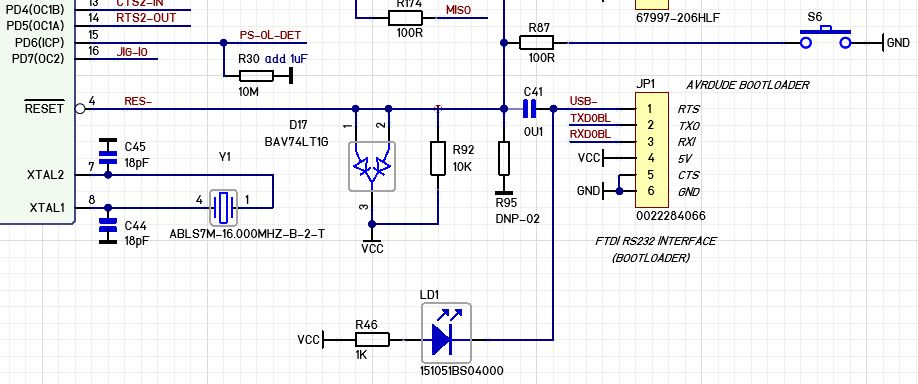
1
$ avr-gcc -g -Os -mmcu=atmega1284p -c init.c
2
$ avr-gcc -g -Os -mmcu=atmega1284p -c usart.c
3
$ avr-gcc -g -Os -mmcu=atmega1284p -c mega_1284p_xplained_example.c
4
$ avr-gcc -g -mmcu=atmega1284p -o m1284p_xpld_ex_nt.elf init.o usart.o mega_1284p_xplained_example.o
5
$ avr-objdump -h -S m1284p_xpld_ex_nt.elf > m1284p_xpld_ex.lst
6
$ avr-objcopy -j .text -j .data -O ihex m1284p_xpld_ex_nt.elf m1284p_xpld_ex_nt.hex
7

8
$ avrdude -p m1284p -c atmelice -U flash:w:m1284p_xpld_ex_nt.hex:i -v
9

10
avrdude: Version 7.1
11
         Copyright the AVRDUDE authors;
12
         see https://github.com/avrdudes/avrdude/blob/main/AUTHORS
13

14
         System wide configuration file is /etc/avrdude.conf
15
         User configuration file is /home/a.../.avrduderc
16
         User configuration file does not exist or is not a regular file, skipping
17

18
         Using Port                    : usb
19
         Using Programmer              : atmelice
20
avrdude: found CMSIS-DAP compliant device, using EDBG protocol
21
         AVR Part                      : ATmega1284P
22
         Chip Erase delay              : 55000 us
23
         PAGEL                         : PD7
24
         BS2                           : PA0
25
         RESET disposition             : possible i/o
26
         RETRY pulse                   : SCK
27
         Serial program mode           : yes
28
         Parallel program mode         : yes
29
         Timeout                       : 200
30
         StabDelay                     : 100
31
         CmdexeDelay                   : 25
32
         SyncLoops                     : 32
33
         PollIndex                     : 3
34
         PollValue                     : 0x53
35
         Memory Detail                 :
36
...
37
         Programmer Type : JTAGICE3
38
         Description     : Atmel-ICE (ARM/AVR) in JTAG mode
39
         ICE HW version  : 0
40
         ICE FW version  : 1.41 (rel. 137)
41
         Serial number   : J42700007679
42
         Vtarget         : 3.37 V
43
         JTAG clk prog.  : 200 kHz
44
         JTAG clk debug  : 250 kHz
45

46
avrdude: JTAG ID returned: 0x3f 0x50 0x70 0x19
47
avrdude: AVR device initialized and ready to accept instructions
48
avrdude: device signature = 0x1e9705 (probably m1284p)
49
avrdude: Note: flash memory has been specified, an erase cycle will be performed.
50
         To disable this feature, specify the -D option.
51
avrdude: erasing chip
52
avrdude: reading input file m1284p_xpld_ex_nt.hex for flash
53
         with 5682 bytes in 1 section within [0, 0x1631]
54
         using 23 pages and 206 pad bytes
55
avrdude: writing 5682 bytes flash ...
56

57
Writing | ################################################## | 100% 2.25 s 
58

59
avrdude: 5682 bytes of flash written
60
avrdude: verifying flash memory against m1284p_xpld_ex_nt.hex
61

62
Reading | ################################################## | 100% 1.73 s 
63

64
avrdude: 5682 bytes of flash verified
65

66
avrdude done.  Thank you.

Dann funktioniert die Steuerung des Demoprogramms im Terminal-Modus über minicom einwandfrei.

1
$ minicom -D /dev/ttyACM0 -b 57600
2

3
Welcome to minicom 2.8
4

5
OPTIONS: I18n 
6
Port /dev/ttyACM0, 20:40:45
7

8
Press CTRL-A Z for help on special keys
9

10
------------------------------------------------------------------------------
11
#  COMMAND:             DESCRIPTION:
12
------------------------------------------------------------------------------
13
1  help                 Print this help
14
2  flash leds           Toggles leds connected to PORTB0:3
15
3  read ntc             Returns NTC ADC code (ADC7)
16
4  read light sensor    Returns Light Sensor ADC code (ADC6)
17
5  light sensor demo    LED3:0 are dimmed according to the light sensor value
18
6  start 32khz crystal  Starts the 32.768kHz crystal
19
7  stop 32khz crystal   Stops the 32.768kHz crystal
20
8  idle                 MCU in idle mode. Wake up by pressing SW0
21
9  power-save           MCU in Power-Save mode. Wake up by pressing SW0
22
10 power-down           MCU in Power-Down mode. Wake up by pressing SW0
23
11 standby              MCU in Standby mode. Wake up by pressing SW0
24
12 extended standby     MCU in Extended Standby mode. Wake up by pressing SW0
25
------------------------------------------------------------------------------
26
To perform a command, enter command number or command string
27

28
MEGA-1284P Xplained>3
29
NTC ADC value:  481
30

31
MEGA-1284P Xplained>2
32

33
MEGA-1284P Xplained>6
34
32.768kHz crystal started.
35

36
MEGA-1284P Xplained>7
37
32.768kHz crystal stopped.
38

39
MEGA-1284P Xplained>

Nochmal vielen Dank an alle für die vielen hilfreichen Beiträge.

Antwort schreiben

Bitte melde dich an, um einen Beitrag zu schreiben.

oder

Mit Google-Account einloggen

Die Registrierung ist kostenlos und dauert nur eine Minute.

Jetzt registrieren