*** German ***

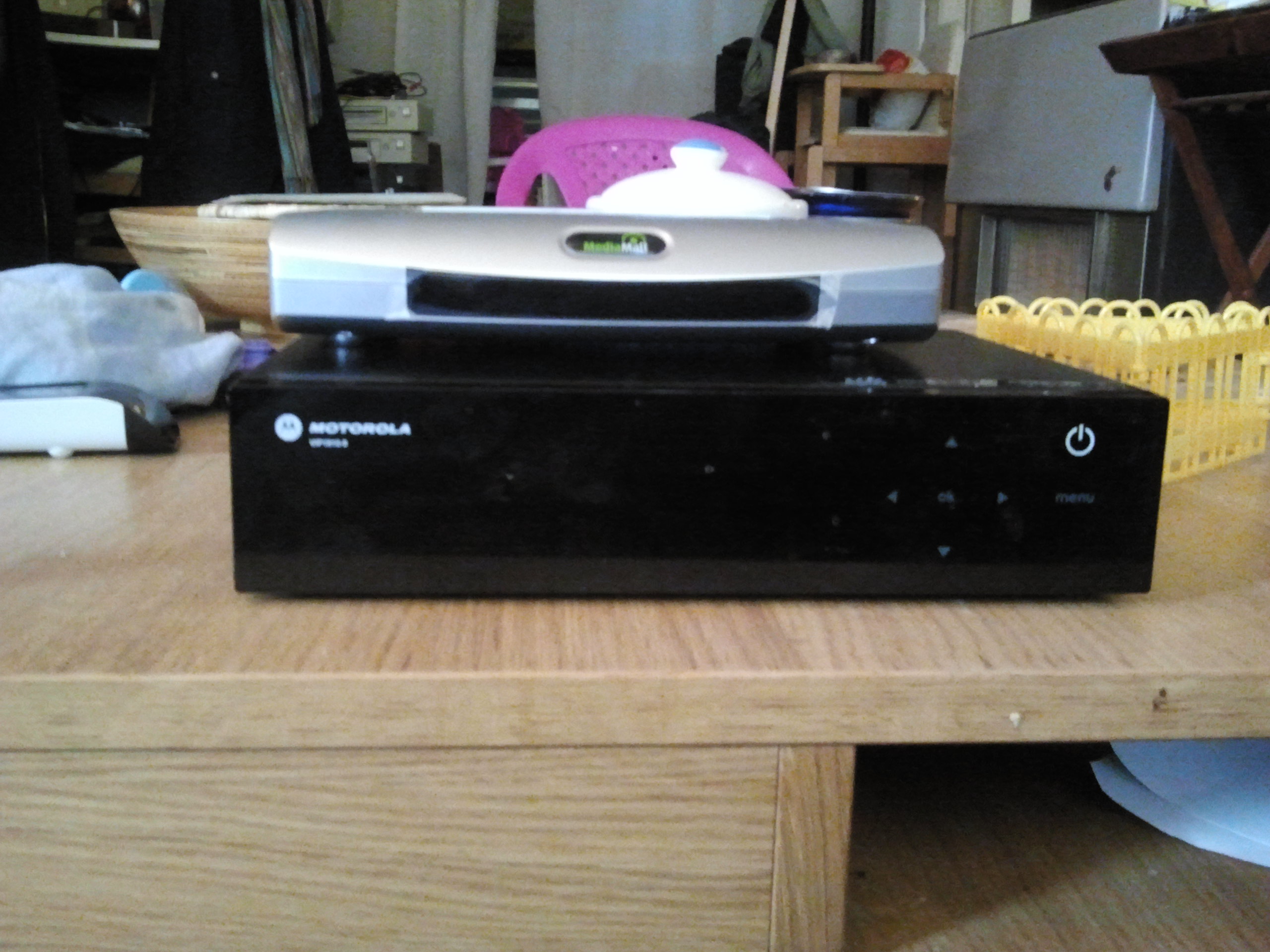
Weil mich auf die vip17x0 mpeg4 fehlt hab Ich mir ein VIP1960 auf
Ebay.de gekauft.

Es sieht ein lott wie die VIP1710.

Telnet war nicht da, so keinen Zugriff auf diese Weise.
Mit dem Einsatz der Vip1710 Artikel fand ich den integrierten seriellen
Port und ich konnte auf die Box zugreifen.

Hab ein generic Image gefunden. So kann mann die Box brauchen mit VDR
als Client, wenn Sie eine gültige Kanalliste schicken uber
infocastserver.

*** English ***

Because I use the vip17x0 and started missing the mpeg4 I bought a
VIP1960 on Ebay.de.

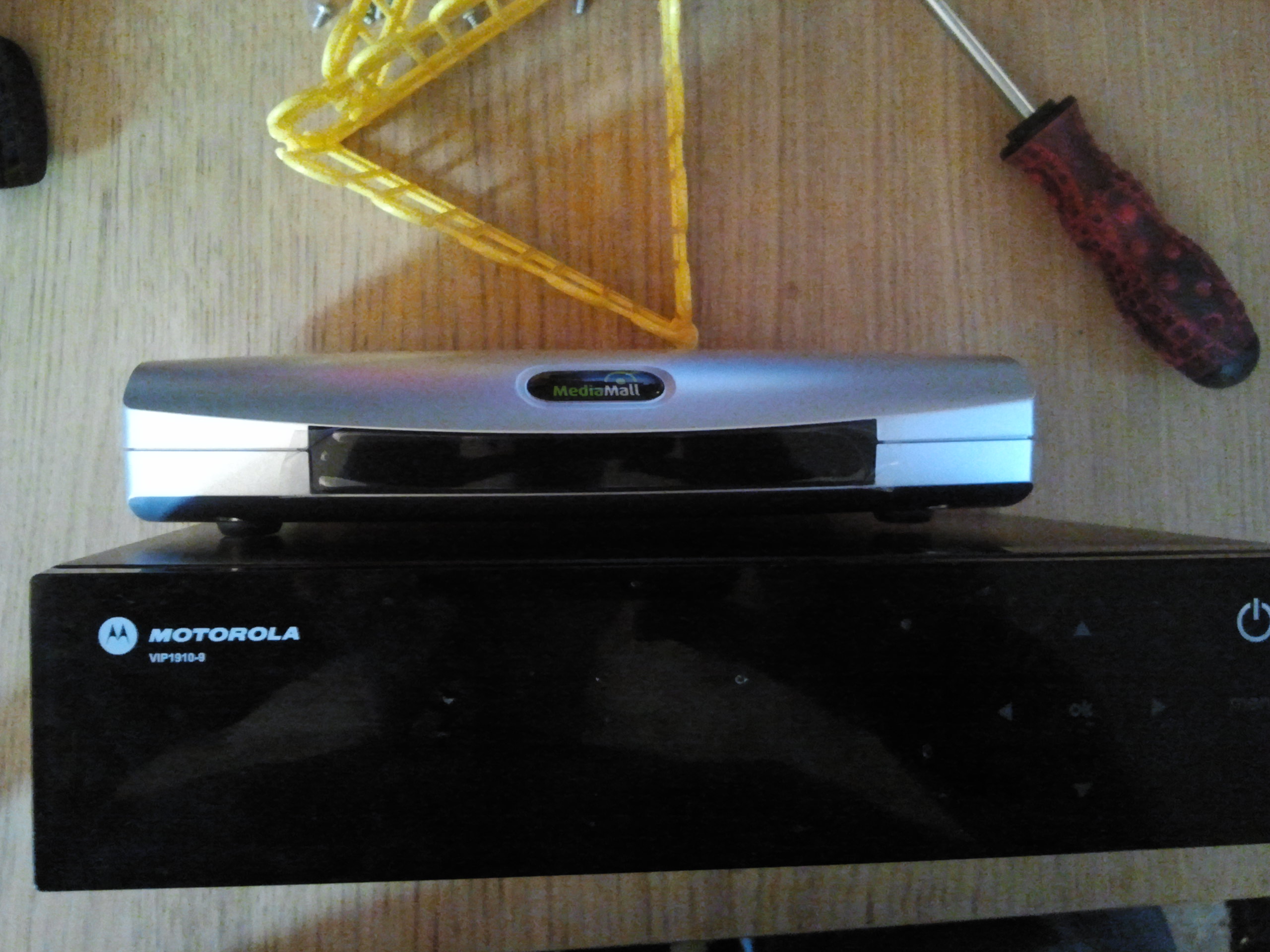
It looks a lott like the VIP1710.

Telnet wasn't there so no access that way.
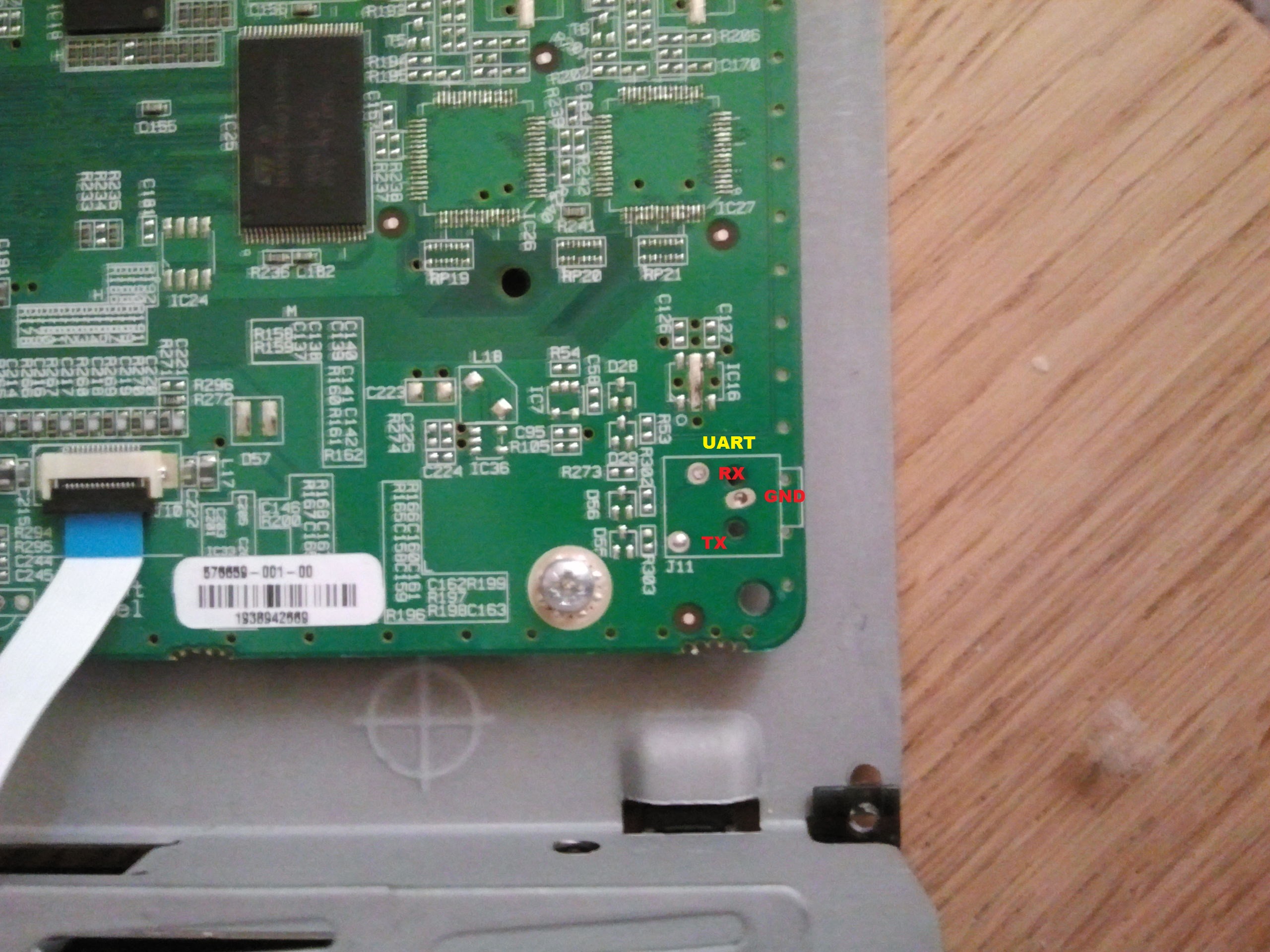
With the use of the Vip1710 article I found the onboard serial port and
I could access the box.

Found a generic Image, so the box can be used with VDR as client if you
send a valid channellist to it.
Heute hab Ich mich auch ein VIP1910 gekauft, nur 5 Euro mit FB aber ohne
PS.
Es braucht 5,7 V so Ich hab die PS von VIP1710 ein gesteckt und es
geht!!

Aber am seriellen port gab es nur "@#$@#$@$#%@%$#$".
Gleiche board is in Vip1960 und damit gehts.

Mit infocastserver das BootImage auf die kiste and es ist nutzbar.


Die Vip 19x0 braucht 'Secure' firmware oder 'Secure, Signed and
Encrypted' Firmware.

Mit aktuelle kreatv-kit-oss kan man nur 'Secure, Signed and Encrypted'
Firmware machen. Aber die keys sind nur valid fur development kit
VIP19xx.

Aber es gab ein alte 3.4.3, nur Secure!

Have fun.
But the busybox included in the bootimage is stripped of wget, dd, ls
etc.


# busybox
BusyBox v1.2.1 (2007.06.18-17:28+0000) multi-call binary

Usage: busybox [function] [arguments]...
   or: [function] [arguments]...

        BusyBox is a multi-call binary that combines many common Unix
        utilities into a single executable.  Most people will create a
        link to busybox for each function they wish to use and BusyBox
        will act like whatever it was invoked as!

Currently defined functions:
        [, [[, ash, busybox, cat, chmod, cp, cut, date, drawblip, echo,
        find, freeramdisk, grep, gunzip, hdparm, ifconfig, init, insmod,
        kill, killall, ln, loadkmap, mdev, mkdir, mknod, mount, mv, rm,
        rmmod, route, sh, sleep, tar, test, umount, zcat


So we need to find a way to get a 'full' busybox on it some how.
Or find the right AES key and secure our own kreatv-oss firmware.
Did try a capture with the infocast2 tools (on a KPN IPTV adsl line) but
it didn't work.

Next try will be a wireshark capture of the traffic when the box starts.

Now waiting to access the line again, I don't have one at home.
I played today with the 1910s, units have newer firmware then my 1960
but in this firmware there is no option to change video out settings.
For scart it is OK but no way to select HDMI. Don't know if every 1910
has this, but both my 1910's don't have the options, both my 1960 have
it.

1910 - RBL 1.9 / FW 3.11.2 -> no video output selection (in the Firmware
Configuratie Menu)
1960 - RBL 1.7 / FW 2.26 -> video output selection

Menu can be reached if you press menu on the remote during startup
(boot)
Hallo,

at first I want to thank you for this very interesting thread. I have
also one question. I am facing with the problem of lack of video output
selection in VIP 1963 STB (from KPN, currently running by my local
operator). Similar to you. By the other hand I have older VIP 1960 with
this menu available in firmware. Do you know any workaround for this
issue?

Best Regards
If telnet is possible you can create the file by hand. If not the
settings must be send by infocastserver, at the moment I haven't studied
on how to send it.

The setting is availible in the settings menu of the original firmware
and can only be accessed if connected to a KPN connection.
Have done some more working on this box. Found an other SDK image (4.3)
which can be loaded in a KPN branded box.
This image has telnet access & wget so I can do more with it but it
lacks the TV app so all it does is boot and wait with a white screen for
something.

So now I try to make my own image with the SDK and see if it will boot.

And now I can get some software on the box, store the files in /flash2,
reboot with the other firmware and try to use the stored files.

Looks like I'm missing some sleep for a couple of days.
If you want to try it search for the file
kreatv-kit-starter-kit-emea_4.3.IAP30.3_i386.tgz

Build image is working, so now to play with it some more. KPN branded
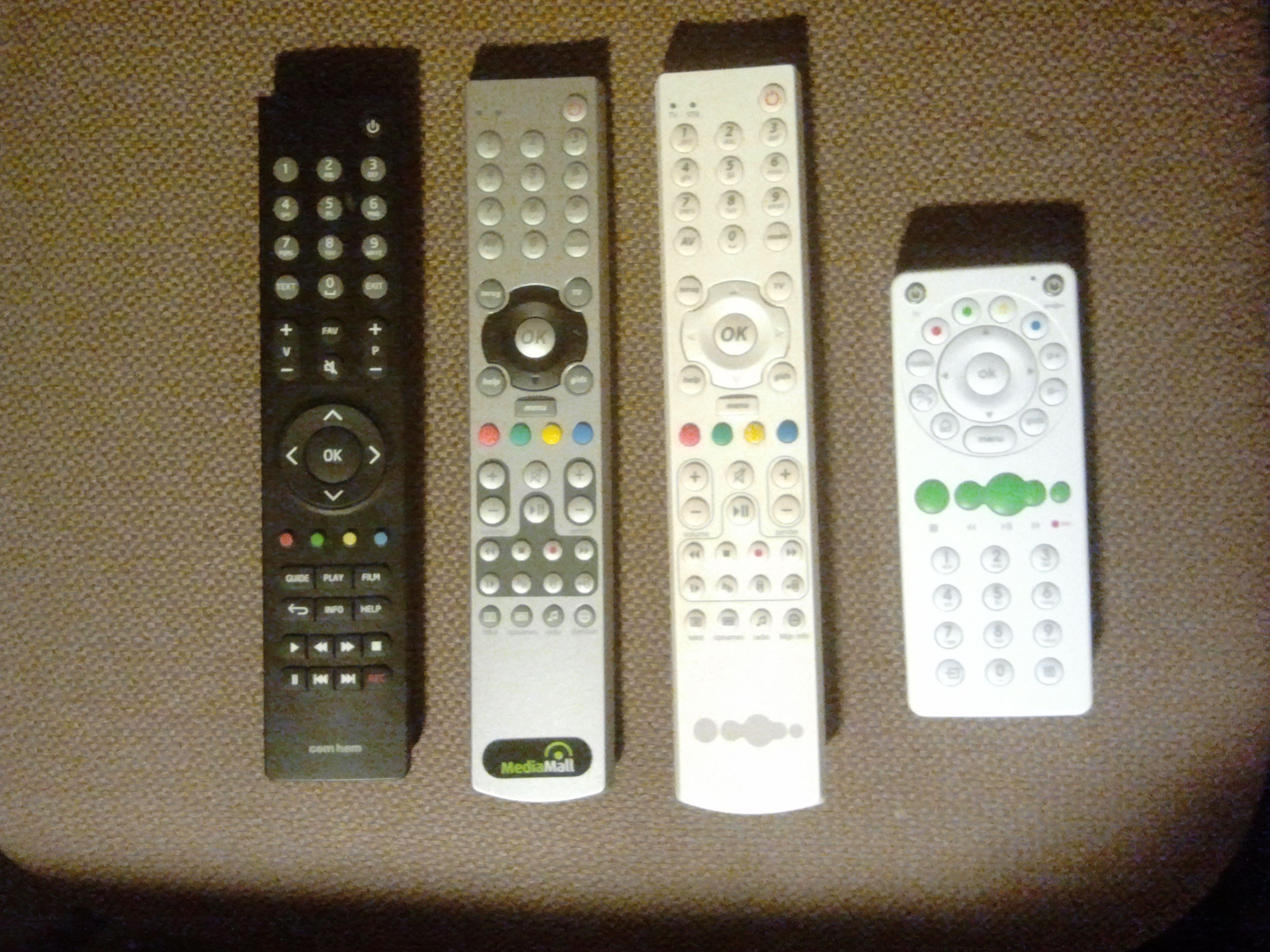
remote is not working, so the build config must be wrong.

Program on the box, read-irdriver, shows this info:
protocol: r-step_kpn, id:  18, scan:  90 (0x5a), key:   0, mod: 0x00,
trans_key:   0, trans_mod: 0x00 [KEY_RESERVED] -> [KEY_RESERVED]
Fernbedienung wirkt. Mann muss bei compilieren angeben KPN
Fernbedienung.
Demo TVportal HTML und SVG lauft.


Brauch nur noch eine tolle TVportal oder ein VDR plugin und die box ist
fertig.
Build an other Image during build you must make a choice SVG or HTML
webportal. This is for HTML webportal.

I made also a quick and dirty webportal, it has the basic TV functions.
up/down & 0-9 for change channel.
Ok show OSD.
Blue restart portal.
Three questions:

Can the image be used for the Motorola VIP 19x3 boxes (aka 1963)?
And how to get the image on the box?

Does anyone know where the console points are on a 1963?
I suspect at the edge, right-bottom (facing the front) but it seems to
do nothing.
With the newer software the console is switched off or used for debug
messages only. So it can't be used. The image can't be used with the
19x3 series.

This image can be used for the Vip1903, Vip1963 or Vip1853

For sending the image to the box, look in the vip1710 thread for tools.
Can the box be used after flashing for regular use? (Aka subscribed tv)
Or is there a way to make a bootloader with telnet enabled only and grab
the current image from the box?
Can you provide a quick setup?

Attach box to network.
Start infocastools and broadcast image from above

I probably have to to do something else here...

Put box in updatemode (Press menu when booting up)?
(Change parameters to suit the server providing image?)
Press update..


Correct me and add where neccesary.
Martin, you are using a vip1960 right? with serial console (edge right
bottom) Is there a way in the official firmware to stream the tv image
out of the box when having serial access? I am thinking of buying a
Vip1960 just for this purpose.
I've got a 1910 & 1960.
Last time I got a official (KPN) image on one of the boxes, the serial
connector only showed debug messages, no login prompt. With the Motorola
bootimages there is also no login prompt.

Looks like Motorola removed the login part from the serial port.

/ # cat proc/tty/driver/stasc
serinfo:1.0 driver revision:
0: uart:stasc mmio:0x18031000 irq:122 tx:1190 rx:0 RTS|CTS|DTR|DSR|CD
1: uart:stasc mmio:0x18032000 irq:121 tx:0 rx:0 CTS|DSR|CD
/ #
Idea:

find old bootloader with console access. Put it on the box.
Block updates from KPN to bootloader (but let it download for future
references)
Let the box update the other parts (kernel, middleware userland)
You think that would work?
Don't think it will. Box has Firmware, which can be updated from the
provider I think, and a bootimage. The bootimage is a secure and signed
file you get from the provider. The bootimage a complete package and
includes all you need to get TV.

But what do you what to do with the access?
I see. It isn't possible to get the stream and send it out over the
serial port.

Maybe you can get hold of the adres of the streaming server and access
the streams by PC (VLC/ Mplayer etc)

Try sniffing the traffic VIP <--> ExperiaBox or logclient on the
original KPN firmware to see if you can get the server adres.
Oroginal streams are verimatrix encrypted, I sniffed the traffic between
VIP and server but there's no firmware. just config list, channel list
and boot options list. I could try to spoof the boot options list since
telnet is an option. (I read the manual) Will see whether that works.

The reason for the telnet/serial access was to put some streaming client
on the device without the need for decryption keys since the box does a
good job on those :-)
The verimatrix encrypted streams aren't a problem. All you need is the
rootcert.pem from the box and the ip of the verimatrix server.

If you use the settings from your own box & contract it isn't illegal I
think. If KPN still use the same way, all allowing is done based on DSL/
Fiber connection location.
thanks for that. How to get the certificate without some kind of access
access to the box?
I am missing a step I think. There's something listening on port 9001
but telnet does not show any banners.
Or perhaps you mean just put "your" software on the box and it will
still work since it's based on mac and decryption is still done inside
box because of rootcert is still in the box?
Try telnet to port 19999, if that is possible you get the log output of
the box.

How to get the rootcert.pem I don't know but maybe all needed is the IP
of the server.

KPN settings are in the KPN bootimage so if I don't have them I can't
include them. And you need the verimatrix to say if you are allowed to
watch stream x.
Oh Well, for those who are interested:

First, the box downloads an index file (RTSP encoded plaintext file)
<ip-of-server>/index/mac-adress-of-box)
Content:
---
vqec-network-cfg <md5 sum of settings file to be downloaded>
vqe-channels <md5 sum of channellist file to be downloaded>
---

Then another RTSP encoded plaintext file called vqec-network-cfg
<ip-of-server>/vqec-network-cfg/mac-adress-of-box)
- This one holds the settings for the box (If different as stored in
flash)
Then final RTSP encoded plaintext file called vqe-channels
<ip-of-server>/vqe-channels/mac-adress-of-box)
- This one holds the channels and their IP and ports etc etc.

If you can the box into thinking that it loads a valid (but modified)
vqec-network-cfg with telnet enabled then you can get access to the box.

I can try if I can do that with tcpreplay or another pcap injection
software.

(Command to inject to cfg file is: libcli_telnet_port = 1; )
Telnet must be in the bootimage, only enableing isn't enough.

Motorola says in the telnet module docs "NOTE: This should NEVER be
enabled in a live environment. It is strictly for debugging purposes
only."

So I don't think KPN put it in the bootimages.

Search google for "kreatv sdk 4shared" to find the SDK and make your own
images.
Martin,

do you know (or can you check) how to insert ab-c-d-e etc. characters
with the remote? When the device boots and you press menu...and
afterwards 2357 (Ip settings) and 7532(advanced menu) You can change
boot order, netconsole ip, tftp ip, http ip, boot filename, splash
filename...etc.etc. But I need to insert characters. Any Idea?
By the way:

splash protocol 313 meand 3 (Bootcast, Local Image, Bootcast)

Change with: arrow back/? button (delete)

1. Local image
2 TFTP
3 Bootcast
4 HTTP

(I guess, 2 is definately Bootcast and 2 definately tftp)

scroll down (channel down) to see other options like enable adavaced
menu? (No default) Uhmm how to change it to Yes is what is the problem.
(not that it cannot be done but you have to change it to "Yes" and only
available option is 123456789
From the motorola SDK

"A string with the splash protocol-order to use when downloading the
splash image.
1 = BootCast

2 = TFTP

3 = Local Storage (if available)

4 = SAP (Session Announcement Protocol)

5 = DVD/CD (if available)

6 = HTTP (available from version 3.03)

For instance, "1,2" means that Bootcast is the first protocol to use but
if it fails, TFTP shall be tried. It is not necessary to use comma
separation. 16 Protocols are supported.
"
Thanx for the Advanced menu tip, it isn't listed in the SDK. But I found
no needed settings in it.

At the moment I'm fighting a 1853, basicly a lowbudget 19x3 but new
firmware.
That one doesn't have the menu, grrrr
Right, i downloaded the firmware onto the box with tftp.
Everyting went ok. I got a white screen but that's because I have to put
in the portal used. (Have to find out about that) telnet and ssh worked.
No I want to download the original software somehow by using your image.
Any idea what command to use to do that? I know the server, SAP adress
port etc. etc.
Martin,

/proc/kboxbch
/proc/kboxparam
/proc/kboxuserparam

are holding those menu settings..you can change them by hand if you or
me can find a way to make it writable (it's Readonly at the moment)
With the infocast2 tools you can get the files.
http://sourceforge.net/projects/infocast2tools/

If you google for the infocastd server tools from Motorola you can send
all those settings. It is also possible to change some with 'toish'

'toish is getobject all' shows all the settings. Some settings are
stored in /flash/settings2.xml

And in flash.config_s1


Greetz from Holland,

Martin
Do you've got a KPN-brand line? If so, can you list the multicast
address and ports for the servers?

My 1853 looks for 224.0.250.64, but I don't know which port.

Better would be a wireshark capture from a booting 1853.
I have an Xs4all line, basically an KPN line. It has another server for
downloading the fw. But when you look in the debug you can find the
server it tries to connect with. (if you have the original fw on the
box)

Since infocast tools are freaking out my computer (maybe use a linux one
for this) I tried streaming media monitor which detects something but
nothing usefull. Anyway, fo a 1963 the server is

Listening on SAP channel 224.3.2.6:9875
Searching for splash session splash.motorola.vip1963...
Searching for kernel session bootstrap.motorola.vip1963...
SAP: Image download attempt 1 of 1
Loading splash image from address 224.0.250.82:64082...
Retrieving network splash version from SAP...
<snap>
SAP: Image download attempt 1 of 3
Loading kernel image from address 224.0.250.118:64118...
Martin,,

do you know how to mount the <stored image> in the flash? (Or do you
know the mountpoint/start address?) I can load your image via tftp in
memory but I want to mount the original rootfs which is on the box.

Infocast is not going to work since it's using sap btw. (If you can
program in C you can get the full desciption out of the
bootloader-toolchain)
Found it, it's called .bootimage on the /flash
So that should be the stored image. Now find a way to extract the rootfs
out of it. After that it can simply be mounted. (I think)
BootImage and Picture are in flash also the settings.
Problem with extracting is the encoding used by KPN. You need the keys
to decrypt the file. See the 1710 thread and also the info on
http://duff.dk/zaptor/

Too bad it is SAP only. Hopefully the newer versions of Infocast can
speak SAP.
Thanx for the duff site. It's probably only for 17xx boxes. Search for
the key will continue since my box isn't secured, althought the software
(hex) says SEC. And you can have secured without encrypted and signed.
(they say)

Btw. If you use a DHCP server with the right options you can override
parameters. It happens when I connect to the DSL line and use their DHCP
server.. You can find DHCP options in
kreatv-doc-sdk-user-manual_4.3.IAP30.3.tgz and examples, maybe this
helps.

I will try to send the spanish guy some (c file) info on the sap
structure, I gained it from the bootloader, Motorola licensed it under
GPL.

I 've written them a small message to release the OSS bootloader for the
19x0/19x3 family of stb's. Let's see what they have to say.
The Duff site is for "VIP1920-9DCB Zaptor box from Stofa"

With the OSS keys it won't boot, you need special keys. But I don't know
what the SDK makes for image, only know the Motorola likes it ;)

Booting with DHCP parameters I already tried but the 1853 didn't change
the way its boots. Still wants a SAP server.

Greetz
Beste Martin,
Om hier even offtopic iets te vragen.
Is het mogelijk om een overgekochte vip1853 werkend te krijgen. Dit als
2e ontvanger bij telfort. De ontvanger download z n software komt
uiteindelijk met de melding: Geblokkeerd Uw account is geblokkeerd.
Dus het lijkt erop dat de gegevens van de vorige gebruiker er nog op
staan.
How to fix this?
Gr Jan
Beste Martin,

Dit werkt niet. Er komt geen vraag voor abonnementsnummer en code.

Is het eventueel mogelijk om deze ontvanger een ander mac adres te
geven?

Mvg Jan
All I can say is factory default & remove software. Box should be as
new. But maybe your provider only supports 1 box.

Remember English is hard for most readers, Dutch is impossible to read.
When i reset en factory default the box. I turn one Receiver off. Then i
connect the other one. It comes up downloads it's software. Then the
message apears: Blocked, Account is locked out, contact HD.

So it looks like the receiver is blocked in the Netwerk of the Service
Provider. If it is still in the profile of the other user (on the site
of the Service Provider) Will it come up also with this message?

Is it possible to change mac and serial number anyway?

Greetz
Without special tools from Motorola it isn't possible right now to
change MAC/Serial.

Maybe you can call the HD and ask them to release the box from the
previous owners account or ask if you are allowed to have 2 boxes.

This problem can better be asked at an other forum like tweakers.net.

Most readers (me included) don't have an dutch IPTV provider so I don't
think anyone here can help you.

I just play with the hardware and try to unlock all its power. Right now
the 1960/1910/1903 are running great with the custom software and VDR.
For about 10 - 15 euro you've a great HD capable player.
Reset the box to factory settings won't do the job. Serial number or Mac
or some key identifier will identify it subscriber as valid/invalid on
Telforts/KPN/other-provider server. You have to call them to release the
box.
"Without special tools from Motorola it isn't possible right now to
2
change MAC/Serial"
I left a message on the Motorola Forum that they are violating the GPL
by not releasing the oos bootloader code. If we have that one we can
figure soemthing out.

I found a strange key sequence in the Kreatel 1710 bootloader.
Btw, KPN is not using a "portal". The complete userinterface with
screens is written in Java (and with espial webkit/browser). (And not
secured) I can make it crash (by using a normal keyboard) but then the
UI restarts. If you want to play with it, i can post the archive if
anyone wants that.
Hello,

I have one VIP1960 that cannot be used for now. I power the box and it
waits the connection to server. How can i get some custom software on
it? I want to use it to receive some streams from my streaming server.

How can i do this ?
Thanks!
Boot the VIP1960 (Powered off..unplug it)

Keep  pressing the "menu" button while booting. You 'll see a blue
screen with some info. Press 2357 for IP Settings and Press 7532 for
changing bootsequence and tftpserver. (For tftpserver boot change
bootsequence to 23
2 is tftp...3 is boot from flash
Got a Comhem 1903C box, first tested it. It worked OK for the free Ziggo
channels. After that I cleared the box and tried to push the firmware on
it no luck. So this box won't work with the Motorola developer keys.
Just tried kreatv-bi-vdr.config_4.3.IAP30.3_st40_vip19x3.bin image on
1903 and remote control does not work, also tv blinks a lot with HDCP
error in logclient.
Not booting on my box... you didnt use keys from sdk 4shared package?
and remote does not work with kreatv-option-rcmaps:kpn option enabled.
My box is from small nordic ISP.
Hi guys,

Anything new?
How can get into this box and get the command line on my screen ?
I still have the box on hold...
I set a static IP to the box but i cannot ping it...
Maybe a short tutorial for breaking into this and connect it to my
network to play some streams from my pc ?

I appreciate your work and i wish to help you as much as I can.

Marian
1) Download the Infocastserverd software and one of the motorola
software listed here.

2) Start the Infocastserverd, the motorola should now connect to it and
get the software.

3) Enjoy the unleased power of the 1960.
You can also use http to get image on your box.

Just go to http://search.4shared.com/q/CCAD/1/kreatv
and download starter kit, sdk and docs.
They include everything you need to know.
I only changed the content, not the copyrights, opensource notes etc

If I find the time I'll make a NFS/Samba server package, so the
1960/1963 hdd can be shared.

Greetz
Digilive has a SDK for free on the webshop.

http://shop.idigilive.com/en/middleware/sdk-license.htm

I ordered one, you get a question about your project and after that a
link in  mail.

It is not the full SDK but the OSS with some evaluation images, a
current Infocastserver and (stripped down) 3.7.3 starter kit.

But the included docs are nice to have.
hi all i have a problem with my motorola i use image download over HTTP
all services work fine my problem is the time on stb is 1.1.1970 and the
clock is 0:00 any can halp me hov to resolve this problem i dont like to
use infocast server
how can i see this i haw configure the NTP server bat dont have corect
time is it a way to configure it manual or how can i create a image i
use BeeSmart platform with ekioch browser and i use the image from
infocast server

for conection with server i use this script on my HTTP Server


 <?xml version="1.0"?>
<!DOCTYPE StbConfig SYSTEM "stbconfig.dtd">
<StbConfig>
<BootParams>
<KernelUrl>http://ServerIP:85/image/kreatv-bi-beesmart_1xx3.bin</KernelUrl>;
<KernelVersion>3.0</KernelVersion>
<SplashUrl>http://ServerIP:85/image/motorola-splash-pal_1900.spl</SplashUrl>;
<SplashVersion>3.0</SplashVersion>
</BootParams>
<StbConfig>

the portal url i inser manual over Telnet
using this comand

toish is SetObject config.ekioh.homepageurl http://my
ServerIP:85/omniplay/client/index.svg permanent
toish is getobject all

In my image it said

'const.time.available_sources: ntp'

Because I've put 'kreatv-option-ntp' in my image.

So you need to know what options are included in the image, often images
comes with a text file which indicate what is included.

Or search for the KreaTV SDK on the web and build your own image.
Martin V. schrieb:> toish is getobject all>> In my image it said>> 'const.time.available_sources: ntp'>> Because I've put 'kreatv-option-ntp' in my image.>> So you need to know what options are included in the image, often images> comes with a text file which indicate what is included.>> Or search for the KreaTV SDK on the web and build your own image.
is it posible to giv me your image or can you create one for me
thenks
Hi everybody.

From work I've got my hands on 2 vip1903 boxes. I might get more. It
seems they are obsolete in our area, and are apparently just scrapped.

I've goggled and found this thread where it seems you guys know a lot
about these boxes.

Personally I live outside my company's area, and have no cable-tv at
all.
So my question is - do I have any use of these boxes at all. I figure I
would like to use them for displaying videos from my own dlna-server or
the USB port, or just YouTube... I guess Netflix is not an option...

Am I way off and ought to quit right here, or should I ask for a dummy's
guide to install such a "stand-alone-image". (Yes, I tried to follow
several of the instructions given above unsuccessfully...)

Yours
Esben


PS: There is also a few vip1510 boxes, but they have no HDMI so I'm
unable to connect them to any of my spare monitors...
Hi,

over here I have satellite TV, I use VDR to convert that into IPTV which
I stream through my house to the 1903 boxes.

At the moment I'm not able to reflash a comhem cable box. I've got one
but it doesn't like the software.
So if you have a  Comhem box you are out of luck for now.
Hi Martin,

Just found my old vip1960 box and your information.
I'd like to give a try in reconfiguring the box as you describe.
Starting reading your articles I'm stuck at the serial interface of the
box, on a picture soldering points are shown but what point is tx, rx,
gnd. What cable should I use? Will the TTL-232R-3v3 do?
Thanx in advance for your response...
With the latest images you don't need any cables. Telnet/ SSH is in the
images.

Just send the images to the box and it should work. If your box has the
new firmware the box can download the image from a web server, if not
you need the infocastserver from Kreatel.
If the above image won't work with java you need to find a java module/
package for the developer kit. Or make your own java package, the box is
running stlinux. http://www.stlinux.com/

Greetz
Hi Martin,

can you try whether this
(https://dl.dropboxusercontent.com/u/27375099/ui.jar) works on your
firmware?
It's a java (jar) archive. Holds the complete UI for  VIP 19x3.

I can't test your software since the key is wrong. It refuses to load on
mine.
The key should work because it is a developers key, so far all the Dutch
boxes I've got worked with it. Tested a dozen of 1910/1960/1903/1963
The 1853 doesn't work with infocastserver so I can't put an image on
that one.

Looked into the jar-file, there are references to Mozilla. This is
removed from Kreatv by Motorola. So I don't think it will work.
Well,for what reason unknown to man the config signed with the
starters-kit keys is working. Anyway, how did you find out what the
IIP's need for parameters? I want to compile firmwaremanager in it but
it keeps saying
"build_time install script failed for with paramter. I untarred the IIP
and looked in the info.xml for the parameters. But maybe i have to put
some ; or : or , somehwere.
Read the docs?

kreatv-option-upgrade-firmware

This updates the firmware on STB bootup if the firmware has newer CRC
and is not of the same version. It is also possible to downgrade the
firmware. Extra note for the VIP1900 series: It is also possible to
update the configuration parameters (flash.config_sX).

Parameters

Name  Repeat  Description  Example
config  Once  Full path to the new configuration parameters file.
Note:ONLY possible for the VIP1900 series.  config=<file>
dbl  Once  Full path to the DBL (firmware) file.  dbl=<file>
force  Once  If this parameter is added, it will be possible to update
only the configuration parameters.
Note:This option is considered INSECURE and should ONLY be used if you
REALLY> know what you're doing!  force
reboot  Once  If this parameter is added, the STB will reboot after
successful firmware upgrade.
Note: This parameter will only take effect if the DBL-option is
specified.  reboot
A production image doesn't have telnet access.

Motorola docs say :
"kreatv-tool-telnet

With this IIP, you can telnet to the STB and get a root shell.

NOTE: This should NEVER be enabled in a live environment. It is strictly
for debugging purposes only."
Hi Martin i saw that
but i think the company that provided the image didnt take care of that
warning

if i telnet to my VIP1003 box ( usual TCP 23 port ) i get

ENTER PASSWORD :......

and it only allows 1 try then it closes the connection

i am sure that the password is on the image but cant find a way to find
it

the image itself is encrypted/secure and it starts with SEC


here is a screenshot of the fingerprint of the image and the telnet
window

http://i.imgur.com/exAKEpm.png
the whole idea is to modify the portal URL on that image because its
hardcoded on the inside files

i tried with infocast server sending new portal URL-s but the image
still connects to the other portal ( their portal )

till now the only option was to create a DNS server that responds when
the STB asks for resolving the domains giving a IP of my webserver
instead of the real IP of the portal

-----------------------------------------

Another option is to have the STB boot from a self made firmware but i
tried some of the firmwares on this page but all came with incorrect
verification and the STB didnt installed them on itself
Never mind , i was able to flash building images using the SDK-s and
also i got the portal ( attached on this topic ) to work


now does anyone knows if there are limitations for the development
version of the images  ?

do they i.e "expire" , have any non working parts ?

regards
Nice to hear, so working with the SDK are : Nangu (Czech), KPN (Dutch),
a Nordic ISP.

Only problems are finding the iip's. There are some on the web but I
like to find/have the dlna iip and some youtube stuff.
what about building/cross compiling programs ?

suppose we need a webserver installed on the STB .

i already did cross compiling for other STB-s ( mag 250 , some routers
etc ) but i`m having probs finding the root filesystem on the motorola
toolchain

P.S : i think the image i have is related to Nangu/ITONIS ... at least
so its named
as i see the IIP are gzip-ed files containing the executables(if any)
and the startup/install/uninstall script

so ... seems we need :
1) to find i.e a DLNA server
2) cross compile it for sh4-linux using the
/usr/local/motorola/toolchain/st40/2.3.0/bin/sh4-motorola-linux-XYZ
3) prepare the startup/install/uninstall files
4) make an IIP with all executable/startups

am i right ?
Partly right, compiling and making the IIP isn't the problem. I've made
some IIP's myself.

The problem is how to use it in the portal. If you install the official
IIP you get some new commands to use in the portal.
seems my fault ... didnt read the full documentation of motorola

there seems that the DLNA support/service interface is there the prob is
how to use it on the portal :)


by the way can you attach some IIP or share the links of those you found
on the internet ?


thanks
for the youtube part you might have a look at the stalker middleware (
open source ) .... it has the youtube plugin for the MAG250 and what it
does its that it parses the youtube API and gives back the URL of the
video with other functionality also ( like search etc )

so since the VIP can play direct HTTP and also rtp/rtsp we can use the
MAG 250 parsing script to get the URL of the video and then pass it to
the TOI player instance
The VDR plugin from Thorsten which I use for my portal can also do some
Youtube. But I still have to program the user input part. I was hoping
to find the Motorola client for it. So in the portal you can switch to
that program and let it do all the work.

The IIP I found are all on 4shared.
The SDK & start-kit include some and also there is
"kreatv-extra-iip-package-ericsson_mu_4.3.IAP30.3.tgz" which include MP4
and ca-verimatrix
Hi Martin,

if you factory reset a VIP (and delete the local image) then it runs
some kind of very small firmware. (Splash image is black and only shows
yellow dots.) Do you know where that filesytem can be found? Maybe we
can mount it.

2d question: If the box starts from a local image..will it copy it's
rootfs to nand (permanent) or does it unpacks the encrypted image and
stores it in memory 'till a reboot?

I wonder how the GUI writes back the settings on a local image.
Info about the small image you talk about can be found :
http://sourceforge.net/projects/vip19x0.arris/

The second question, there are small parts (/flash & /flash2) which can
be written. That space is also used in the Vip1710 exploit.
please can someone help.
i want to download the new firmware to the box via tftp.
but i got error on the box 36.
what do i wrong ?
and the howto in this tread is very low in information.
thanks
@alcomys what box and what firmware are you trying?

@user56 try it. If it works post it!
The problem as far as I know is the output but maybe they have it build
in already.
VDR is running on the VIP but the lack of output makes it useless.
If you can write C, it should be possible to create a output driver for
VDR, X, XBMC etc.
@Martin V
I have the new STB from KPN, the Arcadyan HMB2260, and i happen to have
1 left over, can this one also be overwritten with your custom fw ?
Or do you think KPN made a whole new system for the arcadyans ?
They are not letting out any info to me. ... (and i work for them as a
field-engineer :P)
@Martin V
Okay, in that case, i also have a few VIP1853 units in the car, they
will work right? or will i really have to look for a 1903 or 1963 ?

BTW ... offtopic, did you ever work at Online/Bosch ??
[offtopic]Yup, 'Tosti' I did[/offtopic]

Software should work on the 1853 because it is a stripped down 19x3 but
the problem is getting it on the box. The Infocastserver can't be used
that part is stripped out of the bootloader.
The 1853 looks for a SAP server. Because I don't have KPN I can't make a
wireshark capture of the startup of a 1853. With a capture you can find
what info the 1853 wants to have. After that it is easy to setup your
own sap server and send software.
Okay, so i'll start capturing then ...
I do have KPN, so i can make that happen.
I presume you will be interested to get a copy of the capture files?
If so, do you need anything special ? (or perhaps a capture from another
model ?) name it, and i'll see what i can do.
First you need a HUB not a switch to capture the traffic.
What is needed? All the requests and answers the 1853 gets until
receiving the firmware/software.
As far as I could find the 1853 search for a SAP server, that server
answers with a (text)file that has the firmware/software server info.
Just like the infocast server does.
Shame :(
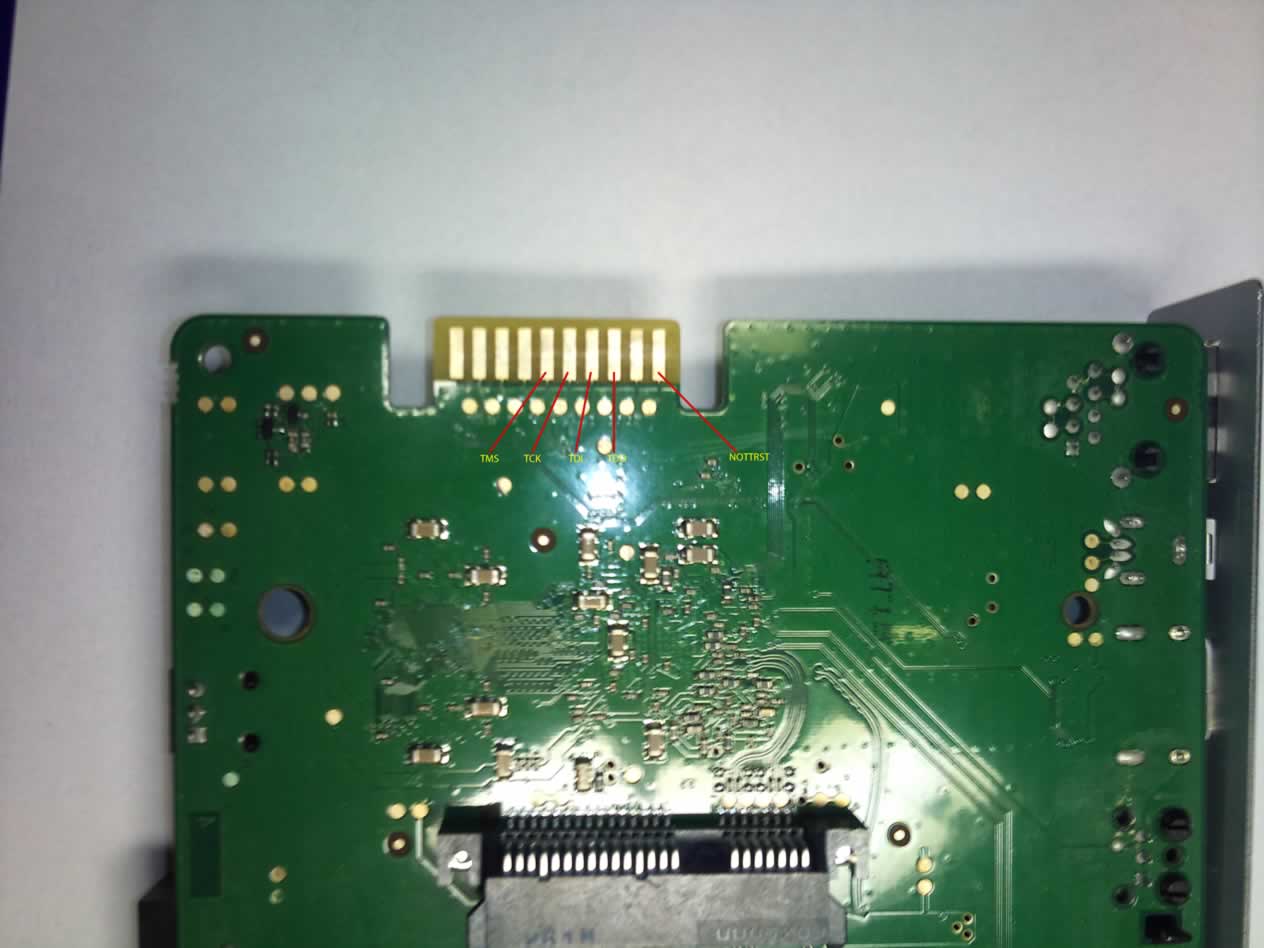
because i also have the full document from the sti7105.
where you can see the jtagging connections ect.
maybe other coders are on this board ?

Regards
Hello Martin,
I would like to run video on demand with vlc server and VIP1003, but I
always get open error when I try to play RTSP stream. HTTP stream works
fine but I want use pause and fastfoward function. Have you any
experience with that or could you recomend me some another server. I
tried vdr but I didnt figere out how to run in without DVB card.
Alcomys schrieb:> Today i found the Jtag interface on the Motorola(VIP1853) STI7105.> in the image you can see the connections.>> Regards
if you can not connect with 7105 or you get the error
thnax
Please does anyone know how to cast Verimatrix motorola 1003? I have the
key but do not know how to incorporate it
I have rootcert.pem and verimatrix.ini but I do not know how to
implement it.
Compile image with the
kreatv-option-ca-verimatrix_4.3.IAP30.3_st40_vip19x3.iip
The following is from the doc include in this IIP.


kreatv-option-ca-verimatrix:inifile=/extra/ca/verimatrix.ini,rootcert=/e
xtra/ca/rootcert.pem


[VERIMATRIX]
COMPANY=Motorola_Linkoping
SERVERADDRESS=192.168.1.1
SERVERPORT=12697
STOREPATH=/flash
ROOTCERT=/tmp/rootcert.pem
MIN_KEY_RETRY_INTERVAL=300
TIMEOUT=10
ENABLE_IPV6=FALSE
KEEP_NULL_PACKETS=FALSE
ERRORLEVEL=0
DISABLELOG=TRUE
CLEARLOG=TRUE
LOGFILE=/var/log/verimatrix.log
MESSAGE_FORMAT=1154


The rootcert.pem is provided from the VCAS server. Contact
customercare@verimatrix.com for further information on these files.
sudo ./build_vip19x3.sh ./test2.conf
Error: could not find IIP 'kreatv-option-ca-verimatrix'

I not have reatv-option-ca-verimatrix_4.3.IAP30.3_st40_vip19x3.iip :-(
you do not have someone?
in /products is not
Martin V. schrieb:> kreatv-extra-iip-package-ericsson_mu_4.3.IAP30.3.tgzMartin V. schrieb:> Beitrag "Re: Motorola Vip19x0 (Big brother of Vip1710)"> The IIP I found are all on 4shared.> The SDK & start-kit include some and also there is> "kreatv-extra-iip-package-ericsson_mu_4.3.IAP30.3.tgz" which include MP4> and ca-verimatrix
kreatv-extra-iip-package-ericsson_mu_4.3.IAP30.3.tgz
is not
http://www.4shared.com/file/zofNzyxY/kreatv-extra-iip-package-erics.html
:-(
Great Thread on this platform.
I have gotten a few of these boxes to test and was able to run the image
and all the nice portals you guys have written on a VIP1003.
The remote is not working as expected.

I am still evaluating the box to port some code I have working on other
similar STBs, but have not access to the API nor SDK. If we decide to
use the platform we would probably by them but for the time being I need
to test and tweak.

Unfortunately, the links to the SDK in this thread are all expired and I
cant find anything on google.

I would really really appreciate it if some one has an archive and can
send a link or IM to me. Does not matter if its older version, I just
need to play with it and evaluate and also get my own image working
right on the boxes I have.

I will give out plenty of beers if by any chance anyone can help me get
the SDKs.

Thanks so much ! you guys have done a traffic job and gathered very
valuable information.
Yes, the remote I know, the one on my box is kreatvir id 37, thus why I
want to build my own image, but need the SDK which is no longer
available in the links.
Hello,
does anybody know how to make sound from webportal? I tried some way
what I found on internet but its looklike thats not supported by
kreatv-app-webkit-portal.
Hallo liebe Freunde.
Ich habe ein Motorola VIP 1003 und mit ihm das problem!
Kann mir jemand erklären, wie das flashing und dann installieren
bootimage,

kreatv-kit-bootloader-ossk_KREATV-FIRMWARE-3-X_st40

oder...

Ich gehe in das Menü, aber ich kann die alte Version der Software nicht
löschen.
Vielen Dank an alle und alles Gute ...
Hello dear friends.
I have a Motorola VIP 1003 and the problem with it!
Can anyone explain how the flashing and then install
boot image,

KreaTV-kit-bootloader-ossk_KREATV FIRMWARE 3-X_st40

or ...

I go to the menu, but I can not use the old version of the software
. delete
Thanks to all and good luck ...
Martin V. schrieb:> ed at an other forum like twe
Hi Jan,
I Know what your problem is...
you stb is still connected with a user profile...
if you want to delete the box... PM me...
i think i can help you ;)
Can anyone re-upload the file
kreatv-kit-starter-kit-emea_4.3.IAP30.3_i386.tgz and maybe all the files
that were on 4shared.com ? THey all got delted

thanks
Hi all
dont ask me but i found something on my HDD and uploaded

http://www.multiupload.nl/KYX8A7RMSY

its the kreatv-kit-starter-kit-emea_4.3.iap30.3_i386.tgz (109.11 MB)

hope it will be up for long

Now someone can reupload the IPP files ?

Regards
Did anyone manage to connect to these boards via JTAG?
I have FT2232 STMC Lite clone and I can interface with Albis STBs just
fine, but I have no luck with Motorola. I have VIP1003 and VIP1963.
Closest I can get is when I use hdk7105 STMC targetpack with
no_clockgen_config=1 option, but whatever I do I get some error and GDB
can't attach to the board.
Is this thread dead? No response to JTAG question, no one sharing IPP
files...
Too bad, this was a very good resource for making something useful out
of ISP's locked STBs...
KPN had an callback/replace action for all 19xx boxes. The're replaced
with Arcadyan's.. Think they get onto it. Well it was fun to play with.
Thanks a lot for all the useful information in this thread!

Hope it will get some new life soon!
Thanks so much for these file they work like a charm. Also the docs is
what I needed most to evaluate this platform.
Was able to compile, customise and run an image for my box.
Not sure what you mean on IPP files, but the ones I need are all
working.
Thanks so much again !
I am myself trying to make something useful out of VIP 1903. So far I am
able to make it connect to my webserver, which was easy of course, but
none of the images I have downloaded here wont work. All I get "Could
not start the system software". Seems there are no ports open so I
cannot telnet. I can see from the web server logs that the device is
connecting.

Could there be something I do wrong on the web-server side? There is
just that simple xml -file that directs the box to the binary file.
Should there be something else too?

I suspect that this device is made to work for one provider only.

Any final ideas? Just trash it?
@Bruter: I didn't try any images on my STBs yet, but these problems you
have is exactly why I'm trying to JTAG it, to get direct NOR r/w access
to replace the bootloader with something that won't complain about
signing/securing the image...
@Bruter, some boxes won't load with the image from Martin. Find the
(non) OSS package (I have it somewhere, will upload it somewhere.) Those
keys work. Compile and off you go. If you have any info about the JTAG
please share. I know that the USBJTAG forum holds some info.

My 1963 had a old bootloader which was replaced a week ago with a new
one. No secret code (service code) to upload my own image anymore. If
anyone knows it for the 1853 it 'll probably work on the 1963 with new
bootloader.
@Mac: Yes, there is some info, but they just say that "NOR is supported
on most of the devices" and I don't see any confirmation.

Also, it's USBJTAGNT software, and I have STMC Lite clone which is used
with ST's targetpacks and software. And none of the targetpacks work
with Motorola VIP boards, it can't be initialized, and I tried with all
of them involving STi7105 CPU (VIP1003, VIP1963).

Regarding non-OSS package, is it the one Roma uploaded a few posts
above? (kreatv-kit-starter-kit-emea_4.3.iap30.3_i386.tgz)
Ok, I need to dig in to that non-OSS. I am just learning at the moment
about all of this, but eager to make something useful out of this. About
jtagging I have read, but never tried it myself.

For years I have used DVBViewer server and streamed the channels to my
home network. Playstation 3 and laptops are used to view and control
recordings from the media server which sometimes is too "techy" for the
rest of the family. Would be nice to use this "wasted" Motorola to watch
the live channels, and maybe control recordings, use it as simple-gui
vdr-client.
@Martin: What about media player, fb, youtube apps?
My ISP has VIP1003 with ability to play media files uploaded to their
filesharing service, facebook, and youtube access. Is it possible to
grab the FW and extract those apps?
I'm not 100% sure, but I think they use Beenius middleware. However,
there are mentions of Kreatel in info menu.
Hi All,

Nice to see more people hacking on these Motorola's!
I'm working on a project right now where i use mumudvb as a multicast
streamer (http://www.mumudvb.net). Nice project, go check it out!
Now i was wondering how i could use the Motorola (VIP1963) as a client
for it. The only thing i need (for now) is to be able to watch the
multicast streams generated by Mumu.

So far i've flashed Martin's fw to the 1963 (thanx for that Martin!),
set up a webserver with the portal script and are able to telnet / ssh
in to the box, but it looks like the ip for the portal is fixed. I guess
i need to create my own fw to be able to change that. Can someone
confirm that's the way to go? If so, does anyone still have the tools
for that (all kit links above ar dead ;-(). Or can i just use the
sourceforge kit?

Is it also correct that there's no gui on the thing itself and
everything gui related runs from a webserver?

I hope someone here can help me out with the above questions.

Thanx & regards,
Joost

Btw: This Motorola is (/was ;-)) a Dutch KPN box, but I have a different
ISP.
With the infocast server you can send an other portal address.
Or you can do it by hand after you telnet to the box.

toish setobject cfg.portal.whitelisturls
"<PortalURLs><PortalURL>http://ServerIP/</PortalURL></PortalURLs>";

But this actions are needed after every reboot.

All the box does is displaying a stream. The gui for the menu is loaded
from a webserver.

Older versions of kreatv had some gui, try the first images on this
thread. But the later SDK (which was up for downloaded) doesn't have it.
If you can write C you can write the GUI yourself.
Martin V. schrieb:> With the infocast server you can send an other portal address.> Or you can do it by hand after you telnet to the box.>> toish setobject cfg.portal.whitelisturls> "<PortalURLs><PortalURL>http://ServerIP/</PortalURL></PortalURLs>";>> But this actions are needed after every reboot.>> All the box does is displaying a stream. The gui for the menu is loaded> from a webserver.>> Older versions of kreatv had some gui, try the first images on this> thread. But the later SDK (which was up for downloaded) doesn't have it.> If you can write C you can write the GUI yourself.
Merci beaucoup Martin,
That and a little hacking on the vdr portal script gave me multicast TV
from mumudvb!
Now i'm going to figger out how I could use the SAP announces from
mumudvb to create the channel list automagically.. any hints on that?
(SAP etc.. is all kind of new for me).
Anyone still have the KreaTV SDK available?! I like to create my own
image / svg portal.
Greetz,
Joost
Hello,

I have Motorola VIP1920 IPTV box hybrid version (with DVB-T tuner).
Originally this box works with local IPTV provider and DVB-T
functionality is disabled. Is possible to build and load some own image
only for DVB-T functionality?

Thanks a lot!

BR
Andrej
@Joost:

Quote from the manual
"The Channel Table

The channel table contains the numbers, names and urls of the channels
available in the TV application.

Channel Table

The cfg.media.channeltable setting is written in text format, as a
semicolon separated list of channels, with one channel on each row. The
format on each row is as follows:

<channel_number>;<channel_name>;<url>;
The <channel_number> is mapped to the number keys of the remote control.

Fields may be left empty, but the correct number of semicolons must be
present.

Channel Table example

The name of this file in the evaluation configuration is
channeltable.txt.

The example below is a valid file:

1;Channel1;224.5.7.10:5000;
2;Test channel;224.5.7.11:10000;
3;Channel3;230.1.2.3:12345;
"


@Andrej:

If you can find the SDK and find the modules, YES.
Else if you find only the SDK also yes but you need to program a lott
more.

Basicly it should be possible to create an image for it.

But do the testing as long as you have access to your provider, so you
can put their image back on if needed.

Greetz Martin
Thanks for answer!

Sorry for my stupidness, but how to determine, for example SDK named
"kreatv-kit-oss" has DVB modules or not? He not included by default?

Thanks!
BR
Andrej
Try one of the images listed above and check the log file.
If the log shows it found and loaded the drivers the SDK has them. If
not you have to compile them yourself
Hello,

Can someone explain for me how to load firmware via Infocast2 server? As
I understand bootloader is searching some files with specific names and
extensions. What is correct config file name, extension and structure?

Here is the booting log from my box:

-> Link is up
Using DHCP
IP-Config: eth0 hardware address 00:02:9b:30:75:11 mtu 1500 DHCP
IP-Config: eth0 guessed broadcast address 192.168.1.15
IP-Config: eth0 complete (from 192.168.1.1):
 address: 192.168.1.7      broadcast: 192.168.1.15     netmask:
255.255.255.240
 gateway: 192.168.1.1      dns0     : 192.168.1.1      dns1   : 0.0.0.0

Download parameters:
  Splash boot order: 313
  Kernel boot order: 313
  Bootcast address : 224.2.2.2:22222
  Sap address      : 224.2.127.254:9875

***** Loading splash image *****

Using Local Storage
LS: No valid splash image available.

Using Bootcast
BC: Download attempt 1 of 3
Loading control file motorola-vip1920t from 224.2.2.2:22222
Connection timeout.
BC: Download attempt 2 of 3
Loading control file motorola-vip1920t from 224.2.2.2:22222
Connection timeout.
BC: Download attempt 3 of 3
Loading control file motorola-vip1920t from 224.2.2.2:22222
Connection timeout.
Child process (/usr/bin/multicast) exited with failure!
BC: Failed!

Using Local Storage
LS: No valid splash image available.

Unable to successfully display a splash image. Skipping splash!

***** Loading kernel image *****

Using Local Storage
LS: No valid kernel image available.

Using Bootcast
BC: Download attempt 1 of 3
Loading control file motorola-vip1920t from 224.2.2.2:22222
Connection timeout.
BC: Download attempt 2 of 3
Loading control file motorola-vip1920t from 224.2.2.2:22222


Thank You!
BR
Andrej
Hi,

Loading issues now solved. Can somebody tell me, why after uploading STB
reports - 'image verification failed"? Maybe there is incorrect product
code, i have 1920 hybrid with DVB-T tuner.
I tried various firmware files from this thread.

BR
Andrej
To omit key checking we need some alternative bootloader?
But way to write initial bootloader is only JTAG?

Thanks!

P.S. Sorry for my questions, but I dont have experience in embedded
systems;)
Every firmware is signed with a key, it looks like the non DVB versions
still accept the default developer key.

With a new bootloader or even with the bootloader of the non DVB
versions the others might boot.
For safety backup the original bootloader ;)

If the bootloader is extracted from the box, you might even get the 1853
working. This box has an other bootloader which isn't accepting the
infocast server but only a SAP server
Thanks Martin for explanation.

Can You explain in several words for how to write bootloader for the
box?
Where i can find alternative bootloader?
Its can be done via bootcast? As I understand bootcast is used only for
the retrieving main image.

Thank You!
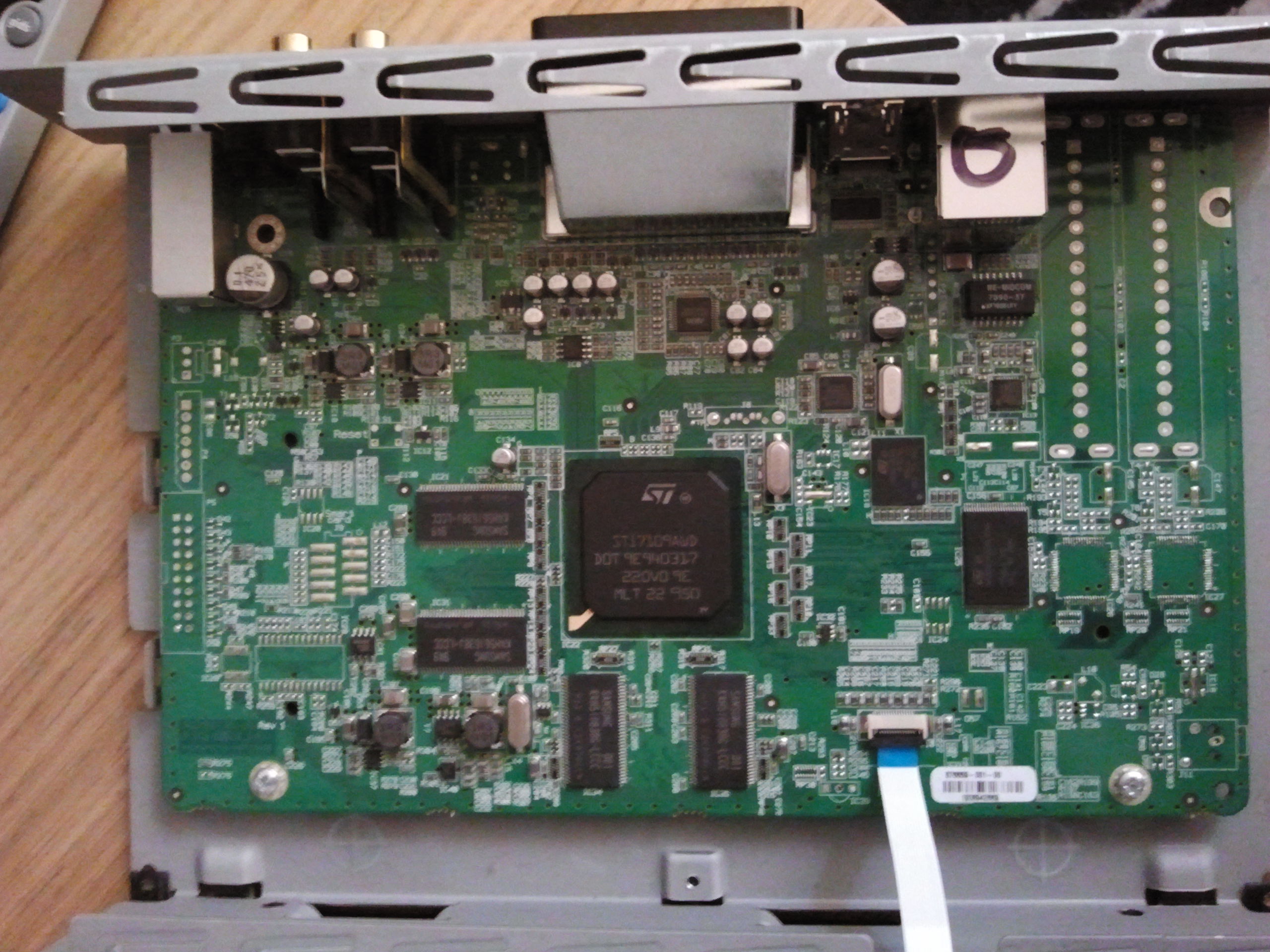
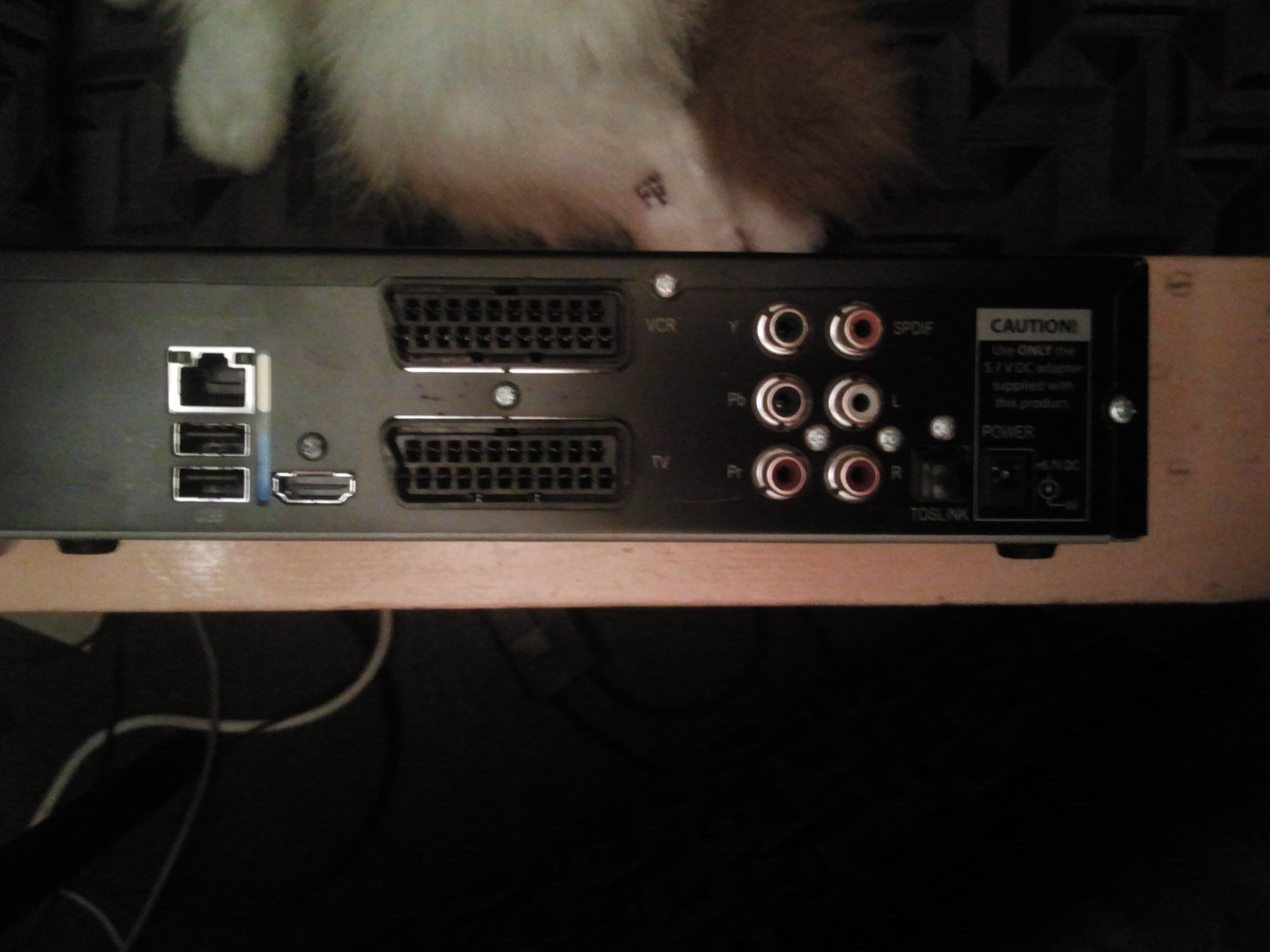
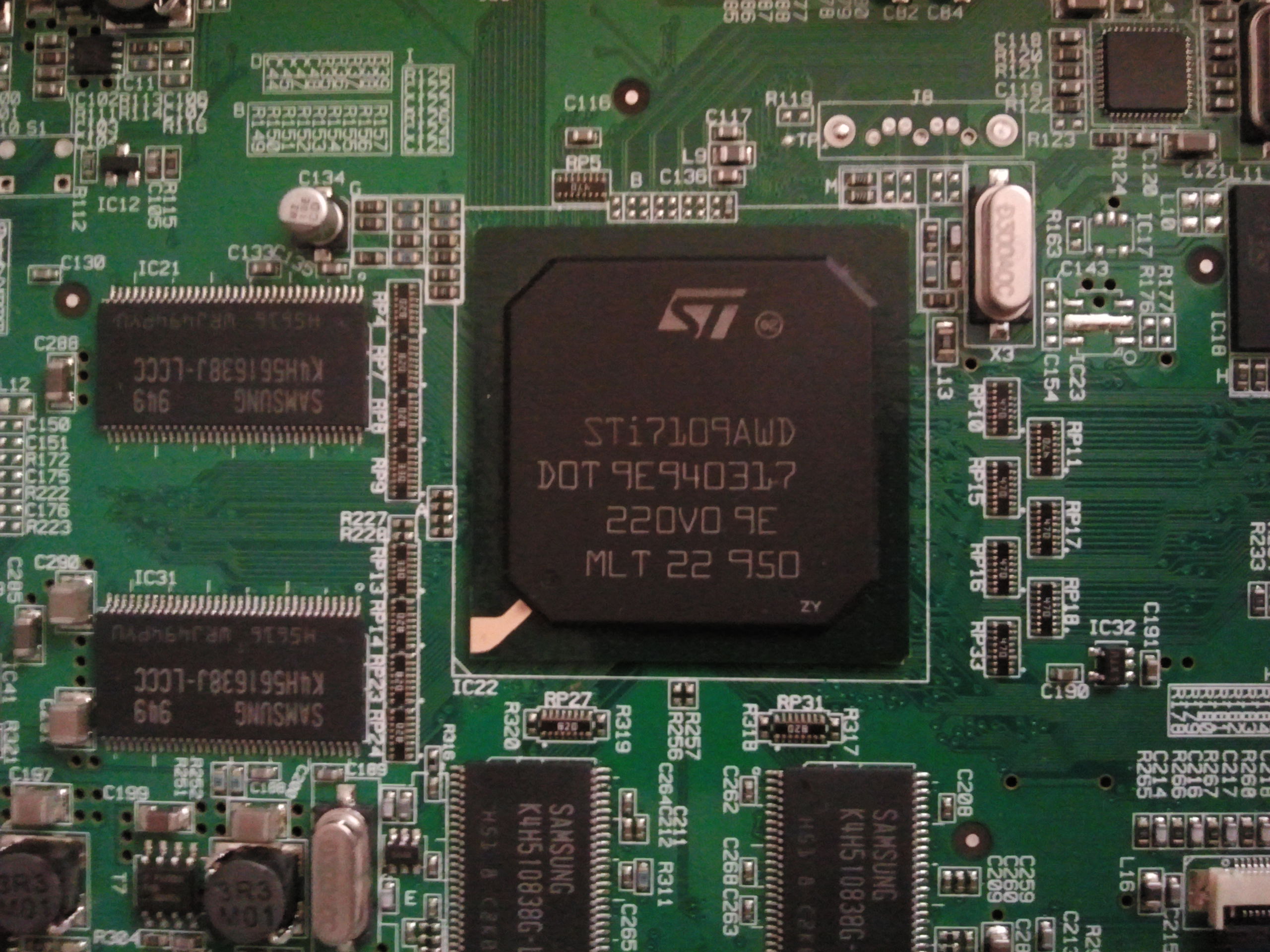
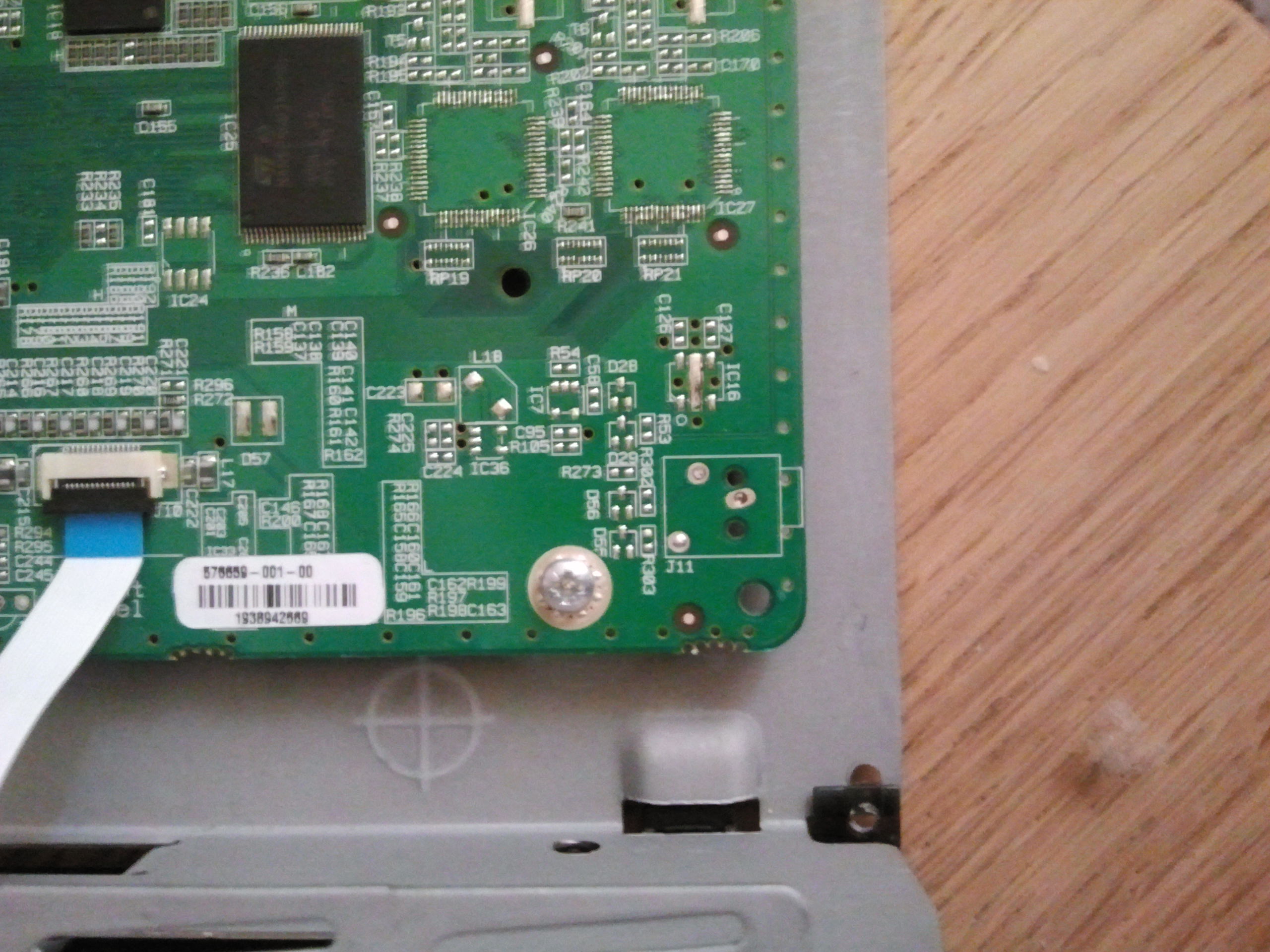
 Thread beobachten
 Seitenaufteilung abschalten
